






Great news! Microsoft has rolled out improvements for Drivers Policies in Intune. Now, Intune users can enjoy the top 3 features of driver policies. These enhancements make managing drivers much easier and more convenient.
Drivers are software programs that enable communication between the operating system (OS) and hardware components. In Intune, driver policies refer to the settings and configurations that control the management of device drivers on Windows devices.
Today, David Guyer and the Microsoft team shared the top 3 improvements for Driver policies in Intune: Bulk Editing. Now, you can do 3 important things together to manage your drivers in Intune.
Here is the Top 5 list of features that will make handling drivers in Intune even better. These new features help you manage drivers more easily and let users know exactly which devices will receive the update.

The Intune Driver Management Best Practices post is a guide that discusses the Pros and Cons of Model-Based Groups. Ryan Williams’ technical takeoff session shared this helpful information. It makes it a friendly and straightforward guide for managing drivers in Intune.
- Policy to Turn Off Downloading of Print Drivers Over HTTP using Intune
- Intune RBAC Role for Windows Drivers Update Management
- Block Vulnerable Signed Drivers Using Intune ASR Rules
Top 3 Improvements for Drivers Policies in Intune
The introduction of Bulk Editing for Driver policies in Intune is a vital enhancement that simplifies the management of device drivers. Let’s explore how this feature works and its key benefits.
- Managing individual driver updates could be time-consuming, especially with many devices.
- Bulk Editing allows administrators to handle multiple drivers simultaneously.
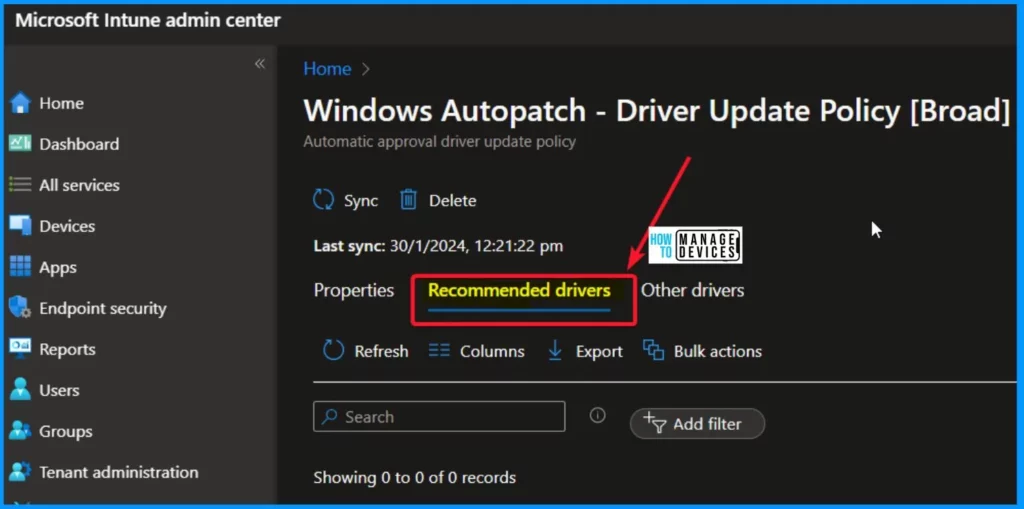
- The bulk Editing feature is now available in the Drivers Policies section of Intune.
- Once multiple drivers are selected, administrators are presented with 3 key options: Approve, Pause, or Decline.
Example – If you have a set of recommended drivers and want to ensure they are approved for installation on the next Patch Tuesday, you can select them all and use the Bulk Editing feature to approve them immediately.
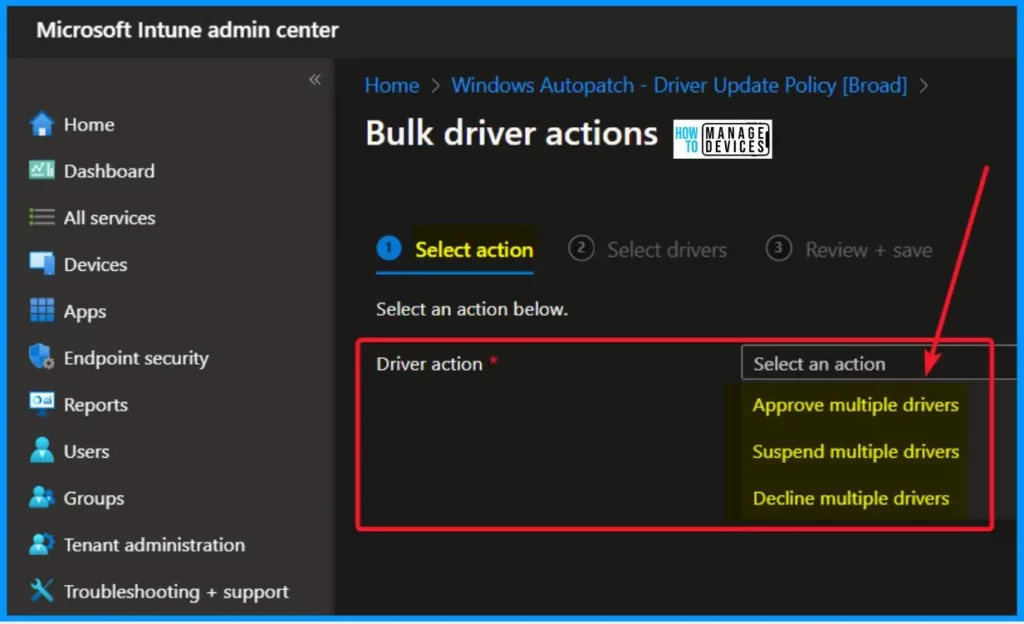
Bulk Driver Actions
The Bulk Driver Actions feature currently presents 3 key options: Approve, Suspend, and Decline, but Future Bulk Editing shows the 3 key options as Approve, Pause, or Decline. The table below helps you show the current and future bulk Driver Actions.
| Current Bulk Driver Actions | Future Bulk Editing Options |
|---|---|
| Approve Multiple Drivers | Approve Multiple Drivers |
| Suspend Multiple Drivers | Pause Multiple Drivers |
| Decline Multiple Drivers | Decline Multiple Drivers |
NOTE! – We can’t see the Pause Multiple Drivers option in Build Driver Actions in our tenant.
We are on WhatsApp now. To get the latest step-by-step guides, news, and updates, Join our Channel. Click here. HTMD WhatsApp.
Author
About the Author – Vidya is a computer enthusiast. She is here to share quick tips and tricks with Windows 11 or Windows 10 users. She loves writing on Windows 11 and related technologies. She is also keen to find solutions and write about day-to-day tech problems.


Discussion