






5 Key Phases to Successfully Plan your Mac Migration with Intune Latest Guidance
Let’s discuss the 5 Key Phases to Successfully Plan your Mac Migration with Intune Latest Guidance. Before you start moving Macs into Intune, it’s important to clearly understand what your organization needs.
To successfully migrate Macs with Intune, start by setting clear goals, such as reducing costs, improving security, or making IT management easier. These goals help you create specific, measurable requirements, like using a single device management platform or adding single sign-on for all Macs.
Migrating macOS devices from Jamf, Kandji, or JumpCloud to Microsoft Intune involves a well-structured process that adapts to your specific mobile device management (MDM) environment, business goals, and technical needs. By following a custom approach, you can ensure a smooth transition with minimal disruption.
In this post, you will get all the details about the 5 Key Phases to Successfully Plan Your Mac Migration with Intune based on the latest guidance. We will walk you through each phase, providing a clear roadmap to ensure a smooth and effective migration process for your macOS devices.

Table of Contents
5 Key Phases to Successfully Plan your Mac Migration with Intune Latest Guidance
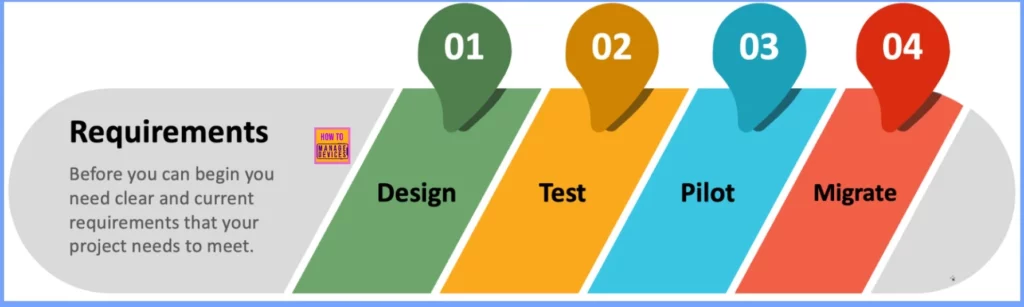
In the Requirements phase of Mac migration to Intune, it’s crucial to identify key objectives like reducing costs, enhancing security, or simplifying IT operations. These goals are then turned into specific, measurable requirements, such as consolidating onto a single MDM platform or implementing single sign-on for Macs.
These requirements form the foundation for all decisions and actions throughout the migration, ensuring a smooth transition to Intune.
- How to deploy DMG apps in macOS using Intune
- How to deploy unmanaged macOS App using Intune
- How to deploy macOS Web App using Intune
Key Phases of Mac Migration to Intune – Design Test Pilot and Migrate
The migration process to Intune consists of 4 main phases: Design, Test, Pilot, and Migrate. Each phase builds on the one before it to ensure a smooth transition. The Design, Test, and Pilot phases are often repeated as new information is learned, allowing for adjustments along the way. Here’s a simple overview of each phase.
| Phase | Description |
|---|---|
| Design | The requirements are translated into a practical solution. The right technologies are selected, configurations are defined, and a blueprint for implementation is created to ensure scalability and maintainability. |
| Test | The solution is validated in a controlled environment to ensure it meets the original requirements. Testing identifies any issues or gaps, ensuring the solution is functional and ready for broader deployment. |
| Pilot | A small, limited rollout in a production environment helps gather real-world feedback. This phase allows for modify before full deployment across the organization. |
| Migrate | After a successful pilot, full migration begins. New devices are enrolled from day one, and existing devices are moved over in phases, ensuring continuity and minimizing disruption. |
Goals and Requirements for Mac Migration to Intune
When starting your Mac migration project, it’s important to set clear goals and match each one with specific, actionable requirements. This helps ensure that the project stays focused and aligned with your organization’s priorities.
| Goal | Matching Requirement |
|---|---|
| Reduce Costs | > Use existing Microsoft licenses to avoid extra costs. > Ship devices directly from Apple to end users. |
| Improve Security | > Use Microsoft Entra and Intune for Conditional Access and compliance, without third-party connectors. > Consolidate security tools like Microsoft Defender for Endpoint and Microsoft Purview across Windows and Mac. |
| Simplify Management | > Merge security and management tools into one platform. > Streamline configuration settings by removing outdated or unused payloads. |
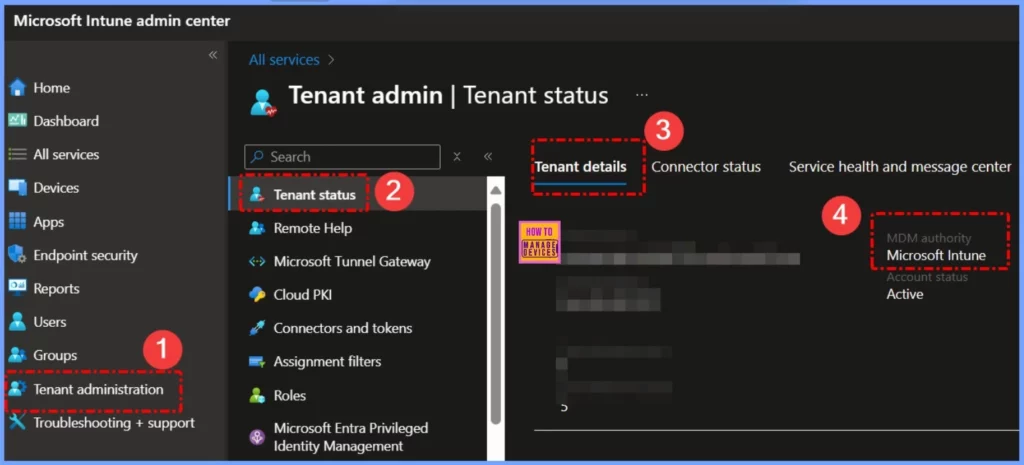
Design Test and Pilot Phases for Mac Management with Intune
To begin your Mac management journey with Microsoft Intune, Microsoft offers a comprehensive end-to-end guide that walks you through setting up your environment, enrolling your first Mac, and applying advanced configurations.
| Resources | Description |
|---|---|
| Intune Team GitHub Shell Samples | A collection of sample shell scripts for common Intune tasks (remember to test scripts before use). |
| macOS Security Compliance Project | A robust framework for applying security baselines on macOS. |
| AppleSeed for IT | Apple’s portal offering enterprise tools, including the Mac Evaluation Utility for testing. |
| Mac Admins Foundation | A community-driven hub of resources for Mac administrators. |
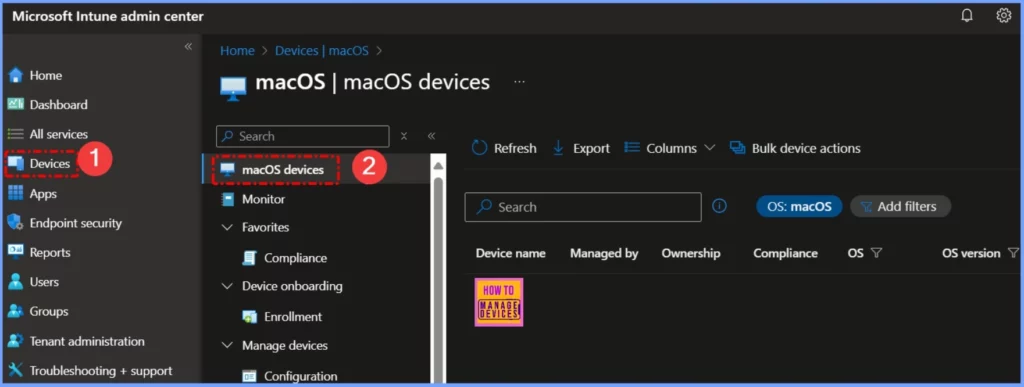
Mac Migration to Intune
Once you have completed your design, testing, and pilot phases, it’s time to focus on migration planning. A clear, step-by-step approach helps make the transition to Microsoft Intune smooth for both IT and end users. The following are the five simple phases.
- Design: Plan how you’ll enroll new devices, manage opt-in users, and deal with devices that haven’t migrated by the end.
- Communicate: Share your plan across the organization. Let users know what’s happening, when, and if any action is required from them.
- New Devices: Start enrolling all new Macs directly into Intune. This avoids having to migrate them later and offers users a smoother experience.
- Opt-In: Allow users to migrate on their own schedule by giving them a guided, self-initiated process. This flexibility leads to higher participation and fewer support issues.
- Deadline Mode: In the final stage, send reminders and set a clear deadline. This encourages users to complete their migration or allows IT to step in and finalize it.
Need Further Assistance or Have Technical Questions?
Join the LinkedIn Page and Telegram group to get the latest step-by-step guides and news updates. Join our Meetup Page to participate in User group meetings. Also, Join the WhatsApp Community to get the latest news on Microsoft Technologies. We are there on Reddit as well.
Resources
Managing and migrating Macs with Microsoft Intune | Microsoft Community Hub
Author
Anoop C Nair has been Microsoft MVP from 2015 onwards for 10 consecutive years! He is a Workplace Solution Architect with more than 22+ years of experience in Workplace technologies. He is also a Blogger, Speaker, and Local User Group Community leader. His primary focus is on Device Management technologies like SCCM and Intune. He writes about technologies like Intune, SCCM, Windows, Cloud PC, Windows, Entra, Microsoft Security, Career, etc.


Discussion