






SCCM ConfigMgr vNext Comes with Windows 10 Servicing Configuration Manager On Prem MDM
Does SCCM ConfigMgr vNext come with Windows 10 Servicing Configuration Manager On-Prem MDM? Microsoft released the next update for SCCM/ConfigMgr vNext (I don’t know whether it will be called SCCM 2016 or something else).
This version of SCCM ConfigMgr TP is 1510. The version number is directly linked to the Year and month of the release (YYMM = 1510). This update has been successfully installed in my lab environment.
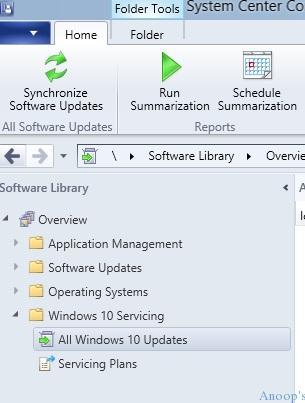
The update 1510 for SCCM/ConfigMgr vNext includes new capabilities, such as Windows 10 servicing and Wipe and Retire for on-premises mobile device management.
The latest version of SCCM ConfigMgr, vNext, introduces enhanced Windows 10 servicing capabilities alongside Configuration Manager’s On-Prem MDM functionalities. For more detailed information, you can visit the TechNet link provided here.

| Index |
|---|
| ConfigMgr vNext Comes with Windows 10 Servicing Configuration Manager On-Prem MDM |
- SCCM 2405 New Features
- SCCM 2403 New Key Features and Improvements
- 2404 Microsoft Intune New Features April Update
- Microsoft Intune Extends Support To Android 10 And Later From October 2024
- Use Power Automate To Import Autopilot Devices Hash Via Email For Intune Engineers
- New Key Features of SCCM 2309 | Top Improvements
- Download SCCM 2309 Early Ring Version using PowerShell Script
- SCCM 2307 Technical Preview New Features
ConfigMgr vNext Comes with Windows 10 Servicing Configuration Manager On-Prem MDM
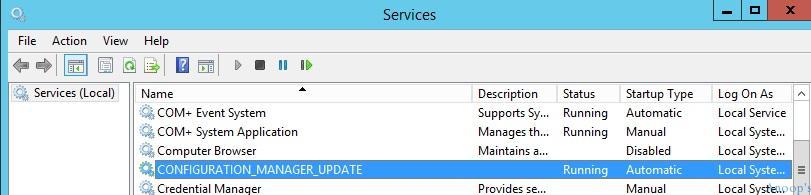
A new service in SCCM vNext is the CONFIGURATION MANAGER UPDATE Service. This new service helps SCCM to update site servers and components via the new ConfigMgr service model.
The update was not initially available in the SCCM console. Then, I bounced back to the SMS_Executive service, and the update started appearing in the console after some time. As explained, SCCM ConfigMgr vNext TP 3 update 1509 is here.
Right-click on the available SCCM vNext (2016 ?) service update from the console and select to run a prerequisite check. This will run the prerequisites for the update (the latest SCCM service update), and you can find the status of the console’s monitoring workspace, as shown in the screen dumps below.
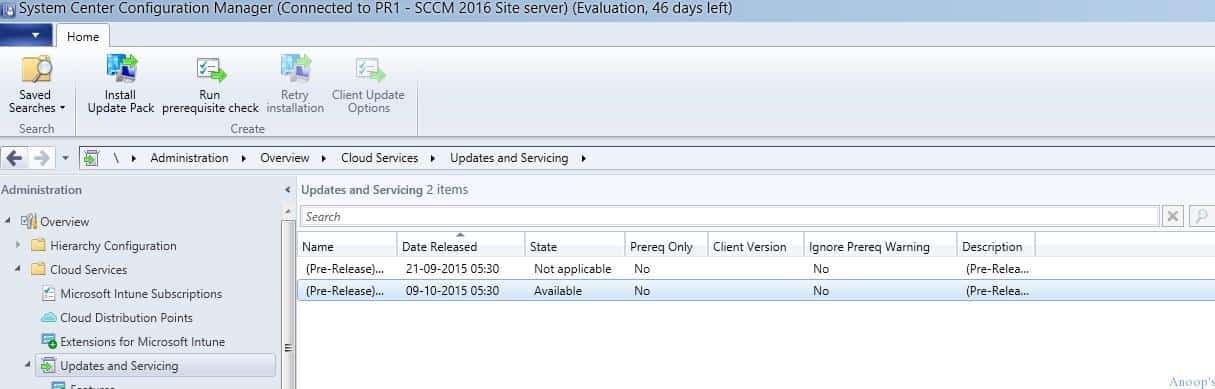
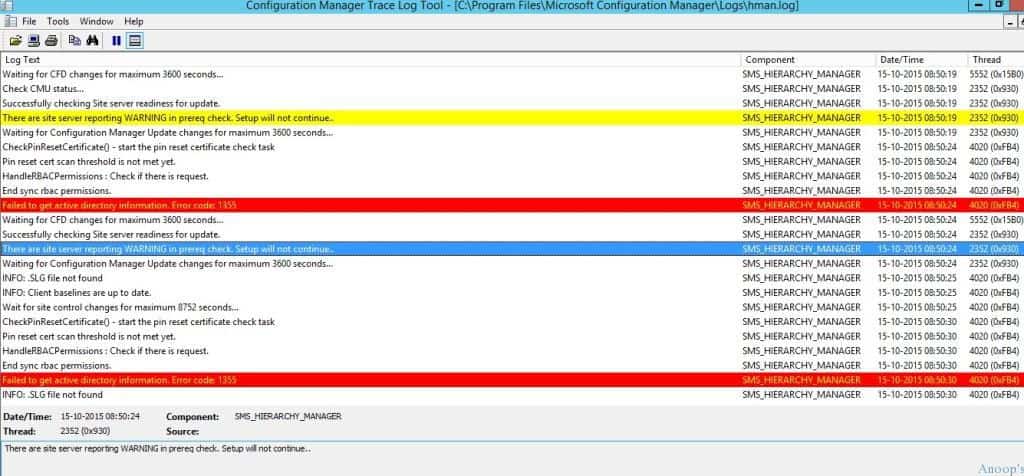
If you select the Install Update Pack option, you must go through the Wizard to upgrade the SCCM site server. However, everything happens in the background if you choose the “Run prerequisite check” option. I ran a prerequisite check this time, but it didn’t install the update. When I looked at hman.log, it gave more details, as mentioned below.
There are site server reporting WARNING in prereq check. Setup will not continue..
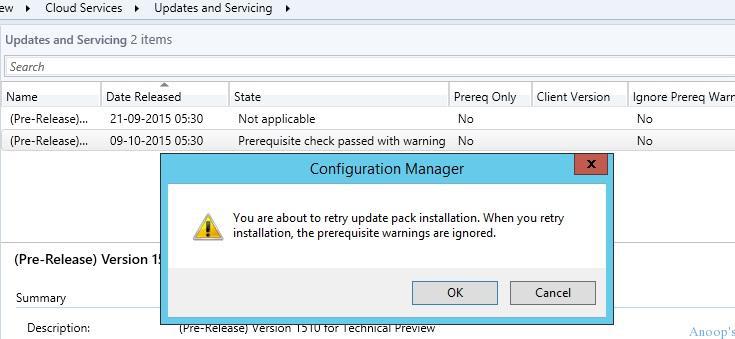
I tried the update from the SCCM console Administration > Cloud Services > Updates and Services again. I right-clicked on available update 1510 and selected “Retry Installation.” This will warn you: “You are about to retry the update pack installation.
- When you retry installation, the prerequisite warning is ignored.” The HMAN.log file also recorded similar messages, as you can see below.
Created notification file (DB316362-77FC-46C9-9984-1BAEB20615F4.CMI) for ONFIGURATION_MANAGER_UPDATE
Continue configuration manager update as it is configured to ignore prereq warnings.
INFO: Waiting for current site server to be ready to apply update:DB316362-77FC-46C9-9984-1BAEB20615F4
Waiting for the site server to be ready to apply changes
INFO: Successfully started service CONFIGURATION_MANAGER_UPDATE Successfully updated Configuration manager update DB316362-77FC-46C9-9984-1BAEB20615F4 readiness.
INFO: Waiting for CONFIGURATION_MANAGER_SERVICE to be ready to apply update: DB316362-77FC-46C9-9984-1BAEB20615F4  $<10-15-2015 09:04:25.345-330><thread=2352 (0x930)="">
C:\Program Files\Microsoft Configuration Manager\CMUStaging\\DB316362-77FC-46C9-9984-1BAEB20615F4\SMSSetup\update.map has hash value SHA256:D3356E0295152320D720A17894330D132A63B76D99BDCB03352CFD0947D47A66  $<10-15-2015 09:04:25.397-330><thread=2352 (0x930)="">
Successfully validated file C:\Program Files\Microsoft Configuration Manager\CMUStaging\\DB316362-77FC-46C9-9984-1BAEB20615F4\SMSSetup\update.map  $<10-15-2015 09:04:25.397-330><thread=2352 (0x930)="">
Detected change in update.map for component CONFIGURATION_MANAGER_UPDATE. It will be updated first.  $<10-15-2015 09:04:25.397-330><thread=2352 (0x930)="">
INFO: Stopping service CONFIGURATION_MANAGER_UPDATE  $<10-15-2015 09:04:25.397-330><thread=2352 (0x930)="">
Successfully copied file from C:\Program Files\Microsoft Configuration Manager\CMUStaging\\DB316362-77FC-46C9-9984-1BAEB20615F4\SMSSetup\bin\x64\cmupdate.exe to C:\Program Files\Microsoft Configuration Manager\bin\x64\cmupdate.exe  $<10-15-2015 09:04:27.411-330><thread=2352 (0x930)="">
INFO: Successfully started service CONFIGURATION_MANAGER_UPDATE  $<10-15-2015 09:04:29.714-330><thread=2352 (0x930)="">
Successfully updated Configuration manager update DB316362-77FC-46C9-9984-1BAEB20615F4 readiness.  $<10-15-2015 09:04:29.723-330><thread=2352 (0x930)="">
Once the hierarchy manager (HMAN) initiates the update pack installation, we can verify the sitecomp.log for more details. The SCCM Site component installs and upgrades the site server and all the other SCCM components.
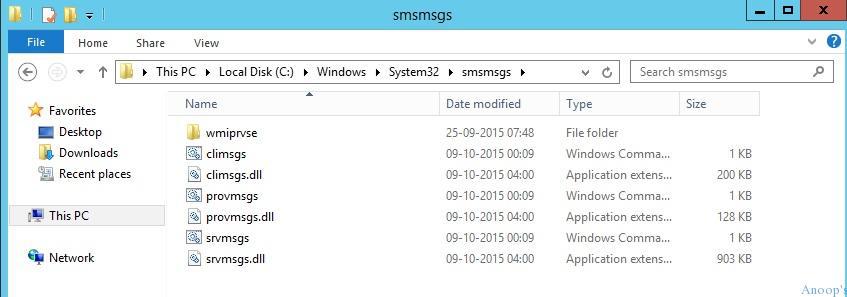
- It started upgrading using 3 cmd files (climsgs.cmd, provmsgs.cmd and srvmsgs.cmd) located in the folder C:\Windows\System32\smsmsgs.
INFO: 'ACNCM2016.NAIR.COM' is a valid FQDN.  $<10-15-2015 09:20:31.682-330><thread=5864 class="hiddenSpellError" data-mce-bogus="1" pre="" (<span="">0x16E8)>
      Installed file C:\Windows\system32\smsmsgs\srvmsgs.cmd.  $<SMS_SITE_COMPONENT_MANAGER><10-15-2015 09:20:31.712-330><thread=5864 (0x16E8)>
INFO: 'ACNCM2016.NAIR.COM' is a valid FQDN.  $<10-15-2015 09:20:31.732-330><thread=5864 class="hiddenSpellError" data-mce-bogus="1" pre="" (<span="">0x16E8)>
      Installed file C:\Windows\system32\smsmsgs\climsgs.cmd.  $<SMS_SITE_COMPONENT_MANAGER><10-15-2015 09:20:31.754-330><thread=5864 (0x16E8)>
INFO: 'ACNCM2016.NAIR.COM' is a valid FQDN.  $<10-15-2015 09:20:31.774-330><thread=5864 class="hiddenSpellError" data-mce-bogus="1" pre="" (<span="">0x16E8)>
      Installed file C:\Windows\system32\smsmsgs\provmsgs.cmd.  $<SMS_SITE_COMPONENT_MANAGER><10-15-2015 09:20:31.776-330><thread=5864 (0x16E8)>
      All files installed.  $<SMS_SITE_COMPONENT_MANAGER><10-15-2015 09:20:31.777-330><thread=5864 (0x16E8)>
      Starting bootstrap operations...  $<SMS_SITE_COMPONENT_MANAGER><10-15-2015 09:20:31.777-330><thread=5864 (0x16E8)>
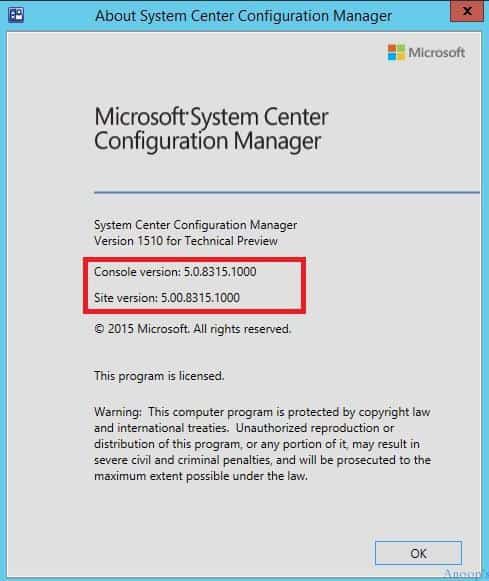
The SCCM vNext Site component manager thread took me over 20 minutes to complete the upgrade process. After that, I upgraded the SCCM console to the latest version, 5.0.8315.1000. The SCCM Site server and console version are the same, 5.0.8315.1000.
| SCCM Version 1510 | Console Version |
|---|---|
| SCCM Version 1510 for Technical Preview | 5.0.8315.1000 |
Resources
SCCM Related Posts Real World Experiences Of SCCM Admins (anoopcnair.com)
We are on WhatsApp now. To get the latest step-by-step guides, news, and updates, Join our Channel. Click here. HTMD WhatsApp.
Author
Anoop C Nair is Microsoft MVP! He is a Device Management Admin with more than 20 years of experience (calculation done in 2021) in IT. He is a Blogger, Speaker, and Local User Group HTMD Community leader. His main focus is on Device Management technologies like SCCM 2012, Current Branch, and Intune. He writes about ConfigMgr, Windows 11, Windows 10, Azure AD, Microsoft Intune, Windows 365, AVD, etc.




Discussion