






Fix SCCM PXE Related WDS Service is not Getting Started Issue
Let’s discuss how to Fix SCCM PXE Related WDS Service is not Getting Started Issue. I wanted to try OSD (Windows 10/Windows 11 deployment) with SCCM /ConfigMgr.
SCCM vNext TP3 Primary server is installed on Windows Server 2012 R2 and enabled PXE role, part of the SCCM DP site system role.
Once the PXE role is enabled, SCCM will automatically manage the prerequisite for the PXE (Preboot Execution Environment) role, Windows Deployment Service (WDS).
Windows Deployment Services is a server technology from Microsoft that is used for the network-based installation of Windows operating systems. The WDS role was installed on Windows 2012 R2. However, the WDS service was not getting started.

| Index |
|---|
| Fix SCCM PXE Related WDS Service is not Getting Started |
| Troubleshooting Fix SCCM PXE Related WDS Service is not Getting Started |
| Tips – Fix SCCM PXE Related WDS Service is not Getting Started |
| Solution |
- FIX: SCCM PXE Error 0x80070490 PXE Boot Failed
- Fix SCCM PXE Issues with C Type Network Adapter Duplicate MACID
- Fix SCCM PXE Related WDS Service is not Getting Started Issue
- How to Install SCCM DP on Windows 11 | Enable PXE Server and Troubleshooting Tips
- FIX PXE Boot Failures Task Sequence Delays with SCCM 2002 | KB 4567007
Fix SCCM PXE Related WDS Service is not Getting Started
There is no log file called PXESETUP.log in SCCM 2012 and SCCM vNext version, as the PXE point is part of the DP role. DistMgr.log will detail the PXE and WDS installation on the site server.
- If you enable PXE on a remote site system server, you can refer to smsdpprov.log.
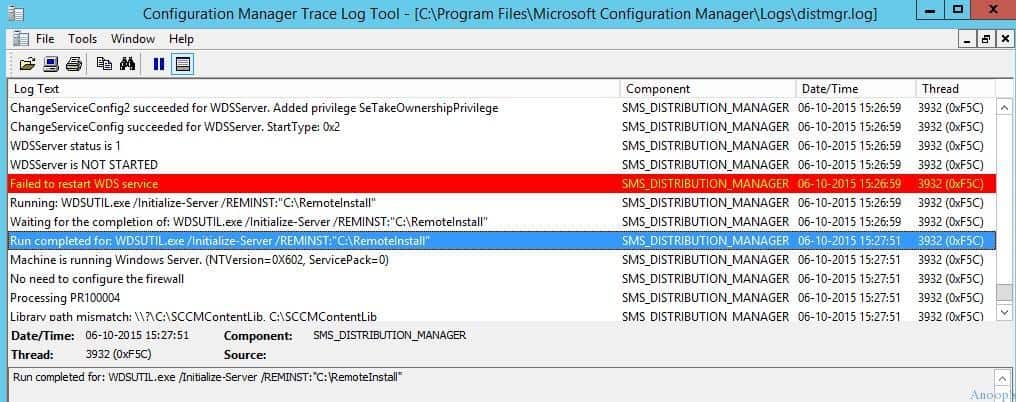
Troubleshooting Fix SCCM PXE Related WDS Service is not Getting Started
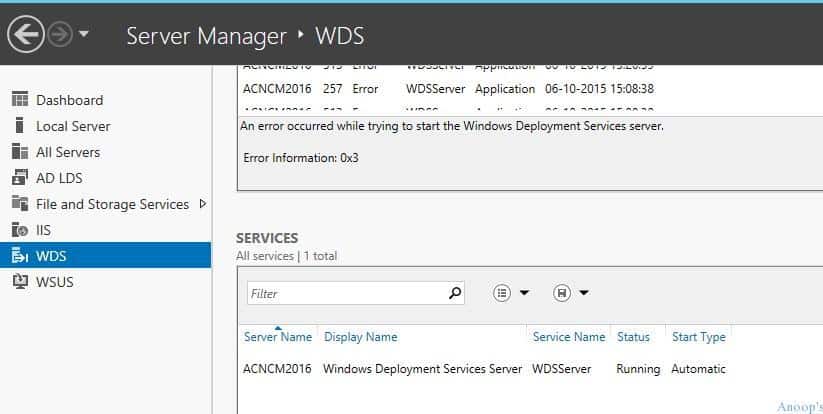
PXE role was installed successfully, but the WDS service was not getting started. I checked the event logs, and the following are some errors related to WDS services…
- An error occurred while trying to initialize provider WDSMC from C:\Windows\system32\wdsmc.dll. Windows Deployment Services server will be shut down.
Error Information: 0x906
An error occurred while trying to start the Windows Deployment Services server.
Error Information: 0x906
Tips – Fix SCCM PXE Related WDS Service is not Getting Started
I removed /uninstalled WDS from the server manager, removed the RemoteInstall folder, and installed it again. With no luck, I tried running the following command.
wdsutil /initialize-server /reminst:C:\RemoteInstall.
- WDSUTIL command didn’t work, pointing towards domain controller connectivity.
- However, the SET l command provides the correct domain and login server names.
C:\Windows\system32>wdsutil /initialize-server /reminst:C:\RemoteInstall
Windows Deployment Services Management Utility [Version 6.3.9600.16384]
© 2013 Microsoft Corporation. All rights reserved.
An error occurred while trying to execute the command.
Error Code: 0x54B
Error Description: The specified domain either does not exist or cannot be contacted.
C:\Windows\system32>set l
LOCALAPPDATA=C:\Users\anoop\AppData\Local
LOGONSERVER=\\ACNCMDC
Solution
Let’s discuss the solution for the issue related to SCCM PXE-related WDS Service not Getting Started. The table below helps you show more details.
| Solution |
|---|
| The issue was related to domain control network connectivity. I deleted the Virtual Switch I created in the Hyper-V console and recreated it with an internal option. I removed the PXE and WDS, restarted the server, and enabled the PXE point again. This time, it started working. |
Resources
SCCM Related Posts Real World Experiences Of SCCM Admins (anoopcnair.com)
We are on WhatsApp now. To get the latest step-by-step guides, news, and updates, Join our Channel. Click here. HTMD WhatsApp.
Author
Anoop C Nair is Microsoft MVP! He is a Device Management Admin with more than 20 years of experience (calculation done in 2021) in IT. He is a Blogger, Speaker, and Local User Group HTMD Community leader. His main focus is on Device Management technologies like SCCM 2012, Current Branch, and Intune. He writes about ConfigMgr, Windows 11, Windows 10, Azure AD, Microsoft Intune, Windows 365, AVD, etc.




HI Anoop ,
We are getting the following error while imaging a bare metal using PXE . “No response from Windows Deployment Services Server”
1)IP Helper settings
2)Option 66 and Option 67 in DHCP server (As the DHCP and DP are not on the same server)
3)Distribution of the boot image
4)Reinstallation of WDS is already done and reconfiguration of PXE is already performed
5)Certificates are imported
6)DP is added to admin group in the site server , MP and vice versa
I have also attached the logs from the Distribution Point
Let us know what else we can try to fix the issue
I am newly started sccm testing in our org.i installed configured sccm.
For Pxe I followed steps like enable px, boo.wim, task sequence install.wim distribute dp.
on newly created vm Pxe not working it connect to DHCP taking ip but it gives error tftp time out error, I check wds service not available. Please suggest imo for my job
StaffTry this https://www.anoopcnair.com/sccm-osd-task-sequence-ultimate-guide/