






SCCM SQL Query to Find Out IE Version with OS Details of Workstations Configuration Manager ConfigMgr
SCCM SQL Query to Find Out IE Version with OS Details of Workstations Configuration Manager ConfigMgr? In this post, I will share the SQL query to fetch IE version details from SCCM/ConfigMgr DB.
Microsoft released a new version of the browser called Microsoft Edge as part of Windows 10. Microsoft (they) announced that Internet Explorer 11 would be the only supported version of IE as we advance.
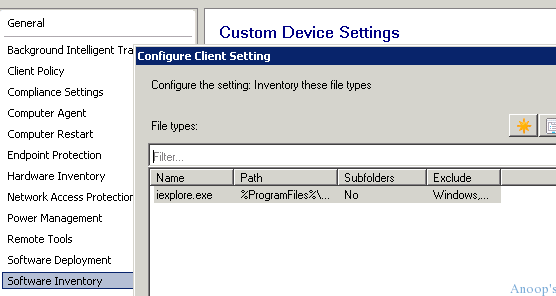
To fetch the information about IE versions from SCCM/ConfigMgr, we need to enable Software Inventory. However, SCCM software inventory is not very popular among MVPs. I don’t recommend enabling it to inventory all the exe file versions; instead, I would allow selective inventory on selective folders, as you can see in the following screen capture.
One of our posts shows how to fix SCCM SQL Replication Issues using the Replication Link Analyzer tool. The tool has been the savior of many replication issues within the recent builds of Configuration Manager.

| Index |
|---|
| SCCM SQL Query to Find Out IE Version with OS Details? – SCCM SQL Query to Find Out IE Version with OS Details of Workstations Configuration Manager ConfigMgr |
- Troubleshoot and FIX SCCM SQL Backlog Issues using SSMS
- FIX SCCM SQL Based Database Replication Failure Between CAS Primary
- SCCM SQL Reports with Approvers Email Address and Require Approval Details of Application Deployments
- SCCM Windows 11 Upgrade Readiness Report using SQL Query
- Export List of SCCM Global Conditions using SQL Query
SCCM SQL Query to Find Out IE Version with OS Details? – SCCM SQL Query to Find Out IE Version with OS Details of Workstations Configuration Manager ConfigMgr
In case you want to take the inventory of Microsoft Edge, then you can collect the information of the “MicrosoftEdge.exe” file from the following location:
“%windir%\SystemApps\Microsoft.MicrosoftEdge_8wekyb3d8bbwe\”
In the following SQL query, I used SQL Inner Join and Left Join along with CASE (SQL CASE is a unique conditional statement providing if/then/else logic for any ordinary SQL command, such as SELECT or UPDATE).
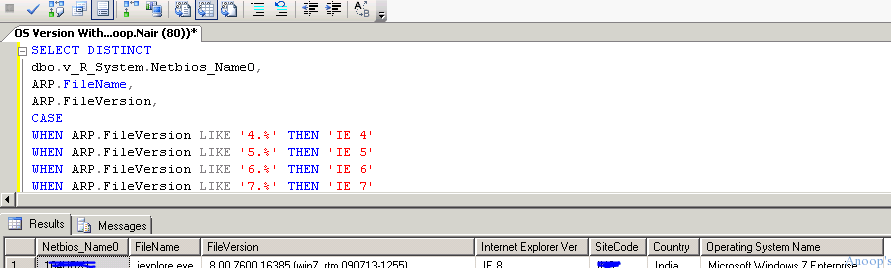
The following SQL query fetches the workstation’s Internet Explorer version details from SCCM/ConfigMgr DB. It also provides the workstations’ SCCM site code, Location Details, and Operating System details.
SELECT DISTINCT
dbo.v_R_System.Netbios_Name0,
ARP.FileName,
ARP.FileVersion,
CASE
WHEN ARP.FileVersion LIKE '4.%' THEN 'IE 4'
WHEN ARP.FileVersion LIKE '5.%' THEN 'IE 5'
WHEN ARP.FileVersion LIKE '6.%' THEN 'IE 6'
WHEN ARP.FileVersion LIKE '7.%' THEN 'IE 7'
WHEN ARP.FileVersion LIKE '8.%' THEN 'IE 8'
WHEN ARP.FileVersion LIKE '9.%' THEN 'IE 9'
When ARP.FileVersion LIKE '10.%' Then 'IE 10'
When ARP.FileVersion LIKE '11.%' Then 'IE 11'
ELSE '??' END AS 'Internet Explorer Ver',
dbo.v_FullCollectionMembership.SiteCode,
CASE
WHEN dbo.v_FullCollectionMembership.SiteCode LIKE 'B%' THEN 'India'
WHEN dbo.v_FullCollectionMembership.SiteCode LIKE 'A%' THEN 'India'
WHEN dbo.v_FullCollectionMembership.SiteCode LIKE 'C%' THEN 'Japan'
WHEN dbo.v_FullCollectionMembership.SiteCode LIKE 'D%' THEN 'HongKong'
WHEN dbo.v_FullCollectionMembership.SiteCode LIKE 'E%' THEN 'HongKong'
WHEN dbo.v_FullCollectionMembership.SiteCode LIKE 'F%' THEN 'US'
WHEN dbo.v_FullCollectionMembership.SiteCode LIKE 'G%' THEN 'US'
WHEN dbo.v_FullCollectionMembership.SiteCode LIKE 'H%' THEN 'Belgium'
WHEN dbo.v_FullCollectionMembership.SiteCode LIKE 'I%' THEN 'Germany'
WHEN dbo.v_FullCollectionMembership.SiteCode LIKE 'J%' THEN 'France'
WHEN dbo.v_FullCollectionMembership.SiteCode LIKE 'K%' THEN 'Italy'
WHEN dbo.v_FullCollectionMembership.SiteCode LIKE 'L%' THEN 'PORTUGAL'
WHEN dbo.v_FullCollectionMembership.SiteCode LIKE 'M%' THEN 'SPAIN'
WHEN dbo.v_FullCollectionMembership.SiteCode LIKE 'N%' THEN 'UK'
WHEN dbo.v_FullCollectionMembership.SiteCode LIKE 'O%' THEN 'UK'
ELSE 'Unidentified' END AS 'Country',
v_GS_OPERATING_SYSTEM.Caption0
FROM dbo.v_R_System
 INNER JOIN dbo.v_GS_SoftwareFile AS ARP ON dbo.v_R_System.ResourceID = ARP.ResourceID
 INNER JOIN dbo.v_FullCollectionMembership ON dbo.v_R_System.ResourceID = dbo.v_FullCollectionMembership.ResourceID
 LEFT JOIN dbo.v_GS_WORKSTATION_STATUS AS HWSCAN ON dbo.v_R_System.ResourceID = HWSCAN.ResourceID
 Inner Join v_GS_OPERATING_SYSTEM ON v_GS_OPERATING_SYSTEM.Resourceid=v_R_System.Resourceid
WHERE (ARP.FileName = 'iexplore.exe') AND (ARP.FilePath LIKE '%:\prog%internet%')
 and (sitecode != 'NULL') and (v_GS_OPERATING_SYSTEM.Caption0 != '%server%')
GROUP BY ARP.FileName, ARP.FileVersion,
dbo.v_FullCollectionMembership.SiteCode, dbo.v_R_System.Netbios_Name0,ARP.FilePath,v_GS_OPERATING_SYSTEM.Caption0
Resources
SCCM Related Posts Real World Experiences Of SCCM Admins (anoopcnair.com)
SCCM Video Tutorials For IT Pros – HTMD Blog #2 (howtomanagedevices.com)
We are on WhatsApp now. To get the latest step-by-step guides, news, and updates, Join our Channel. Click here. HTMD WhatsApp.
Author
Anoop C Nair is Microsoft MVP! He is a Device Management Admin with more than 20 years of experience (calculation done in 2021) in IT. He is a Blogger, Speaker, and Local User Group HTMD Community leader. His main focus is on Device Management technologies like SCCM 2012, Current Branch, and Intune. He writes about ConfigMgr, Windows 11, Windows 10, Azure AD, Microsoft Intune, Windows 365, AVD, etc.




Nice one (Y)
How about getting this information using Editing .Mof files?
http://www.mnscug.org/blogs/sherry-kissinger/330-internet-explorer-version-information-via-hardware-inventory
StaffBetter approach to collect the inventory !!
When I run the report, it returns blank results. I have software inventory running. What am I doing wrong?
what if i want to know whether the installed version is an RTM one or the definitive one?
I ran into a minor issue with this query and just wanted to share my fix.
With (v_GS_OPERATING_SYSTEM.Caption0 != ‘%server%’) using “!=” seems to not do what was wanted and will return results from servers. This is because != literally looks for %server% and doesn’t use % as a wildcard.
Rather, I had to use: (v_GS_OPERATING_SYSTEM.Caption0 NOT LIKE ‘%server%’) to actually exclude results from servers.
Or another option is to add: AND (dbo.v_FullCollectionMembership.CollectionID = ‘XXXXXXXX’) to the WHERE statement to limit results from a specific collection that just has workstations.
Not sure why but when I copy the above query statement into a new query and click OK I get a syntax error. Any clues?