






SCCM ConfigMgr Create TsMedia Failed with Error 0x800b0108 SCCM
Let’s discuss the SCCM ConfigMgr Create TsMedia Failed with Error 0x800b0108 Configuration Manager. In the SCCM hierarchy, we started facing an odd issue: Task Sequence Boot Media creation failed with error code 0x800b0108.
We could reproduce the issue in different SCCM 2012 primary servers in the environment. A Microsoft CSS engineer mentioned that it might be a known issue. This problem occurs if you have many Global Accounts in the SCCM console.
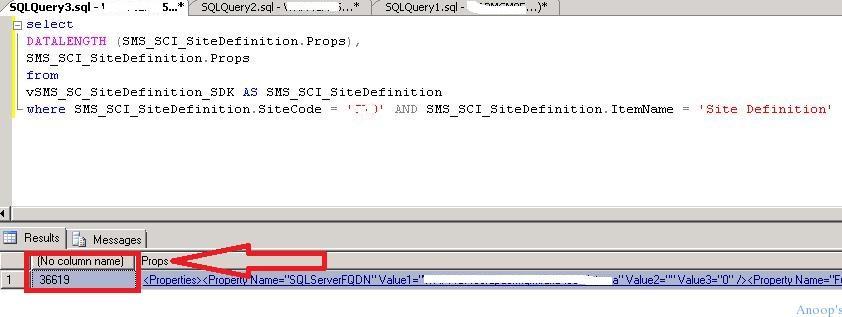
He also mentioned that if the following query returns a value greater than 31000, we may have known issues with creating TS/Boot Media. Before using the query below, please change the “site_code” to match your SCCM 2012 primary server or CAS server site code.
The query returned 36619 columns, which was way above the recommended value. This post will provide all the details of SCCM ConfigMgr Create TsMedia failing with error 0x800b0108 Configuration Manager.

Table of Contents
- Translate SCCM Error Codes to Error Messages
- FIX SCCM Error Verify Inventory Action Status Failed 80041003
- FIX SCCM Agent Installation Error 0x80200010
- SCCM Failed to Download Updates Error Invalid Certificate Signature
The Error While Creating Task Sequence Media – SCCM ConfigMgr Create TsMedia Failed with Error 0x800b0108 Configuration Manager
Media creation failed with the error message: ‘A certificate is missing or has an empty value for an important field, such as a subject or issuer name.’Refer to the CreateTsMedia.log file to find more details.
SQL Query – SCCM ConfigMgr Create TsMedia Failed with Error 0x800b0108
select DATALENGTH (SMS_SCI_SiteDefinition.Props),SMS_SCI_SiteDefinition.Props from vSMS_SC_SiteDefinition_SDK AS SMS_SCI_SiteDefinition where SMS_SCI_SiteDefinition.SiteCode = ‘SITE_CODE‘ AND SMS_SCI_SiteDefinition.ItemName = ‘Site Definition‘
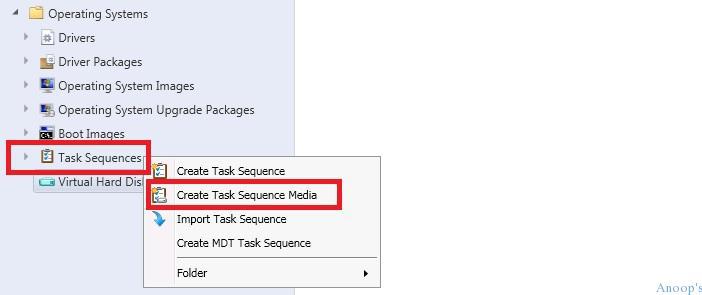
To reproduce the issue:- I tried following the steps mentioned in the following part of the blog post. Right-click on Task Sequence and select “Create Task Sequence Media“.
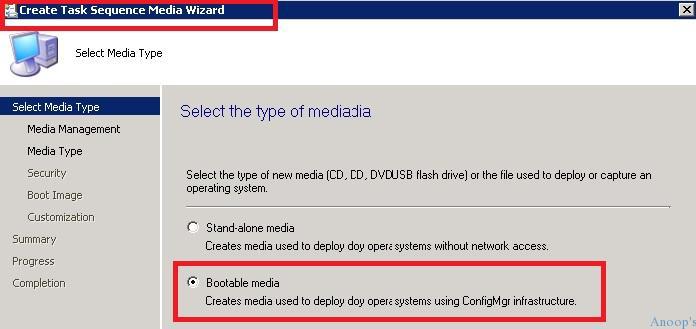
On the Create Task Sequence Media wizard, select “Boot Media.” This creates media for deploying the OS using ConfigMgr infrastructure.
| Select the Type of Media |
|---|
| Bootable Media |
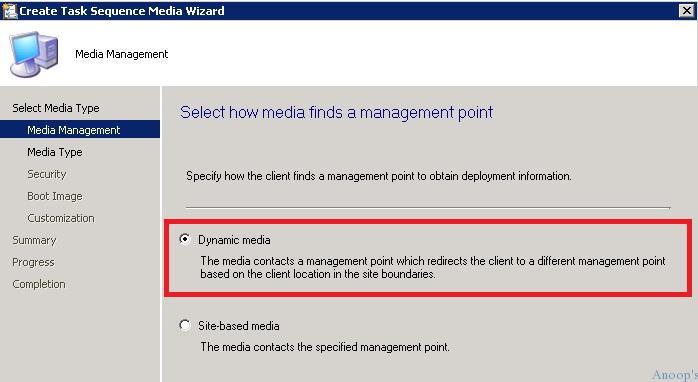
On the next page, “Select how media finds a management point,” select Dynamic media. The Media contacts an SCCM 2012 MP, which redirects the client to a different management point based on the client’s boundaries.
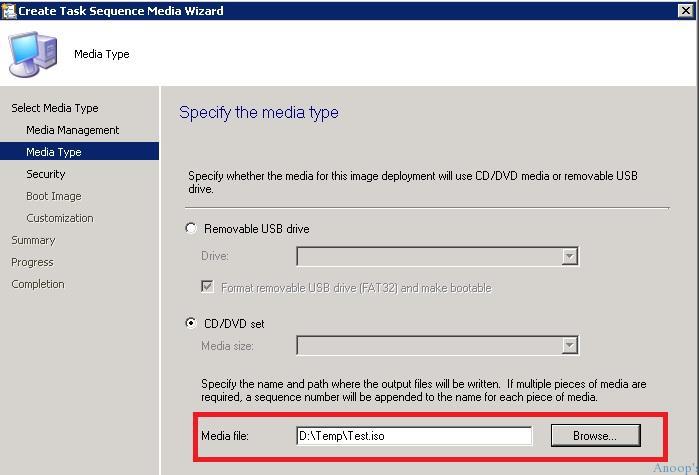
On the following page, “Specify the media type” on SCCM Create Task Sequence Media Wizard, specify the file name and path location of the ISO file that will be written.
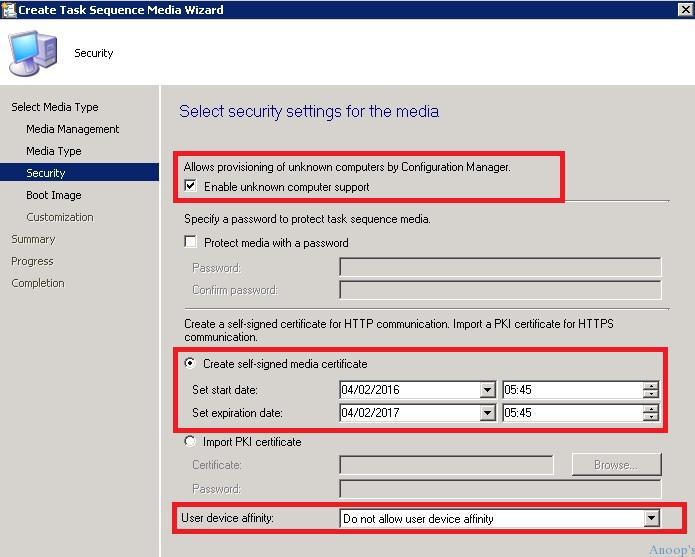
On this page, “Select the security settings of the media“,:- we can enable unknown computer support, Protect media with a password, create a self-signed media certificate and Set User Device affinity.
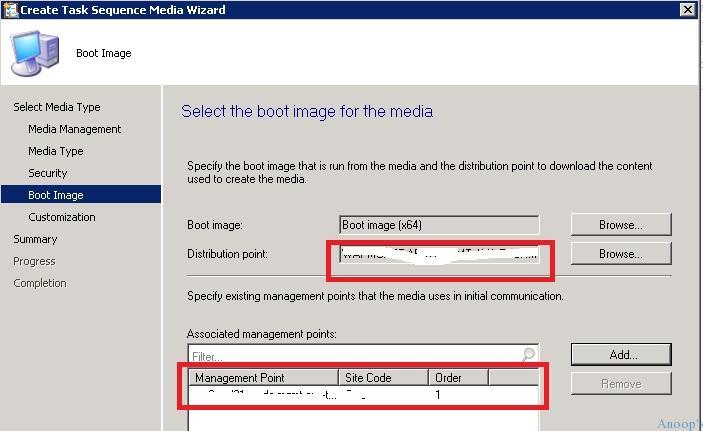
The following two pages of this wizard allow you to specify the boot media file, DP, and MP details. If you have any customisation requirements, you can customize this page.
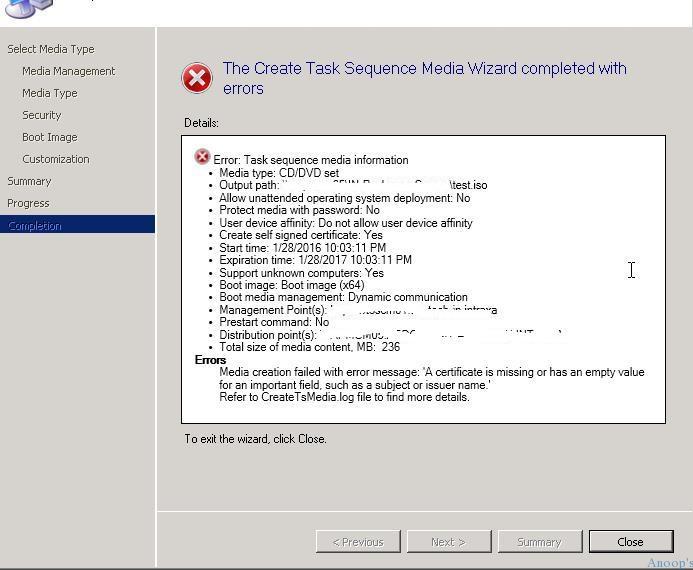
The task sequence media creation wizard fails in the completion screen with the following error: “The Create Task Media Wizard completed with errors”. More details: Media creation failed with the error message:
‘A certificate is missing or has an empty value for an important field, such as a subject or issuer name.’Refer to the CreateTsMedia.log file to find more details.
More details of the error are available in the following log file C:\Program Files\Microsoft Configuration Manager\AdminConsole\AdminUILog\CreateTsMedia.log.

Could not find the trusted root key of site MH0 in WMI  CreateTsMedia  1/12/2016 8:01:52 AM   24732 (0x609C)
MediaGenerator::~MediaGenerator()      CreateTsMedia  1/12/2016 8:01:52 AM   24732 (0x609C)
Failed to create media generator (0x800b0108)  CreateTsMedia  1/12/2016 8:01:52 AM   24732 (0x609C)
CreateTsMedia failed with error 0x800b0108, details=''   CreateTsMedia  1/12/2016 8:01:52 AM   24732 (0x609C)
Media creation process that was started from Admin Console completed. CreateTsMedia  1/12/2016 8:01:52 AM   12676 (0x3184)
CreateMedia.exe finished with error code 800b0108       CreateTsMedia  1/12/2016 8:01:52 AM   12676 (0x3184)
So, what was the solution to this issue? We removed/cleaned up the accounts from SCCM 2012 console “\Administration\Overview\Security\Accounts“

After the accounts were cleaned up, the SQL query mentioned at the start of the post returned 30391 columns, which is fine according to Microsoft. So, this resolved the TS Media creation issue.
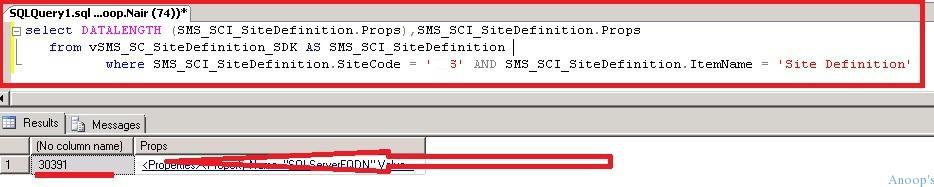
We reduced and removed loads of accounts from the SCCM 2012 console to reach the above value of 30391. However, we still get the following errors in SMSProv.log, and the TS boot media creation fails.
SQL MESSAGE:  - String data, right truncation        05.02.2016 16:30:10      10040 (0x2738)
Results returned : 1 of 2  05.02.2016 16:30:10      10040 (0x2738)
Removing Handle 25421000 from async call map    05.02.2016 16:30:10      10040 (0x2738)
The CSS engineer confirmed this is a known issue with SCCM 2012 R2 SP1 CU2. Is it fixed in SCCM’s current branch version (1511)? I still have a question mark. I have not tested this in 1511 or 1602. The workaround for this issue is to reduce the number of global accounts used in SCCM 2012.
Another possibility is to look for Tombstoned Accounts in your SCCM environment and try to remove them! Here’s a sample SQL query to find tombstoned accounts in the SCCM 2012 environment.
SELECT * from ActiveDirectoryForests where Tombstoned = '1'
Resources
SCCM Related Posts Real World Experiences Of SCCM Admins (anoopcnair.com)
SCCM Video Tutorials For IT Pros – HTMD Blog #2 (howtomanagedevices.com)
We are on WhatsApp now. To get the latest step-by-step guides, news, and updates, Join our Channel. Click here. HTMD WhatsApp.
Author
Anoop C Nair is Microsoft MVP! He is a Device Management Admin with more than 20 years of experience (calculation done in 2021) in IT. He is a Blogger, Speaker, and Local User Group HTMD Community leader. His main focus is on Device Management technologies like SCCM 2012, Current Branch, and Intune. He writes about ConfigMgr, Windows 11, Windows 10, Azure AD, Microsoft Intune, Windows 365, AVD, etc.




The workaround will not work if you have an environment with 20 or more untrusted domains. Each domain has 2 AD accounts, but creates 3 accounts in SCCM. 1 is for the agent/installations, 1 is for discovery systems and the other for Forest discovery. Discovery for systems and forests has the same AD account, but it creates 2 different global accounts in SCCM.
This is a good reason to talk with my manager about upgrading to 1511 😉
StaffHi Albert ! – I know 🙁 It’s better not use Task Sequence Media ! Isn’t it ?
KR
Anoop
Yes indeed but unfortunately SCCM is implemented in a isolated network without DHCP and PXE. This means that I have to use the media for OSD. I have also spoken with Microsoft about this problem. They said that 1511 does not fixed this problem. Probably 1602 it does, but that’s is not for sure. We wait.. 🙂