






How to Restore or Recover SCCM Standalone Primary Server Configuration Manager ConfigMgr
Let’s learn How to Restore or Recover the SCCM Standalone Primary Server Configuration Manager ConfigMgr.
This is another video tutorial to demonstrate “How to restore or recover an SCCM standalone primary server“. The prerequisite for this type of recovery (explained in the video and the table below). Introduction – I will use SCCM CB full backup to restore or recover the Site Database server in this scenario.
The SCCM Site Server and Site Database Recovery options I selected during the recovery process are essential. In this scenario, I opted to reinstall the site server part of SCCM CB site server recovery and for the “Recover DB using SCCM full backup” option to recover the site server database.
Another question I get as part of the SCCM CB hybrid (with Intune integration) is:- Do we need to re-enroll the mobile devices once the SCCM CB server is restored/Recovered? The answer is there in the video 🙂

Table of Contents
- SCCM ConfigMgr Current Branch Backup Recovery Options
- ConfigMgr / SCCM 2007 Recovery Restore Site Repair Wizard Step by Step Guide
- How to recover SCCM / ConfigMgr 2012 primary Server from a good backup?
- How to recover SCCM / ConfigMgr 2012 primary Server from CAS server?
- Recovery of SCCM ConfigMgr 2012 CAS Server from SQL Backup
- Improvements in High Availability Redundancy and Disaster Recovery Options in SCCM or ConfigMgr 2012
- How to recover SCCM or ConfigMgr 2012 SP1 Secondary Servers?
- How to troubleshoot on SCCM / ConfigMgr Backup related issues?
Prerequisites – How to Restore or Recover SCCM Standalone Primary Server Configuration Manager ConfigMgr
Do we need the following to Restore or Recover the SCCM Standalone Primary Server? The table below shows the prerequisites: How to Restore or Recover SCCM Standalone Primary Server Configuration Manager ConfigMgr.
| Prerequisites |
|---|
| SCCM full backup |
| FQDN – The server name should be the same as the existing server |
| Drive Letters should be the same |
| The installation path should be the same |
| It should have the same patch level |
| Better to have the same IP (to avoid opening new Firewall rules) |
If you have a question about “How to take the full backup of the SCCM CB server, ” it is explained in the previous post here. So, I won’t cover that topic in this post or video. Also, SCCM CB primary server migration to new hardware is already covered in the post here.
More details – How to Restore or Recover SCCM Standalone Primary Server
More details about SCCM ConfigMgr CB 1606 How to Plan Backup and Recovery https://www.anoopcnair.com/what-are-the-options-for-sccm-cb-1606-backup-and-recovery/
Table 1:- SCCM CB Site Server and Site Database Recovery options demonstrated in the above video are highlighted.
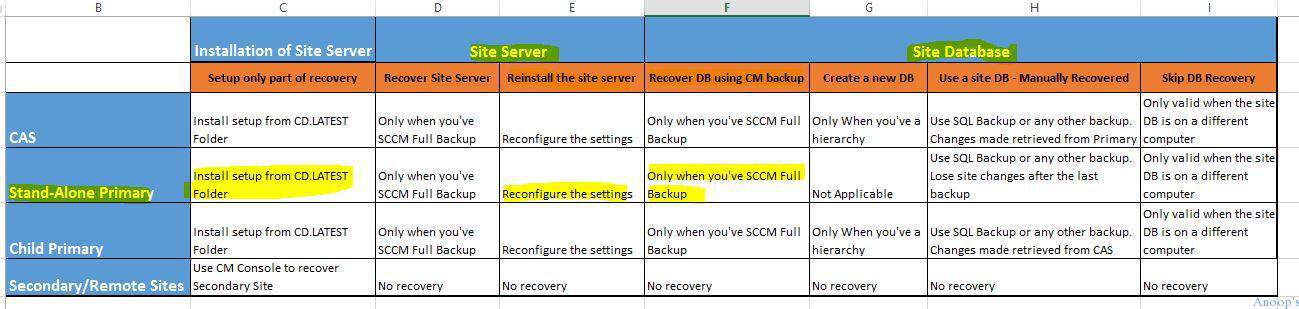
SCCM ConfigMgr CB How to Restore or Recover Primary Standalone Server
This is another video tutorial to demonstrate “How to restore or recover the SCCM/ConfigMgr CB standalone primary server“. The prerequisite for this type of recovery (explained in the video and the table below) – we need to have SCCM/ConfigMgr CB full backup, the Server name should be the same as the existing server, the Drive Letters should be the same, the Installation Path should be same, Should have same patch level and Better to have the same IP (to avoid opening new Firewall rules).
Resources
SCCM Related Posts Real World Experiences Of SCCM Admins (anoopcnair.com)
SCCM Video Tutorials For IT Pros – HTMD Blog #2 (howtomanagedevices.com)
We are on WhatsApp now. To get the latest step-by-step guides, news, and updates, Join our Channel. Click here. HTMD WhatsApp.
Author
Anoop C Nair is Microsoft MVP! He is a Device Management Admin with more than 20 years of experience (calculation done in 2021) in IT. He is a Blogger, Speaker, and Local User Group HTMD Community leader. His main focus is on Device Management technologies like SCCM 2012, Current Branch, and Intune. He writes about ConfigMgr, Windows 11, Windows 10, Azure AD, Microsoft Intune, Windows 365, AVD, etc.




After performing a site restore or migration to another server, after removing and re-adding the Intune Subscription – what is the correct process for iOS platform management? If we try to use the .pem file we downloaded from Apple originally, this no longer works and show an error that the “certificate signing request does not match the apn’s public key.” We have proceeded on the basis of renewing the APN certificate in the Apple Certificate page and supply a new .csr generated by our ConfigMgr environment – hoping that we do not have to re-enroll iOS devices.
StaffIn my experience, you don’t want to do anything with Apple APN cert. It worked for me straight away We don’t need to re upload the certs which is already downloaded
Anoop, we have build the SCCM environment with Current branch 1511 and later updated the 1602 hot fix .
So I will be having 1602 full site backup , Now my primary sites has crashed and when i trying to recover the site with 1511 install media and full site backup of 1602 it failed saying build number should match . Can you help me how to perform the recover in this scenario
StaffYou’ve to install SCCM CB from CD.Latest folder and this folder is part of your SCCM full backup see in the following post https://www.anoopcnair.com/what-are-the-options-for-sccm-cb-1606-backup-and-recovery/
Staffand this is explained in the video as well https://www.youtube.com/watch?v=QysIUzt53rc
1. Two Servers – SCCM Primary Site Server and SQL 2014 working fine.
2. Backup taken from SCCM for both SiteServer and SiteDatabase
3. These two server will be disjoined from domain.
4. Two new Hardware with Windows 2012 built.
5. Install SQL Server
6. Attach MDF File to the SQL Server
7. Install SCCM server – using recover site and for DB – DC manually restored.
8. SCCM not connecting to Database server.
Questions :
I don’t know the passwords of SQL Server Service Accounts : SQL Agent, SSRS, and SQLdatabase engine.
Do I really need this account and password for SCCM to connect to SQL server.
StaffYes it’s important to get the passwords correct in any scenario.
1. Two Servers – SCCM Primary Site Server and SQL 2014 working fine.
2. Backup taken from SCCM for both SiteServer and SiteDatabase
3. These two server will be disjoined from domain.
4. Two new Hardware with Windows 2012 built.
5. Install SQL Server
6. Attach MDF File to the SQL Server
7. Install SCCM server – using recover site and for DB – DC manually restored.
8. SCCM not connecting to Database server.
Questions :
I don’t know the passwords of SQL Server Service Accounts : SQL Agent, SSRS, and SQLdatabase engine.
Do I really need this account and password for SCCM to connect to SQL server.
These account are asked during SQL Install as seen in the pic below
The new hardware is joined to domain using the same host name like the original Site Server and Db server
StaffYes, you would try to reset the SQL service account passwords and try the new password. Confirm everything is working before upgrade.