






How to Recover SCCM CB Primary Server Using SQL Database Backup Configuration Manager ConfigMgr
How to Recover SCCM CB Primary Server Using SQL Database Backup Configuration Manager ConfigMgr with the following video tutorial from the HTMD community.
Let’s see “How to Recover SCCM CB Primary Server Using SQL Database Backup.” Sometimes, you must restore the SQL on a new virtual server or hardware. I have also included that in the post below.
The critical point here is that “SCCM CB full backup” is not required to restore your SCCM CB primary server. Instead, you can restore or recover the primary site server from SQL backup and CD—latest folder backup (along with package source folders, WSUS folders/DBs, etc.).
This post provides all the details on recovering the SCCM CB primary server using the SQL database backup configuration manager configMgr.

Table of Contents
- SCCM Architecture Decision Making Guide for 2023 or Later | Best Practices
- New ConfigMgr Primary Server Installation Step By Step Guide
- SCCM Log Files Updated List Client and Server
Prerequisites:
The following are the prerequisites for Recovering the SCCM CB primary server using SQL database backup configuration manager configMgr.
- Remove existing SCCM servers from the domain, ensuring you know local admin account details.
- Shutdown existing SCCM servers
- Rename existing SCCM servers in Vcenter or HyperV to .old
- Rename the new SCCM server in Vcenter/HyperV to the existing SCCM server names
- Delete existing SCCM servers from AD
- Remove new SCCM/ConfigMgr servers from the domain and reboot, ensuring you have local admin account details.
- Log onto new SCCM/ConfigMgr servers using the local admin account
- Change IPs of new SCCM servers to reflect old SCCM server IP details
- Change new SCCM server names to existing SCCM server names and reboot
- Log on to new SCCM servers as the local admin account
- Add new SCCM servers to the domain and reboot
- Verify the OU, System Management Access, and AD membership information for the new SCCM/ConfigMgr servers. Reboot if you have made any changes above
- Storage migrates any back-end storage in VMware/HyperV to ensure that vmdk files and vmx/VHDX files are named correctly.
How to Recover SCCM CB Primary Server Using SQL Database Backup Configuration Manager ConfigMgr?
I have another three posts and videos related to SCCM Current Branch backup and recovery options. You can refer to those posts from here.
The SCCM CB standalone primary server should be installed from CD.Latest folder (p.s – this is because we are making a recovery of the server). I used the native SQL backup option from SQL Management Studio to back up the SQL DB.
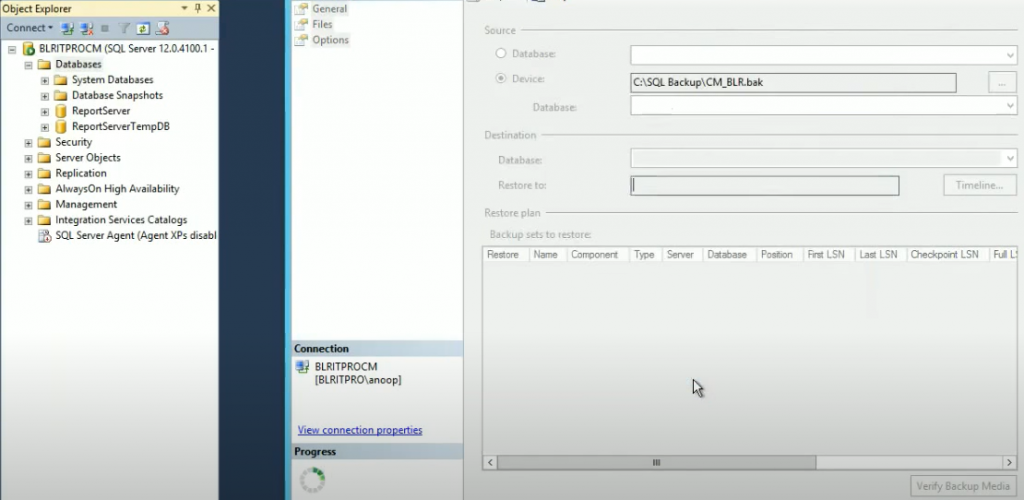
Once the recovered server OS was up and running with all the prerequisites(ADK, WSUS, SQL), I restored the SQL DB using Management Studio from the SQL full backup file. The video tutorial below explains all these processes.
Also, note the “post-recovery” process in addition to removing and adding Intune subscriptions. It would be best to ensure that all the accounts configured in the SCCM ConfigMgr CB console are removed and added back.
If a hotfix is installed on the SCCM CB server, we must install it after the recovery Wizard is completed. During recovery, we must follow the following SCCM CB primary server prerequisites.
| Prerequisites for the SCCM CB Primary Server |
|---|
| The hostname Should be the same |
| Drive Letters should be the same |
| The installation path should be the same |
| Should have the same patch level |
| Better to have the same IP: All the prerequisite apps should be installed: SQL Databased is already restored (manually) |
Recover SCCM CB Primary Server Using SQL Database Backup
Here is the end-to-end recovery experience video. (1) How to Recover or restore SCCM CB Primary server using SQL Database Backup – YouTube.
Resources
We are on WhatsApp now. To get the latest step-by-step guides, news, and updates, Join our Channel. Click here. HTMD WhatsApp.
Author
Anoop C Nair is Microsoft MVP! He is a Device Management Admin with more than 20 years of experience (calculation done in 2021) in IT. He is a Blogger, Speaker, and Local User Group HTMD Community leader. His main focus is on Device Management technologies like SCCM 2012, Current Branch, and Intune. He writes about ConfigMgr, Windows 11, Windows 10, Azure AD, Microsoft Intune, Windows 365, AVD, etc.




My Site SCCM 2012R2 v 1902 content from 4 servers
1- SCCMPRI which is Primary server
2- SCCMDP which is Deployment Server
3- SCCMDPII which is Distribution Point server
4- SCCMSQL which SQL DB
the problem that is my SCCMPRI compromise (you can say its Fail or corrupted) also the last Backup was after the server compromised
i want recover my SCCMPRI without losing my 3 year work 🙁
What’s a prerequisites for this scenario?
StaffI don’t known whether the prerequisites mentioned above was helpful or not. Here is it for you again
Following are the prerequisites which we need to follow during the recovery process SCCM CB primary server :-
Hostname Should be same :
Drive Letters should be same :
Installation Path should be same:
Should have same patch level:
Better to have the same IP:
All the prerequisite apps should be installed:
SQL Databased is already restored (manually):
Hi, Thanks for the reply, highly appreciated. I have few questions.
I already have healthy SQL database in a separate server, can i install SCCM primary server in a new server and connect this server to the current SQL database server.
StaffHi, yes if all the prerequisites are in place for new primary server. You might need to perform restore options as explained the article.
Ok nice,,,,how can i connect to the current SQL DB server 🙂
StaffYou might need to go through the end to end restore process as I explained …
1.Take backup and remove the CM_PR1 DB (existing DB ) from SQL
2. install new SCCM primary with new DB
3. and then restore the old DB (existing DB which you removed)
follow all the things explained in the video and other articles which I linked in the above post 🙂