






How to Change Intune MDM Authority Office 365 MDM Authority to SCCM or Intune
Let’s discuss how to Change Intune MDM Authority Office 365 MDM Authority to SCCM or Intune. Is the SCCM option not available for MDM authority?
First of all, what is MDM authority? The MDM authority helps us define a management service that has permission to manage a set of devices (like Windows, iOS, Android, and MAC OS). There are 3 types of MDM authority options.
Once you set Configuration Manager/SCCM as the Mobile Device Management authority, no other service (arguably – Intune, Office 365) can manage mobile devices. Changing mobile device management authority is always confusing and complex for IT admins.
Resetting Intune and ConfigMgr/SCCM, mobile device management authority, can not be done without Microsoft CSS help. However, Changing the Mobile Device Management Authority from Office 365 to Intune is straightforward, as shown in the Intune console below.

Table of Contents

- Fix MDM Enrollment Error Code 0x80180001
- Create AAD Dynamic Groups based on MDM Intune SCCM Management
- Intune Issue with iOS 16 Upgrade new MDM payload does not match the old payload
- Easily track Windows 10 Intune MDM policy information on the Endpoint – Support Help #1
- Windows 10 MDM Log Checklist – Ultimate Help Guide for ITPro #1
MDM Authority Options
Let’s discuss the MDM Authority Options. The table below shows the MDM Authority Options.
| MDM Authority Options |
|---|
| Intune by itself |
| SCCM/ConfigMgr with Intune |
| Office 365 with Intune |
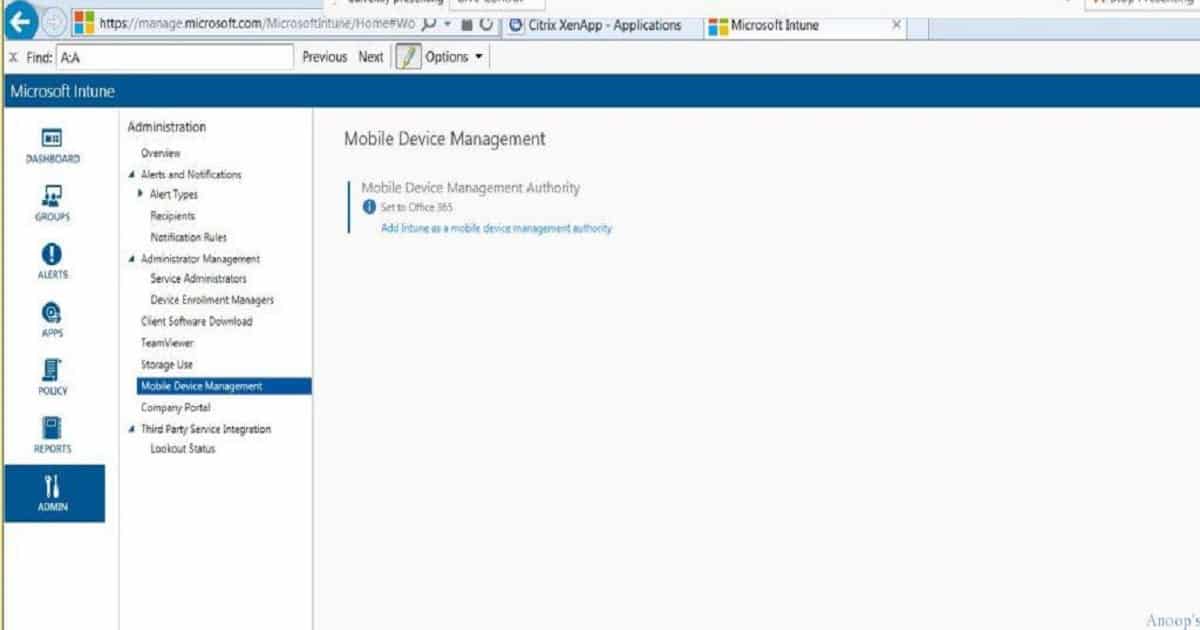
How to Change Intune MDM Authority Office 365 MDM Authority?
We don’t have to call Microsoft CSS to reset MDM authority from Office 365 (O365) to Intune. Also, we don’t need to re-enroll (already enrolled ones to O365) if you reset MDM authority from Office 365 to Intune.
In another scenario, when you want to reset MDM authority from Office365 to ConfigMgr/SCCM, you need help from Microsoft CSS/Premier support or raise a service request from the Intune portal. In this scenario, we need to re-enroll the mobile devices.
Conclusion:- How to Change Intune MDM Authority?
Changing MDM authority from Office365 to Intune – You can do it from the Intune console, and there is no need to enroll devices.
Changing MDM authority from Office365 to SCCM—Raise a service request/premium ticket with Microsoft. We should remove all the data from the Intune tenant, including applications, devices, users, etc. Devices need to be enrolled.
Resources
Learn Microsoft Intune Related Posts Real World Experiences (anoopcnair.com)
Validate Azure AD Dynamic Group Rules | Intune
We are on WhatsApp now. To get the latest step-by-step guides, news, and updates, Join our Channel. Click here. HTMD WhatsApp.
Author
Anoop C Nair is Microsoft MVP! He is a Device Management Admin with more than 20 years of experience (calculation done in 2021) in IT. He is a Blogger, Speaker, and Local User Group HTMD Community leader. His main focus is on Device Management technologies like SCCM 2012, Current Branch, and Intune. He writes about ConfigMgr, Windows 11, Windows 10, Azure AD, Microsoft Intune, Windows 365, AVD, etc.


Discussion