






FIX SCCM ConfigMgr Failed to Process Configuration Manager Update 0x87d20b15
Let’s discuss the FIX SCCM ConfigMgr Failed to Process Configuration Manager Update 0x87d20b15 troubleshooting tips issues.
Microsoft released a KB3192616 patch to add iOS 10 support to the SCCM CB hybrid environment. This patch will only be available in the SCCM console when your SCCM CB infra has already been integrated with Intune. Otherwise, you won’t be able to see the hotfix KB3192616 in your console.
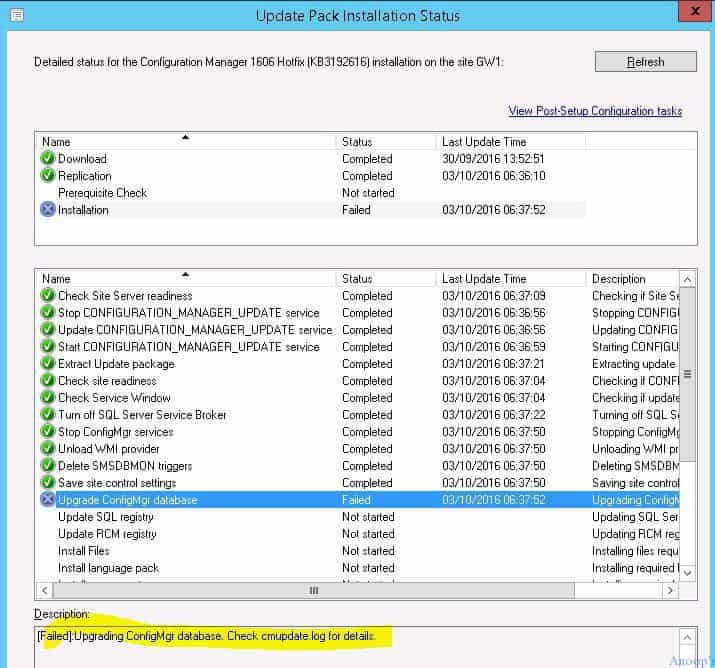
Introduction—FIX SCCM ConfigMgr Failed to Process? I’ve seen this error a couple of times in different environments. When I tried to install this patch, it failed with the following error: “[Failed]: Upgrading ConfigMgr database. Check cmupdate.log for details.”
When I checked CMUpdate.log, it gave me the error 0x87d20b15 (as you can see in the following log snippet).

Table of Contents
- FIX SCCM Hash Mismatch Issues Troubleshooting Guide
- FIX SCCM Agent Installation Error 0x80200010
- List of Issues Fixed with SCCM 2403 KB26186448
FIX SCCM ConfigMgr Failed to Process Configuration Manager Update 0x87d20b15
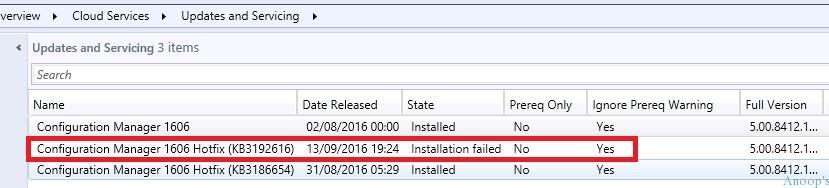
Let’s discuss how to fix SCCM ConfigMgr Failed to Process Configuration Manager Update 0x87d20b15. The screenshots below show the details of the Configuration Manager Hotfix (KB3192616).
| Name | Date | State |
|---|---|---|
| Configuration manager 1606 Hotfix (KB3192616) | 13/09/2016 | Installation Failed |
INFO: File \\?\D:\Program Files\Microsoft Configuration Manager\inboxes\sitecomp.box\shutdown.trn does not exist. No zapping needed. $<CONFIGURATION_MANAGER_UPDATE><10-03-2016 06:38:00.385-120><thread=12084 (0x2F34)>
Old build 8412 is detected installed $<CONFIGURATION_MANAGER_UPDATE><10-03-2016 06:38:00.386-120><thread=12084 (0x2F34)>
INFO: Installing Site Component Manager... $<CONFIGURATION_MANAGER_UPDATE><10-03-2016 06:38:00.387-120><thread=12084 (0x2F34)>
INFO: Installing Site Component Manager under acct <NT AUTHORITY\SYSTEM> path <D:\Program Files\Microsoft Configuration Manager\bin\x64\sitecomp.exe>~ $<CONFIGURATION_MANAGER_UPDATE><10-03-2016 06:38:00.388-120><thread=12084 (0x2F34)>
INFO: SQL Connection succeeded. Connection: SMS ACCESS, Type: Unsecure $<CONFIGURATION_MANAGER_UPDATE><10-03-2016 06:38:00.528-120><thread=12084 (0x2F34)>
INFO: Running Post Auto Upgrade script. $<CONFIGURATION_MANAGER_UPDATE><10-03-2016 06:38:00.528-120><thread=12084 (0x2F34)>
INFO: Starting Site Component Manager... $<CONFIGURATION_MANAGER_UPDATE><10-03-2016 06:38:00.571-120><thread=12084 (0x2F34)>
INFO: Started Site Component Manager service $<CONFIGURATION_MANAGER_UPDATE><10-03-2016 06:38:02.600-120><thread=12084 (0x2F34)>
INFO: Site Component Manager installation completed. $<CONFIGURATION_MANAGER_UPDATE><10-03-2016 06:38:02.600-120><thread=12084 (0x2F34)>
INFO: SQL Connection succeeded. Connection: SMS ACCESS, Type: Secure $<CONFIGURATION_MANAGER_UPDATE><10-03-2016 06:38:02.602-120><thread=12084 (0x2F34)>
Turned on activation for service broker queue $<CONFIGURATION_MANAGER_UPDATE><10-03-2016 06:38:02.613-120><thread=12084 (0x2F34)>
Failed to apply update changes 0x87d20b15 $<CONFIGURATION_MANAGER_UPDATE><10-03-2016 06:38:02.613-120><thread=12084 (0x2F34)>
ERROR: Failed to process configuration manager update. $<CONFIGURATION_MANAGER_UPDATE><10-03-2016 06:38:02.614-120><thread=12084 (0x2F34)>
- New Features in SCCM Technical Preview 2401
- New Key Features of SCCM 2309 | Top Improvements
- Download SCCM 2309 Early Ring Version using PowerShell Script
- SCCM Versions Build Numbers Client Console Site
- End of Support Dates for SCCM CB Current Branch | ConfigMgr | SCCM End of Life
- SCCM Unsupported Deprecated or Removed Features
Solution:- FIX SCCM ConfigMgr Failed to Process
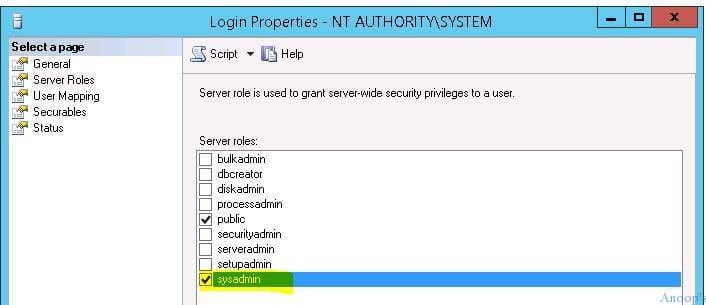
I provided the Sys Admin rights to the account called in SQL Management Studio. I tried “Retry installation” from SCCM CB updates and servicing. I could see the following information on CMUpdate.log: “INFO: Site Component Manager installation completed.“
The patch installation was successful after providing the Sys Admin rights to NT AuthoritySystem. Another tip is not to start the SCCM CB console update until the site component finishes reinstalling the components.
You can monitor this progress from services (check whether the service “SMS_SERVER_BOOTSTRAP” is running or not); otherwise, check the log file called sitecomp.log (if you can see the snippets like “Starting service SMS_SERVER_BOOTSTRAP” and then wait for that service to complete).
Result:- FIX SCCM ConfigMgr Failed to Process
After giving the sysadmin access to the NT AUTHORITY\System account, the hotfix installation worked very well via SCCM CB updates and servicing.

Resources
SCCM Related Posts Real World Experiences Of SCCM Admins (anoopcnair.com)
We are on WhatsApp now. To get the latest step-by-step guides, news, and updates, Join our Channel. Click here. HTMD WhatsApp.
Author
Anoop C Nair is Microsoft MVP! He is a Device Management Admin with more than 20 years of experience (calculation done in 2021) in IT. He is a Blogger, Speaker, and Local User Group HTMD Community leader. His main focus is on Device Management technologies like SCCM 2012, Current Branch, and Intune. He writes about ConfigMgr, Windows 11, Windows 10, Azure AD, Microsoft Intune, Windows 365, AVD, etc.




Hello,
Just wanted to add to this – ran into this very same issue on an upgrade from 1802 to 1902.
The issue was resolved by doing a site reset and checking permissions on all accounts and machine accounts on the database, making sure they had the sysadmin role.
Have a great day!
StaffGood point
Thank you for sharing
Hi,
I also bumped into the same issue with my SCCM Current Branch 1810 while I was trying to apply the Update Rollup Hotfix 2 on top of this configuration. In my case, the error message was the same, however, reading a few lines above the actual error message in the cmupdate.log revealed that the update was trying to drop a function that was still being used by replication.
Now, normally, upgrades would not start without replication being disabled (that is, if you have a distributor setup on the primary site server DB replicating the db to a replica db on one or more management points). I made sure to run the disable distributor and publisher wizard before starting the installation and that my pre-requisite check had also passed. Nevertheless, there could be a glitch (which I don’t know the reason why) while the disable wizard was running.
To solve this, I logged into my SQL DB on the primary site server and ran the following SQL commands:
USE “CM_DbName_xx”
EXEC sp_dropdistributor
The command completed successfully (https://docs.microsoft.com/en-us/sql/relational-databases/system-stored-procedures/sp-dropdistributor-transact-sql?view=sql-server-2017)
As an additional step I also re-started the SMS_EXECUTIVE on the MP where the db replica was hosted.
After taking these steps, I re-started my installation and it went like a breeze.