






SCCM Third-Party Patch Management Automation Configuration Manager ConfigMgr
Let’s discuss SCCM Third-Party Patch Management Automation. SCCM Third-Party Software Update Support without SCUP Patch management is essential for all admins. We can segregate patch management into two parts.
The first is Microsoft patches, which can be installed flawlessly with SCCM/ConfigMgr or WSUS.
[Related Posts – SCCM Third-Party Software Update Support without SCUP & How Tedious for SCCM Admins to Patch 3rd Party Applications via SCUP].
The second one is non-Microsoft (third-party applications) patching, which is critical for organizations. I have seen many organizations struggle with third-party patch management. How do you perform patch management in your organization?

Table of Contents
- SCCM 2405 New Features
- List of Issues Fixed with SCCM 2403 KB26186448
- SCCM Versions Build Numbers Client Console Site
- End of Support Dates for SCCM CB Current Branch | ConfigMgr | SCCM End of Life
- SCCM Unsupported Deprecated or Removed Features
- SCCM 2403 New Key Features and Improvements
SCCM Third-Party Patch Management Automation
I have encountered questions from SCCM admins about managing non-Microsoft application patches using SCCM. Though they can deploy these patches using WSUS, it takes loads of time to research for patches and then deploy the 3rd party patches after writing the script.
Another solution is to create packages of third-party patches and deploy them through SCCM/ConfigMgr. However, this is not a one-time solution and does not always work perfectly for all users. SCCM Third-Party Patch Management Automation | Configuration Manager | ConfigMgr?
Many tools in the market can help SCCM deploy third-party patches, but not all are reliable or feasible. The one tool that stands out is ManageEngine Patch Connect Plus, which is perfect for ConfigMgr/SCCM environments and can do the best job deploying vulnerabilities in the enterprise environment.
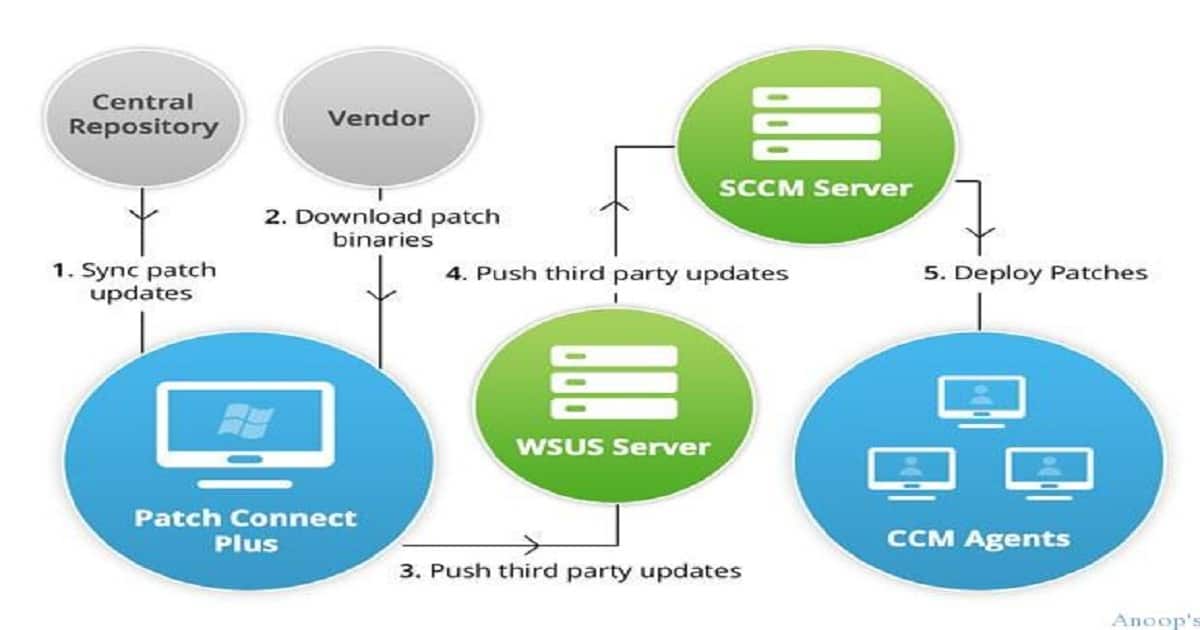
Some of the Reasons Why We Should Prefer Patch Connect Plus
The highest number of supported applications: It supports over 250 applications, including almost all applications used in an enterprise. None of the other tools in the market supports more applications than Patch Connect Plus, as most support only around 100 applications.
| Some of the Reasons Why We should Prefer Patch Connect Plus |
|---|
| Any patch management tool must have an extensive catalog of supported applications to combat all system vulnerabilities in the network; otherwise, those vulnerabilities will still exist in the enterprise environment and provide attackers with opportunities to exploit. |
| Uses SCCM infrastructure and console: Most tools ask customers to set up infrastructure in their network, whereas Patch Connect Plus uses the SCCM infrastructure you would’ve already set up. |
| Also, you will be using the same SCCM console for deployment. Hence, we are overcoming the requirement of learning about a new console and infrastructure altogether for third-party patch management. The following figure shows how it works |
| Affordable price: Patch Connect Plus is priced lower than all the similar products I’ve encountered. Since enterprises have invested a significant amount in Microsoft SCCM, they expect a high ROI, and this product helps them achieve that. Click here to find out the pricing of the product. |
| Easy and quick setup: I just took 5 minutes to set up the product! Follow the easy steps in the video, and you are good to go—video link. The product support is also helpful and responsive and helped me easily publish all patches. |
Try out the product, it comes with a free trial for 1 month! – Download now! SCCM Third-Party Patch Management Automation | Configuration Manager | ConfigMgr?
We are on WhatsApp now. To get the latest step-by-step guides, news, and updates, Join our Channel. Click here. HTMD WhatsApp.
Author
Anoop C Nair is Microsoft MVP! He is a Device Management Admin with more than 20 years of experience (calculation done in 2021) in IT. He is a Blogger, Speaker, and Local User Group HTMD Community leader. His main focus is on Device Management technologies like SCCM 2012, Current Branch, and Intune. He writes about ConfigMgr, Windows 11, Windows 10, Azure AD, Microsoft Intune, Windows 365, AVD, etc.




250+ really wonderful number of applications to patch them on regular basis. Very interesting and love to practice once
StaffGlad to see you are interested with this.
I explore something in LAB, recorded document and posted here.
https://gallery.technet.microsoft.com/SCCM-3rd-Party-Patch-4691e952
very useful.
StaffThank you 😉
Thnks gotta give it a try txs for the post Anoop,
They definately have to give a second thought on the price front.
We can hire 2 Packaging + 1 SCCM guys n pay there one year salary in that price 😛 (got 25000+ systems to manage)
StaffDoes that mean you already got the pricing from them? 🙂
Ya too costly going to stick to hiring packagers
StaffLong term, the packagers won’t be very cheap. And they can always make manual errors. We need a manager for packagers. Automation is the main motive here 😀
3rd party packagers can make mistakes too, I have personally seen from ga main stream vendor. Which begs the question they lack proper QA testing
StaffYes, I agree. But my point was more towards some other aspects. When an internal team mate makes a mistake is entirely different when a vendor has a bug in their product 🙂
Can Patch Connect Plus patch OSX 3rd party application, since SCCM now can enroll Macs?