






SCCM Online Service Connection Point Details – 2 Options
Let’s discuss the SCCM Online Service Connection Point Details – 2 Options. Microsoft released a new SCCM Current Branch version, SCCM CB 1610. If you are running SCCM CB 1511, 1602, or 1606, you can directly upgrade to SCCM CB 1610. This post and video provide more details about SCCM ConfigMgr CB Updates in Console and Upgrade.
SCCM Upgrade Process The ConfigMgr CB upgrade process via updates and servicing channel is very straightforward if you have an ONLINE service connection point mode.
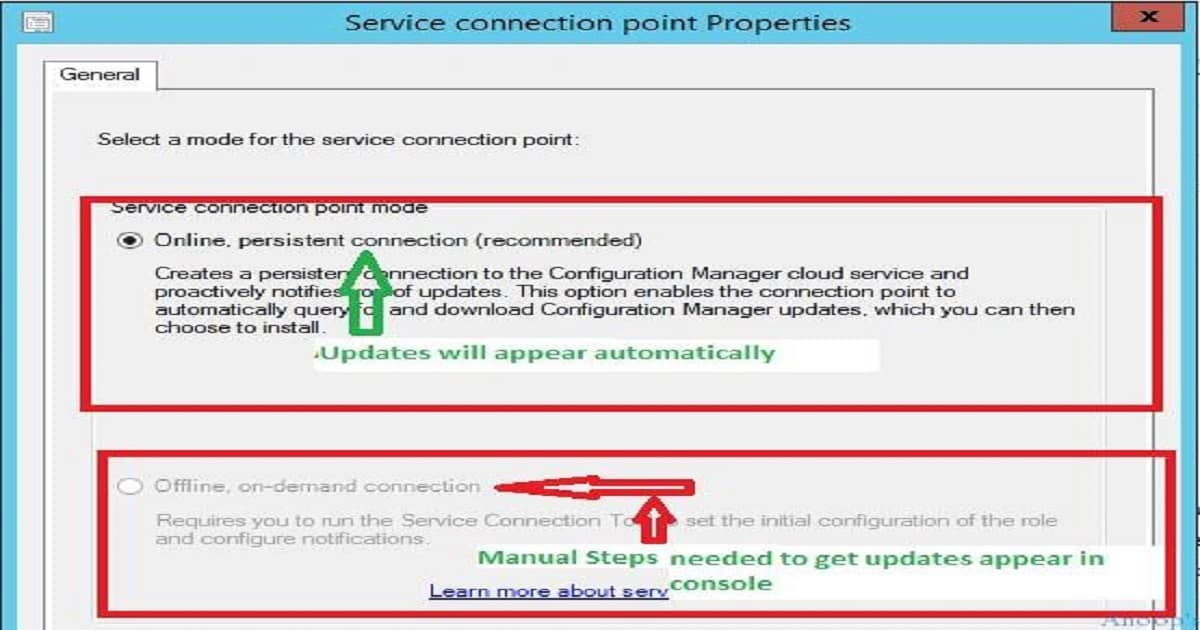
If you are running an offline service connection point mode, you must perform manual ways to get the latest SCCM CB 1610 updates available in your SCCM CB console.
This post provides all the details about the SCCM Online Service Connection Point Details—2 Options. For SCCM CB infra with an online service connection point, the SCCM CB 1610 update will automatically appear in the console once Microsoft has released this for “slow ring“.

Table of Contents
- SCCM 2403 New Key Features and Improvements
- Get SCCM Baseline Version Installation Media | ConfigMgr | VLSC | Download
- SCCM CB Release has Changed 2 Versions per Year | March and September
- Changes to Windows Client OS Release Cycle and Moment Feature Drop Control
SCCM Online Service Connection Point
Now (18th Nov 2016), Microsoft released SCCM CB 1610 updates only for the “fast ring,” which can be enabled only by running a PowerShell script provided in the following link.
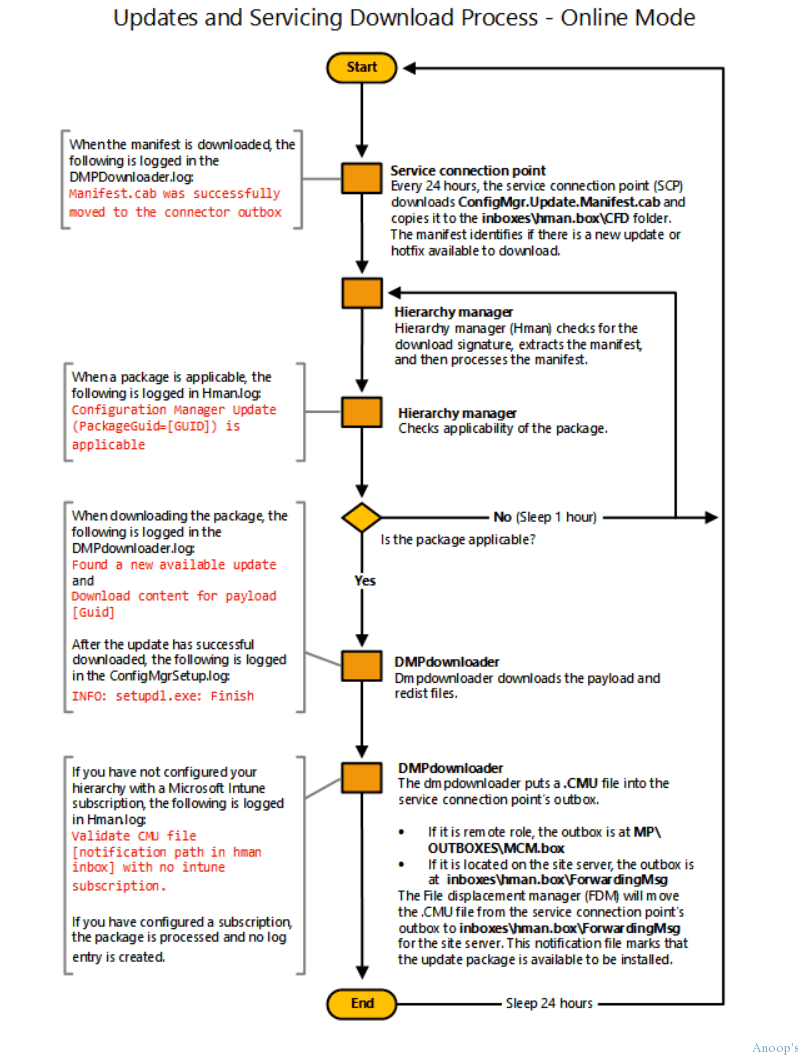
SCCM Servicing Flowchart
Let’s discuss the SCCM Servicing Flowchart. The screenshot helps you show the updates and servicing download process. The flow chart documentation is here.
| Updates and Servicing Download Process |
|---|
| Service Connection Point |
| Hierarchy Manager |
| The hierarchy Manager checks the applicability of the package |
| Is the package applicable? |
| DMP Downloader downloads the payload and redist files |
| The hierarchy Manager checks the applicability of the package |
How Did I Upgrade ConfigMgr SCCM CB 1602 to 1606
This is a 1-minute video that tells you how to start the SCCM CB 1610 upgrade process once the updates are available in the CM CB console. I have already covered the end-to-end SCCM CB upgrade process in a video here (even though that is about the CM 1606 upgrade, the process is similar).
Start the Upgrade Process from the Console
I’m sharing the video tutorial about upgrading the SCCM ConfigMgr CB 1610 console. Before initiating the SCCM ConfigMgr CB console upgrade process, you must complete all the reset activities for site system roles (sitecomp.log gives you more ideas). Otherwise, there could be more chances of failures during the SCCM CB console upgrade.
SCCM Console Upgrade
Let’s discuss the SCCM Console Upgrade. The below section shows the SCCM Console Upgrade details.
We are on WhatsApp now. To get the latest step-by-step guides, news, and updates, Join our Channel. Click here. HTMD WhatsApp.
Author
Anoop C Nair is Microsoft MVP! He is a Device Management Admin with more than 20 years of experience (calculation done in 2021) in IT. He is a Blogger, Speaker, and Local User Group HTMD Community leader. His main focus is on Device Management technologies like SCCM 2012, Current Branch, and Intune. He writes about ConfigMgr, Windows 11, Windows 10, Azure AD, Microsoft Intune, Windows 365, AVD, etc.




I ran the PS script to EnableFastRing and when I selected 1610 and install if failed. Stated I did not have enough disk space. I moved some data from the drive and added more storage then extended the volume as well. Now SCCM is in a stuck state checking prerequisites for 1606. I am going from 1602 to 1610 (skipping 1606). I’ve tried restarting the CAS and Primary Site server. Its been in this state for three days now and I’d really like to figure this out. All the Retry and Install options are grayed out. Any suggestions would be greatly appreciated.
StaffHi ! – The restart of the services would be the first step to resolve this issue with SCCM ConfigMgr CB 1606 to 1610 upgrade
Hello Annop
In my environment we have SCCM CB 1606, which was later migrated to version 1610.
A secondary site was then installed, but the secondary site has not copied the agents from the primary site to the secondary site. Normally this is done automatically, but this has not worked for me.
The message is as follows: “In progress – Waiting for Content” status
I understand that this happened earlier with the 2012 version and was solved with a fix from Microsoft
Do you know if this has happened also with this version (1610) ??
I will be attentive to your answer.
Greetings.
StaffI think, this means the content is not reached the secondary server. Have you confirmed the content has already been replicated to secondary site? There is one flowchart which explains the underline process of content replication with respect to CM update https://docs.microsoft.com/en-us/sccm/core/servers/manage/update-replication-flowchart
Do we have option to migrate SCCM 1606 to 1802 using fast ring script? If yes please help me with steps.
Thanks,
Sundar
Hi Anoop,
Do we have option to migrate SCCM 1606 to 1802 using fast ring script? If yes please help me with steps.
Thanks,
Sundar
Stafffast ring script won’t work once MS releases the slow ring. But why do you need fast ring script. It’s not going to help you in resolving any issues if I understand correctly.
Any site to verify the version available in fast ring or slow ring ?
StaffYes, normally Microsoft updates the TechCommunity post with this information. For 2203, it’s https://techcommunity.microsoft.com/t5/configuration-manager-blog/update-2203-for-microsoft-endpoint-configuration-manager-current/ba-p/3280318 and I have updated https://www.anoopcnair.com/sccm-2203-upgrade-guide-top-5-best-new-features/ post with the screenshot.
Updated 4/26/2022
Note: The update is now globally available to all customers. The script to enable the first wave is no longer necessary.