






FIX SCCM ConfigMgr WSUS Error 1722 Action Performance Counter Installation Configuration Manager
FIX SCCM ConfigMgr WSUS Error 1722 Action Performance Counter Installation Configuration Manager? WSUS installations have never been kind enough to me in my career as an SCCM admin! Every time, I get stuck in WSUS installation, and this time, it is not any different.
The installation of WSUS was not happening on the newly installed Server 2008 R2. The WUSU installation failed with event ID 11722. The details of event ID 11722 are given below, but it did not show any clear indication of the issue.
Resolving Error 1722 in SCCM involves troubleshooting the Action Performance Counter Installation Configuration Manager. This error typically occurs when there are issues with the installation or configuration of performance counters.
To fix it, you can start by checking the Configuration Manager setup logs for any specific error messages. Ensure that the necessary permissions are set for the Configuration Manager setup account.

- Fix SCCM ConfigMgr Backup Failed with Error SQL Backup Failed Error Code 2 Configuration Manager
- SCCM 2012 to CB Current Branch Upgrade | Migration | Possible Issues | ConfigMgr
- FIX: SCCM WSUS Sync Failed with UssInternalError SoapException Error 0x80131500 | ConfigMgr
- SCCM CB WSUS Config file did not contain a Value InstanceName Error | ConfigMgr | MEMCM
Table of Contents
SCCM ConfigMgr WSUS Error 1722
Product: Windows Server Update Services 3.0 SP2 — Error 1722. There is a problem with this Windows Installer package. A program run as part of the setup did not finish as expected. Contact your support personnel or package vendor.
Action PERF_COUNTER_INST, location: C:\Program Files\Update Services\Setup\HideConsoleApp.exe, command: C:\Windows\Microsoft.NET\Framework64\v4.6.1086\InstallUtil.exe /LogFile="C:\Users\ANOOP~1.NAI\AppData\Local\Temp\2\WSUSCa_170117_1039.log" /ShowCallStack /WsusInstall /CategoryMessageFile="C:\Program Files\Update Services\Common\EventCategories.dll " "C:\Program Files\Update Services\Setup\bin\Microsoft.UpdateServices.Setup.CustomActions.dll "
| Application Level | Event ID |
|---|---|
| Error | 11722 |
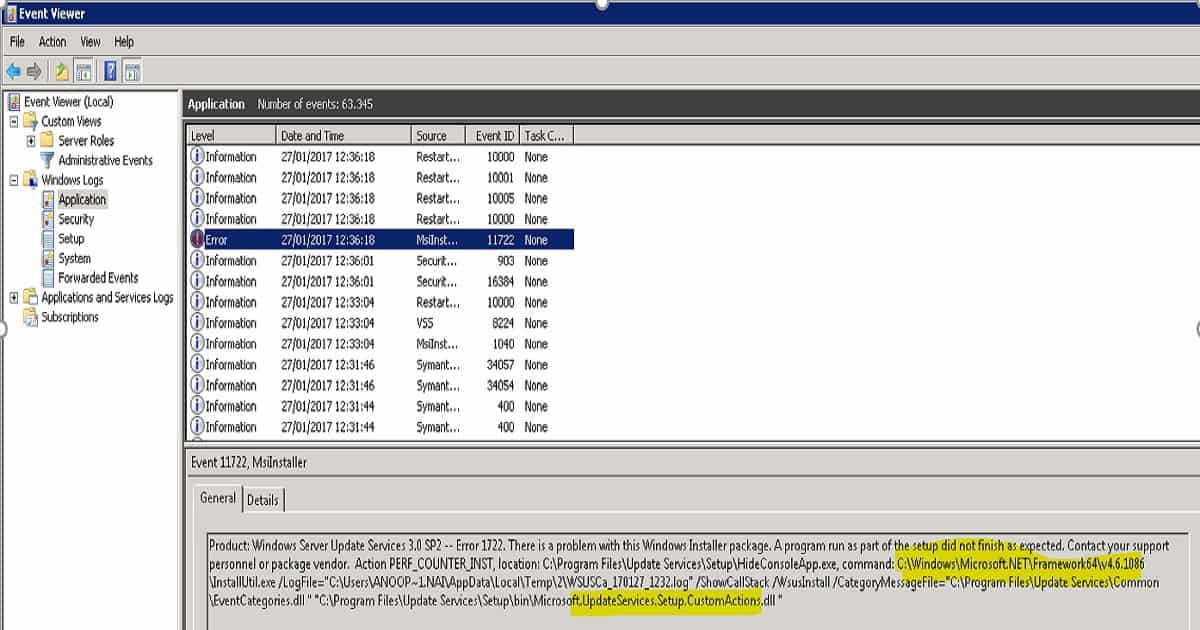
In the event log, we can see that the MSI installation of WSUS failed. The installation failed when it was trying to perform an MSI custom action called PERF_COUNTER_INST. It couldn’t complete this action, so it failed.
I checked the MSI log file called WSUSCa_170117_1039.log to get more details about the error, but there was nothing much expected from the error in the event log above.
Rather the error was a bit more confusing. After some Google search, I tried to reset the Performance counter, but that didn’t help either. But what is the point in resetting the perm counter of a newly installed server 🙂
FIX SCCM ConfigMgr WSUS Error 1722 Action Performance Counter Installation Configuration Manager?
MSI (s) (F8:9C) [10:23:27:201]: Executing op: CustomActionSchedule(Action=PERF_COUNTER_CLEAN,ActionType=5202,Source=C:\Program Files\Update Services\Setup\HideConsoleApp.exe,Target=SupressError C:\Windows\Microsoft.NET\Framework64\v4.6.1086\InstallUtil.exe /u /LogFile="" /WsusInstall "C:\Program Files\Update Services\Setup\bin\Microsoft.UpdateServices.Setup.CustomActions.dll ",)
FIX SCCM ConfigMgr WSUS Error 1722?
OK, so as the next step, I checked the .NET Framework folder path, which appears in the log file. The folder path is “C:\Windows\Microsoft.NET\Framework64\v4.6.1086\“, and this is the place where WSUS MSI custom action is supposed to happen. But the MSI couldn’t complete this custom action because of some issue.
When I checked, there was no folder called “v4.6.1086” in that path. Then, I checked the .Net versions installed on the server and found that .Net Framework 4.6.1 is installed. Yes, .Net framework 4.6.1 is installed, but no folder “v4.6.1086” was created for .NET.
FIX SCCM ConfigMgr WSUS Error 1722 Action Performance Counter Installation Configuration Manager?
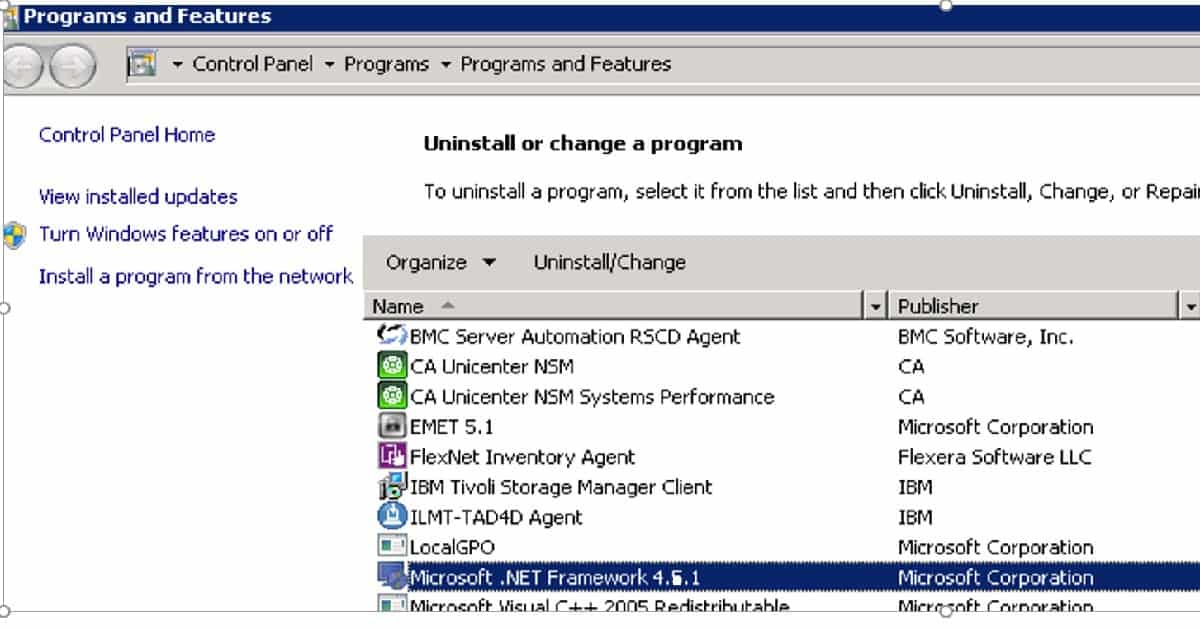
I uninstalled the .NET Framework 4.6.1, which resolved the issue. The WSUS was installed successfully on the server without any issues. FIX SCCM ConfigMgr WSUS Error 1722 Action Performance Counter Installation Configuration Manager?
Resources
SCCM Dynamic Collection – Part 2 | WQL Query | ConfigMgr | Create HTMD Blog (anoopcnair.com)
How to Configure Intune Enrollment Setup for Android Enterprise Device management
We are on WhatsApp now. To get the latest step-by-step guides, news, and updates, Join our Channel. Click here. HTMD WhatsApp.
Author
Anoop C Nair is Microsoft MVP! He is a Device Management Admin with more than 20 years of experience (calculation done in 2021) in IT. He is a Blogger, Speaker, and Local User Group HTMD Community leader. His main focus is on Device Management technologies like SCCM 2012, Current Branch, and Intune. He writes about ConfigMgr, Windows 11, Windows 10, Azure AD, Microsoft Intune, Windows 365, AVD, etc.




Higher version of .net frame work is not supported for installation of WSUS on Windows 2008 R2 so is it supported on windows server 2012?
What is the supported version of .net framework on windows 2008 R2.
StaffUnfortunately, there is no documentation I could found on this. However, from Server 2012 + SCCM CB onwards, we don’t need to install WSUS from any MSI. Rather we can directly install it from server manager !
I removed .NET 4.7 and was able to reinstall WSUS 3 with no issues. Thanks.
THANK YOU!!! After removing .Net 4.7 it installed. I had tried everything else. Thanks for sharing your expertise!