






How to Recover Windows 10 BitLocker Keys from Intune
Let’s discuss how to How to Recover Windows 10 BitLocker Keys from Intune. Several reasons might cause a Windows 10 device to go into recovery mode.
Once recovery mode is enabled, the user needs to put in BitLocker recovery keys to recover the encrypted drive of the Windows 10 machine managed by Microsoft Intune.
What are the reasons why Windows 10 devices go into recovery mode? For example, your organization might have a password security policy that locks you out after several failed attempts to sign in; Windows 10 PC could have encountered a hardware malfunction, an unexpected configuration change, or another security event.
BitLocker recovery key is required to help ensure that only an authorized person can unlock your Windows 10 PC and restore access to your encrypted data. How can we get my BitLocker recovery key? The BitLocker recovery depends on how Windows 10 PC is set up; there are different ways to get your recovery key.

Table of Contents
How to Recover Windows 10 BitLocker Keys from Intune – Windows 10 BYOD Personal Device Managed by Intune
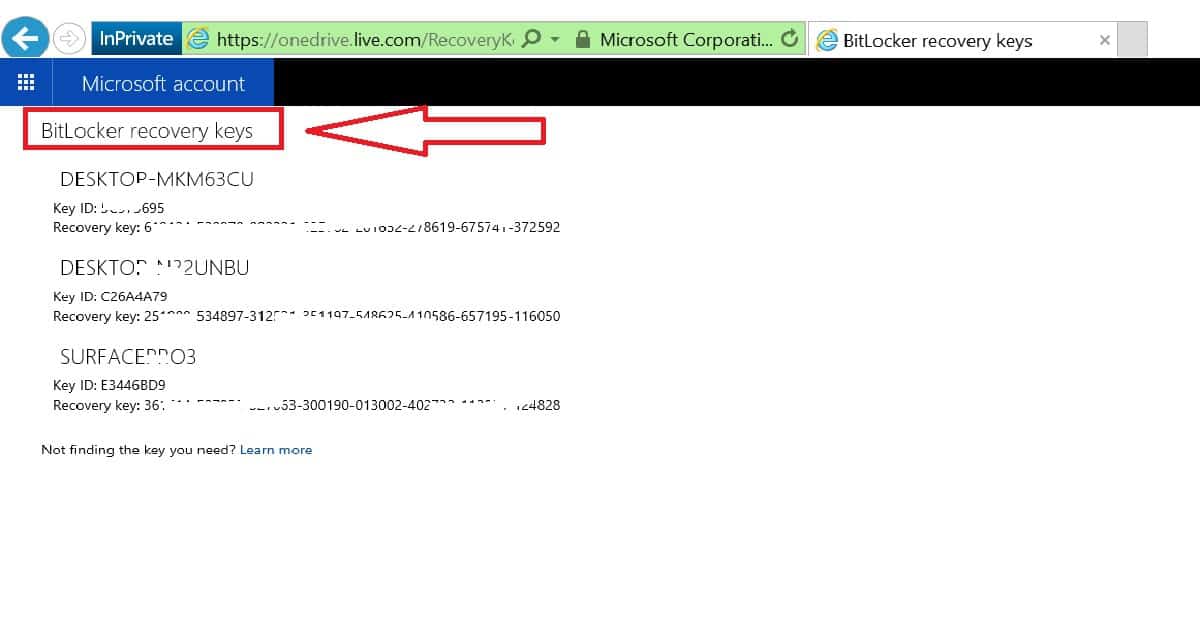
You can recover the key depending on how you saved it. You can retrieve the BitLocker recovery key from your Microsoft account if you have a Windows 10 BYO(Bring Your Own) device. If you have a BitLocker encrypted Windows 10 CYOD device, the BitLocker recovery key is saved in the Azure Active.
BitLocker Recovery Keys – Windows 10 CYOD Managed by Intune
BitLocker Recovery Keys for Windows 10 BYOD can be retrieved from the following URL https://onedrive.live.com/RecoveryKey. This is possible when your Windows 10 device is logged in with a Microsoft account, and you have selected the option BitLocker Recovery Key from your Microsoft account.
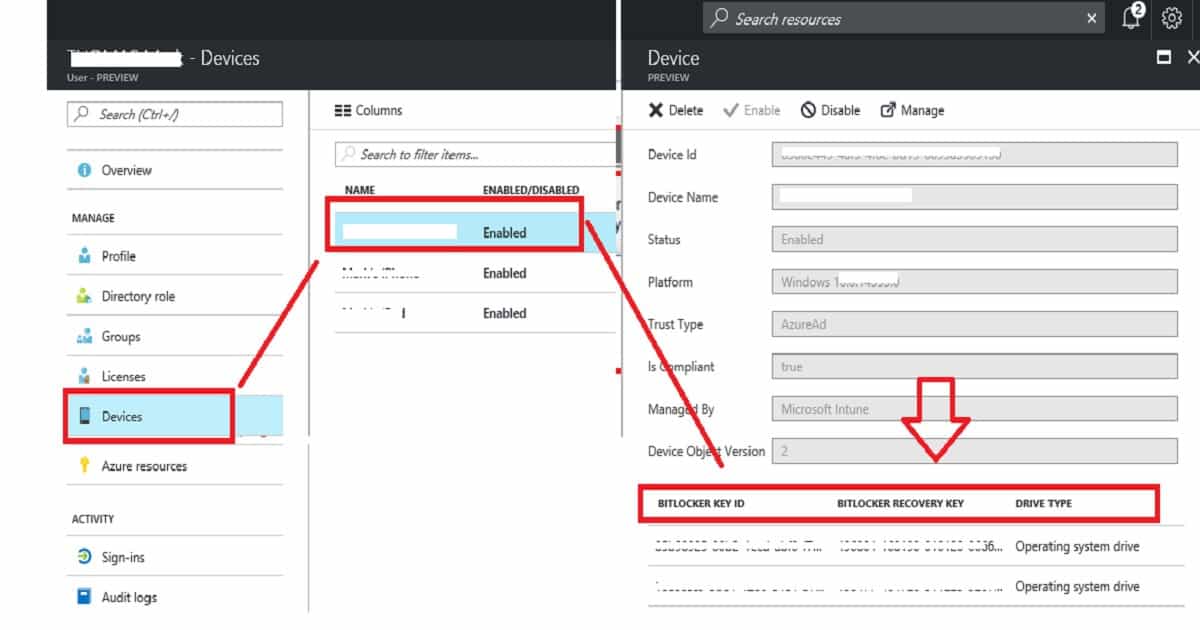
- We have two options to get the BitLocker Recovery keys for Windows 10 CYOD (company-owned device).
- Users can retrieve their recovery key by going to the following site http://myapps.microsoft.com, go to user profile, then select Devices and select the device for which they would like to get the BitLocker Recovery keys “https://account.activedirectory.windowsazure.com/r#/profile “.
- The second option is to get the BitLocker recovery key from Azure Active Directory “Microsoft Azure – Tenant Name – Users and groups – All users – User Name – Devices – Device.”
BitLocker Recovery Keys – Windows 10 BYOD Process – How to Recover Windows 10 BitLocker Keys from Intune Microsoft Endpoint Manager | Intune
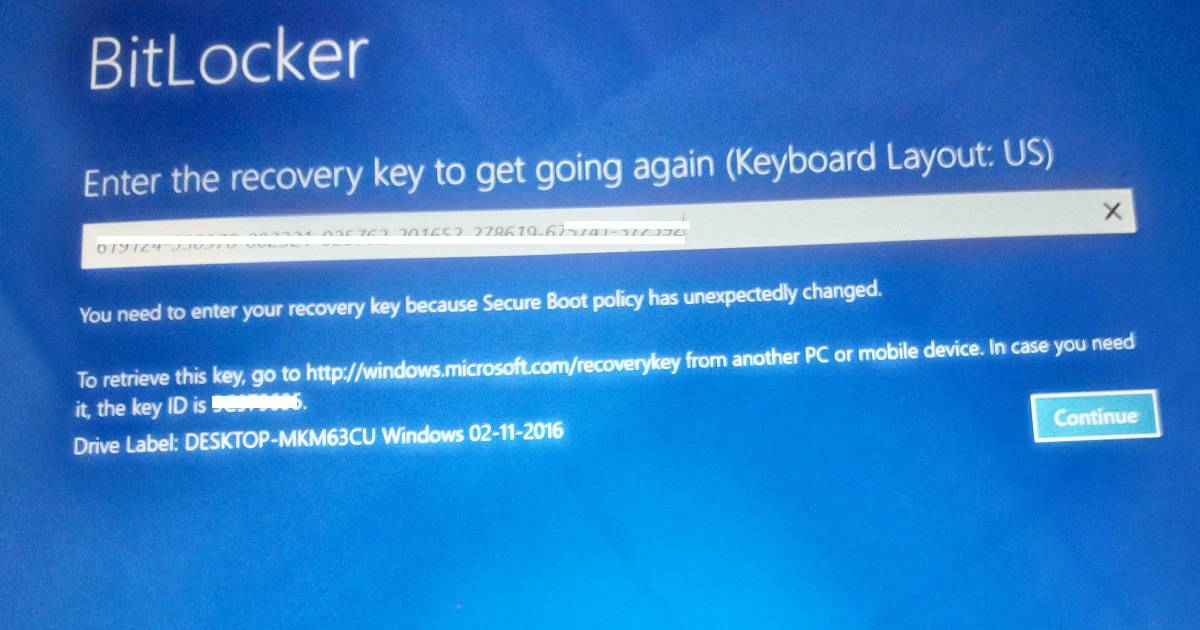
Enter the recovery key to get going again. The recovery key can be retrieved using any of the methods mentioned in the above sections. While booting up the Surface device, I received the following error: “You need to enter the recovery key because the secure boot policy has unexpectedly changed.”
| BitLocker Recovery Keys |
|---|
| This screen also provides the URL to go to get the recovery key. |
| The user can also get the key ID and Drive Label details from this screen. |
| Once the user finds the BitLocker recovery key for that device and drive, click on Continue to recover the drive. |
Resources
- BitLocker recovery keys: FAQ (frequently asked questions) – here
- Automatic Bitlocker on Windows 10 during Azure AD Join – here
- Find my BitLocker recovery key
We are on WhatsApp now. To get the latest step-by-step guides, news, and updates, Join our Channel. Click here. HTMD WhatsApp.
Author
Anoop C Nair is Microsoft MVP! He is a Device Management Admin with more than 20 years of experience (calculation done in 2021) in IT. He is a Blogger, Speaker, and Local User Group HTMD Community leader. His main focus is on Device Management technologies like SCCM 2012, Current Branch, and Intune. He writes about ConfigMgr, Windows 11, Windows 10, Azure AD, Microsoft Intune, Windows 365, AVD, etc.



Thank you very much sir it helped me 🙂
Hey Anoop, After deleting the Object from Intune is there a way to recover the key from AAD?
Login to https://myaccount.microsoft.com/ click on devices and You can find Recovery key.