






How to Remove Work Profile from Intune Managed Android Devices
How to Remove Work Profile from Intune Managed Android Devices? This quick post will help you understand how to remove a work profile from an Android device.
If you’re curious about how work profiles are created, my previous post, “Intune: How to Enroll Android for Work Supported Devices for Management | Google Play Store for Work,” provides a comprehensive guide.
The work profile is created when the Android for Work (A4W) supported device is enrolled in the Intune environment, which is enabled to support A4W. There are more than two ways to remove the Work profile from Android devices. We will cover three of them in this post.
This post will show you how to remove the work profile from Intune-managed Android devices using Endpoint Manager. The detailed steps are explained below.

- Configure Android-shared devices using Intune
- Prepare Android Virtual Device For Intune Deployment Testing
- Microsoft Ends Support for Running Android Apps on Windows 11
- Universal Print Integration with Microsoft 365 Mobile App for Android Printing
Table of Contents
Intune Android for Work – How to Remove Work profile -Post with Android Device Admin Method
This video clearly demonstrates how to remove the work profile from Intune-managed Android devices using the Android Device Admin method. The step-by-step process is explained thoroughly, making it easy to follow along and understand.
How to Remove Work Profile from Intune Managed Android Devices
As per Google documentation, the following is the method to remove the work profile, but I won’t recommend this approach if your device has enrolled in Intune. On Android 5.0+ devices, you can delete your work profile in Settings > Accounts > Remove work profile. Touch Delete to confirm the removal of all apps and data within the work profile.
- The first proper way to remove a work profile or unenroll a device is to go to the Intune portal -> Devices and groups -> All devices.
- Select the device you want to remove or unenroll, then click the “Remove Company Data” button. This will initiate the unenrollment process from Intune.
| Remove a Work Profile or Unenroll a Device |
|---|
| Go to the Intune portal |
| Click on the “Devices and Groups” section in the Intune portal |
| Choose “All devices” to view a list of enrolled devices |
| Locate and select the device that you wish to remove or unenroll from Intune |
| After selecting the device, find and click on the “Remove Company Data” button. This initiates the unenrollment process from Intune |
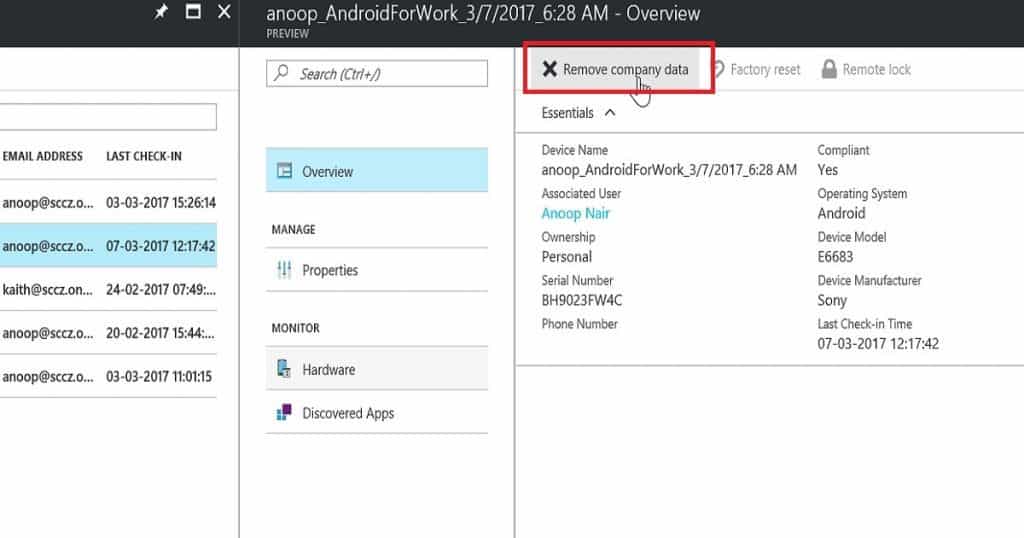
How to Remove Work Profile from Intune Managed Android Devices
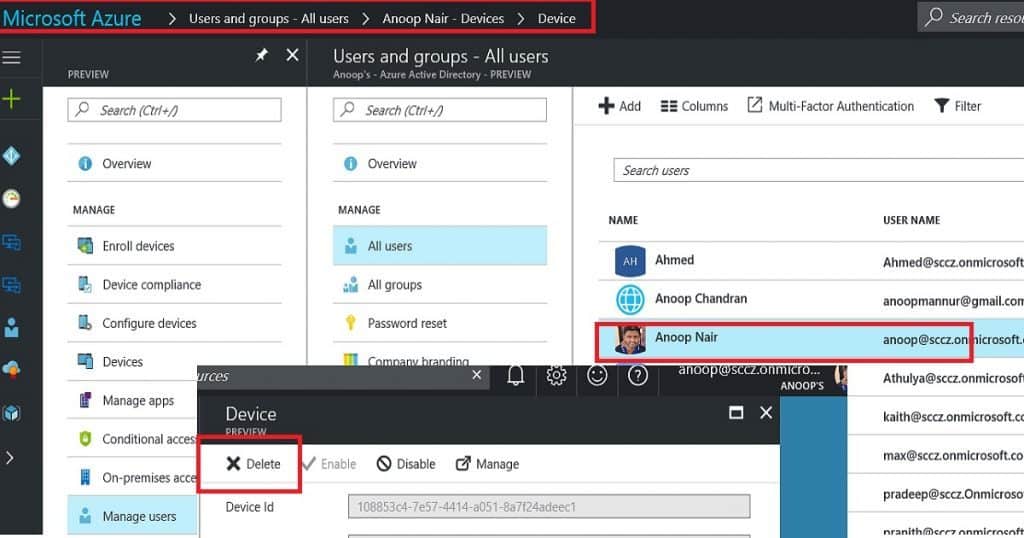
Another option is to remove the work profile or unenroll the Android device. You can also go to your user profile and choose the device you want to delete/remove from the following blade path from the Azure portal “Users and Groups – All users – Anoop Nair (username) – Devices – Device.”
As you can see in the following picture, click on the delete button to remove the device from Intune or to remove the work profile.
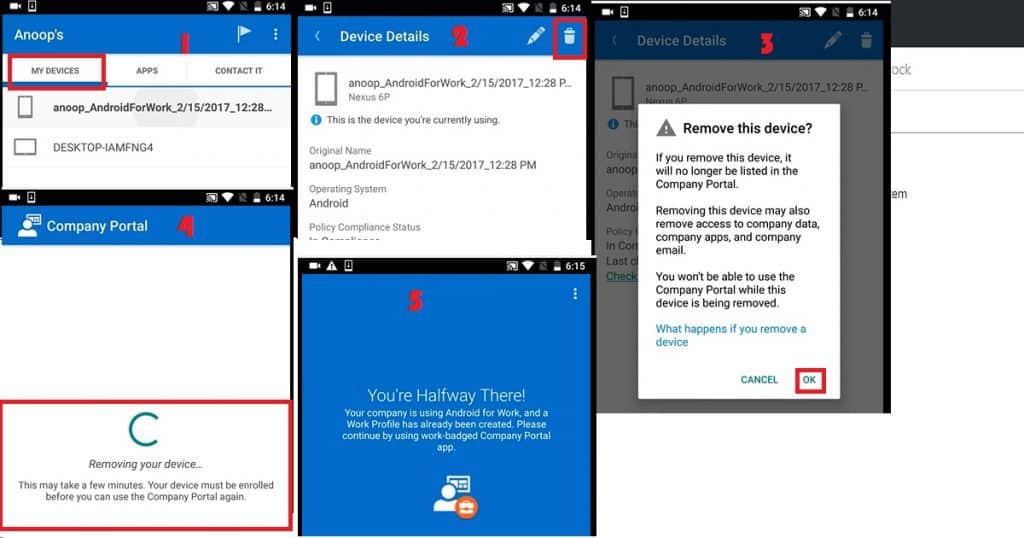
The second option to remove the work profile must be initiated from the end-user device. The user must initiate this process from the Intune company portal application (for more details about the company portal, read my previous post – Intune How to Enroll Android for Work Supported Devices for Management | Google Play Store for Work.
Launch the company portal app from your Android device, tap on the “My Devices” tab, and select the user’s device. In the following picture, tap on the recycle bin button to remove the device’s work profile.
- The Android device unenrollment process will remove company data from your mobile, the work profile created during A4W enrollment, and all the applications deployed through the work profile.
- However, as shown in the above picture (#5), the company portal application will stay on the device.
- It won’t allow you to enroll the device again with the same instance of the company portal.
- If you want to re-enrol the Android device for Intune management, you need to uninstall the existing company portal and install it again.
We are on WhatsApp now. To get the latest step-by-step guides, news, and updates, Join our Channel. Click here. HTMD WhatsApp.
Author
Anoop C Nair is Microsoft MVP! He is a Device Management Admin with more than 20 years of experience (calculation done in 2021) in IT. He is a Blogger, Speaker, and Local User Group HTMD Community leader. His main focus is on Device Management technologies like SCCM 2012, Current Branch, and Intune. He writes about ConfigMgr, Windows 11, Windows 10, Azure AD, Microsoft Intune, Windows 365, AVD, etc.


Hi,
I installed MobileIron Go while in a company. Now, I moved out of it. How can I remove Work profile in Redmi 3S Prime so that MobileIron Go can be removed from my devie?