






SCCM ConfigMgr Prerequisite Check Error Failed to Verify Authenticode Signature Configuration Manager MEMCM
SCCM ConfigMgr Prerequisite Check Error Failed to Verify Authenticode Signature Configuration Manager MEMCM? SCCM prerequisite file check is one of the essential steps before the kick-start of an actual upgrade of SCCM/ConfigMgr 2012 to CB.
Several key aspects must be examined to ensure a smooth transition when considering the upgrade from SCCM 2012 to CB (Current Branch) 1606. The article “SCCM 2012 to CB Current Branch Upgrade | Migration | Possible Issues | ConfigMgr” provide a list of things to look into before starting the upgrade.
While performing the upgrade process, you “really” don’t want to be stuck with some issues and don’t want to miss the timelines of the SCCM upgrade.
To avoid these delays in the SCCM CB upgrade process, I suggest completing the prerequisite download step a few days before the upgrade. We received the following error: the SCCM CB upgrade wizard wasn’t completed successfully.

- New Features in SCCM Technical Preview 2401
- List of Issues Fixed with SCCM 2403 KB26186448
- New Key Features of SCCM 2309 | Top Improvements
- Download SCCM 2309 Early Ring Version using PowerShell Script
- SCCM Versions Build Numbers Client Console Site
- End of Support Dates for SCCM CB Current Branch | ConfigMgr | SCCM End of Life
- SCCM Unsupported Deprecated or Removed Features
Table of Contents
Prerequisite Download Issues – SCCM ConfigMgr Prerequisite Check Error Failed to Verify Authenticode Signature Configuration Manager MEMCM
As you can see, the error in the following picture, Prerequisite Downloads – Use previously downloaded files- An error has occurred while attempting to download or verify required prerequisite components, and setup cannot continue. Review the configmgrsetup.log file for further details.
| Configuration Manager Product Updater |
|---|
| An error has occurred while attempting to download or verify required prerequisite components and Setup cannot continue. Review the configmgrsetup.log file for further details. |
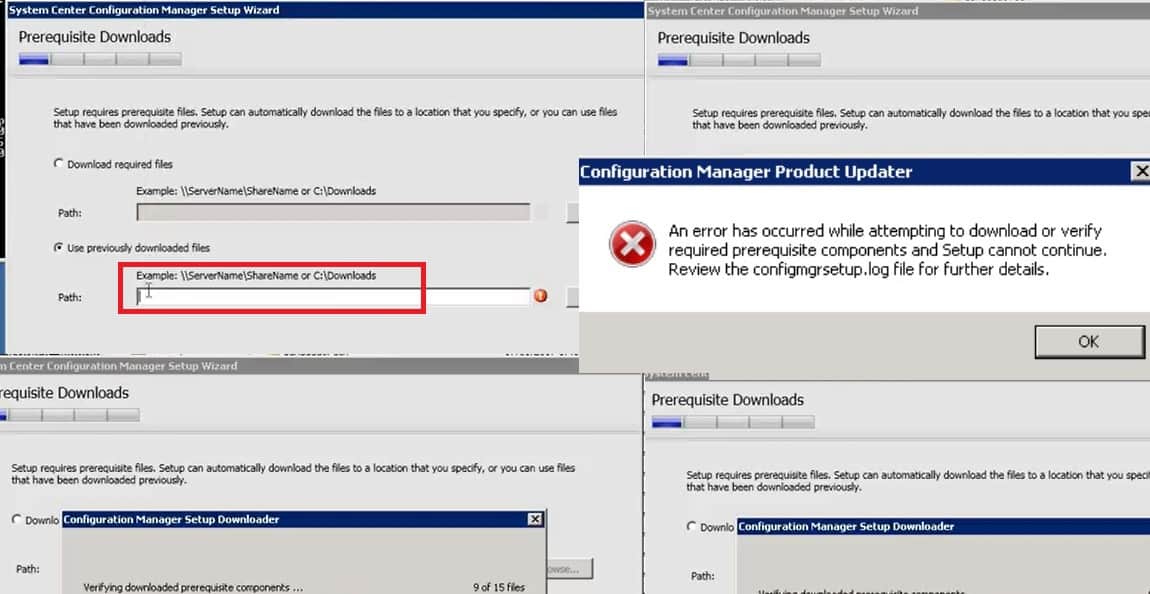
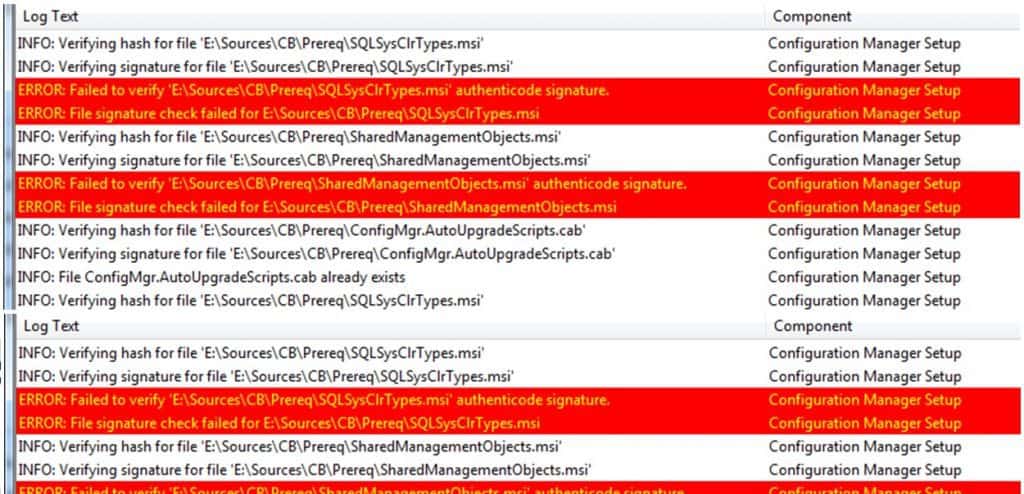
We reviewed the configmgrsetup.log file, which gave us two errors related to Authenticode Signature. The following Reddit thread provided some clues about a similar issue. However, I was not sure which certificate was mentioned in the thread.
ERROR: Failed to verify 'F:\Sources\CB\Prereq\SQLSysClrTypes.msi' Authenticode Signature
ERROR: File Signature check failed for F:\Sources\CB\Prereq\SQLSysClrTypes.msi
ERROR: Failed to verify F:\Sources\CB\Prereq\SharedManagementObject.msi' Authenticode signature
ERROR: File Signature check failed for F:\Sources\CB\Prereq\ SharedManagementObject.msi.msi
Fix SCCM ConfigMgr Prerequisite Check Error Failed
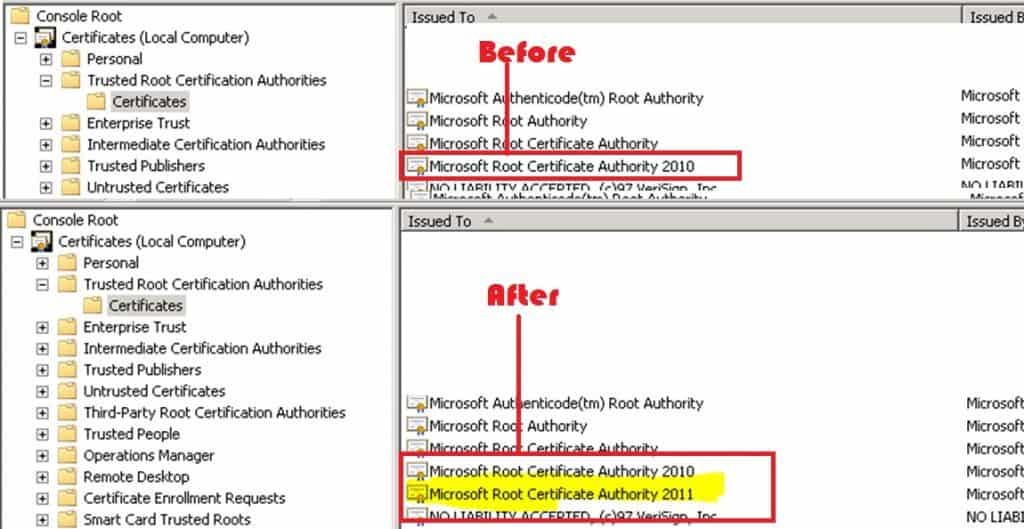
We used the same prerequisite files for all the hierarchy, and those files worked for a couple of other primaries and CAS. But one primary was giving us loads of trouble. I started comparing the certs of CAS and Primary servers and found that one particular cert was missing from the problematic SCCM/ConfigMgr primary server.
The cert name missing from the SCCM primary server is “Microsoft Root Certificate Authority 2011.” We imported the certificate from the working SCCM CAS server and exported it to the primary server’s Local computer—Trusted Root Certification Authorities—which helped resolve the Authenticode Signature issue.
We are on WhatsApp now. To get the latest step-by-step guides, news, and updates, Join our Channel. Click here. HTMD WhatsApp.
Author
Anoop C Nair is Microsoft MVP! He is a Device Management Admin with more than 20 years of experience (calculation done in 2021) in IT. He is a Blogger, Speaker, and Local User Group HTMD Community leader. His main focus is on Device Management technologies like SCCM 2012, Current Branch, and Intune. He writes about ConfigMgr, Windows 11, Windows 10, Azure AD, Microsoft Intune, Windows 365, AVD, etc.




Discussion