






How to Setup Intune Compliance Policy for Windows 10 Devices
Let’s discuss Setting up an Intune Compliance Policy for Windows 10 Devices. This post will show how to do so. Managing Windows 10 devices is critical in modern device management.
Intune compliance policies are the initial safeguard in securing access to corporate applications. These policies help ensure that devices meet predefined security and compliance standards, preventing unauthorized or non-compliant devices from accessing sensitive corporate resources.
The Intune Compliance Policy for Windows 10 helps protect company data. The organization must ensure that the devices that access company apps and data comply with specific rules. These rules might include using a password/PIN to access devices and encrypting data stored on devices.
This set of such rules is called a compliance policy. The best option is to use a compliance policy with Azure AD Conditional Access.

- How to Plan Design Intune Compliance Policy for Android Devices
- How to Setup Intune Compliance Policy for iOS Devices
- Create Intune Compliance Policy for iOS iPadOS Devices
- iOS iPadOS ADE enrollment Profile Authentication method Company Portal Removal from Intune
- Account-Driven User Enrollment for iOS/iPadOS
Table of Contents
How to Setup Intune Compliance Policies for Windows10
This video guide shows you how to set up Intune compliance policies for Windows 10. It walks you through each step clearly and simply, making it easy to follow.
How to Setup Intune Compliance Policy for Windows 10 Devices
Sign in to the MEM portal with an Intune admin access account. Select More services, enter Intune in the text box, and then select Enter.
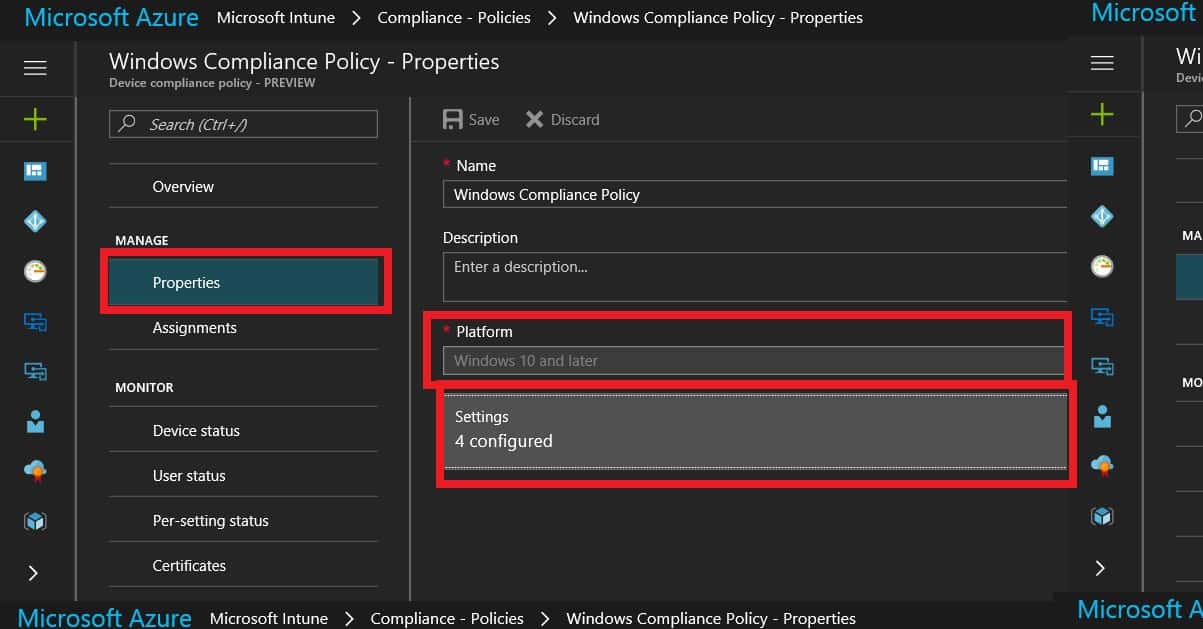
Select Intune—Device Compliance—Compliance—Policies and click on the +Create policy button to create a new compliance policy. Select the platform as “Windows 10.” Settings configurations are really important for compliance policies. There have been some improvements in Azure portal Windows 10 compliance policies.
The 3 categories in Windows 10 compliance policies are shown in the table below.
| Windows 10 Compliance Policies |
|---|
| Device Health |
| Device Properties |
| System Security |
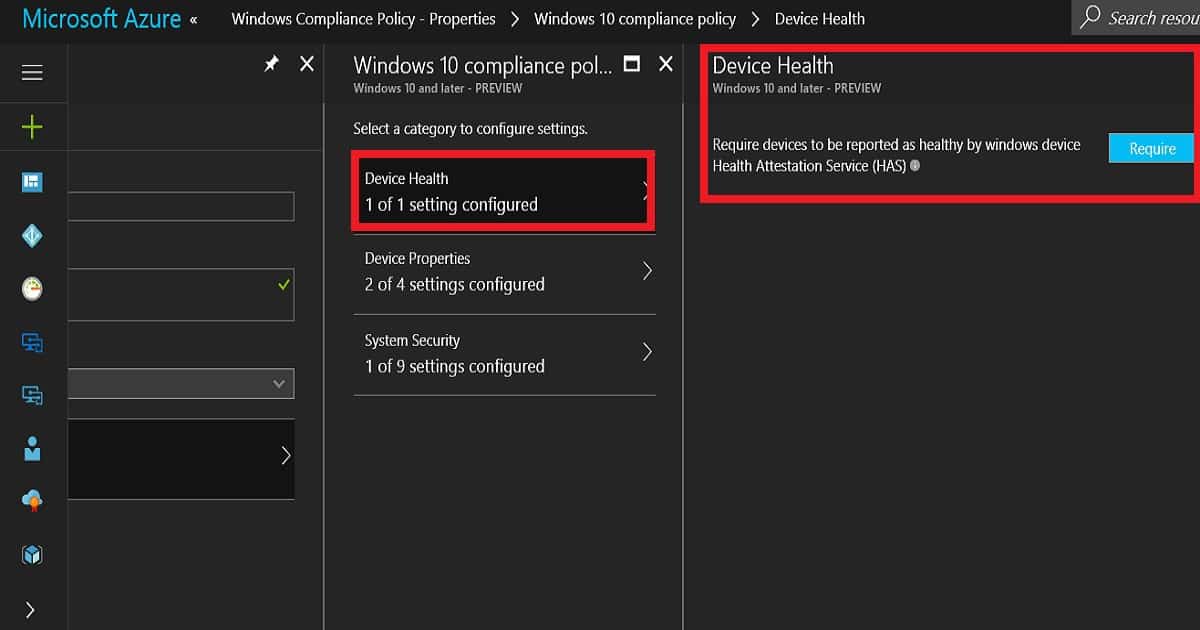
Device Health is the setting where the compliance engine will check whether Windows 10 devices are reported as healthy by the Windows device Health Attestation Service (HAS). The device health attestation service includes loads of checks, such as TPM 2.0 (the requirement for the latest build of Windows 10 is TPM 1.0), BitLocker encryption, etc.
- Device Properties is the setting where Intune Admins define the minimum and the maximum versions of operating system details for the corporate application access. Operating System Version.
- Minimum OS version
- Maximum OS version
- Minimum OS version for mobile devices
- Maximum OS version for mobile devices
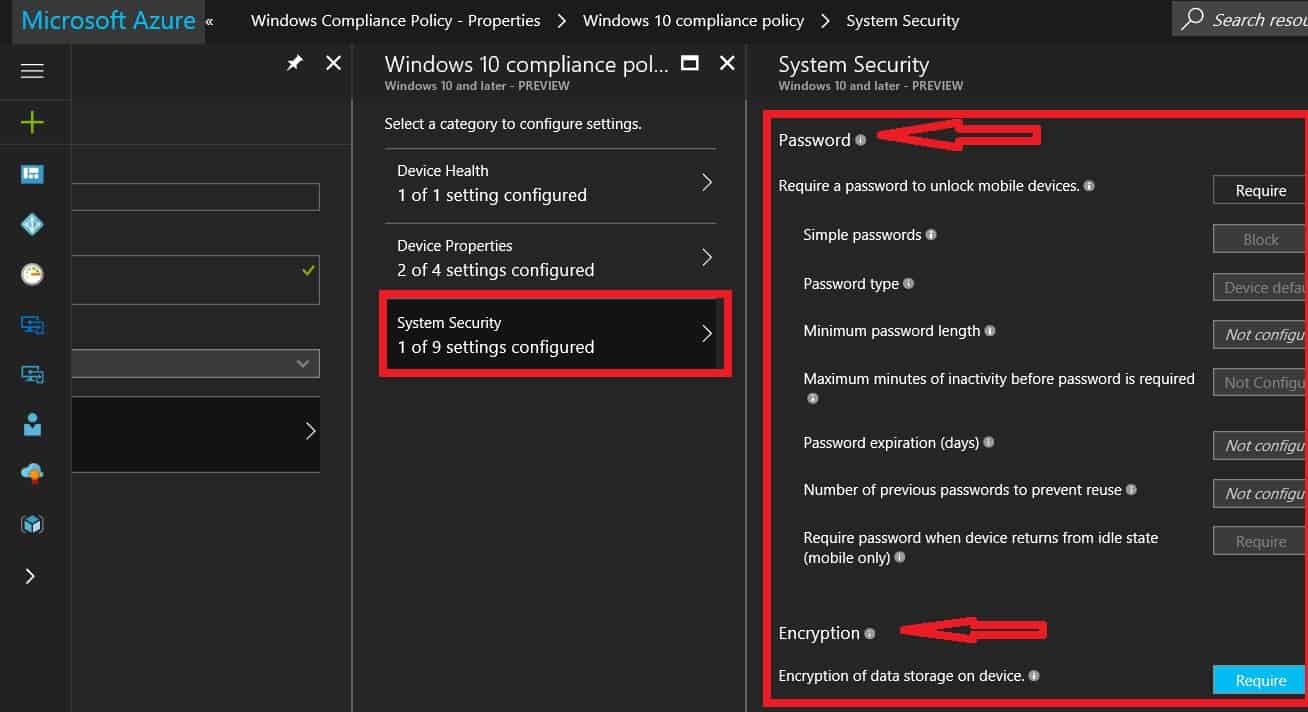
System Security is the setting where Intune Admins define password policies for Windows devices. These settings have two sections: Password and Encryption. Password Policy—We don’t need to set the Windows password policy here if you already use “Windows Hello for Business.”
- Require a password to unlock mobile devices. Simple passwords
- Password type
- Device default device defaultAlphanumericNumeric
- Minimum password length
- Maximum minutes of inactivity before the password is required
- Password expiration (days)
- Number of previous passwords to prevent reuse
- A password is required when the device returns from an idle state (mobile only). Encryption – If you have enabled HAS in the above policy, you don’t need to enable this encryption policy.
- Encryption of data storage on a device.
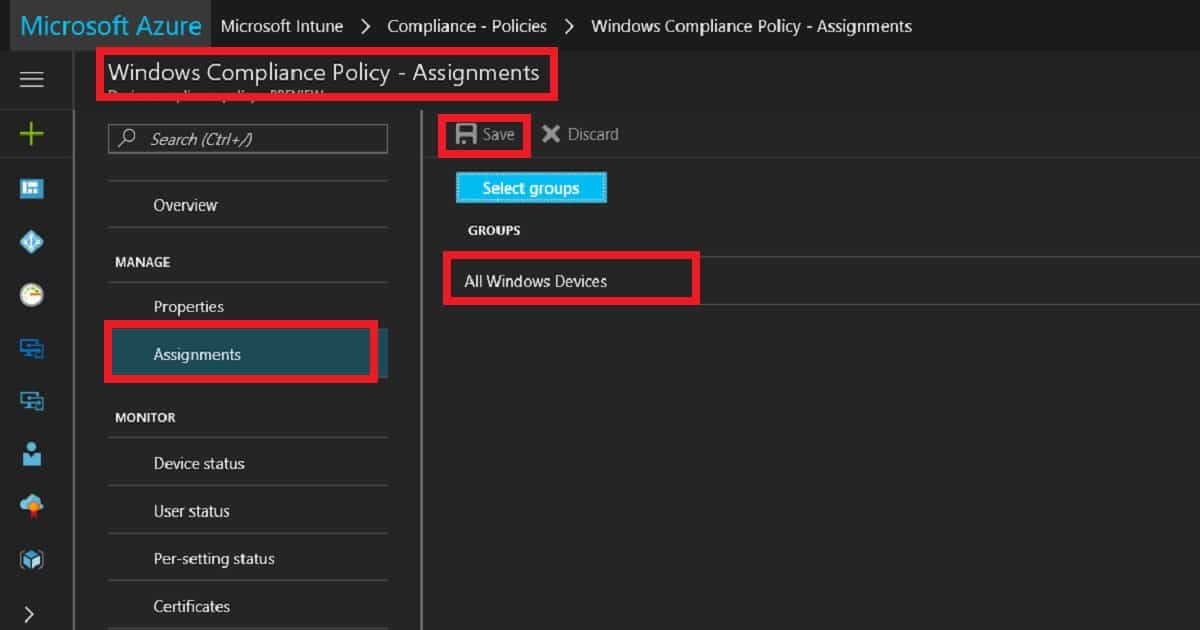
Deploy Windows 10 compliance to All Windows devices’ dynamic device groups. (Update Device Groups are not supported for Compliance policies—hence, use user groups for Intune compliance policies.)
- Click on Assignment and select the dynamic device group.
- I would use AAD dynamic device groups rather than user groups to deploy compliance policies.
We are on WhatsApp now. To get the latest step-by-step guides, news, and updates, Join our Channel. Click here. HTMD WhatsApp.
Author
Anoop C Nair is Microsoft MVP! He is a Device Management Admin with more than 20 years of experience (calculation done in 2021) in IT. He is a Blogger, Speaker, and Local User Group HTMD Community leader. His main focus is on Device Management technologies like SCCM 2012, Current Branch, and Intune. He writes about ConfigMgr, Windows 11, Windows 10, Azure AD, Microsoft Intune, Windows 365, AVD, etc.


Discussion