






Check Windows 11 Hardware Readiness Insights from Intune Endpoint Analytics
Let’s learn how you can get Windows 11 Hardware Readiness report from Intune. Windows 11 hardware readiness details are accessible from the Work from anywhere report in Endpoint Analytics. Reviewing this detailed report lets you gain insights into the Windows device compatibility to perform the Windows 11 upgrade.
Endpoint analytics can help identify policies or hardware issues that may be slowing down devices and help you proactively make improvements before end-users generate a help desk ticket.
Intune provides integrated reports that allow you to view comprehensive status information for Windows 11 devices. To utilize these insights effectively, you need to configure the necessary prerequisites to enable endpoint analytics.
The ability for your employees to work from anywhere and be productive is essential in today’s world. This report offers insights on how prepared your workforce is to be productive from anywhere. Review your score and how it compares to the selected baseline.

You can use the Windows 11 Hardware Readiness PowerShell script to determine if a device meets the minimum system requirements for Windows 11 upgrades, and in the case that not all requirements are met, it will highlight which hardware checks failed.
- Intune Endpoint Analytics With Joy | Learn And Discover
- Cloud PC Monitoring Health Performance Using Endpoint Analytics Intune
Endpoint Analytics Permissions
Devices enrolled in Endpoint analytics need a valid license for the use of Microsoft Intune. Check the license requirement for Endpoint Analytics as stated by Microsoft. We are considering you have already enabled Endpoint Analytics for your tenant and have devices onboarded, here, you can check insights.
To access endpoint analytics, you must be assigned an Intune built-in role or custom role. Intune built-in roles already have access to endpoint analytics. This permission is included in the following Intune built-in roles.
| Role name | Entra ID (Azure AD) role | Intune role | Endpoint analytics permissions |
|---|---|---|---|
| Global Administrator | Yes | Read/write | |
| Intune Service Administrator | Yes | Read/write | |
| School Administrator | Yes | Read/write | |
| Endpoint Security Manager | Yes | Read only | |
| Help Desk Operator | Yes | Read only | |
| Read Only Operator | Yes | Read only | |
| Reports Reader | Yes | Read only |
Check Windows 11 Hardware Readiness Insights from Intune Endpoint Analytics
The Windows metric measures the percentage of devices on supported versions of Windows. Here’s how you can access to Work from anywhere report inside the endpoint analytics.
- Sign in to the Microsoft Intune admin center https://intune.microsoft.com/.
- Navigate to Reports > Endpoint Analytics.
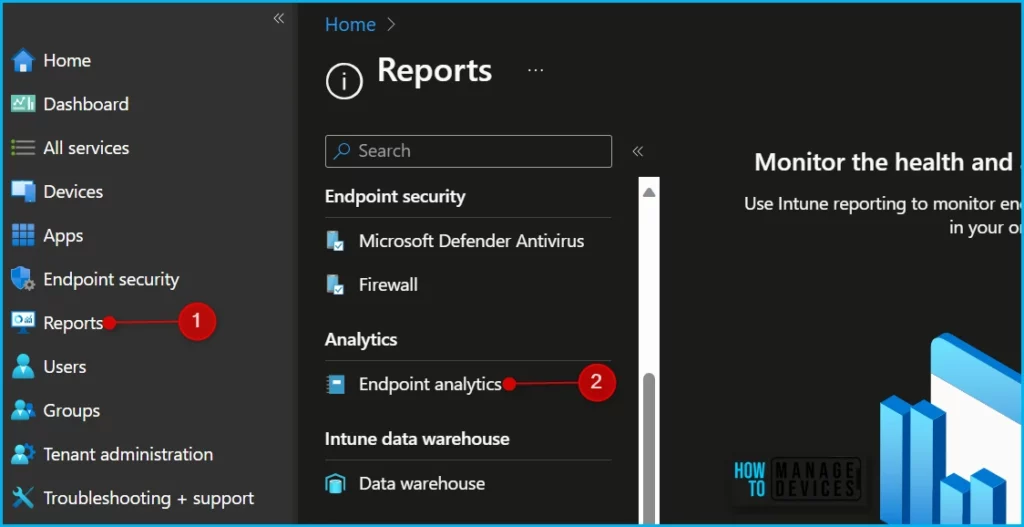
The Windows metric provides Windows 11 hardware readiness insights for devices that are enrolled via Intune, co-management, or SCCM version 2107 or newer with tenant attach enabled.
To determine how many of your enrolled devices meet the minimum system requirements for Windows 11, select Windows to open the flyout on the Overview page in Work from anywhere.
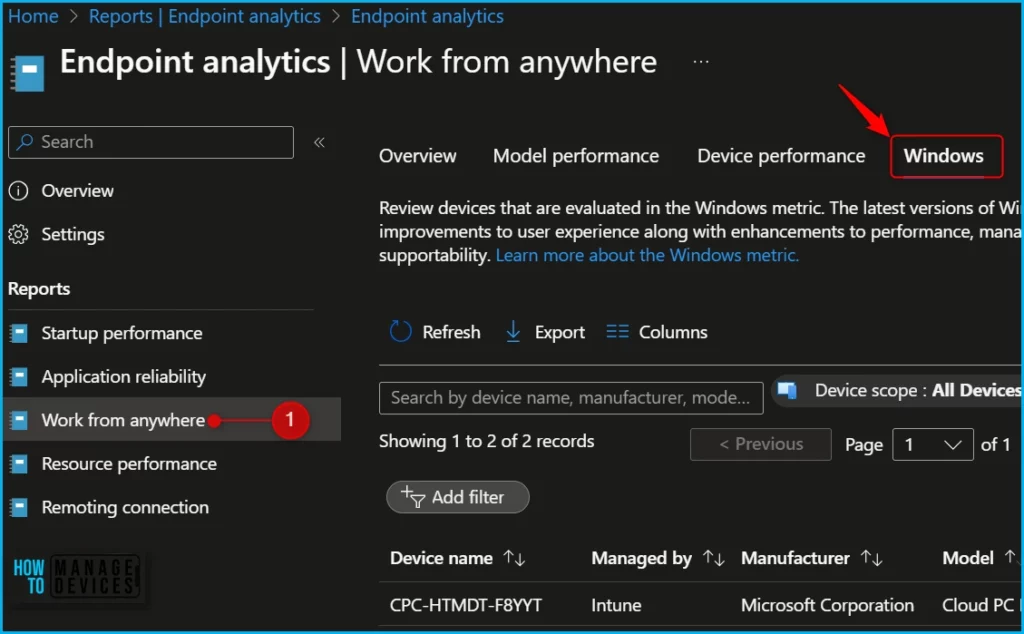
In the Column details, You can get detailed reports containing valuable information allowing you to Search by device name, manufacturer, model, or OS version.
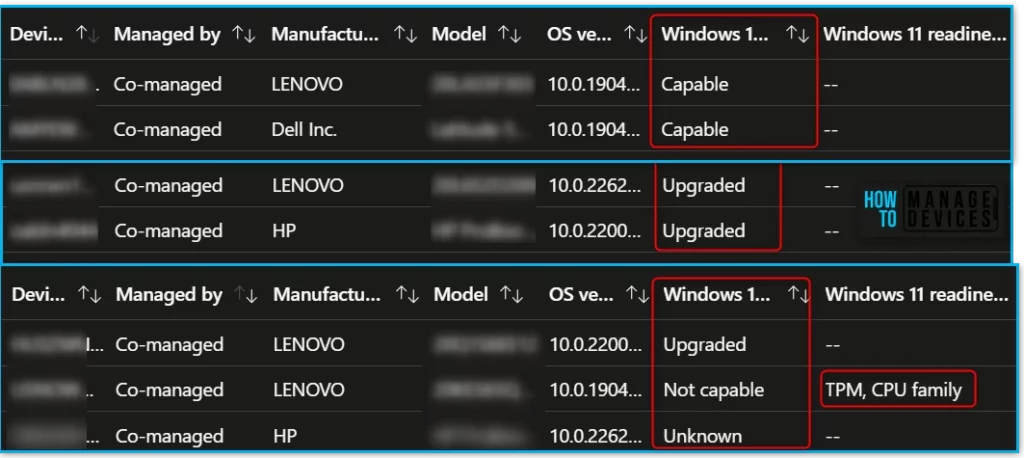
A device-by-device view of Windows 11 hardware readiness is displayed in the Windows tab. The Windows 11 readiness status column indicates whether a device is Capable or Not capable of upgrading to Windows 11 based on the minimum system requirements.
The column also lists if a device is already Upgraded or if the status is Unknown for a device. The Windows 11 readiness reason column outlines the hardware requirements that aren’t met for devices with a readiness status of Not capable, as you can see in the screenshot TPM, CPU family below.
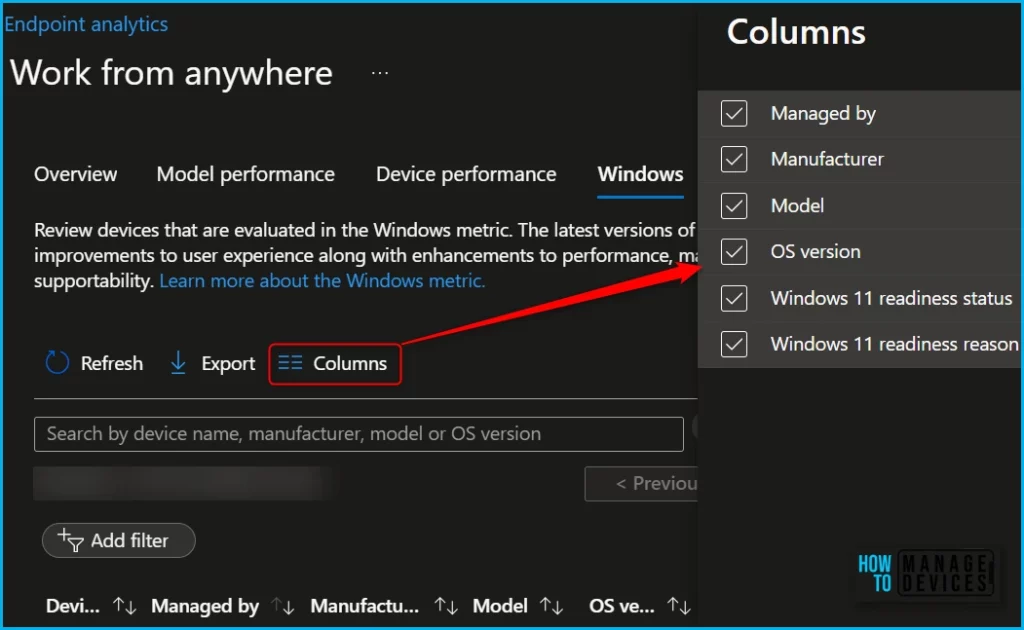
If you want to add or remove columns to reports, Use the Columns property to add or remove columns from the appeared report. Click on the Columns, and A flyout displays, here, you can Check or Uncheck the columns you want to include in the Windows 11 readiness report. Select Apply to update.
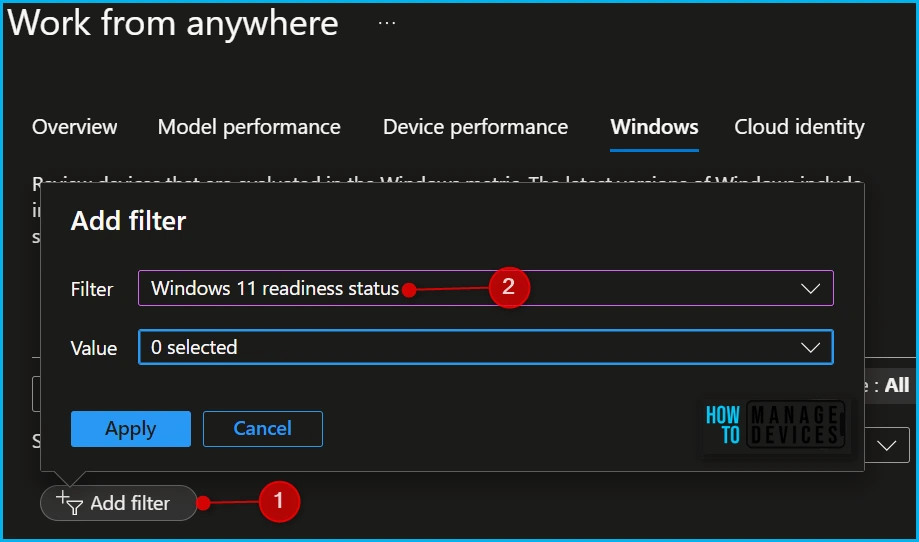
You also have the option to filter, Select Filter and Value from the popup and click Apply. The option available Filter, Windows 11 readiness status, Managed by. The value you can add from the drop-down list.
| Windows 11 readiness status (Value) |
|---|
| Upgraded |
| Unknown |
| Not capable |
| Capable |
We are on WhatsApp. To get the latest step-by-step guides and news updates, Join our Channel. Click here –HTMD WhatsApp.
Author
About Author – Jitesh, Microsoft MVP, has over six years of working experience in the IT Industry. He writes and shares his experiences related to Microsoft device management technologies and IT Infrastructure management. His primary focus is Windows 10/11 Deployment solution with Configuration Manager, Microsoft Deployment Toolkit (MDT), and Microsoft Intune.


Discussion