






New Windows Update for Start Menu on Windows 11
Exciting News! New Windows update for Start Menu. New features and improvements were added to the start menu in the new updation. The Start Menu update for Windows 11 is version 22H2, and it’s expected to arrive in October 2023.
Adding new features to the Start menu would be a significant improvement. We all use the Start menu; this further improvement will give you the best user-friendly experience. Microsoft announced on September 26, 2023, that this new Start menu update gives a richer preview experience.
The Start Menu is the best feature of the Windows Operating System. This feature helps you to access files, settings, and installed applications. It is usually located at the screen’s bottom-left corner, but you can change its position and appearance according to your preferences.
The Start Menu has been part of your operating system since Windows 95. But it has changed over the years. The new Start Menu update is expected to be a great one. The latest version, Windows 11, has a new Start Menu offering unique features and improvements.

- MS Paint Cocreator Feature Now Rolling Out
- Start Menu Issues of Third-Party UI Customization Apps in Windows 11
- Microsoft is Planning to Remove VBScript from Windows Permanently
What are the new Improvements in the Start Menu?
1. Recommended section
2. Improvements in System label
3. Account-related notifications
New Windows Update for Start Menu
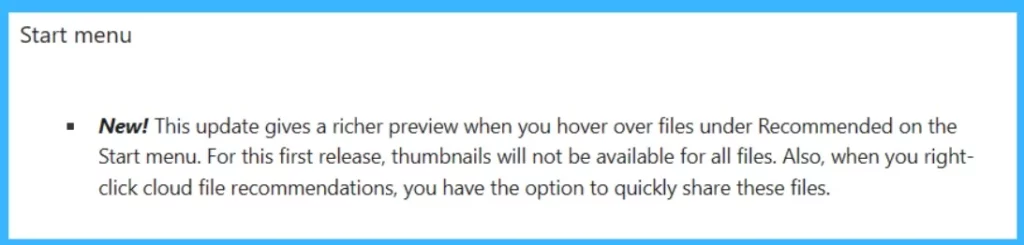
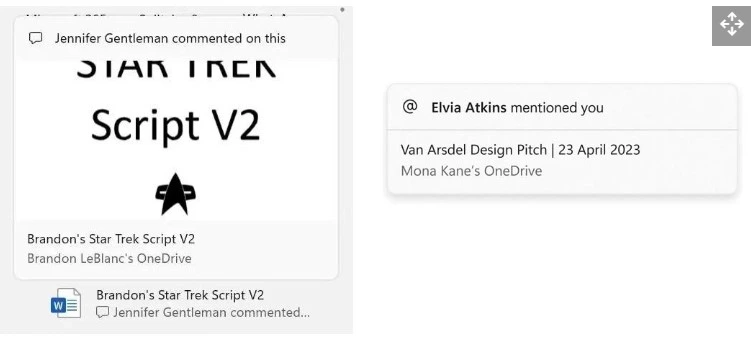
Start Menu getting new features in new updation. The MS announcement said that the recent updates give a richer preview when you hover over files under recommended on the Start Menu. We can expect that the recommended section have some new improvements.
- Thumbnails will not be available for all files
- You can share cloud file recommendations when you right-click on them
| Category | New Update News |
|---|---|
| Start Menu | This update gives a richer preview when you hover over files under Recommended on the Start menu. For this first release, thumbnails will not be available for all files. Also, when you right-click cloud file recommendations, you have the option to share these files quickly. |
What is New in System Labels
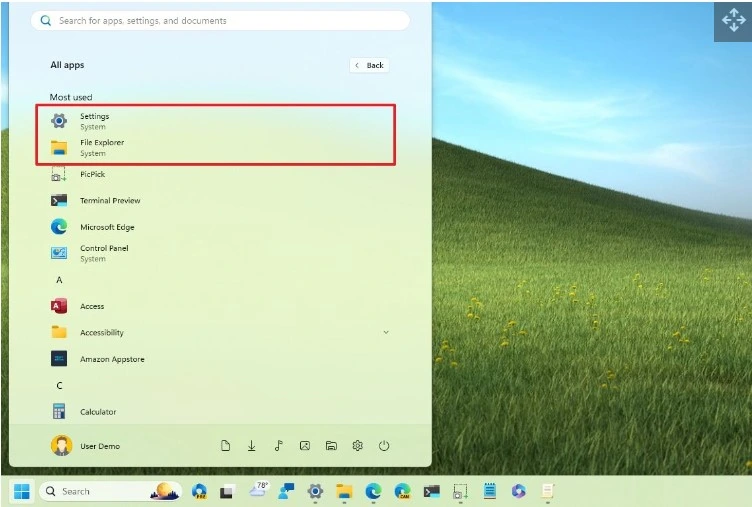
In this new update, Microsoft has updated the features to differentiate between its features and apps. Also,
Recent system labels are being added to distinct components for Settings, Control Panel, File Explorer, Get Started, Microsoft Store, and others.
Improvements in Account-Related Notifications
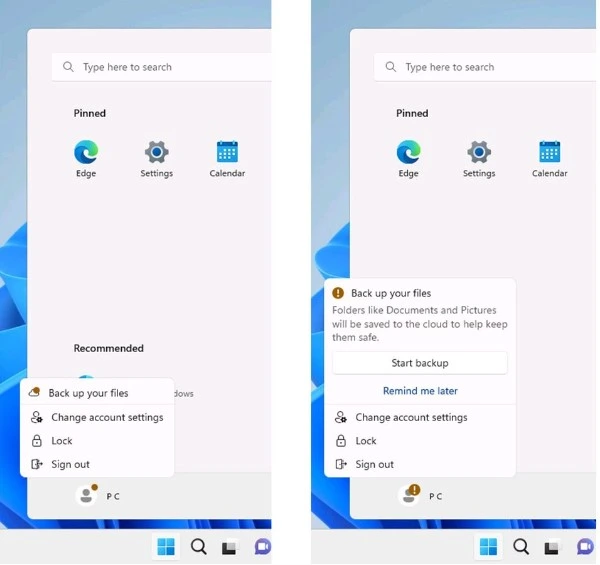
In the new release, Microsoft added some changes in Notifications. You will see notifications related to your Microsoft account, such as security alerts and subscription status storage usage, at the top of the Start Menu. If your system gives any alerts or attention to any important notification, that will appear on your profile with a warning symbol.
The notification may differ if you have a local account, as you are prompted to switch to a Microsoft account. Some notifications might include Signing in to your Microsoft account, keeping your account safe, etc.
- WordPad App Removal from Windows is Announced by Microsoft
- New Smarter Faster OneDrive and Upcoming Features
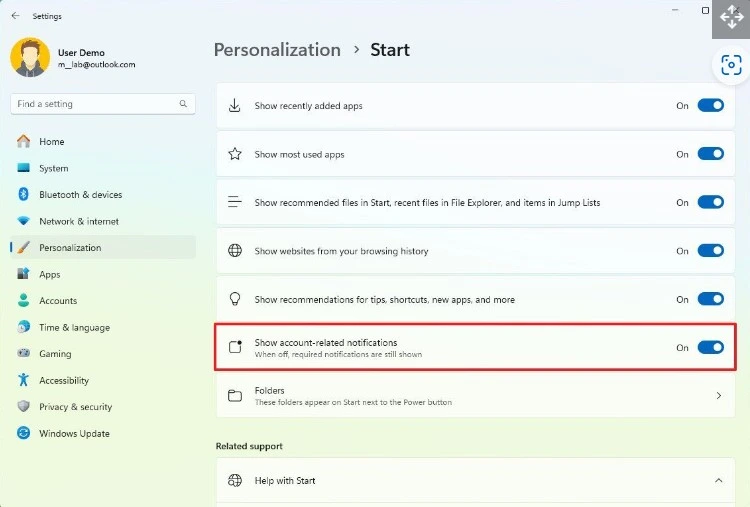
These improvements and notifications are suitable for users, and it is informative. Still, if you’re not interested in changing your account or moving files to the Cloud, you can turn this notification off with the help of settings. To Turn off account-related notifications.
- Settings > Personalization > Start
- Turn off the “Show account-related notifications” (by toggling the pan to the left)
Improvements in the Recommended section
Microsoft also brings some improvements in the Recommended section. For example, when you hover over the files stored in the cloud, the Start Menu can show a rich thumbnail preview.It will give a more minimalistic preview when the file is empty or showing a thumbnail preview.
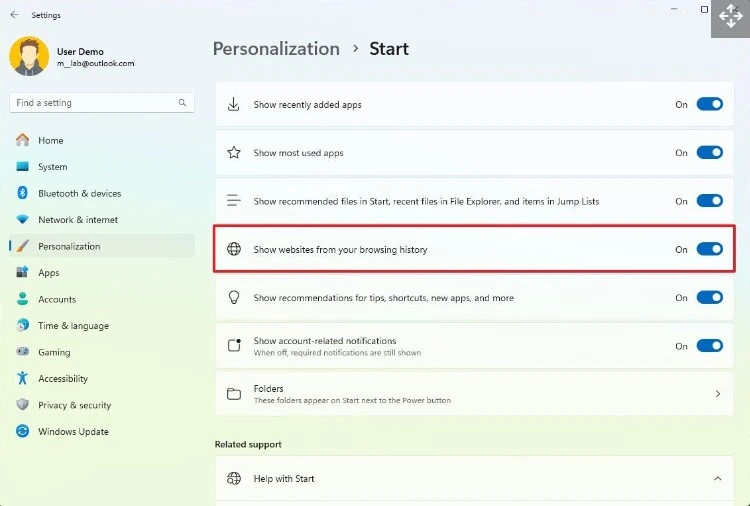
In the new release, the Start Menu can show Websites from your history. That is something interesting in the reales. The Start Menu shows suggestions of your websites that you can load in the browser under the recommended section.
It all depends on the online activities that you use for browsing. To disable the website recommendation, use your settings for this;
- Settings > Personalization > Start
- Turn off the ” Show websites from your browsing history”(by toggling the pan to the left)
Check this post – Windows configuration update – What’s new in the Start menu
We are on WhatsApp. To get the latest step-by-step guides and news updates, Join our Channel. Click here – HTMD WhatsApp.
Author
Krishna. R is a computer enthusiast. She loves writing on Windows 11 and related technologies. She likes to share her knowledge, quick tips, and tricks with Windows 11 or Windows 10 with the community.




Discussion