






Software Update Policy Rings in Intune MEM
Let’s see how to configure Software Update Policy Rings in Intune MEM. How do you set up Windows 10 Software Update Policy Rings in the Intune?
Managing software updates for Windows 10 with Intune is straightforward, but there is a catch: you can’t expect the granular controls you have with SCCM/ConfigMgr. We must configure the Windows Software update policy and deploy that policy to Windows 10 devices.
I have an updated post on Intune monthly patching guide, troubleshooting, etc. Cloud PC Monthly Patching Process Using Intune. Another guide on Intune patching – Software Update Patching Options With Intune Setup Guide (anoopcnair.com)
Windows 10 devices will receive software updates directly from Microsoft Update services. Unlike SCCM, there is no need to download the updates, create a package, and deploy them to the devices (as seen in this video post here).

Windows Update for Business will give us more options to configure and control the behavior of Windows 10 updates and Servicing. Update:- FIX CBB Ring Devices are Getting Windows 10 CB (SAC-T) Updates Intune Windows 10 Update Rings.
- Intune Vs SCCM and WSUS Vs WUfB Patching Method Differences
- Best Practice of Intune Driver Management from Microsoft
- Intune RBAC Role for Windows Drivers Update Management
- Intune Pivot Query Real-time Reporting Troubleshooting Capabilities
Table of Contents
Intune Video Software Update Rings Setup Design Decisions
This video guide is about Software Update Policy Rings in Intune MEM. It explains how to set up and manage these policy rings to control when and how updates are applied to your devices. This guide will teach you to update and secure your devices using Intune MEM.
Software Update Policy Rings in Intune MEM
We have an out-of-the-box Software Update (Automatic Update) policy as part of the Intune Silverlight portal configuration policy. However, I have noticed that this policy has stopped working in the last few months. Now, there are two options to control the behavior of Windows 10 updates and Windows servicing.
If your Silverlight portal has not yet been migrated to the MEM portal, the first choice is to use custom policies in the Intune Silverlight portal. I have a post here about Intune Silverlight migration blockers.
The second choice is to control Windows Update for business via the Software Updates button in the Intune blade in the MEM portal. We will cover this in this post.
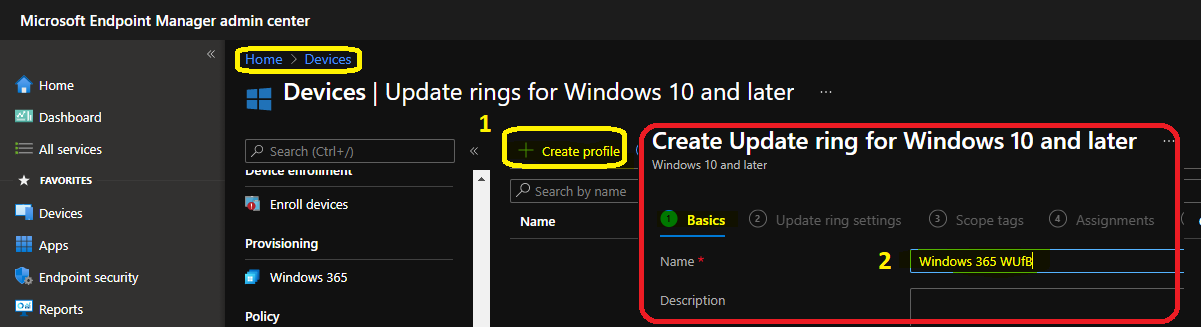
Basic Test Rings for Windows 10 Software Update
As a fundamental requirement, we may need to create at least two Windows 10 Software Update Policy Rings for your organization. One Windows 10 Update ring is for Windows 10 machines in the Current Branch (CB).
The second Windows 10 update ring is for Windows 10 machines in the Current Branch for Business (CBB). Windows 10 update rings evolve as you progress with your organization’s testing and development. But this is the first stage of your testing of Software update deployments.
Windows 10 CBB Update Ring - All the devices in Current Branch
Windows 10 CB Update Ring - All the device in Current Branch for Business
Pilot and Production Rings for Windows 10 or Windows 11 Servicing
Another recommendation is to create different Windows 10 Software Update Policy Rings for deferrals of Windows 10 servicing branches CB and CBB. The rings can be delayed for a maximum of 30 days.
These two update rings would help with the latest Windows 10 CB/CBB servicing updates (e.g., upgrading from 1607 to 1703) with some pilot devices rather than simultaneously deploying servicing updates to all the devices.
During the CB pilot testing, if you find any problems with the upgrade and don’t want to deploy the update to the CBB ring, you can PAUSE the updates for the production ring.
Pilot Windows 10 CBB Updates Ring - Pilot Servicing Ring for CBB
Production Windows 10 CBB Updates Ring - Production Servicing Ring for CBB
Pilot Windows 10 CB Updates Ring - Pilot Servicing Ring for CB
Production Windows 10 CB Updates Ring - Production Servicing Ring for CB
Pilot and Production Rings for Windows 10 or Windows 11 Monthly Security Patches
I would also recommend creating different Windows 10 Software Update Policy Rings for Windows 10 CBB and Windows 10 CB quality updates (monthly security and other patches). So, Windows 10 CBB machines will have a minimum of 2 rings.
One ring is for the pilot machines running Windows 10 CBB, and the second ring is for the production machines running Windows 10 CBB. The same applies to Windows 10 CB devices, and the CB machines should also have two rings.
Pilot Windows 10 CB Quality Updates Ring - Monthly patch pilot ring
Production Windows 10 CB Quality Updates Ring - Monthly patch production ring
Pilot Windows 10 CBB Quality Updates Ring - Monthly patch pilot ring
Production Windows 10 CBB Quality Updates Ring - Monthly patch production ring
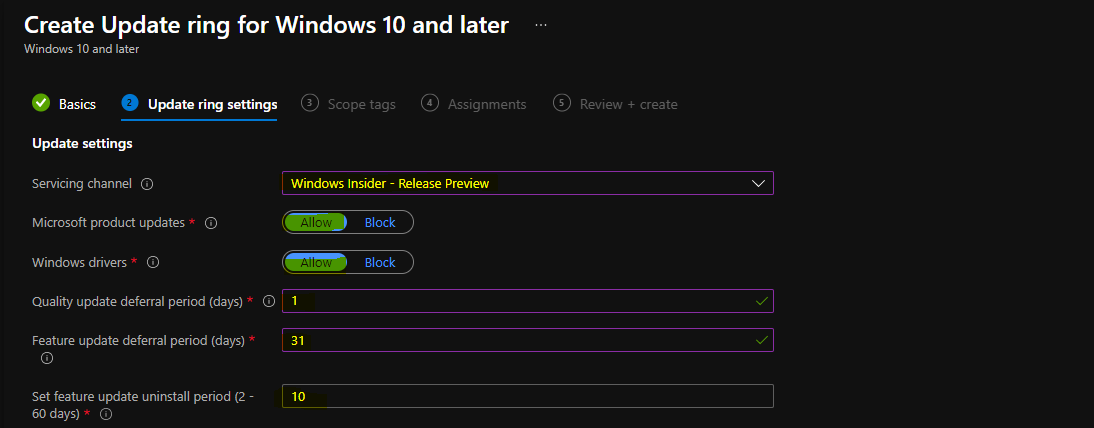
How to Create Advanced Windows 10 Software Update Rings?
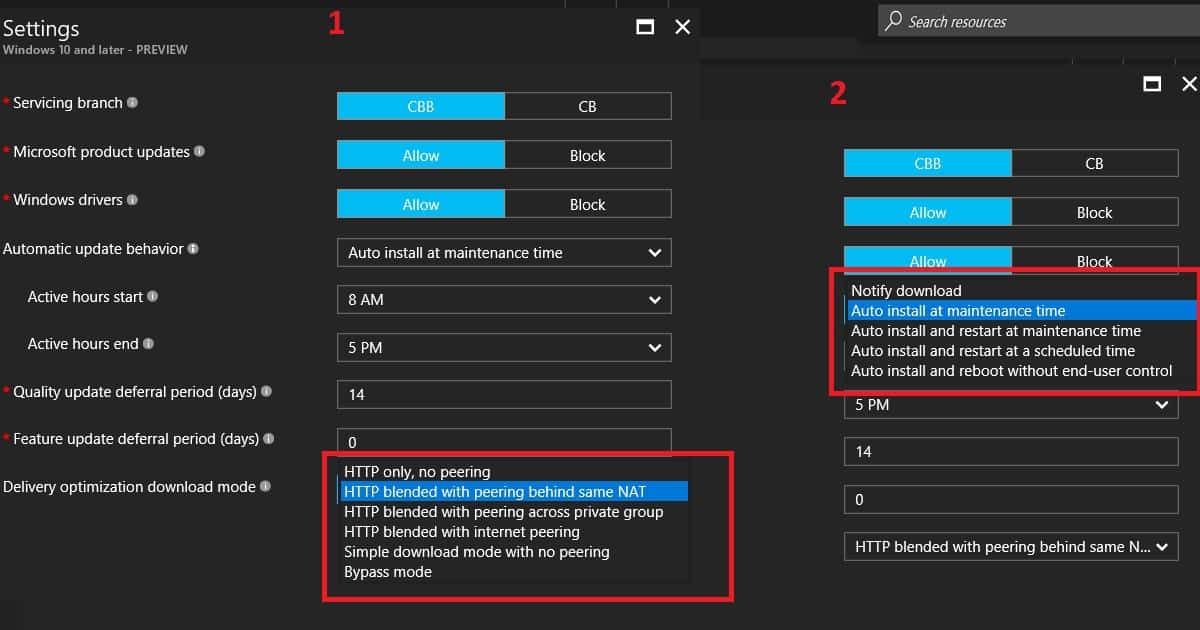
There could be other complex scenarios of Windows 10 Software Update Policy Rings. These rings could depend purely on the requirements of your organisation’s region or business group. Some of the other essential options you have in Windows 10 Software Update Policy Rings are.
- Windows 10 Automatic update behavior – How do you want to perform scan, download, and install updates? Scheduling options for Windows updates.
- Do you want to update Windows 10 drivers as part of your patch deployment rings?
- What kind of Delivery optimization (Build a caching solution with Windows 10) do you want to use?
| Delivery Optimization Download Mode |
|---|
| HTTP blended with peering behind same NAT |
Deployment – Assignment of Windows 10 Software Update Rings
Windows 10 Software Update Policy Ring deployments/assignments are critical decisions. I recommend using dynamic device groups wherever possible, but at the moment, this is not possible for all scenarios. In some scenarios, we need to use static device/user groups. I hope Microsoft will develop assignment exclusion group options (similar to AAD Conditional Access policies).
Exclusion groups would be instrumental in Software Update ring deployment scenarios. For example, you want to exclude pilot devices from the production software update ring deployments, which is impossible without exclusion options.
We are on WhatsApp now. To get the latest step-by-step guides, news, and updates, Join our Channel. Click here. HTMD WhatsApp.
Author
Anoop C Nair is Microsoft MVP! He is a Device Management Admin with more than 20 years of experience (calculation done in 2021) in IT. He is a Blogger, Speaker, and leader of the Local User Group HTMD Community. His main focus is Device Management technologies like SCCM 2012, Current Branch, and Intune. He writes about ConfigMgr, Windows 11, Windows 10, Azure AD, Microsoft Intune, Windows 365, AVD, etc.


Hey Anoop,
What do you have to do in order to select the Fast update ring or the Preview ring?
If using Intune, does one need to use it with WSUS to get any reporting or what would be the best method to get reporting for installed or missing updates?
Does the Intune update policy also manage Office 365 updates when selected to install other Microsoft products? Office 365 seems to have a habit of updating during mid day for some users.
StaffUpdate management solution can be used to get reports from Intune managed Windows Devices. https://docs.microsoft.com/en-us/windows/deployment/update/update-compliance-monitor
From Intune – Windows Quality Update Ring – Can we deploy N-1 (current month -1 month means Today we get December month updates release but we need to deploy November month updates) Quality updates to client devices ?. If yes, please guide us how to deploy.
StaffI won’t recommend this. But the maximum delay you can put in is 30 days for Quality updates. More details https://www.anoopcnair.com/cloud-pc-monthly-patching-process-using-intune/
Hi Anoop,
Great article, thanks for helping the IT of the world. Sorry for my English, I am writing from Argentina, I wanted to know the win10 21H1 update ring can update Win10 18xx versions, and if not, how could I update those versions through the rings, 18xx, thank you very much!