






Microsoft Intune Android Work Apps User Experience Explained
Let’s discuss the Microsoft Intune Android Work Apps User Experience Explained. The android operating system has several variants, and fragmentation is very high. What are the reasons for this? With the open standards, every smartphone manufacturer has the freedom and option to customize the operating system according to their preference.
So, all the Android mobile device manufacturers grabbed the opportunity to push their apps and tweak their versions of Android. So, what is the biggest problem with the Intune Android Work app’s user experience? I will see the details in this post. Also, I have explained the same in the below video.
There is no standard user experience, and different mobile manufacturers, like Samsung, Sony, and LetV, have their own way of arranging Android Work applications. Once you have enabled Android for Work support, you can enrol the Android devices into Intune for management, as I explained in the post “How to Enroll Android for Work Supported Devices into Intune.”
In this post, we explain the user experience of Microsoft Intune Android Work Apps in all its details. This comprehensive guide delves into the user experience of Microsoft Intune Android Work Apps.

- How to Configure Intune Enrollment Setup for Android Enterprise Device Management
- Configure Android Shared Devices using Intune
- Prepare Android Virtual Device For Intune Deployment Testing
- Microsoft Ends Support for Running Android Apps on Windows 11
- Universal Print Integration with Microsoft 365 Mobile App for Android Printing
Table of Contents
Intune Android Work Apps User Experience
In this post, we will examine the difference between a good and a bad Intune Android for Work user experience. I wanted to make it clear that Intune cannot do much to improve the user experience because this is a necessary OS capability.
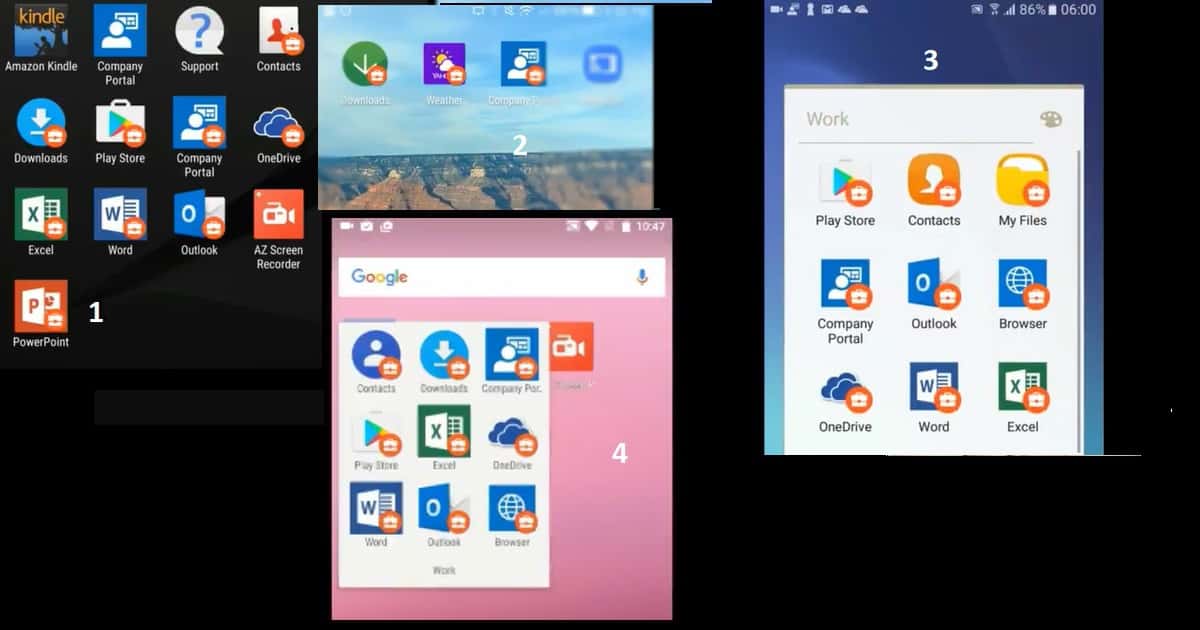
I have tested Intune Android for Work enrollment with devices like Nexus 6P, Sony, Samsung, etc. The Intune Android Work Apps user experience is good for all the tested devices. However, the problem is the placement of badged applications on the devices.
- Each Android mobile manufacturer has its own way of placing badged Android Work applications.
- I like how a manufacturer places all the badged apps into a folder.
- This is very useful for the user to switch from work applications to personal ones. In my testing, if the manufacturer does not create a group for work applications after Intune Android for Work enrollment, it does not provide a good user experience.
- Per my testing on several Android devices, I liked the Intune Android for the Work user experience of Samsung and Google Nexus the most.
Intune Android for Work End User Device Experience Video LetV Samsung Nexus Sony
Initially, the Intune Android for Work enrollment experience with the company portal was not flawless. However, the enrollment process has greatly improved with the latest version of the Intune company portal. Suppose you enroll the device with the latest company portal app. You don’t have to close the existing company portal app and open the company portal app for the work app (with a badge/briefcase symbol) to continue the enrollment process.
Intune Android for Work Nexus 6s Enrollment Experience
In this video, we’ll walk you through the comprehensive enrollment experience of Intune Android for Work on the Nexus 6s. From the initial setup to the final configuration, we’ll guide you step-by-step to ensure a smooth and efficient process.
I like the Samsung and Google Nexus user experience because all the Android work applications are placed or stored in a separate WORK folder. The work folder helps users better segregate their apps from work apps.
That user experience is excellent. Microsoft Endpoint Manager Intune Android Work Apps User Experience Explained? The Android work apps’ user experience of Sony and LetV Android devices is not so good if you compare the UX of Samsung and Nexus.
The bad user experience is that those devices won’t create a separate folder for WORK apps. The video tutorial in the first part of this project explains the more detailed experience. Intune Android Work Apps User Experience Explained in the above video.
Resources
Intune SCEP HTTP Errors Troubleshooting Made Easy With Joy – #5 (anoopcnair.com)
We are on WhatsApp now. To get the latest step-by-step guides, news, and updates, Join our Channel. Click here. HTMD WhatsApp.
Author
Anoop C Nair is Microsoft MVP! He is a Device Management Admin with more than 20 years of experience (calculation done in 2021) in IT. He is a Blogger, Speaker, and Local User Group HTMD Community leader. His main focus is on Device Management technologies like SCCM 2012, Current Branch, and Intune. He writes about ConfigMgr, Windows 11, Windows 10, Azure AD, Microsoft Intune, Windows 365, AVD, etc.


Discussion