






Let’s discuss 5 Top Intune AI-Driven Troubleshooting and Remediation. Microsoft integrates Generative AI and LLM to all their security products such as Intune and MDE. This gives rapid and insightful decision-making capabilities, simplifies complexities to enhance efficiency, and strengthens security measures.
Intune collects a lot of device data that can help IT and helpdesk admins find and fix the root cause of these issues. The Security Copilot feature in Intune is changing the role of IT admin operations.
Security Copilot can use Intune device data to give insights into device compliance, app installation issues, or health events and anomalies. Security Copilot can compare multiple devices, highlight key configuration differences, and understand device error codes. It can also provide recommendations on how to address these issues.
With Microsoft Intune, this feature enhances the AI-based protection of cybersecurity, using the data from endpoints to assess the health and security of their digital assets. Checkout Ignite session Fortified security and simplicity come together with Microsoft Intune for more details (link is given at the bottom of this post).

- New Intune Troubleshooting options using Security Copilot
- Data Flow Architecture for Intune and Security Copilot
- Intune Device Assistance Features with Copilot
5 Top Intune AI-Driven Troubleshooting and Remediation
Microsoft Intune offers a help desk, and Intune admins a wealth of device data to help discover and remediate device-related issues. With access to Intune device data, Security Copilot can provide insights to help you better understand issues related to device compliance, app installation, or health events and anomalies.
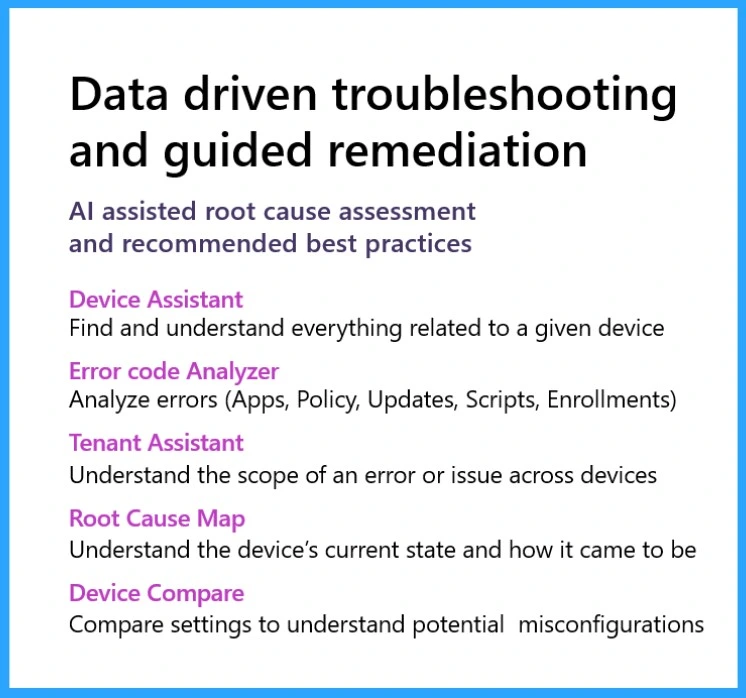
AI has been a game-changer in Intune troubleshooting, allowing IT professionals to understand and resolve issues quickly. There are 5 top-intune AI-driven troubleshooting and guided remediation.
| Intune AI-driven troubleshooting and guided remediation | Uses |
|---|---|
| Device Assistant | Find and understand everything related to a given device |
| Error Code analyzer | Analysis errors (app policy, updates,scripts,Enrollments) |
| Tenant Assistant | Understand the scope of an error or issue across devices |
| Root cause map | Understand the device’s current state and how it came to be |
| Device Compare | Compare settings to understand potential misconfigurations |
Device Assistant
The Device assistant is the main feature of Intune AI-driven troubleshooting and Remediation. With this, you can understand and find everything related to the device. The Security Copilot integrated with the AI will help you find the details about the device. This will give suggestions for your device to find.
- Summarize device
- See device health this week
- List applications on the device
- Summarize application deployment status
- What does Intune error code 0xC7D14FB5 mean for a failed Android app installation?
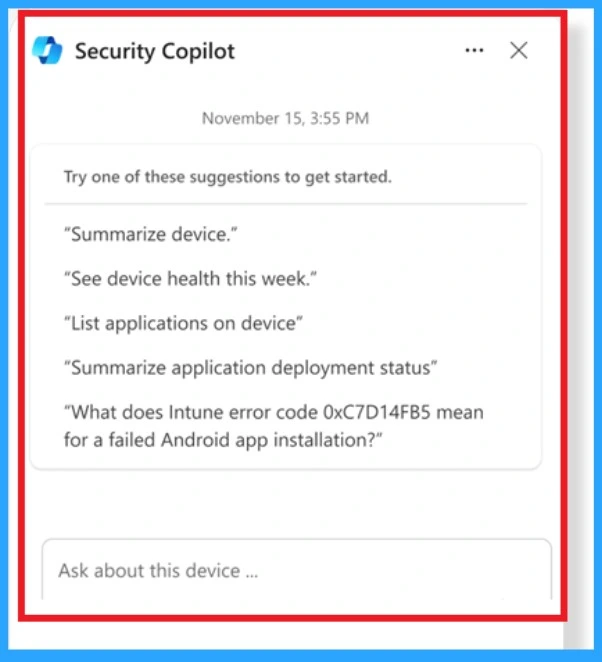
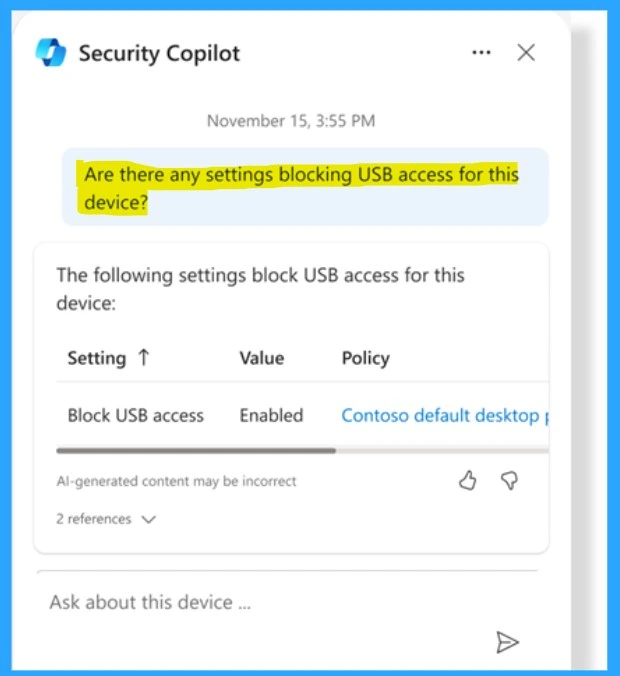
In the security copilot option, you can analyse errors in app policy, updates, scripts, and Enrollments. With this option, you can ask questions about questions related to your device, like ” Are there any settings blocking USB Access for this device?
- You will get a quick response from Copilot, such as Setting, value, policy
Intune Error Code analyzer
Intune Error Code analyzer helps admins to analyze the error codes and give a meaningful and helpful explanation for that error. Also, possible actions that they can take whenever this error occurs.
One Example prompt for Intune Copilot is – What does Intune error code 0xC7D14FB5 mean for a failed Android app installation?
Intune Device Compare
The device comparison is another option in Intune AI-Driven Troubleshooting and Remediation. With this option, you can compare the device hardware, configuration, compliance, discovered apps, managed apps or app crash history of the device with another device in the tenant.
- In the Microsoft Intune Admin Center
- Home >Devices
- Click on the Copilot
- Select the Compare devices
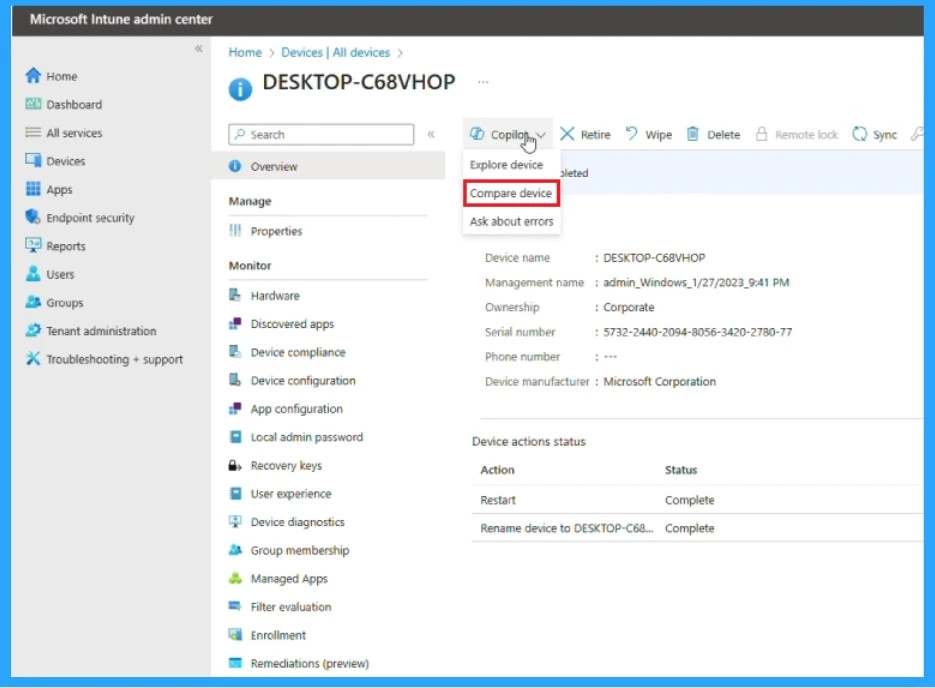
After clicking on the Compare devices, you will get a Copilot window on the right side. There, you can ask questions about comparing devices. Here, asked a question about ”Compare this configuration with DESKTOP L5F3CDV.
- After that, Copilot Generates the answers
- Gives a detailed comparison of the device
Compare device Summary from Intune Copilot
- Storage auth certificate
- adj1 (DomainJoinPreview)
Unique Policies for DESKTOP-L5F3CDV: The following policies are applied only to the “DESKTOP-LSF3CDV” device:
- AttackSurface_Win10Later_DeviceControl
- DeviceCameraRestrictions
- MDMSecuritybaseline_Nov21
- Microsoft Defender for Endpoint baseline [testing]
- SecurityBaselineForMicrosoftEdge
- User Experience Settings Accounting Dept
- Win10Later_EndpointProtection
In summary, both devices share several common policies related to network boundaries. device restrictions and application settings. However, “b51689a9-da95-483e-92aa-5478057ae30c” has unique policies related to network configuration, endpoint security, and domain joining. while “DESKTOP-LSF3CDV” has unique policies related to device control. camera restrictions. security baselines. and user experience settings.
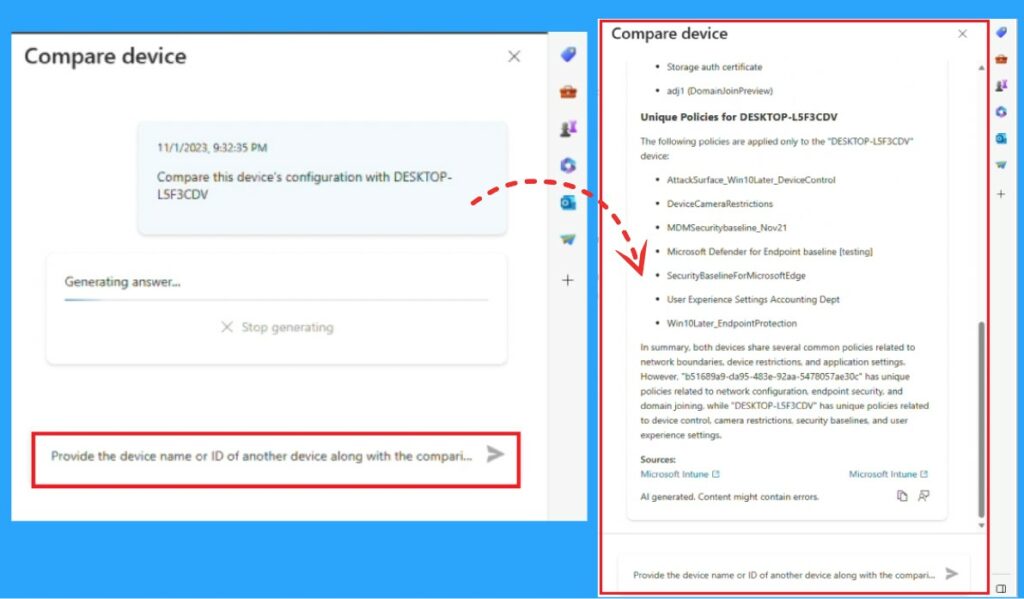
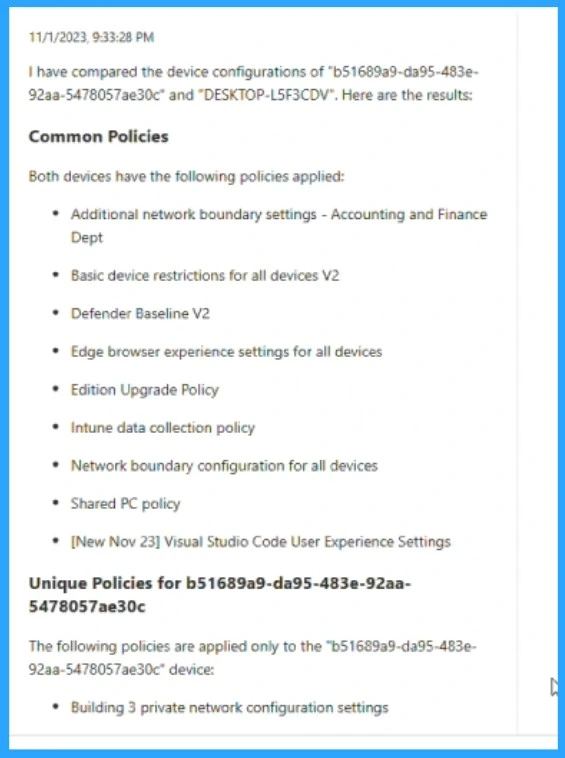
The answer will provide the compared device configuration and Desktop-L5F3CDV. It will go over the details of all comparisons, Like Policies and unique policies.
Common Policies
- Additional network boundary settings
- Basic device restriction for all device V2
- Defender Baseline V2
- Edge browser experience settings for all devices
- Edition upgrade policy
- Intune data collection policy
- Network boundary configuration for all devices
- Shared a PC policy
- New number 23 Visual Studio. Code user experience settings
Unique Policies
- Building 3 private network configuration settings
Video –Fortified security and simplicity come together with Microsoft Intune
We are on WhatsApp. To get the latest step-by-step guides and news updates, Join our Channel. Click here – HTMD WhatsApp.
Author
Krishna. R is a computer enthusiast. She loves writing on Windows 11 and Intune-related technologies. She likes to share her knowledge, quick tips, and tricks with Windows 11 or Windows 10 with the community.


Discussion