






SCUP 2017 Preview Installation and Configuration Video Guide
Let’s discuss the SCUP 2017 Preview Installation and Configuration Video Guide. Microsoft recently released the preview version of System Center Updates Publisher (SCUP)2017, which adds support for Windows 10 and Windows Server 2016.
SCUP is a stand-alone tool that enables 3rd party applications (non-Microsoft apps) or LOB application developers to manage custom updates.
SCUP can be integrated with WSUS and SCCM. This post will provide a video guide for SCUP 2017 preview installation and configuration.
More details about How to Publish 3rd Party Abode Acrobat Patches via SCCM SCUP 2017. The SCUP installation process is straightforward, as you can see in the video embedded in this post. Similar to SCCM, we have different workspaces in the SCUP console.

- Enabling Third-party Custom Catalogs For Patching In SCCM
- SCCM SCUP 2017 How to Publish 3rd Party App Patches
- SCCM Third-Party Software Updates SCUP Troubleshooting Part-2
- SCCM Third-Party Software Updates Setup Step-by-Step Guide Post 1
- List of Free SCCM Catalogs for Third-Party Software Updates
- SCCM Third-Party Updates Step-by-Step Troubleshooting Process Guide
Table of Contents
SCUP 2017 Preview Installation and Configuration Video Guide – Install SCUP 2017 on Server 2016
Those SCUP workspaces are Updates Workspace, Publications Workspace, Rules Workspace, and Catalogs Workspace. You can navigate to “Update Workspace – Overview” and add updated catalogs from partners like Adobe.
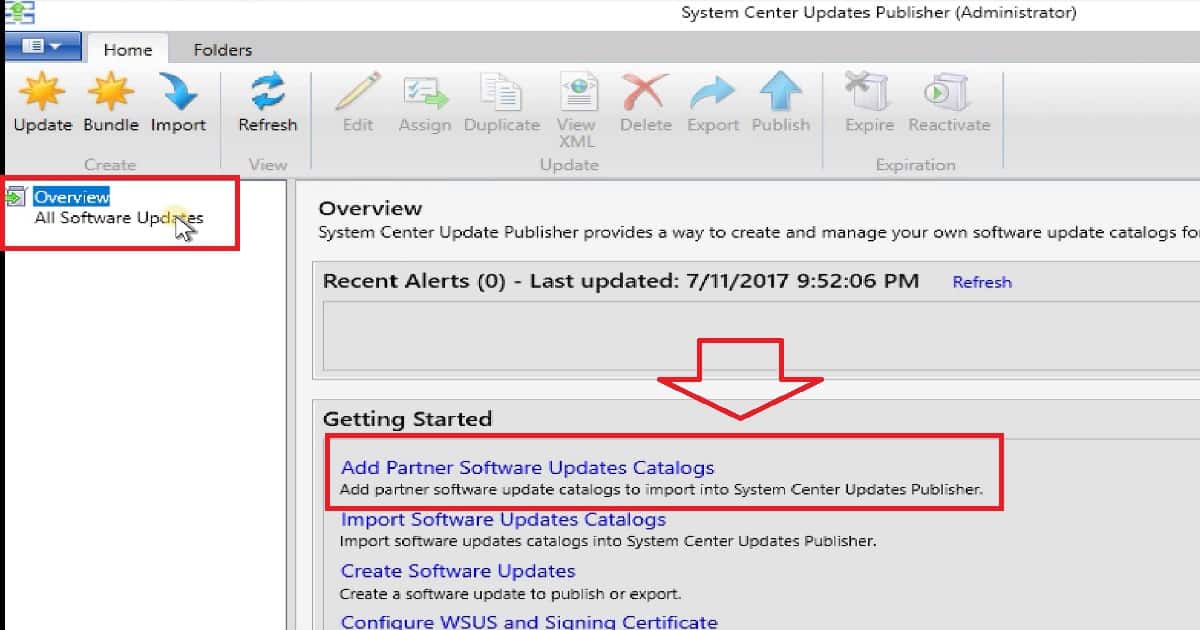
Import 3rd Party Application Catalog to SCUP 2017
Add partner software updates catalogs allow us to download/Import third-party app catalogs like Adobe Acrobat 11 Updates. This initiates the Acrobat11_Catalog.cab file download. As part of the process, we must also accept the catalog’s security validation from a vendor like Adobe System.
Several updates are available in a catalog or cab file, like Acrobat11_Catalog.cab. The Adobe Acrobat 11 update catalog has 20 updates available, similar to Acrobat 11.0.18 Update and Acrobat 11.0.20 Update. All these updates are imported to SCUP.
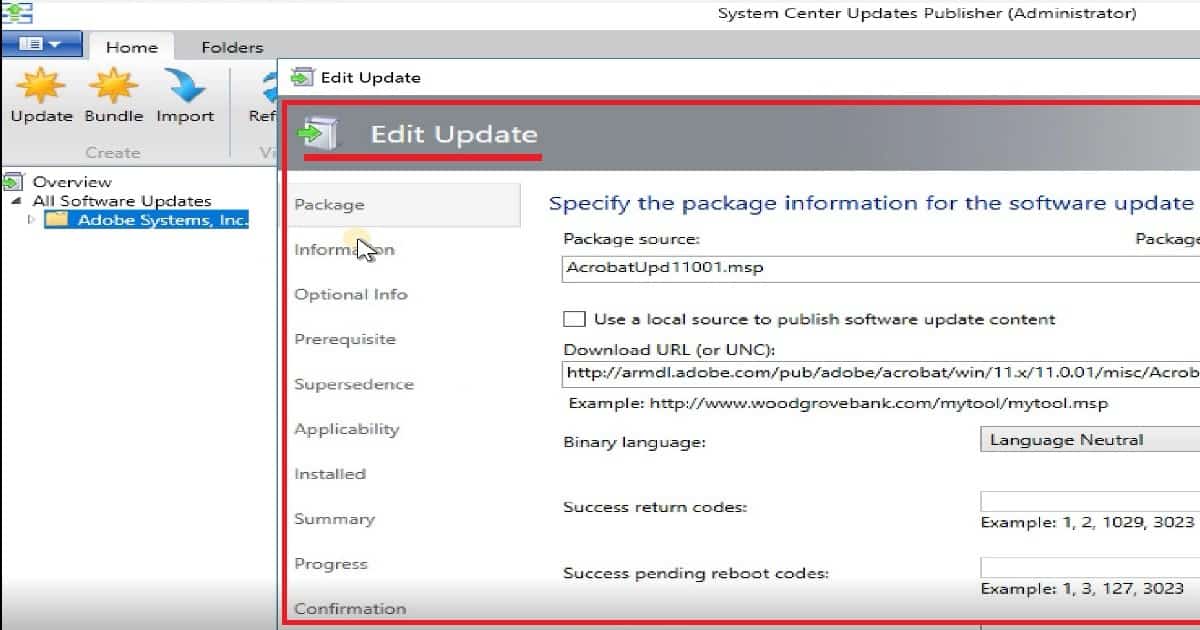
There are options to edit/customize third-party application updates imported into SCUP. The package information tab has all the details about the location from which the actual source file, like AcrobatUpd11001.msp, will be downloaded.
We can also specify the installation command line, etc., for each update. There are several options to customize each update. The following are the main customization options for each update: the package, Information, Optional Info, Prerequisite, Supersedence, Applicability, Installed, etc.
SCUP 2017 Integration with SCCM and WSUS
SCUP can be integrated with WSUS and SCCM. One prerequisite for this integration is SCUP and WSUS (+ SCCM) connectivity. This connectivity must publish third-party patch updates to WSUS and then to SCCM.
The SCUP console has a checkbox option to enable publishing updates to an update server (WSUS server). As you explained in the above video, you must create a self-signed certificate for WSUS connectivity. A similar option enables configuration manager (SCCM) integration with SCUP 2017.
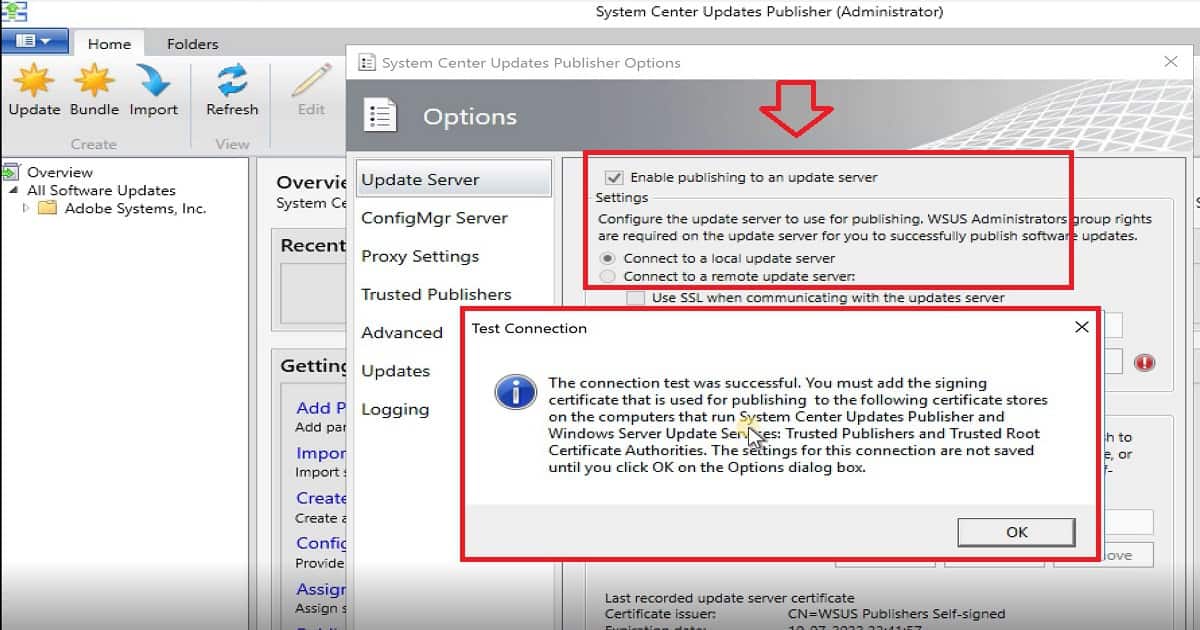
The configuration options and workspaces have not changed in the SCUP 2017 preview version (compared with previous versions of SCUP). I recommend installing WSUS and the SUP component from the SCCM console before connecting the SCUP with WSUS.
As you can see in the screenshot above, the test connection succeeded. However, no signing certificate was detected for the update server. You cannot publish content to the update server without registering a signing certificate.
SCUP 2017 Certificate Export and Import Activities
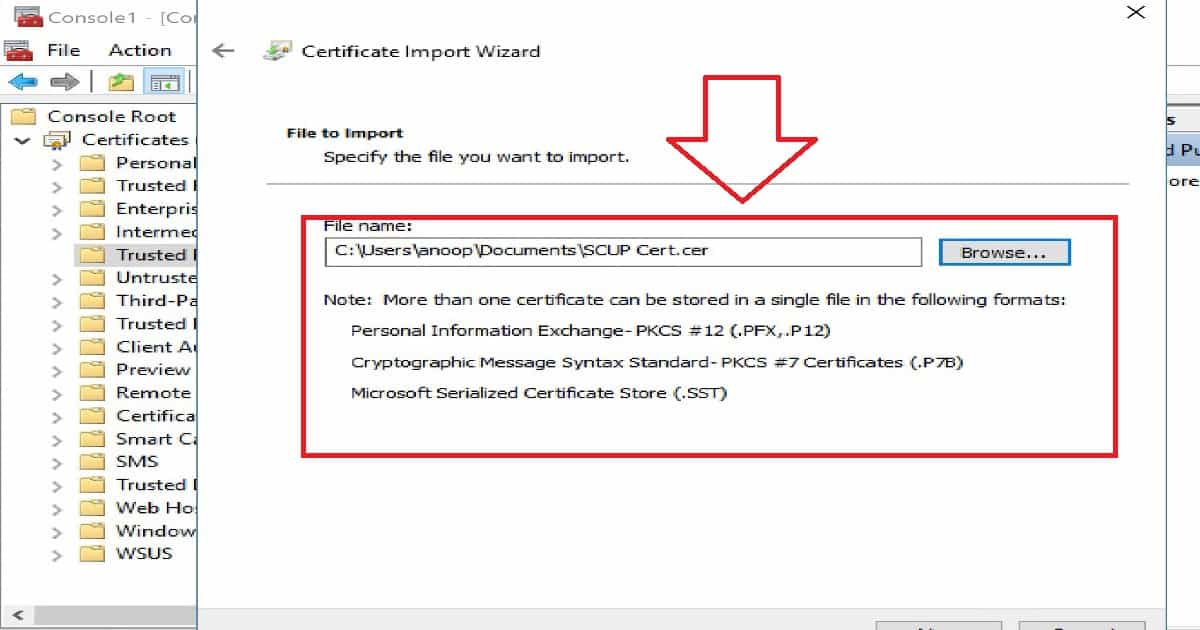
We need to export the WSUS certificate from MMC and import it to the locations mentioned below. We must also add the signing certificate used for publishing to the following certificate stores on the SCUP and WSUS computers: Trusted Publishers and Trusted Root Certificate Authorities.
- The settings for this connection are not saved until we click OK on the Options dialog box.
- The WSUS and SCCM connection tests were successful after the certificates were imported to MMC.
- Now, we are ready to publish the updates to WSUS. Publish the updates to WSUS and SCCM via SCUP.
Reference
System Center Updates Publisher June 2017 Preview is now available
System Center Updates Publisher
Author
Anoop is Microsoft MVP! He is a Solution Architect in enterprise client management with more than 20 years of experience (calculation done in 2021) in IT. He is Blogger, Speaker, and Local User Group HTMD Community leader. His main focus is on Device Management technologies like SCCM 2012, Current Branch, and Intune. He writes about ConfigMgr, Windows 11, Windows 10, Azure AD, Microsoft Intune, Windows 365, AVD, etc……………




Hi – Good video. Will be deploying SCUP 2017 within the lab this weekend.
Do, I need to deploy a package with WSUS cert to all system within the network for SCUP 2017 to work properly?
In the past with SCUP 2011, I did deploy a package titled SCUP cert – for copying the WSUS cert to all workstations at their respective locations (Trusted Publishers and Trusted Root Certificate Authorities).
StaffThank you Ram. Those client side requirements are NOT changed.
hello, i followed step by step but when i publish an app to a client machine it does not appear.
I get it to publish and download in sccm.
Any logs where i can see an error of why the deployment from sccm to client won’t work?
StaffHave you checked the GPO and Cert requirement for SCUP deployment from client perspective? Preparing Certificates and GPOs for System Center Update Publisher https://richardjgreen.net/preparing-certificates-gpo-system-center-update-publisher/
Anoop
I am only able to see Dell Drivers and Applications in the SCCM Software Update Properties Products Tab.
Is there something I am missing? Is SCUP 2017 required?
StaffAre you able to see this in WSUS? Are other updates getting published in WSUS? Also, we need to wait sometime and couple of WSUS Sync to have this appear in SCCM console.