






SCCM SCUP 2017 How to Publish 3rd Party App Patches
Let’s discuss the SCCM SCUP 2017 How to Publish 3rd Party App Patches. I have published a post about installing and configuring the SCUP 2017 preview version.
You can have a look at that post before going through this post. More details SCUP 2017 Preview Installation and Configuration Video Guide.
The SCUP installation process is straightforward. Similar to SCCM, the SCUP console has different workspaces. This post will show how to publish third-party app patches using SCCM SCUP 2017.
The first step is to import a third-party Application Catalog to SCUP 2017. The following are out-of-the-box Partner Software Update Catalogs with the SCUP 2017 preview version.

Adobe Acrobat X, Adobe Acrobat 11, Adobe Reader X, Dell Business Client, Dell Server, Fujitsu PRIMERGY, HP Client, and HPE ProLiant.
- SCCM SCUP Third-Party Application Patching System Center Update Publisher
- SCCM 2403 New Key Features and Improvements
- Fix SCCM Third-Party Updates Trust Failed Issue
- New Features in SCCM Technical Preview 2401
- New Key Features of SCCM 2309 | Top Improvements
- Download SCCM 2309 Early Ring Version using PowerShell Script
- SCCM Versions Build Numbers Client Console Site
- End of Support Dates for SCCM CB Current Branch | ConfigMgr | SCCM End of Life
Table of Contents
SCCM Built-in Third-party Software Update Publishing Feature without SCUP – NO Need for SCUP Anymore
This video provides comprehensive details about the SCCM built-in third-party software update publishing feature, eliminating the need for SCUP. SCCM now offers an easy process for publishing third-party software updates directly within its interface without relying on SCUP anymore.
SCCM SCUP 2017 How to Publish 3rd Party App Patches
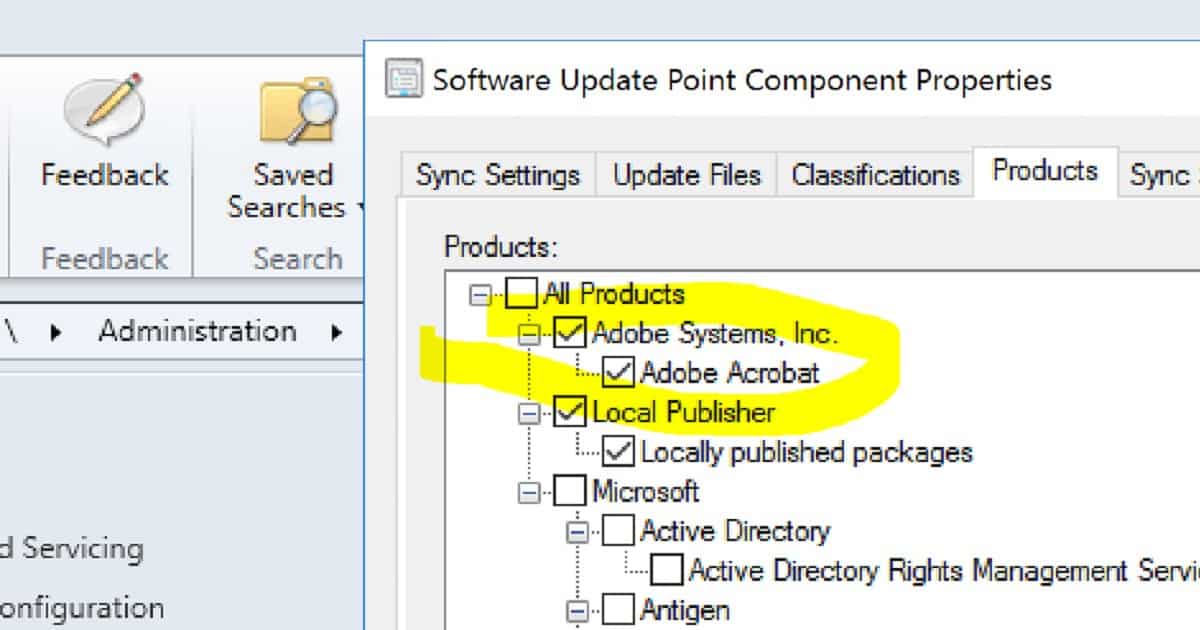
We must add third-party applications to SCCM SUP products like Abode, Dell, Fujitsu, and HP. To do so, navigate through SCCM Settings, Configure Site Components, Software Update Point, Products, and Adobe Systems. Inc. – Abode Acrobat.
SCUP 2017 Publish 3rd Party Apps Updates to SCCM
We are ready to publish the 3rd part of the app updates to SCCM. Right-click on all the updates from SCUP and publish them to SCCM CB.
Select the Automatic option while deploying the 3rd party app updates to SCCM. The automatic option is available only when SCCM integration is selected in SCUP.
Click Automatic to allow updates. The publisher will query SCCM to determine whether the selected software updates are published with full content or only metadata.
In this mode, software updates are only published when they meet the client request count and package source size thresholds specified on SCCM. Only the software update definition(metadata) is published if neither threshold is met.
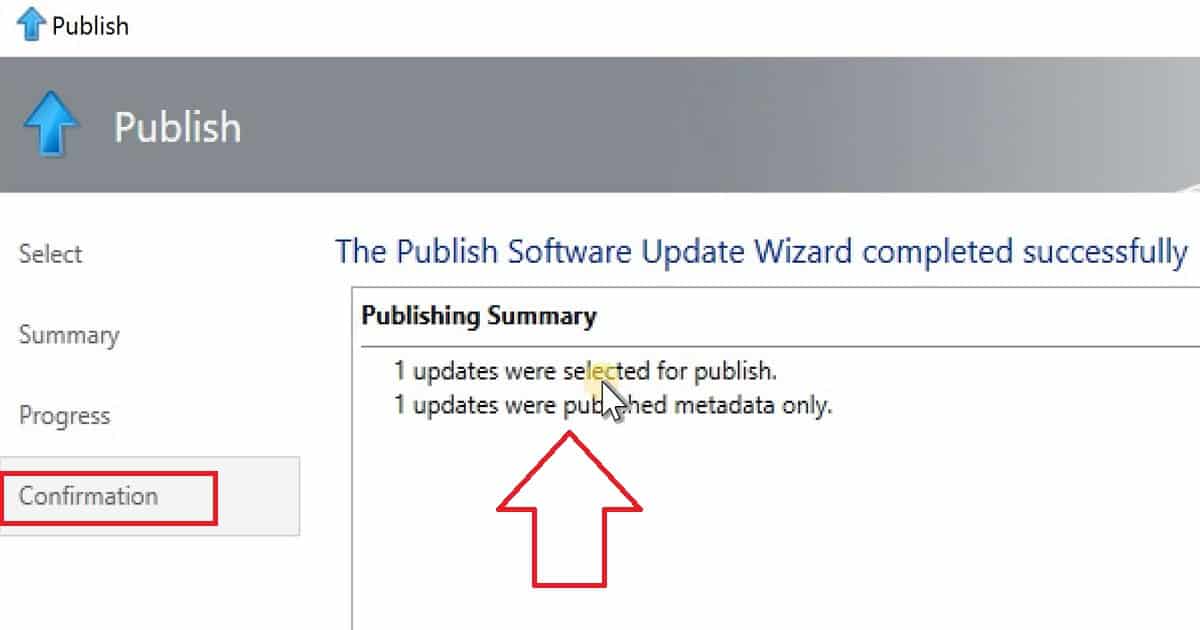
| Confirmation |
|---|
| 1 Updates were selected for publish |
| 1 Updates were published metadata only |
We also need to Sign all software updates with a new publishing certificate when published software updates have not changed but their certificate has changed.
SCCM Software Update Sync after Publishing 3rd Party Apps
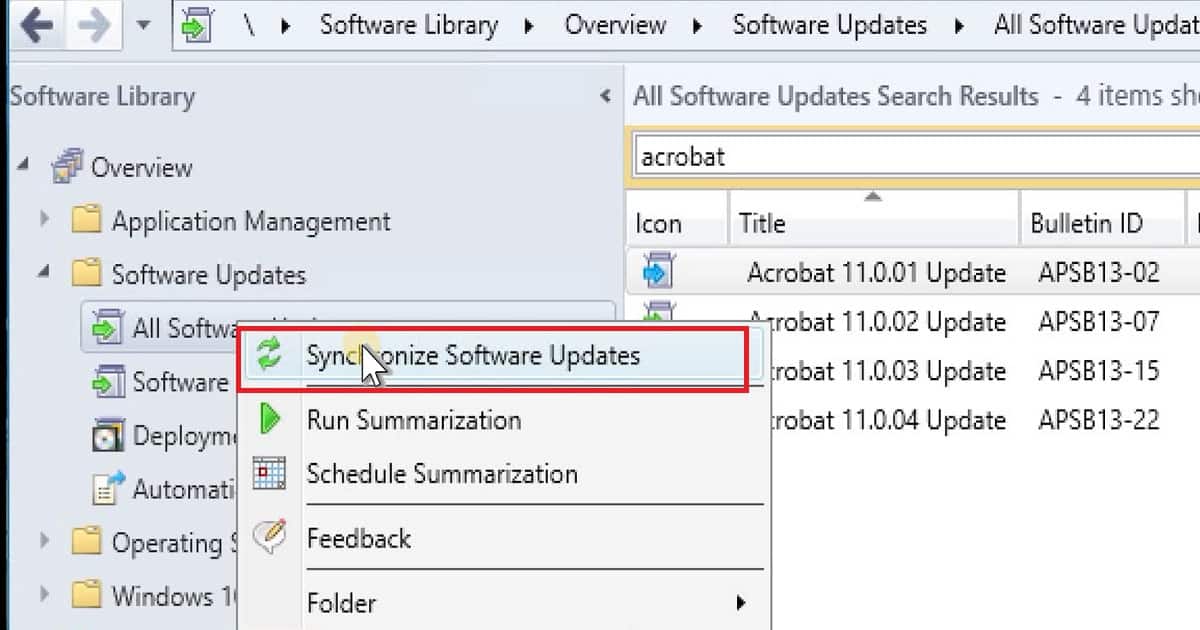
SCCM All Software Update Sync to have the newly added Acrobat 11 and other app product updates in the SCCM console.
We have published one new update from the SCUP console, bringing the total number of third-party updates to five. After the SYNC, SCCM should have five Acrobat updates.
References
SCCM + SCUP Wiki – https://blogs.technet.microsoft.com/jasonlewis/
System Center Updates Publisher June 2017 Preview is now available https://blogs.technet.microsoft.com/enterprisemobility/2017/07/03/system-center-updates-publisher-june-2017-preview-is-now-available/
System Center Updates Publisher https://docs.microsoft.com/en-us/sccm/sum/tools/updates-publisher/
We are on WhatsApp now. To get the latest step-by-step guides, news, and updates, Join our Channel. Click here. HTMD WhatsApp.
Author
Anoop C Nair is Microsoft MVP! He is a Device Management Admin with more than 20 years of experience (calculation done in 2021) in IT. He is a Blogger, Speaker, and Local User Group HTMD Community leader. His main focus is on Device Management technologies like SCCM 2012, Current Branch, and Intune. He writes about ConfigMgr, Windows 11, Windows 10, Azure AD, Microsoft Intune, Windows 365, AVD, etc.




From an Enterprise level, is SCUP reliable and stable? What are some of the challenges when implemented?
#3MS Consulting, LLC
Hi Anoop,SCUP will work with SCCM 1710 to upgrade the HPBios firmware on windows 10 machines?
StaffI have not tested this personally but if the HP updates are available in the SCUP catalogue then, it should work
Hi, Anoop, Thanks for your reply, is it good using the SCUP to upgrade the BIOS over the Task sequence based approach from SCCM?