






Let’s learn how to Delete or Remove Configuration Profiles Policies from Intune. Microsoft Intune is a device management tool that helps you manage devices easily. Users can easily create and delete Configuration Profiles Policies from Intune.
Intune allows you to remove any policies on your organization quickly. Different methods are used to delete Configuration profile policies in Intune. Microsoft Intune only allows authorized users to delete a configurational policy.
Intune includes different settings and features to enable and disable policies to create users. Deleting configuration profiles helps you to remove unwanted profiles or duplicate profiles. Several device configuration profiles exist in your PC without any use. This option allows us to remove them.
This blog post shows you how to delete or remove Configuration Profiles Policies from Intune. It is beneficial for users to manage spaces in files and folders. Deleting duplicate files helps to avoid confusion on profiles.

- Create New Intune Policy using Copilot
- How to Enable Auto Updates for Google Chrome on Windows with Intune Policy
How to Delete Remove Configuration Profiles Policies from Intune
Deleting Configuration Profiles Policies from Intune is not a complicated thing. It can be quickly done via Intune Portal. First, you have to sign in to the Intune Admin Center portal. Follow these steps to delete configuration profile policies.
Note – Once a configuration profile is deleted, there is no way to recover it. So be careful before you delete Intune configuration profiles.
| Different Methods for Deleting Configuration Profiles Policies from Intune |
|---|
| Using Context menu |
| From Device and User Check-in Status |
1. Using the Context Menu
Using the Context menu is the first method for deleting Configuration Profiles Policies from Intune. It is a method for deleting Configuration profile Policies. The below steps will help you.
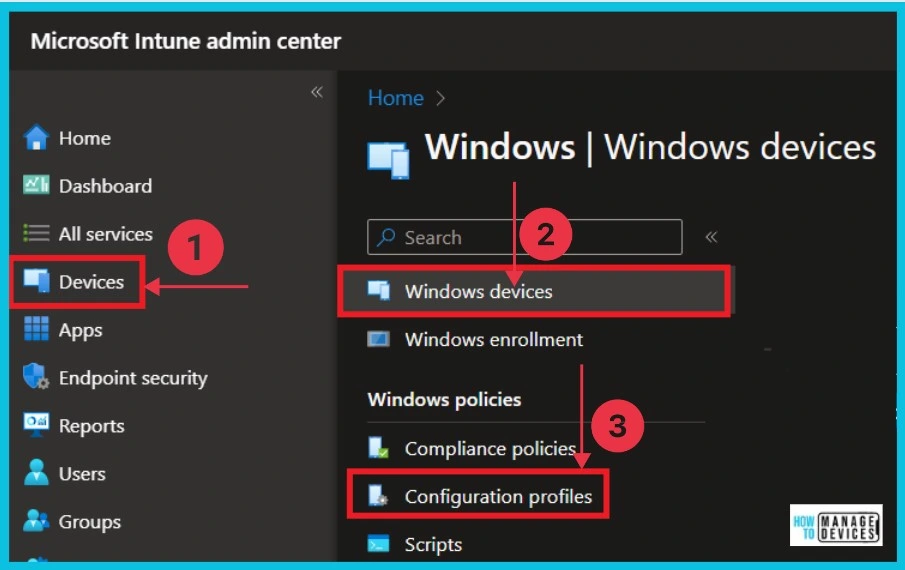
- Select Devices from the Microsoft Intune admin center
- Click Windows devices
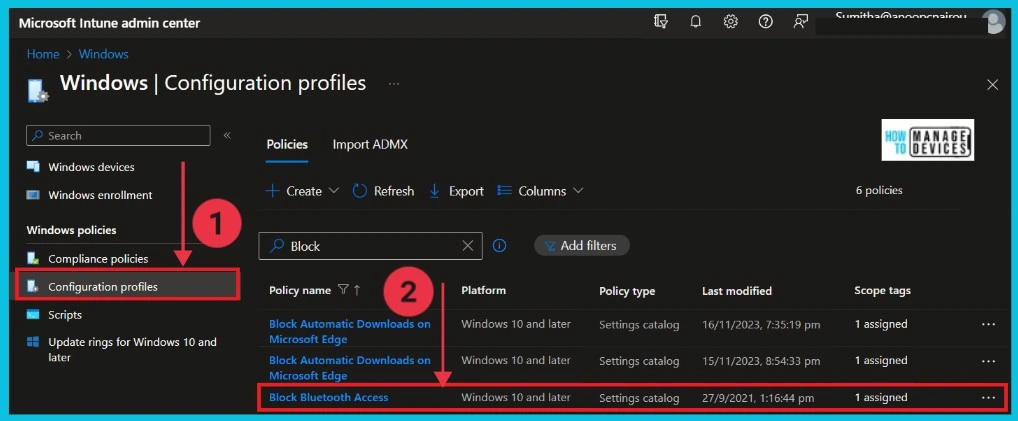
- Select Configuration profiles
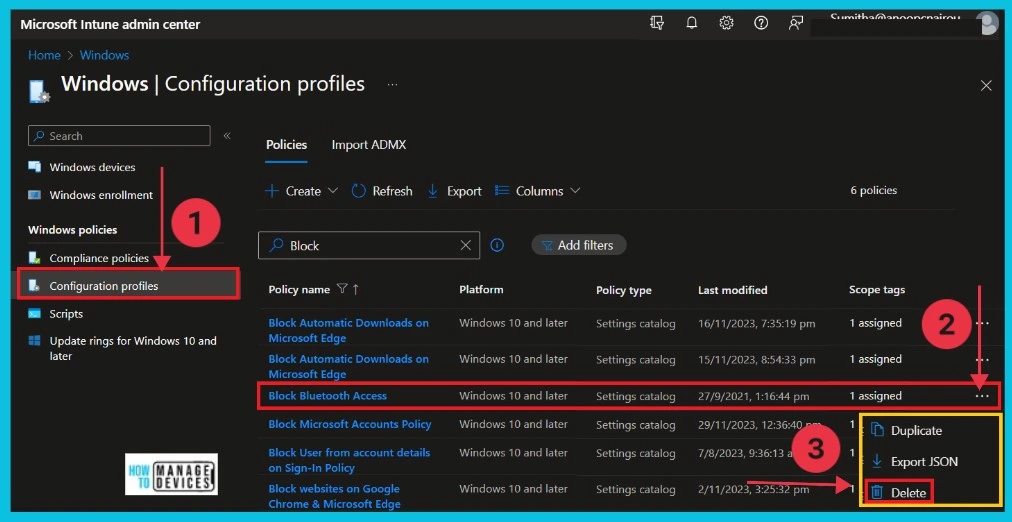
After selecting the Configuration profiles, you can see the policy names individually. You can search for the policy name in the search box and click the Policy you want to delete. Here, we select the “Block Bluetooth Access” Policy for deleting.
- Click on the 3 dots(context menu) on the right side of the policy.
- Here, you can see the Delete option to delete the policy.
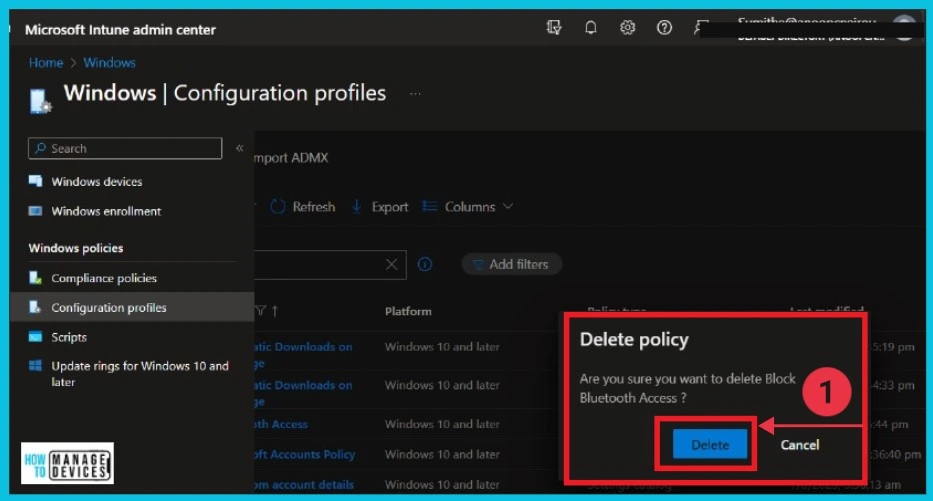
After clicking the Delete button, a confirmation box shows the “Are you sure you want to delete Block Bluetooth Access” policy. Click the Delete button to Delete the policy. The Configuration profile is now deleted.
- You will also get a notification showing the message “successfully deleted Block Bluetooth policy.“
- Create Intune Policy to Block Microsoft Accounts
- Intune Policy Device and User Check-in Status Report
2. Deleting Policy From Device and User Check-in Status
This is the second and most straightforward method for deleting a configuration profile policy. Begin by selecting the “Configuration Profiles.”Devices > Windows devices > Configuration profiles.
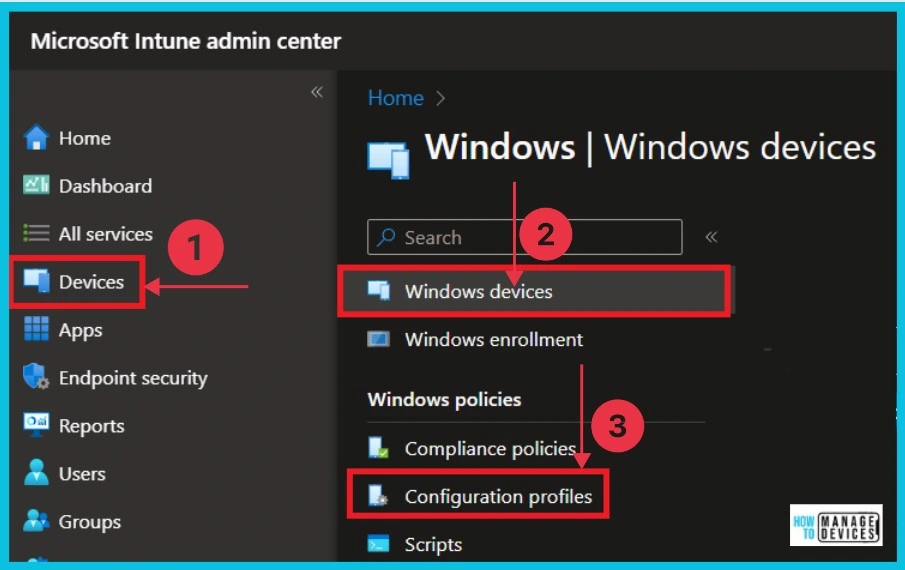
Once you have selected “Configuration Profiles,” you will see a list of all the policies you have created. To delete a specific policy, like “Block Bluetooth Access,” double-click on it. This action will open up the settings for that particular policy, allowing you to proceed with the deletion process.
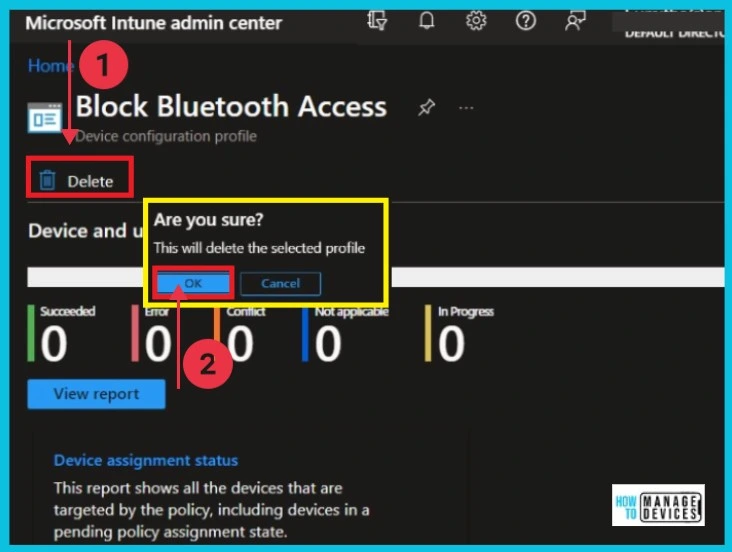
This is the Device and User Check-in Status of Block Bluetooth policy. The screenshot below helps you to show the Delete button. To remove the “Block Bluetooth” policy, click the Delete button. After clicking, a popup window will appear; confirm the deletion by clicking OK.
We are on WhatsApp. To get the latest step-by-step guides and news updates, Join our Channel. Click here for HTMD WhatsApp.
Author
Sumitha was introduced to the world of computers when she was very young. She loves to help users with their Windows 11 and related queries. She is here to share quick news, tips and tricks with Windows security.


Discussion