Skip to content
Settings Catalog Commands for Intune Mac Device Management

Settings Catalog Commands for Intune Mac Device Management

Written By Vidya M A
Last Updated January 29, 2024
Posted In Intune
SHARE

Let’s discuss the Settings Catalog Commands for Intune Mac Device Management. Microsoft recently made significant improvements to the Settings Catalog. In Settings Catalog, a feature allows users to control and manage device configurations on Mac devices.

The Settings Catalog in Intune for Mac Device Management is an essential tool for controlling and managing settings on Mac devices. This feature allows you to issue commands to configure and maintain your devices as you want them.

The settings catalog is a vast list that shows you all the settings you can change in one place. It makes creating policies and managing settings much easier because you can see everything in one place.

Microsoft keeps adding more settings, giving you even more options for configuring things exactly how you want. The Settings catalog is a convenient menu to pick and choose the settings you need.

Patch My PC

Microsoft identified a performance degradation problem in Microsoft Intune that affects administrators. This issue arises when administrators add settings to a Single Policy, especially when using the Settings catalog to create policies.

Settings Catalog Commands for Intune Mac Device Management - Fig.1
Settings Catalog Commands for Intune Mac Device Management – Fig.1

What is the Settings Catalog in Microsoft Intune for Mac Devices?


The Settings Catalog in Microsoft Intune enables administrators to issue specific configuration commands to Mac OS devices.

Settings Catalog Commands for Intune

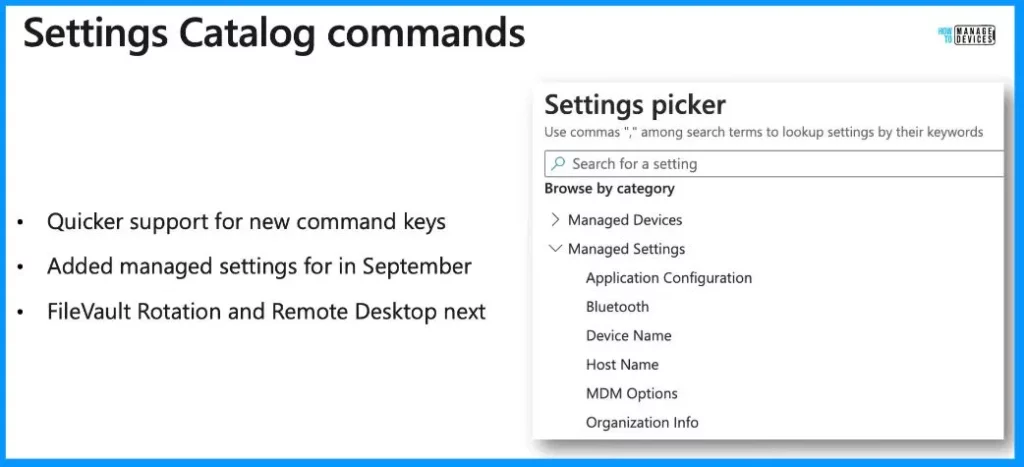
Initially, Microsoft introduced Managed Settings and Bluetooth management. In the upcoming updates, Microsoft plans to include support for FileVault rotation and Remote Desktop, making it easier to keep devices in the desired state by periodically reissuing specific configuration commands.

  • This enhancement aims to provide a more effective and modern management experience through the Settings Catalog.
Settings Catalog Commands
Quicker support for new command keys
Added managed settings for September
FileVault Rotation and Remote Desktop next
Settings Catalog Commands for Intune Mac Device Management – Table 1
Settings Catalog Commands for Intune Mac Device Management - Fig.2 - Creds to Arnab Biswas MS
Settings Catalog Commands for Intune Mac Device Management – Fig.2 – Creds to Arnab Biswas MS

Settings Catalog

The Intune settings catalog profile report comprehensively looks at device configuration policies. When you check out the settings catalog overview page, you get a quick and convenient view of your new settings catalog policy. It shows you the status and properties of the policy all in one place.
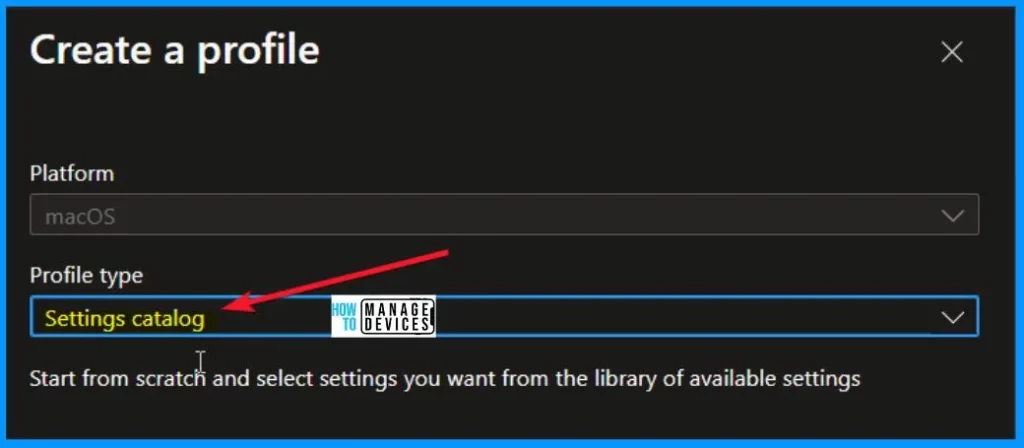
Settings Catalog Commands for Intune Mac Device Management - Fig.3
Settings Catalog Commands for Intune Mac Device Management – Fig.3

NOTE! During the latest Technical Takeoff session, Microsoft shared detailed information on Settings Catalog Commands for Intune Mac Device Management with Arnab Biswas.

Microsoft Intune reinvents Mac management (youtube.com)

We are on WhatsApp now. To get the latest step-by-step guides, news, and updates, Join our Channel. Click here. HTMD WhatsApp.

Author

About the Author: Vidya is a computer enthusiast. She is here to share quick tips and tricks with Windows 11 or Windows 10 users. She loves writing about Windows 11 and related technologies. She is also keen to find solutions and write about day-to-day tech problems.

Written by

About Author - Vidya is a computer enthusiast. She is here to share quick tips and tricks with Windows 11 or Windows 10 users. She is also keen to find solutions to day-to-day tech problems and write about them.

Discussion

Join the discussion

Your email address will not be published. Required fields are marked *

Related guides

Intune

Simplify Windows Devices to Run Only the Required Applications using Intune

Key Takeaways Hey, let’s learn about Simplify Windows Devices to Run Only the Required Applications using Intune. This policy lets administrators replace the default windows shell with a custom or lightweight shell. it improves performance by using system resources and is useful for devices that run a dedicated application. If the policy is disabled or […]

AC Anoop C Nair 8 min read
Intune

Enhance macOS Compliance with Custom Security and Compliance Checks to Improve Device Security using Microsoft Intune

Key Takeaways In this post we are discussing about Enhance macOS Compliance with Custom Security and Compliance Checks to Improve Device Security using Microsoft Intune. Microsoft has announced the general availability of Custom Compliance Settings for macOS in Microsoft Intune. The feature helps organizations strengthen security controls while supporting many types of macOS management scenarios. […]

AC Anoop C Nair 4 min read
Intune

Manage Samsung Galaxy Firmware Versions to Improve Security and Compliance using Microsoft Intune

Key Takeaways In this post we are discussing Manage Samsung Galaxy Firmware Versions to Improve Security and Compliance using Microsoft Intune. Microsoft Intune has received a new update that expands firmware management capabilities for Samsung Galaxy devices through Firmware Versionsintegration. This enhancement gives IT administrators more control over firmware and operating system updates, helping them […]

AC Anoop C Nair 4 min read
Intune

MS Intune Adds Windows Registry Data Collection to Device Inventory for Single Values All Key Values and Subkeys

Key Takeaways Microsoft Intune 2607 introduces Windows Registry Data collection in Device Inventory, allowing IT admins to verify actual device configurations without relying on custom discovery or remediation scripts. Using the Properties Catalog, admins can collect registry information through Single Value, All Values Under a Key (Non-Recursive), or Same Value Across Subkeys. MS Intune Adds […]

AC Anoop C Nair 5 min read