






SCCM Third-Party Patching Best Practices for an Organization Configuration Manager ConfigMgr
Let’s discuss the SCCM Third-Party Patching Best Practices for an Organization Configuration Manager (ConfigMgr). I have patched Windows machines since the SMS 2003 + ITMU days. Every month, we need to perform very complex steps to deploy patches.
Nowadays, SCCM 2007/ 2012 /CB uses WSUS along with Windows Update to Download, Deploy, and Install patches. The Microsoft patching process using SCCM is challenging, and I’ve seen many IT Pros struggle to get good compliance reports.
Most organizations don’t have a process for patching third-party applications. This post will see “Third-Party Patching Best Practices for an Organization.”
All software applications/drivers must undergo the software release life cycle, which includes bug fixing and improvements.

Table of Contents
- Third-Party Applications are Patched up-to-date? SCCM admins?
- Best SCCM Patching Software Update Deployment Process Guide
- Intune Vs SCCM and WSUS Vs WUfB Patching Method Differences
- Intune Monthly Patching Guide Software Update Patching Options with Intune WUfB
What is Patching?
Each vendor releases a patch to fix bugs in software and drivers. Deploying/installing these patches to one or more systems or devices is called software patching.
SCCM Third-Party Patching Best Practices for an Organization Configuration Manager ConfigMgr
Organizations must patch all existing applications. This process helps to keep the environment secure. Software vendors like Microsoft, Adobe, Android, iOS, macOS, Linux, and Unix OSes release patches. These patches cover bug fixes for their software.
What is Third Party Patching? SCCM Third-Party Patching Best Practices for an Organization Configuration Manager ConfigMgr
Now, I hope you understand patching. Let’s learn about third-party patching. Third-party patching is the process of deploying/installing bug fixes and improvements to non-Microsoft software applications/Drivers. An application provided by a third-party vendor other than the manufacturer of the device and OS.
Microsoft takes a systematic approach to patching its Windows OS and applications, such as Office. SCCM can automatically deploy Microsoft monthly patches to all machines in the organization.
Some Examples of Third-Party Applications
Microsoft doesn’t include patches from other company application software. The Windows OS updates/fixes include drivers for many manufacturers and devices. However, Microsoft is not responsible for providing updates for other manufacturers, so Microsoft OS updates won’t cover all vendors.
| Some Examples of Third-Party Applications |
|---|
| Chrome |
| Java |
| Adobe |
| Oracle |
| Dell/HP/Lenovo Device Drivers |
| Firefox |
| Any Business applications |
Why is Third-Party Patching Important?
The infamous Ransomware attack Bad Rabbit happened because of a flaw in Adobe Flash. When a vendor releases a patch for a bug, and organizations don’t deploy that patch, machines become vulnerable to security attacks.
Different vendors have different patching schedules. This is because they follow different software release management cycles. Hence, we can’t expect all vendors to release patches on the 2nd Tuesday of every month.
Cyber attacks are the main threat to organizations. Third-party application patching is one of the main areas of concern and needs more attention.
Unpatched third-party applications act as a gateway for hackers to access the corporate network. Once hackers have access to the corporate network, they can do more damage to the organizations.
Why is Third-Party Patching So Difficult?
Third-party application/driver patching is indeed challenging for most organizations. We have a large ecosystem of third-party applications. We have hundreds of third-party applications used in different organizations. The different vendors of these applications have their software release cycles.
In an ideal world, all the vendors can’t release patches and fixes on the same schedule. Each vendor releases patches depending on their priority. So, the IT Pros should always monitor all vendors to get notifications about patch releases.
Once the patch is released, it should be deployed to all the workstations in the network. However, there is no unified mechanism for tracking these third-party application patches.
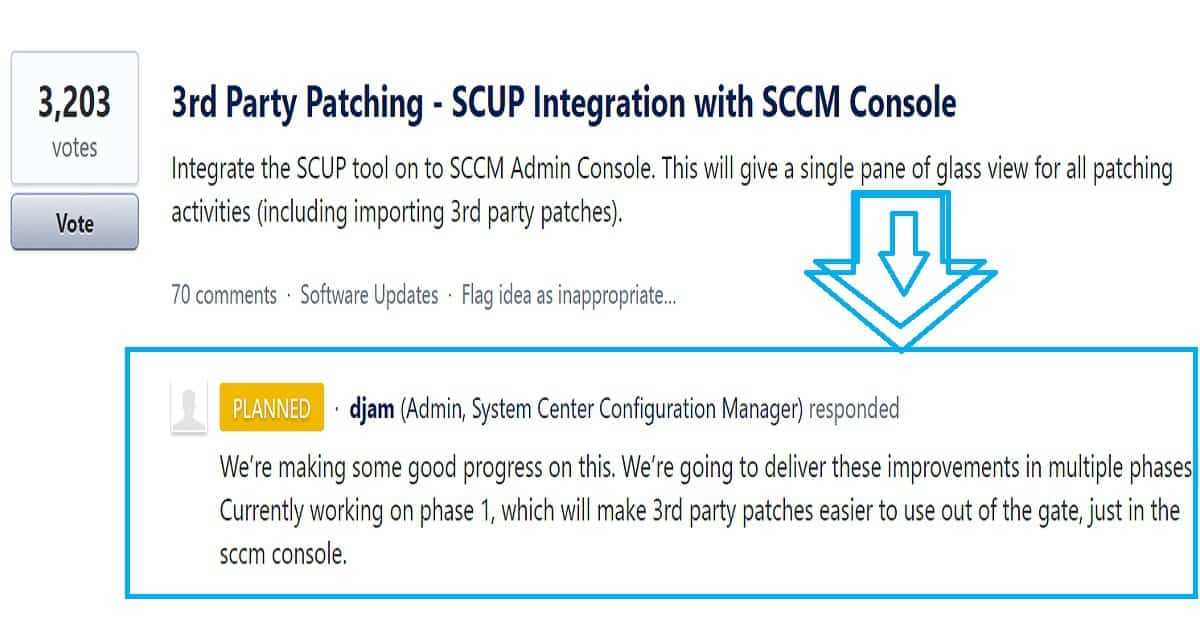
SCCM manages 90% of Windows devices worldwide. However, SCCM faces challenges in getting the patches from each vendor, uploading them to the database, and deploying them.
IT admins can look for third-party patching solutions to deploy patches via SCCM. Those third-party solutions have their database to keep updated about the patch release from different vendors.
I have posted about the difficulties SCCM admins face concerning third-party application patching. You can refer to that post via the following link: “How Tedious for SCCM Admins to Patch 3rd Party Applications via SCUP.” As you can see in the above picture, the situation with SCCM will improve soon.
Another big challenge for organizations and 3rd party patch management vendors is none of the SCCM environments are equal. An SCCM infrastructure with
Multiple DP servers may experience high delivery failure rates due to problems with the content delivery system. If just 1% or 2% of DP servers fail, there could be thousands of unpatched workstations in the network, a high-risk situation for organizations.
Peer-to-peer delivery technology such as Adaptiva OneSite can make roll-outs faster and easier. OneSite eliminates the need for servers, speeds delivery, and does much more to improve your success rates and shrink troubleshooting time and effort.
What are the Best Practices for Third-Party Patching?
In my 17 years of IT experience with different organizations, I have never seen a global patching team responsible for third-party application patching. Most organizations have a patching team responsible for Microsoft patching but not for other third-party applications.
The main problem is that there is no single point of contact 3rd third-party applications. Each department and each business unit has its own set of third-party applications, which are not centrally managed.

So, the best practice is to get an executive sponsor for third-party application patching. The initial step should be running an automatic discovery process (with the help of third-party patching vendors) to understand your organization’s app landscape.
Once the discovery is completed, the organization can start remediation and build a dedicated team to patch third-party applications.
Join Adaptiva’s upcoming webinar to learn more about how to accelerate Windows 10 deployment and speed up the delivery of updates and patches post-deployment.
- Windows 10 Accelerator Program Webinar
- Tuesday, November 7th,
- 9am PST / 5pm GMT / 6pm CET
- Register: http://www2.adaptiva.com/webinar/2017/11/windows-10-accelerator-program
We are on WhatsApp now. To get the latest step-by-step guides, news, and updates, Join our Channel. Click here. HTMD WhatsApp.
Author
Anoop C Nair is Microsoft MVP! He is a Device Management Admin with more than 20 years of experience (calculation done in 2021) in IT. He is a Blogger, Speaker, and Local User Group HTMD Community leader. His main focus is on Device Management technologies like SCCM 2012, Current Branch, and Intune. He writes about ConfigMgr, Windows 11, Windows 10, Azure AD, Microsoft Intune, Windows 365, AVD, etc.




Really Good,
I need some information in Windows10 OS whille deploying from SCCM.
When i deploy OS in SCCM server.I need to change UEFI mode and format HDD manually.Than only OS is working with SCCM.
can you help this
StaffSCCM Step by Step Automation Solution Guide for BIOS to UEFI Conversion is this post helpful for you to convert BIOS to UEFI ? https://www.anoopcnair.com/sccm-solution-guide-bios-uefi-conversion/
I need information on patching third-party applications or Non-Microsoft software.