






What to Expect from Windows 11 24H2
Exciting news! What to Expect from Windows 11 24H2. There is a chance to get 24H2 soon this year. Microsoft always invents something that will be great for all users. Windows 11 23H2 is the latest version of Windows, version 23H2, which is also known as the Windows 11 2023 Update.
Microsoft has not announced a new Windows 11 version yet, but some hints will give hope for the next version. Windows 11, launched in late 2021, receives significant updates every fall year. The new version that is coming next will likely be the best version, with several Artificial intelligence features.
We can expect the new Windows version to come soon this year before the Windows 12 update. The next big Windows update, version 24H2 or the 2024 Update, is in the works at Microsoft. It has the codename Hudson Valley and will be released later this year.
The new update coming this year may be mainly focused on AI. So, with this version, we can expect some significant changes in functions and improved performance. There are many rumours about the new feature that is coming in this version.

- FIX Windows 11 Version 23H2 Download Error – 0x80246019
- New Windows 11 23H2 Group Policy Settings List for Download
- Windows Update Troubleshooting using MoUxCoreWorker-Udiag and MoNotificationUx-Udiag
- Windows Update Logs Deep Dive with Microsoft
What to Expect from Windows 11 24H2
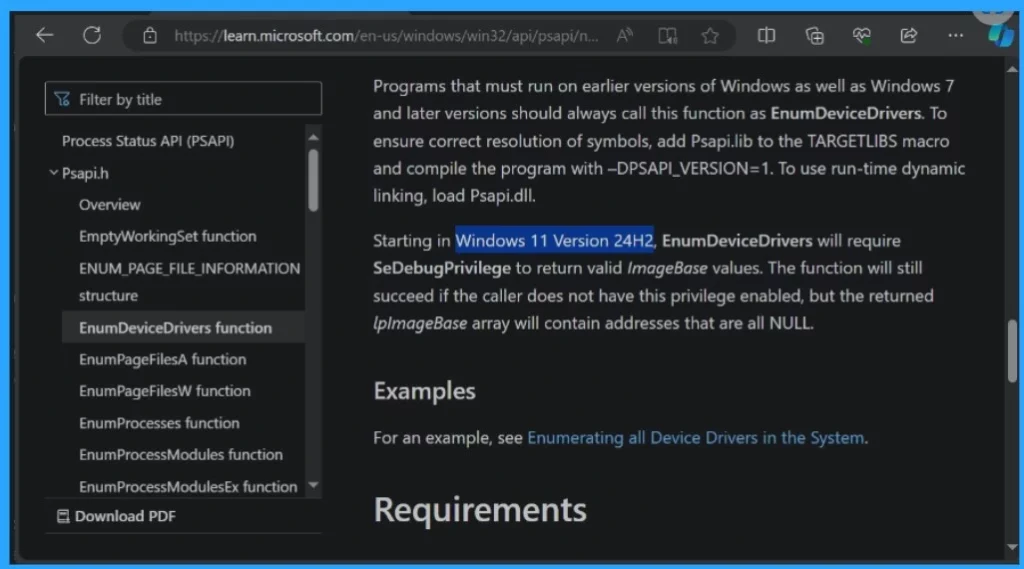
Microsoft has not confirmed or announced the Windows 11 24H2 update. But they give us a hint in their document that mentions the 24H2. With that hint, we can expect that version 24H2 will be Microsoft’s next big update.
This update may arrive later this year and change the EnumDeviceDrivers function. Microsoft unintentionally confirms about 24H2 through the documentation of the EnumDeviceDrivers function. A new clue indicates that Windows 11 24H2, a significant AI update, is nearing its launch.
| What we can expect in Windows 11 24H2 |
|---|
| The new version of Copilot with contextual awareness and deeper integration with other apps or services. For example, you can access messages from your Android phone using Copilot. |
| The new version may be the best in improving security, adding new functions, and making the user experience better. |
Reference
Microsoft document confirms Windows 11 24H2 update
We are on WhatsApp now. To get the latest step-by-step guides, news, and updates, Join our Channel. Click here. HTMD WhatsApp.
Author
Krishna. R is a computer enthusiast. She loves writing about Windows 11 and Intune-related technologies and sharing her knowledge, quick tips, and tricks with the community about Windows 11 or 10.




Discussion