






Let’s discuss the List of Supported OS versions for SCCM clients. SCCM supports various operating system (OS) versions for its clients. This includes different versions of Windows, such as Windows 10, Windows 8.1, Windows 7, and even older versions like Windows Vista and Windows Server editions.
Additionally, SCCM supports macOS, allowing you to manage Apple computers running macOS versions. SCCM will enable you to install client software on Windows and macOS computers. You can easily manage and control these computers through SCCM, which ensures that SCCM meets your organization’s security and compliance standards.
Some essential requirements and limitations apply to all clients. You should not change the startup type or Log-on settings for any SCCM service. Doing so can cause critical services to stop working correctly.
SCCM servers are crucial for managing system configurations and deploying software. They support various Windows Server operating systems versions, allowing organizations to control and maintain their IT environments effectively.


- Is SCCM Dying?
- Advanced Insights of SCCM Data
- Install SCCM Client Manually Using Command Line
- SCCM Server In-place OS Upgrade to Server 2022 Guide
List of Supported OS Versions for SCCM Clients
SCCM can handle various operating systems for both clients and devices. You can manage Windows, Windows Embedded, macOS, and mobile devices with it.
Whether it’s updating software, installing apps, or keeping everything secure, Configuration Manager helps you do it all. So, whether you are working with Windows, macOS, or mobile devices, SCCM covers you.
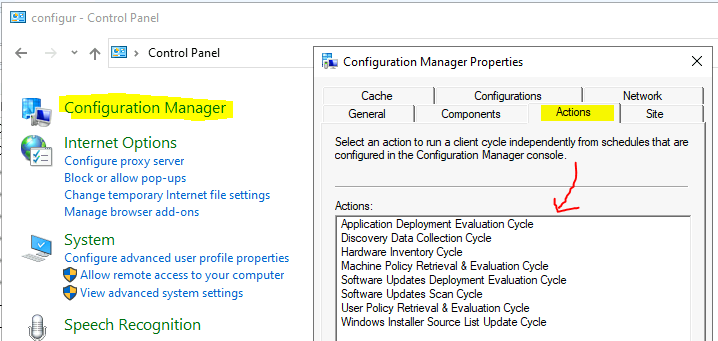
Managing Windows Computers with SCCM
To efficiently manage Windows computers running various operating system versions, you can utilize the client included with SCCM. This integrated client is specifically designed to simplify tasks such as updates, installations, and configurations across your network of Windows machines.
Supported Client OS Versions Windows 11
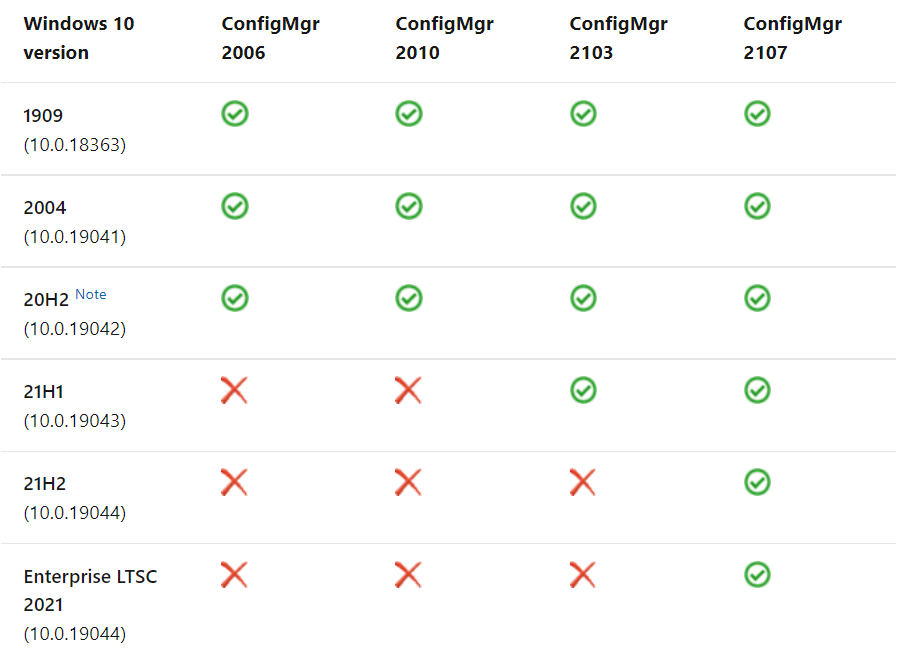
SCCM version 2107, you can manage devices running Windows 11 using the SCCM client. While Windows 11 support is introduced, you can continue to manage these devices similarly to Windows 10 devices using Microsoft Endpoint Manager.
Supported Client OS Versions Windows 10
SCCM also supports managing devices running Windows 10. Whether it’s deploying updates, software installations, or configurations, you can effectively manage Windows 10 devices using SCCM.
Read more – Best Guide to Deploy Windows 10 21H2 Using SCCM
Managing Azure Virtual Desktop with SCCM
Azure Virtual Desktop is a powerful desktop and application virtualization service hosted on Microsoft Azure. With SCCM, you can efficiently manage virtual devices running Windows within Azure.
Managing Windows Embedded Computers with SCCM
To effectively manage Windows Embedded devices, install the SCCM client directly onto the device. The requirements and limitations are explained in detail below.
Requirements and Limitations
All client features are fully supported on Windows-embedded systems that do not enable write filters. However, there are some limitations:
- Clients using Enhanced Write Filters (EWF), RAM File-Based Write Filters (FBWF), or Unified Write Filters (UWF) are supported for all features except power management.
Supported OS Versions
The SCCM client supports the following operating system versions on Windows Embedded devices.
| Supported OS Versions |
|---|
| Windows 11 Enterprise |
| Windows 11 IoT Enterprise (Note 4) |
| Windows 10 Enterprise (x86, x64) |
| Windows 10 IoT Enterprise (x86, x64) (Note 4) |
- Download SCCM 2309 Early Ring Version Using PowerShell Script
- Download Latest SCCM Installation Media | Baseline Version
- SCCM Slow Ring Vs Fast Ring Details | Opt-in Vs Generally Available | Early Update Ring
Managing Apple Mac Computers with SCCM
The SCCM client for macOS efficiently manages Apple Mac computers. The requirements and limitations for macOS are explained below.
Requirements and Limitations for macOS
When working with macOS, please note the following requirements and limitations. The Configuration Manager client for macOS cannot be installed or executed on computers under an account other than root.
Supported Versions
The SCCM client for macOS supports the following versions of macOS
- macOS Big Sur (11) (requires SCCM client for macOS version 5.0.9000.1002 or later)
- macOS Catalina (10.15) (requires SCCM client for macOS version 5.0.8742.1000 or later)
- macOS Mojave (10.14)
Managing Mobile Devices with Configuration Manager
SCCM offers built-in capabilities for managing mobile devices on-premises without installing client software. The supported operating systems are listed below in detail.
Supported Operating Systems
The following operating systems are supported for mobile device management with Configuration Manager.
- Windows 10 Pro (x86, x64)
- Windows 10 Enterprise (x86, x64)
- Windows 10 IoT Enterprise (x86, x64) – This version includes the long-term servicing channel (LTSC).
- Windows 10 Team for Surface Hub
We are on WhatsApp now. To get the latest step-by-step guides, news, and updates, Join our Channel. Click here. HTMD WhatsApp.
Author
About the Author: Vidya is a computer enthusiast. She is here to share quick tips and tricks with Windows 11 or Windows 10 users. She loves writing about Windows 11 and related technologies. She is also keen to find solutions and write about day-to-day tech problems.




Discussion