






Cosmetic Issue with SCCM 1710 Service Manager GUI ConfigMgr
There is a cosmetic issue with the SCCM 1710 and Hotfix Rollup KB 4057517 service manager. The Service Manager console GUI had a GUI bug in the SCCM CB 1710 version.
But it’s not fixed with the roll-up hotfix released recently. The KB 4057517 fixed 13 known issues, but it didn’t fix the service manager console cosmetic bug.
The same bug is present in SCCM Technical Preview version 1712. This issue has no technical impact, but it’s good to have a fix for this. Everything works as expected, but it is just a cosmetic problem.
I hope this will get fixed in the 1802 production version.

Table of Contents
What is an SCCM Service Manager?
The service Manager helps SCCM admins troubleshoot SCCM issues. It also helps to learn how each component works. Service Manager enables you to manipulate various SCCM services and threads. More details
- Query Individual SCCM Components
- Stop Individual SCCM Components
- Start Individual SCCM Components
- Pause Individual SCCM Components
- Resume Individual SCCM Components
- Stop Individual SCCM Components
- Enable Logging Changes to SCCM Components
- Clear status of SCCM Components
- Video Tutorial SCCM 1710 New Features Overview Plus Upgrade Guide
- New SCCM CB 1710 Rollup Update KB4088970 for Co-Managed Devices
- WQL Query SMS Units Changes after SCCM CB 1710 Upgrade
Where is the SCCM CB Service Manager?
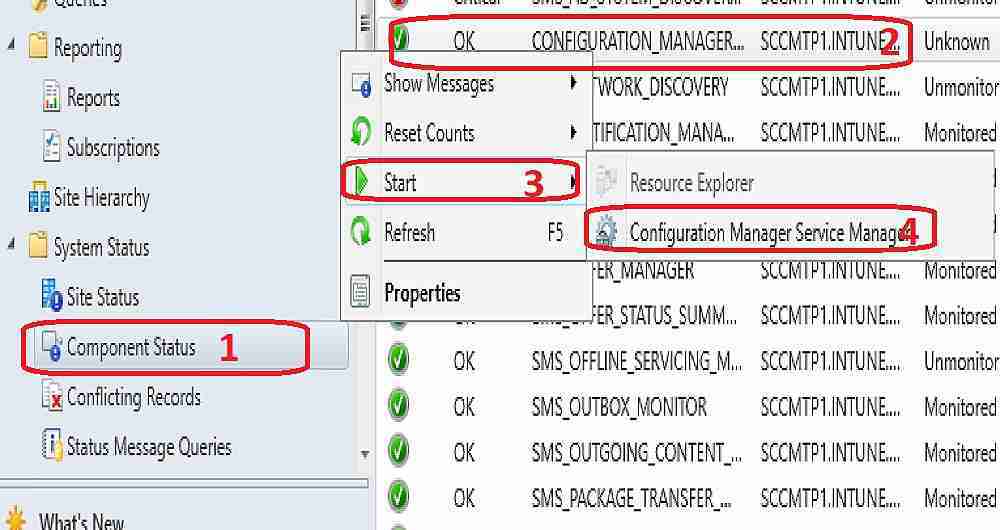
I have a post that talks about launching an SCCM service manager. More details “Where is Tools ConfigMgr Service Manager Option in SCCM Console”. The Service Manager console can be found from the SCCM CB console via “\Monitoring\Overview\System Status\ Component Status”.
Right-click on any SCCM components and click on Start—Configuration Manager Service Manager. Launching Service Manager from the SCCM 2007 console was easy. But it’s hidden in SCCM CB, as shown in the following screen capture.
What is the Bug with the SCCM Service Manager GUI?
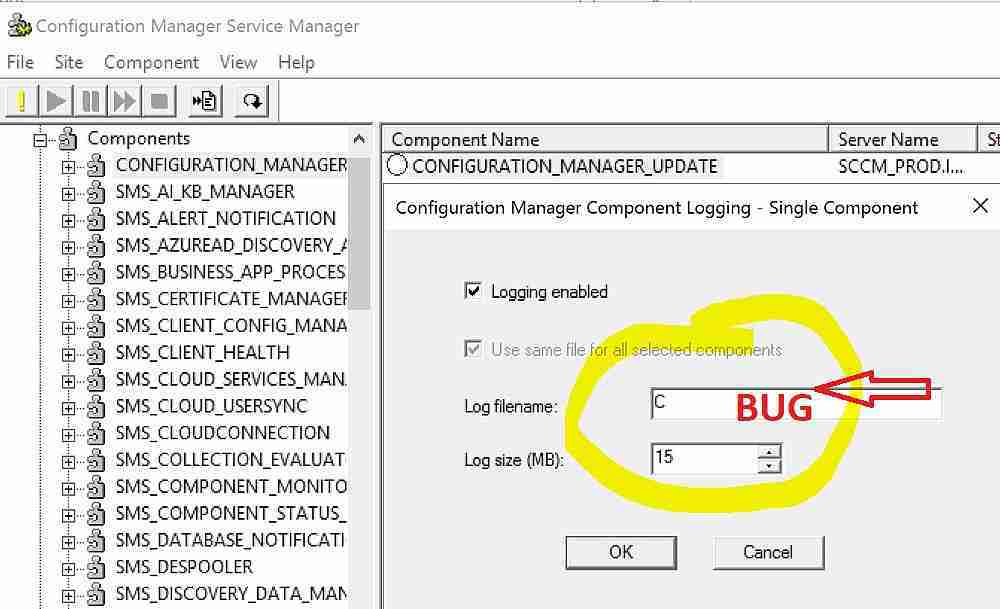
In a typical scenario, if we click on the LOGGING option from the Service Manager, we can see the related log file name and path for that component.
You can also set a new filename. The LOGGING option doesn’t show the LOG file name and path with this bug. Instead, it just shows the DRIVE letter of the SCCM installation drive.
Configuration manager component logging—Single Component windows give the following options as part of SCCM troubleshooting: We can disable the logging for that component and check the log file name and size.
| What is the Bug with the SCCM Service Manager GUI? |
|---|
| Checked the box enabled – Logging Enabled |
| Log Filename – C (This is the BUG) |
| Log size (MB) – 15 |
We are on WhatsApp now. To get the latest step-by-step guides, news, and updates, Join our Channel. Click here. HTMD WhatsApp.
Author
Anoop C Nair is Microsoft MVP from 2015 onwards for consecutive 10 years! He is a Workplace Solution Architect with more than 22+ years of experience in Workplace technologies. He is a Blogger, Speaker, and Local User Group Community leader. His main focus is on Device Management technologies like SCCM and Intune. He writes about technologies like Intune, SCCM, Windows, Cloud PC, Windows, Entra, Microsoft Security, Career etc…




Discussion