






Reassign DPs Offset Days Phased Deployments with SCCM 1801
Let us learn Reassign DPs Offset Days Phased Deployments with SCCM 1801. Microsoft SCCM product group released SCCM CB preview 1801 with many new features. I think they are getting all set for the big bang SCCM CB 1802 production release with loads of new features.
The video tutorial “Reassign DPs Offset Days Phased Deployments” here can give you a visual experience of all of my favorite features of 1801.
This post covers everything you need to know about adjusting the offset days for phased deployments using SCCM 1801.
We will break down how to reassign these settings in simple steps, making it easier to manage your deployment schedule effectively. Whether you are new to SCCM or need a refresher, this guide will help you navigate the process smoothly.

Table of Contents
My Favorite Features of SCCM 1801 Preview
Reassign DPs and Phased deployment features are limited to the SCCM admin console experience. The SCCM CB 1801 client side is NOT ready to test these features. The table below provides more details.
| My Favorite Features of SCCM 1801 Preview |
|---|
| Reassign DPs |
| ADR Offset Days schedule |
| Phased Deployments for Task Sequences |
| Software Center Live Preview |
- Office MSI is Almost Dead, but Use SCCM to Click to Run Install Configuration Manager ConfigMgr
- System Center Products Moved to Semi-Annual Channel But NOT SCCM Configuration Manager ConfigMgr
How to Reassign DPs in SCCM?
Reassigning DPs is my favorite feature of SCCM 1801. I know that SCCM admins have struggled for ages to migrate TBs of content from one DP server to another DP server. In most cases, this could be because of changes or redesigns of SCCM hierarchies.
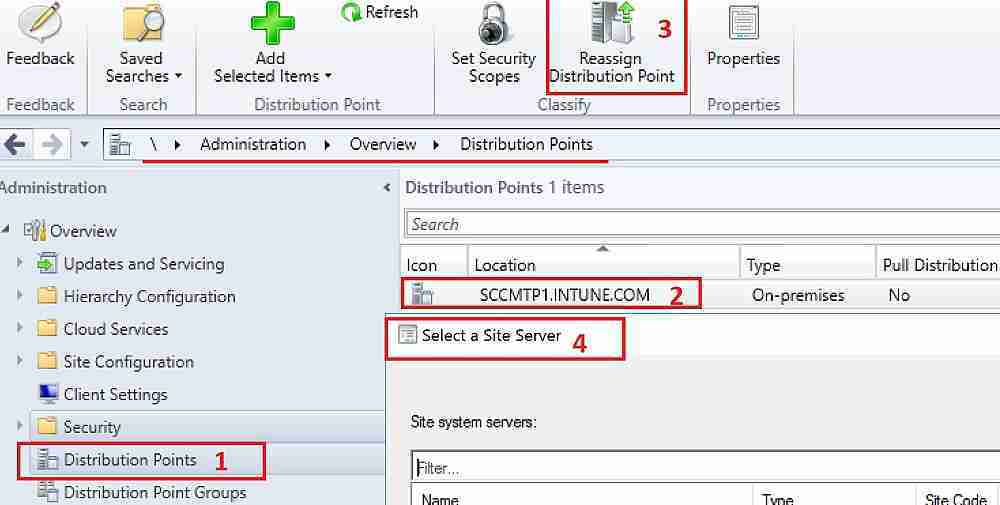
SCCM 1801 has additional functionality to move a distribution point (DP) from a primary site to another primary site or from under a secondary spot to a primary site.
- \Administration\Overview\Distribution Points
SCCM ADR Challenge of 2nd Tuesday
Creating ADRs when part of Asia and Australia is always a challenge. Microsoft releases patches every second Tuesday, but for some parts of the world (the Asia continent), it won’t be Tuesday.
Hence, a special script of manual intervention is required for patch Tuesday ADR to work correctly.
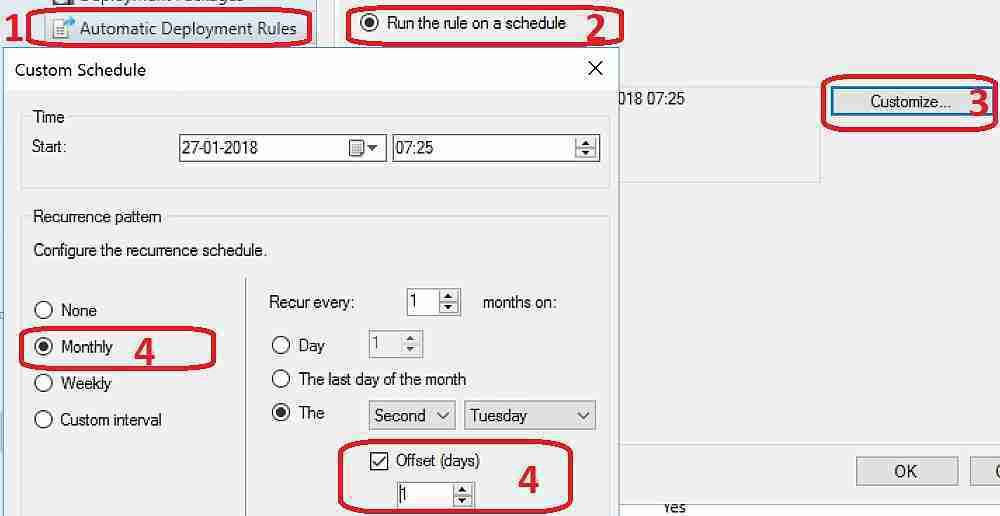
Offset Days option in custom Automatic Deployment Rule (ADR) schedule. As I mentioned above, improvements to the Automatic Deployment Rule evaluation schedule are helpful. You can now schedule an ADR evaluation to be offset from a base day.
Check if a custom schedule that deploys updates offset from a base day has been created. The video tutorial “Reassign DPs Offset Days Phased Deployments” provides more details.
\Software Library\Overview\Software Updates\Automatic Deployment Rules
Custom – Monthly – 2nd Tuesday – Offset (days)
Software Center “Live Preview” from SCCM Client Settings
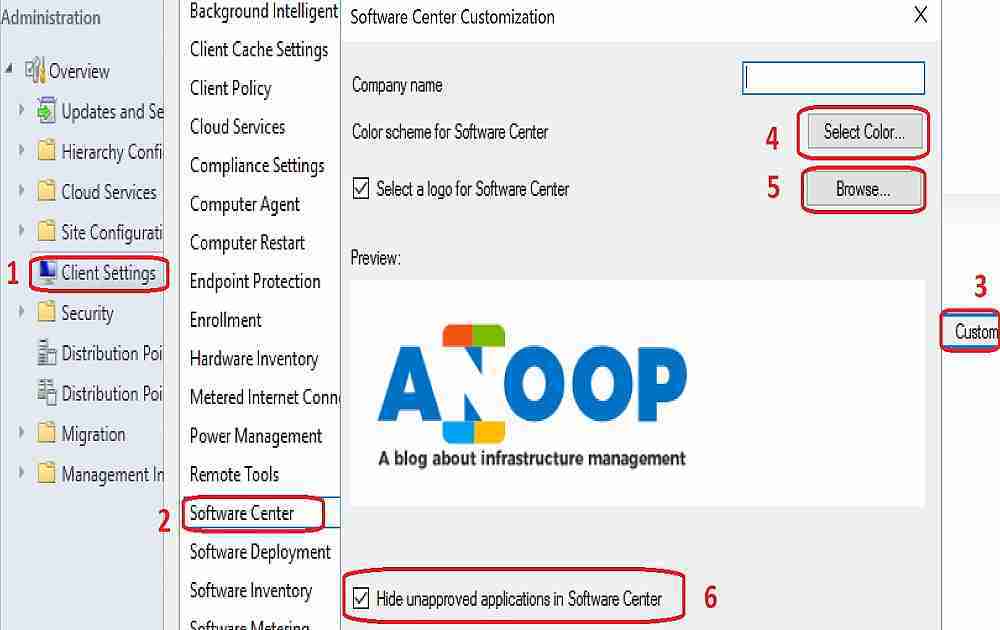
Improvements to Client Settings for the Software Center are really modern stuff from the SCCM team. You don’t need to deploy NEW software center client settings to devices and test changes.
Instead, you can see the live preview on the SCCM console. Thank you for making the SCCM admin’s life easier!!
The video tutorial “Reassign DPs Offset Days Phased Deployments” provides more details of the software center customization live experience.
Enabling the ‘Hide unapproved applications in the Software Center’ setting in the new Software Center client settings is another option.
The client settings for Software Center now have a Customise button where users can preview their customization before deploying them to machines. Users can also hide unapproved applications in the Software Center.
- \Administration\Overview\Client Settings
Phased Deployments for SCCM Task Sequences
SCCM Phased deployments automate a coordinated, sequenced rollout of software without creating multiple implementations. This feature is available only for Task Sequences in this version of SCCM. I hope it will be useful for Windows 10 servicing models.
I assume phased deployments are getting input from status filtering rules. Status filter rules will check the criteria for phased rollout, and if the deployment failure is more than 5% (this % can be customized), it will automatically STOP the deployment.
- \Software Library\Overview\Operating Systems\Task Sequences
In this Technical Preview version, the phased deployment wizard can be completed for task sequences in the admin console. However, deployments are not created. Following is the example of phased deployment from my lab environment.
More details are available in the video tutorial “Reassign DPs Offset Days Phased Deployments“.
Phased Deployment Configuration
• Phased Deployment Name: Phase Deployment
• Phased Deployment Description:
Collections in this Phased Deployment
• Collection(s): TP100017
• Collection(s): SMSDM003
Resources
Capabilities in Technical Preview 1801 for System Center Configuration Manager
We are on WhatsApp now. To get the latest step-by-step guides, news, and updates, Join our Channel. Click here. HTMD WhatsApp.
Author
Anoop C Nair is Microsoft MVP from 2015 onwards for consecutive 10 years! He is a Workplace Solution Architect with more than 22+ years of experience in Workplace technologies. He is a Blogger, Speaker, and Local User Group Community leader. His main focus is on Device Management technologies like SCCM and Intune. He writes about technologies like Intune, SCCM, Windows, Cloud PC, Windows, Entra, Microsoft Security, Career etc…




Discussion