






This blog post will discuss High Level Overview of Identity Protection in Microsoft Entra ID. You all know about Entra ID, previously known as Azure AD, the most essential service for cloud-based identity management. Cybercrime is the biggest fear worldwide, and it has significantly increased nowadays.
As cyberattacks increase, we need to block them with an essential tool. Microsoft Entra ID Protection is the best security system for IT admins to block and detect cyberattacks. In Entra, ID protection will prevent hackers from interrupting the users.
We all know how much Entra ID secures the user’s identity. Enta ID protection is a powerful tool for organizations to detect, investigate, and remediate identity-based risks. Identity protection in Entra allows the admins to make detailed reports to manage the risks.
Microsoft Defender is one of the best tools for detecting and investigating advanced threats in identity protection. In this blog post, I will provide an overview of Identity protection and a brief discussion about Microsoft Entra ID Protection.

- EntraOps V0.7.0 Released With Improved Microsoft Entra Tenant Governance And Role Visibility
- Top 5 Security Layers of Protection
- Block Users Personal Devices to Join Entra ID using Intune
- External Collaboration Settings in Entra ID

High Level Overview of Identity Protection in Microsoft Entra ID
We first learned that there are many tools for identifying threats to Microsoft Entra ID. ID always secure and monitor when anyone signs in to Entra to ensure no troubles occur. These tools include heuristics, machine learning, and threat intelligence.
| Protection Detection in Entra ID | Tools |
|---|---|
| Heuristics | It helps to identify unusual behaviour when you sign in |
| Machine learning | It helps the system to identify dangers itself |
| Threat intelligence | Threat intelligence means getting threat hints from Microsoft security teams, products like the Microsoft Defender suite, in Microsoft partners. |
How to Classify Risk Detection Types
Risk Detection is critical and it will always ensure security. We can classify Risk detection into 3 types, user risk, sign-in risk, and identity risk. All kinds of detections are either high, medium, or low risk and ID protection.
Entra ID Protection helps organizations detect, investigate, and remediate identity-based risks. It acts as a tool like Conditional Access to make access decisions. Combining ID protection with conditional access is like adding an extra layer of security.
- User Risk – The probability that a user is compromised
- Sign-in Risk – The probability that a sign-in is compromised
- Workload Identity Risk – Probability that an application or service principal is compromised
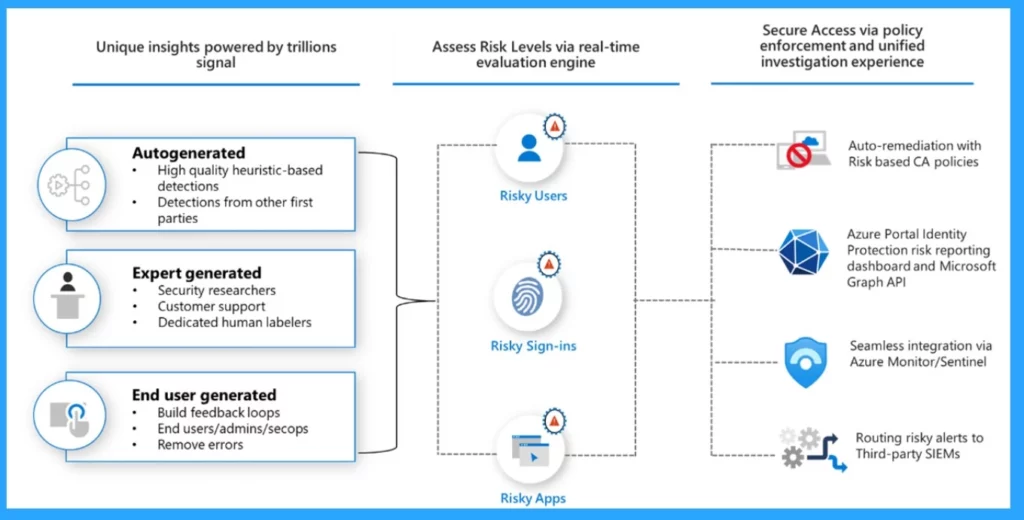
Types of Risk-Based Policies
Threat detection with high risk means that there is a high chance that someone has a threat against your account. At lower risk, it indicates some unusual behaviour at sign-in.
When we use identity protection with conditional access, it gives you the best security decisions. These policies act like automatic security systems. Having risk space policies in your environment has multiple benefits.
| Benefits of Risk-Based Policies |
|---|
| 1. Balance security and productivity |
| 2. Reduced the number of potential account compromise |
| 3. No upkeep needed |
- The following are the Risk-based policies
- Sign-in risk – It requires actions like multi-factor authentication (MFA) to stop attacks as they happen.
- User Risk – Disrupt observed attacks that happen before sign-in. That means these risk policies stop any attacks on users that Microsoft has noticed
- Service principal risk policies – It will allow you to block applications that have been compromised so you can contain any threats automatically
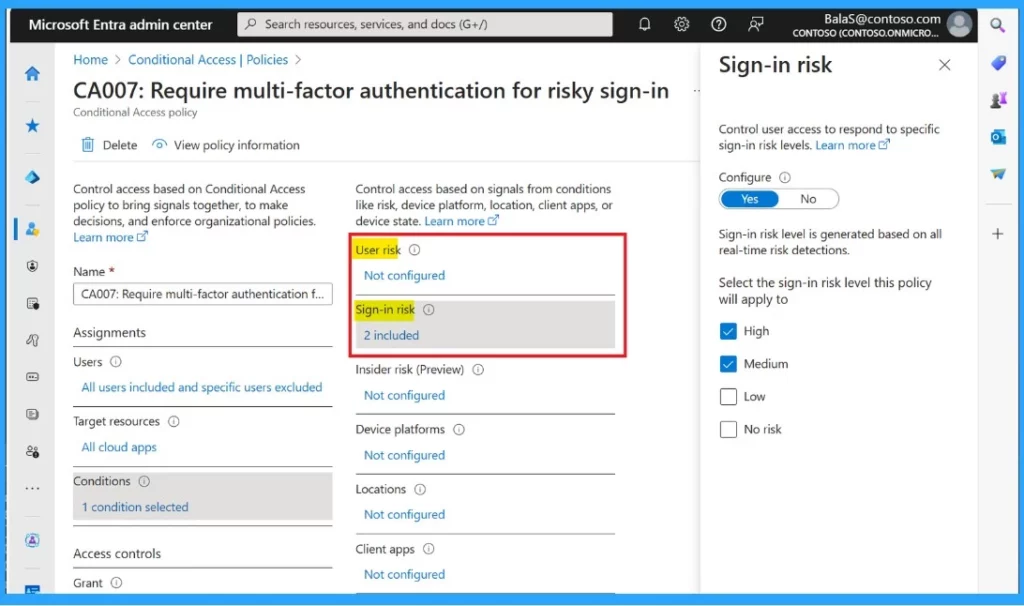
How to Get Started Identity Protection in Entra ID
Above we discussed a lot of things about Microsoft Entra ID Protection and Microsoft Entra ID Protection and High-level Overview of Identity Protection. In Entra ID, we can start it from the Dashboard.
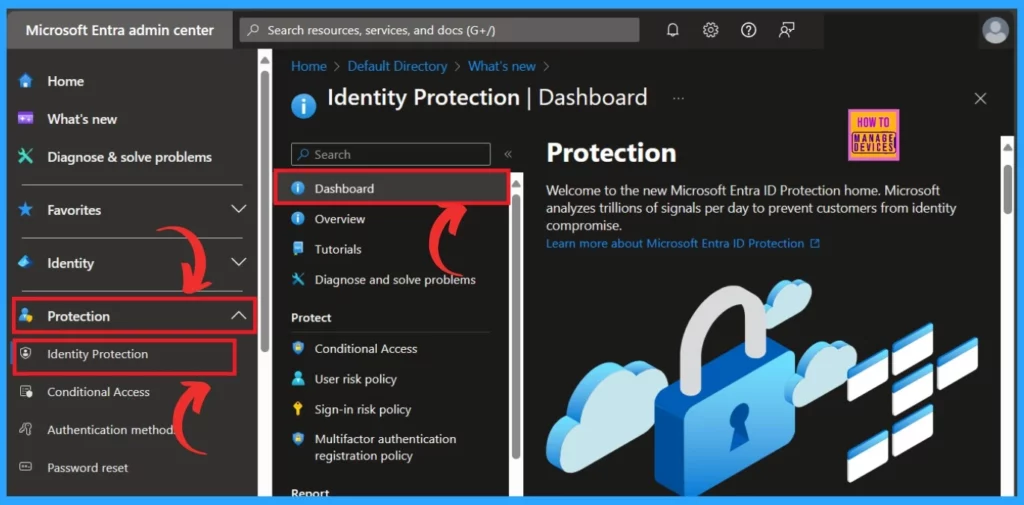
The dashboard will help the user analyse the security advice for your organization. To do this, you must navigate the following steps.
- Sign in to the Microsoft Entra ID
- Navigate to Protection> Identity Protection>Dashboard
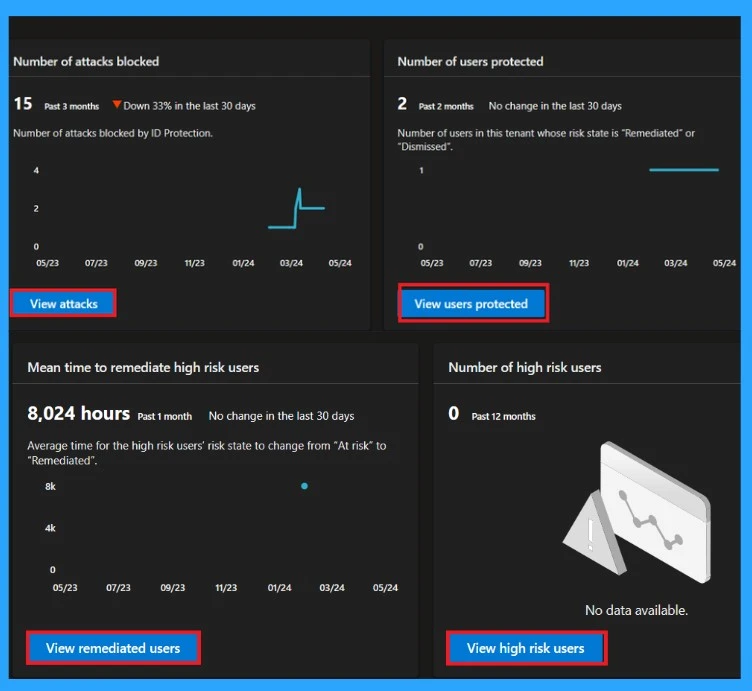
Metric Cards
First, the metric cards are visible in the dashboard, allowing the user to identify the security level. As you add more safety features, like risk-based policies, your organization strengthens tenant protection. There are 4 metrics for understanding the effectiveness of the security measures.
- Number of attacks blocked
- Number of users Protected
- Number of Remediate risk
- The number of new high-risk users detected
- Modernize MFA Authentication Policies in Entra ID
- What is Microsoft Entra ID?
- Security Enhancement with Named Locations in Entra ID
Graph of Attack
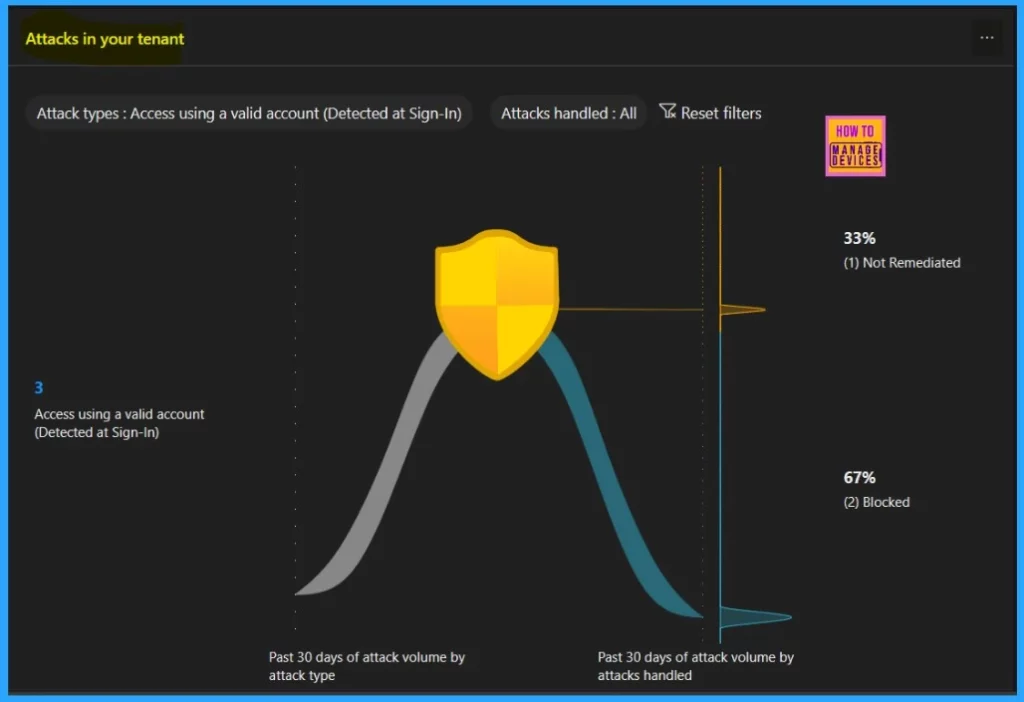
With th help of an attack graph, you should know about the attackers through a visual representation. Identity-based attack patterns are the best method for identifying which user identity is targeted by attackers. The attack patterns are represented by MITRE ATT&CK techniques for classifying attacks.
- Blocked – It blocks risky sign-in and asks for a multifactor authentication. This action will help to prevent the attackers from signing in
- Not Remediated – This means some risky sign-ins need fixing. They are like a warnings. You can find them in the Risky sign-in report.
Map
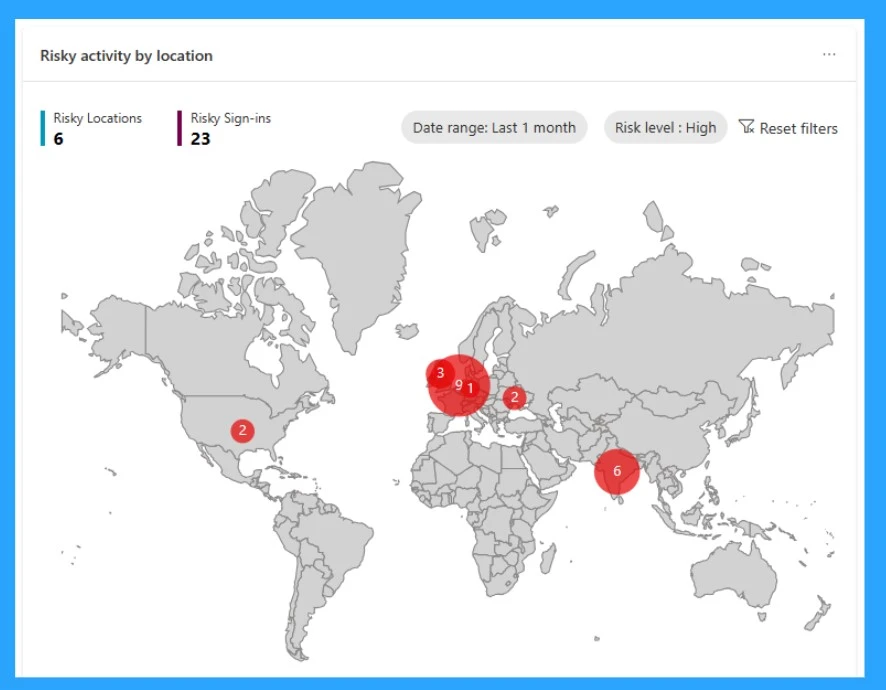
The map is another view in the dashboard, where you can see the geographic location of sign-ins. Here, you can see where people have signed in to your system in a risky way. If any bubbles are represented on the map, that shows that a risky sign-in occurred.
- If you move your mouse over a bubble, it sees the exact country and how many risky signs happen there.
We are on WhatsApp. To get the latest step-by-step guides and news updates, Join our Channel. Click here –HTMD WhatsApp.
Author
Krishna. R is a computer enthusiast. She loves writing about Windows 11 and Intune-related technologies and sharing her knowledge, quick tips, and tricks about Windows 11 or 10 with the community.




Discussion