






Explicit Forward Proxy in Microsoft Entra Internet Access Helps Secure VDI BYOD and Clientless Browsing
Key Takeaways
- Extends secure internet access to unmanaged and browser-only devices like BYOD, kiosks, Linux browsers, and multi-session VDI.
- Helps enforce Microsoft Entra security and Conditional Access policies even without the Global Secure Access client.
- Supports browser-based traffic inspection with TLS inspection and PAC file deployment for better visibility and control.
- Reduces the need for risky security exceptions in hard-to-manage environments.
- Provides a practical transition path while organizations continue modern device management and standardization efforts.
Explicit Forward Proxy in Microsoft Entra Internet Access! This feature allows organizations to use secure web and AI gateway capabilities without deploying the Global Secure Access client, making it useful for browser-based and lightly managed environments. It works with browsers that support Proxy Auto-Configuration (PAC) files. Since this is a prerelease feature, Microsoft may change functionality before general availability, and no formal warranties or guarantees are provided at this stage.
Table of Content
Explicit Forward Proxy in Microsoft Entra Internet Access
Before configuring Explicit Forward Proxy, make sure you have the required Microsoft Entra admin roles, including Global Secure Access Administrator and Conditional Access Administrator. You should also complete the Global Secure Access setup, review Explicit Forward Proxy and session management concepts, enable the Internet Access traffic-forwarding profile, and configure TLS inspection to support secure web traffic inspection and policy enforcement.
- 3 Layers of Protection in Entra Internet Access Network Identity and AI Security
- Non-Human Identities and Agent Identities Gain Access Package Support with Entra Identity Governance for AI Agents
- Setup Risk-Based Conditional Access for Entra Agents to Automatically Protect against Compromised Agents
- How to Manage Agents through Microsoft Entra Agent ID Interface for Security and Zero Trust Enforcement
Steps to Enable Explicit Forward Proxy in Microsoft Entra
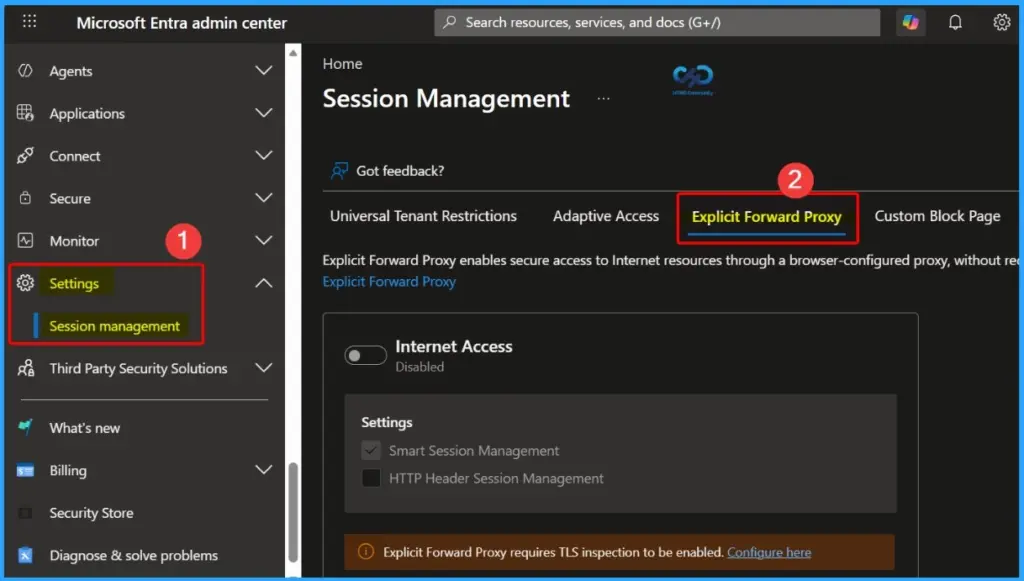
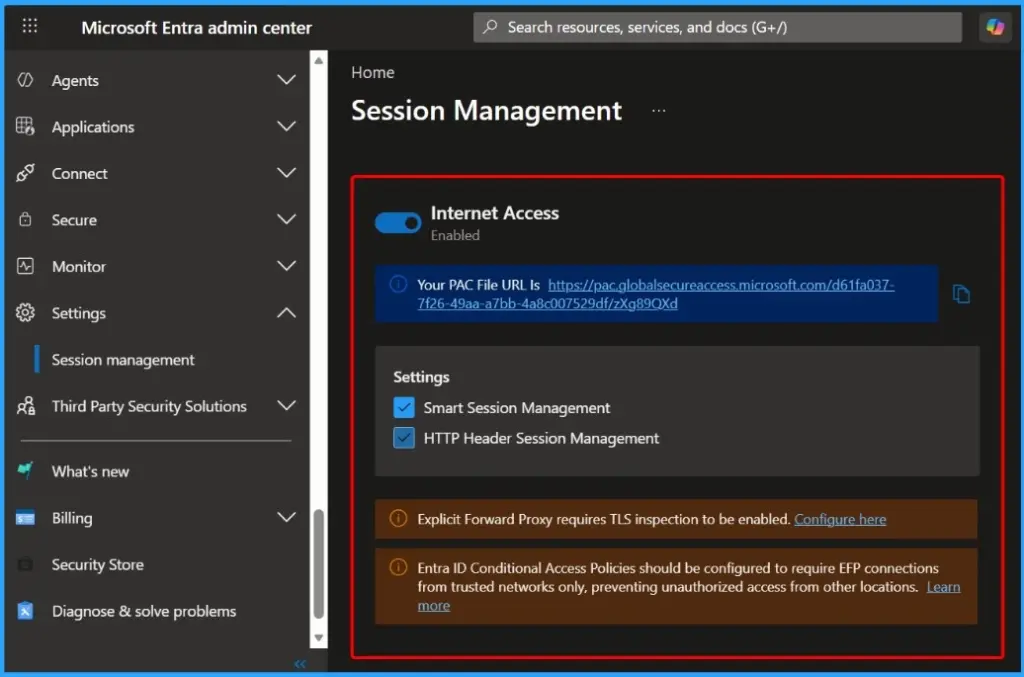
You can configure and manage Explicit Forward Proxy directly from the Microsoft Entra admin center to extend secure web access and session management capabilities for browser-based traffic. The below list helps you to show more details.
- Sign in to the Microsoft Entra admin center.
- Navigate to Global Secure Access > Session Management.
- Open the Explicit Forward Proxy tab.
- Enable the Internet Access toggle.
- Smart session management is enabled automatically by default.
- Optionally, enable HTTP header session management for enhanced session control and policy handling.
| Why This Matters | Benefit |
|---|---|
| Protected Access for More Devices | Extends secure internet access to browser-only, clientless, and hard-to-manage environments such as BYOD, kiosks, Linux browsers, and VDI. |
| Entra Policy Enforcement | Keeps web sessions connected to Microsoft Entra security and Conditional Access policies instead of leaving unmanaged users outside security controls. |
| Easier Modernization Path | Gives IT teams a practical bridge solution while they continue standardizing device management and security over time. |
Need Further Assistance or Have Technical Questions?
Join the LinkedIn Page and Telegram group to get the latest step-by-step guides and news updates. Join our Meetup Page to participate in User group meetings. Also, join the WhatsApp Community and the Whatsapp channel to get the latest news on Microsoft Technologies. We are there on Reddit as well

Resources
Explicit Forward Proxy Overview – Global Secure Access | Microsoft Learn
Author
Anoop C Nair has been Microsoft MVP for 10 consecutive years from 2015 onwards. He is a Workplace Solution Architect with more than 22+ years of experience in Workplace technologies. He is a Blogger, Speaker, and Local User Group Community leader. His primary focus is on Device Management technologies like SCCM and Intune. He writes about technologies like Intune, SCCM, Windows, Cloud PC, Windows, Entra, Microsoft Security, Career, etc.




Discussion