






SCCM Software Update is not working through OSD Task Sequence
Today, I will discuss how the SCCM Software Update is not working through the OSD Task Sequence. Many complain that their software update is not working through the OSD Task sequence.
Some challenges are that the client won’t know where to go for Windows updates, etc., but we can help it find those updates with a Server Locator Point by Installing that role on our SCCM server.
You must have created a Deployment Management Task containing Windows updates applicable to the OS you install in your Build and Capture task sequence.
The Deployment Management Task must be targeted to a collection your build and capture computer will be in during OSD deployment. A suitable collection would be the Unknown Computers collection. SCCM Software Update.

Table of Contents
SCCM Software Update is Not Working Through OSD Task Sequence
Server locator points are used in a Configuration Manager 2007 hierarchy to complete client site assignments on the intranet and help clients find management points when they cannot see that information through Active Directory Domain Services. SCCM Software Update.
- SCCM OSD Task Sequence Ultimate Guide 5 Understand Process
- OSD Known Issues Troubleshooting Guide | SCCM | ConfigMgr
- Deploy Microsoft Edge Patches with SCCM Software Updates|ConfigMgr Part 1
- SCCM Software Update List Packages are not Visible on Child Primary Servers ConfigMgr
- Fix SCCM Software Updates ReDownload Issue Hotfix ConfigMgr
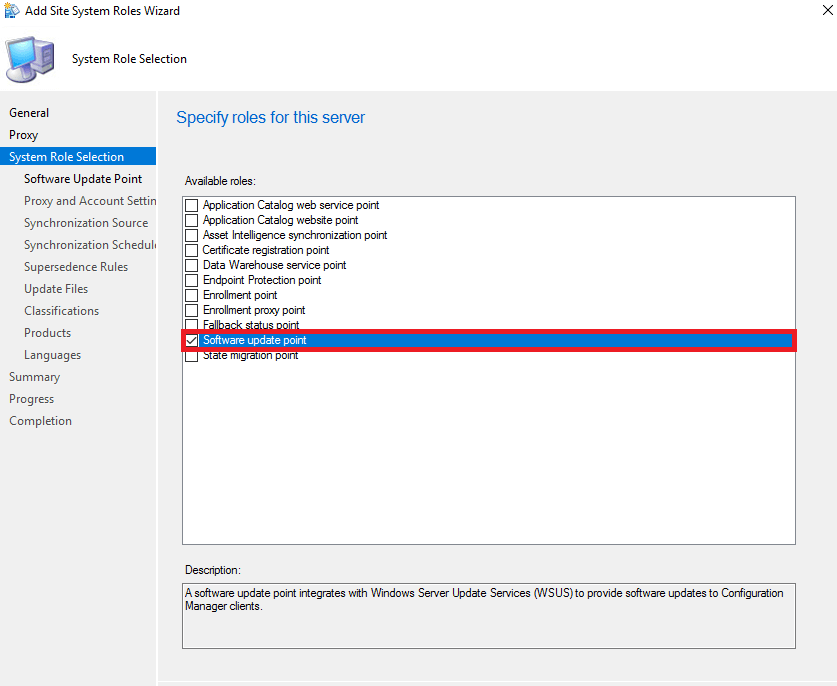
Intranet clients prefer to use Active Directory Domain Services to complete site assignments and find management points. However, clients must use a server locator point if the Active Directory schema is not extended for Configuration Manager 2007, the site is not published to Active Directory Domain Services, or clients do not belong to the same Active Directory forest as the site server’s forest. SCCM Software Update
Note: You need only one server locator point for the Configuration Manager 2007 hierarchy, even if you have multiple sites. In a multi-site hierarchy, install the server locator point on the central site. If you install a server locator point in the middle of the hierarchy, it will not know about the sites above it.
To install the Server Locator Point Role >> Link
How can you patch your machines using the SUP in SCCM? More specifically, we will be utilizing Update Lists >> Link http://www.windows-noob.com/forums/index.php?/topic/1809-using-update-lists-when-deploying-monthly-updates/
Resources
We are on WhatsApp. To get the latest step-by-step guides and news updates, Join our Channel. Click here –HTMD WhatsApp.
Author
Anoop C Nair is Microsoft MVP! He is a Device Management Admin with more than 20 years of experience (calculation done in 2021) in IT. He is a Blogger, Speaker, and Local User Group HTMD Community leader. His primary focus is Device Management technologies like SCCM 2012, Current Branch, and Intune. He writes about ConfigMgr, Windows 11, Windows 10, Azure AD, Microsoft Intune, Windows 365, AVD, etc.




Discussion