





SCCM ConfigMgr State Messaging in Depth
Let’s discuss SCCM ConfigMgr State Messaging in Depth. I have gone through excellent documentation on SCCM State Messaging. Understanding state messaging in ConfigMgr is essential—critical software update data relies on this system—but in v.next of ConfigMgr, understanding state messaging is even more vital as more components take advantage of it. That said, let’s explore how the state messaging system works.
State messaging is a new mechanism in SCCM that reflects the client’s point-in-time conditions. Status messages, by contrast, help administrators track data flow through various SCCM components. A status message viewer is built into the console to view and follow these messages. SCCM ConfigMgr State Messaging in Depth.
There is no such equivalent for state messages. The result of state messages is largely only seen in reports, various data in the console (such as many systems needing a patch), or client logs. State messages are minimal and communicate brief information about the client’s conditions. We will see state messages in action shortly.
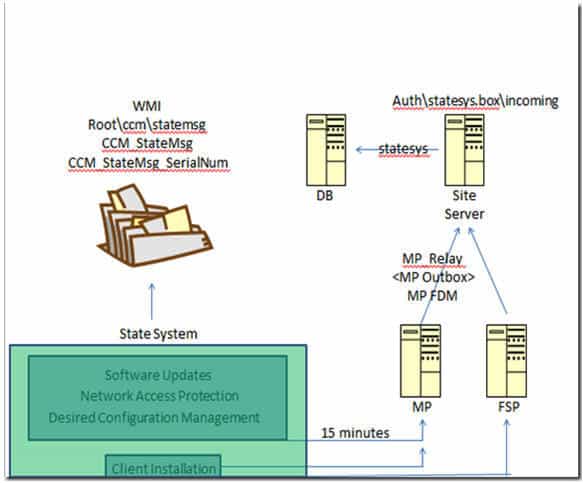
The state messaging system is used by specific components of SCCM – the most well-known being software updates, desired configuration management, network access protection, and the client. There are a few other places, but these are the major components. To summarize, I pulled together the general state message flow below.

Table of Contents
SCCM ConfigMgr State Messaging in Depth
Let’s walk through the graphic given below. The green box represents the state messaging system, and the components inside feed information into it. Two things happen when state messages are received: first, state messages are stored in WMI. Then, on a 15-minute cycle (by default—this can be changed), the state system will scrape WMI for any state message that has not yet been sent and forward it to the MP.
- SCCM CB DMPDownloader Troubleshooting With State Messages
- Learn To Use SCCM Status Message Viewer Tool 1
- CMTrace Log File replacement Tool SCCM OneTrace
Note in the graphic that I have pulled the client installation piece out separately. During the client install and before installation has proceeded sufficiently to find or access the MP—or if the MP is down for some reason—state messages about the client install will be forwarded to the FSP if configured. For everything else, traffic goes directly to the MP.
State messages arriving at the MP will be processed. The MP_Relay component processes SMX files and places them in the authstatesys. box incoming folder on the site server. From there, they are processed into the database to complete the flow. SCCM ConfigMgr State Messaging in Depth
Hopefully, the graphic communicates the general flow well, but let’s dig deeper to understand what happens in detail. To get started, we need to ensure verbose logging is enabled for the client, MP, and state messaging component on the site server.
To set verbose/debug logging on an SCCM client or MP, edit (or create) the following registry keys, and additional logging should kick in. SCCM ConfigMgr State Messaging in Depth.
HKLM/Software/Wow6432Node/Microsoft/CCM/Logging/@Global/LogLevel to 0HKLM/Software/Wow6432Node/Microsoft/CCM/Logging/DebugLogging/Enabled to True
On the site, the server edits the following registry key to enable verbose logging and then restarts the SMS_Executive (or the state system component)
HKLM/Software/Wow6432Node/Microsoft/SMS/Components/SMS_STATE_SYSTEM/Verbose Logging – Reg_DWORD set to 1
We are on WhatsApp. To get the latest step-by-step guides and news updates, Join our Channel. Click here –HTMD WhatsApp.
Author
Anoop C Nair is Microsoft MVP! He is a Device Management Admin with more than 20 years of experience (calculation done in 2021) in IT. He is a Blogger, Speaker, and Local User Group HTMD Community leader. His primary focus is Device Management technologies like SCCM 2012, Current Branch, and Intune. He writes about ConfigMgr, Windows 11, Windows 10, Azure AD, Microsoft Intune, Windows 365, AVD, etc.




Discussion