






Video Review of SCCM CB 1802 New Features
Microsoft released the latest version of SCCM 1802 in the fast ring. To get more details, I recommend reading the newest production version of SCCM CB 1802 and the step-by-step upgrade guide.
Also, I believe SCCM CB 1802 helps organizations keep their infra neat and clean with new management insight features. In this post, we can discuss the review of SCCM 1802 new features.
Video tutorials help people discover the real-world experience of SCCM 1802’s new features.
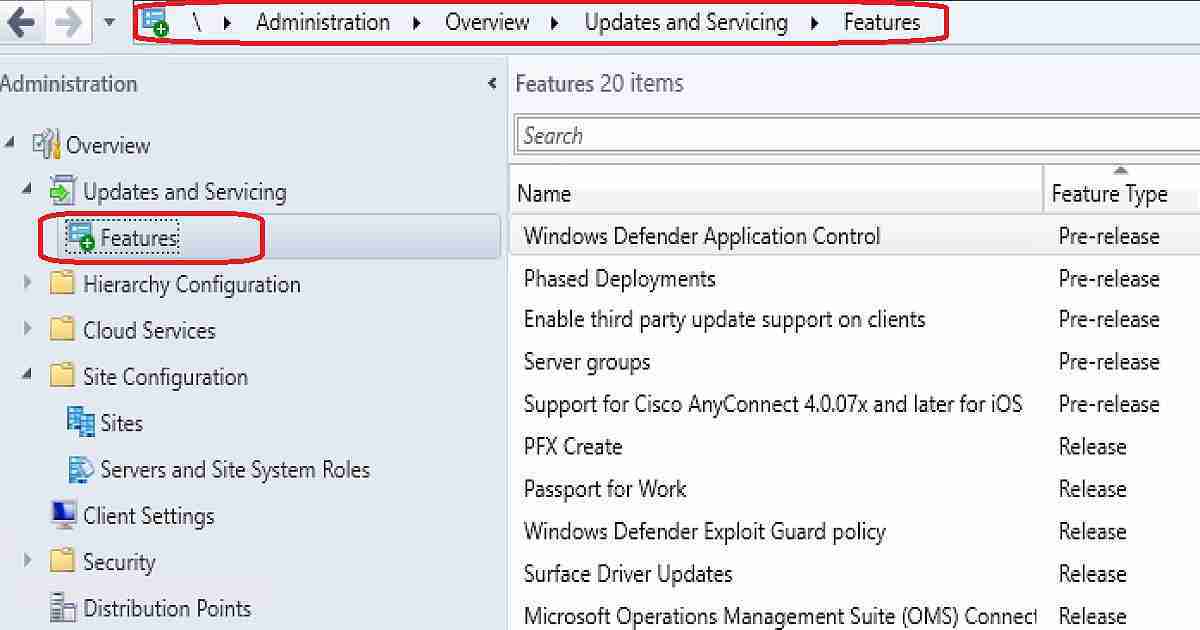
Enabling the third-party update option will cause Software Update Point (SUP) to download the signing certificate used by Windows Server Update Services (WSUS) to sign third-party software updates.

Table of Contents
Third-Party Updates – SCCM 1802 New Feature
If this option is enabled along with the software update client setting, the following local group policy, “Allow signed updates from an intranet Microsoft update service location,” will be created on a local machine.
The client will be configured to allow signed third-party updates, and the signing certificate will be installed in trusted publishers’ certificate stores on clients.
Enable third (3rd) party update support on clients – Enabled configuration by allowing signed third party updates policy and installing WSUS code signing certificate on clients. Enable Third-Party Software Update.
- FIX SCCM SQL Replication Issues using Replication Link Analyzer
- Troubleshoot and FIX SCCM SQL Backlog Issues using SSMS
- FIX SCCM SQL-Based Database Replication Failure Between CAS Primary
Duplicate Hardware Identifiers Improvement – SCCM 1802 New Feature
Navigate through SCCM console Administration – Site Configuration – Sites -Hierarchy Settings Properties – Client Approval and Conflicting Records. Some hardware is known to have duplicate IDs. Add them to the list so SCCM can ignore these PXE boot and client registration hardware IDs.
Add Duplicate Hardware ID – Specify the type of hardware ID and the value to include as a known duplicate. This ID will be ignored for PXE and client registration.
| Duplicate Hardware Identifiers Improvement – SCCM 1802 New Feature |
|---|
| 1. MAC address (12 hex characters) |
| 2. SMBIOS GUID (32 hex characters) |
Console Experience – SCCM 1802 Features
The primary user assigned to a device is available in the SCCM CB 1802 console. Navigate Assets and Compliance—Overview—Devices—Primary User(s).
Encryption Options – SCCM CB 1802 New Features
Configure client computers’ signing and encryption requirements when communicating with the SCCM site server. SCCM Clients always sign their client identification when communicating with the Application Catalog website.
Require Signing -Enabled by Default -This option requires that it’s signed when clients send data to management points.
Require SHA-256 -Enabled by Default – When clients sign data and communicate with site systems using HTTP. This option requires the client to use SHA-256 to sign the data. The client must support the SHA-256 hash algorithm to use this option. This option applies to clients that do not use PKI certificates.
Use Encryption – NOT enabled by default – This option uses 3DES to encrypt the SCCM client inventory data and state messages sent to the Management Points.
Site Infrastructure Improvements – SCCM 1802 New Features
Let’s discuss the Site infrastructure Improvements – SCCM 1802 New Features. The list below will help you to see more details.
- Reassign distribution point
- Configure Windows Delivery Optimization(DO) to use SCCM boundary groups (Client Settings option)
- Support for Windows 10 ARM64 devices
- Improved support for CNG certificates
- Boundary group fallback for management points
- Cloud distribution point site affinity
Client Management Improvements – SCCM CB 1802 New Features
Let’s discuss the Client Management Improvements – SCCM CB 1802 New Features. The list below will help you to see more details.
- Cloud management gateway support for Azure Resource Manager
- Configure hardware inventory to collect strings larger than 255 characters
- Surface device dashboard
- Primary User Details in the SCCM console
- Change in the Configuration Manager client install – No Silverlight installed
Application Management Improvements – SCCM CB 1802 New Features
Let’s discuss the Application Management Improvements – SCCM CB 1802 New Features. The list below will help you to see more details.
- Allow user interaction when installing an application
- Do not automatically upgrade superseded applications
- Approve application requests for users per device
- Run scripts improvements
SCCM CB Operating System Deployment Improvements
Let’s discuss the SCCM CB Operating System Deployment Improvements. The list below provides more details.
- Windows 10 in-place upgrade task sequence via SCCM cloud management gateway (CMG)
- Improvements to Windows 10 in-place upgrade task sequence
- Improvements to operating system deployment
- Deployment templates for task sequences
- Phased deployments for task sequences
Software Center Changes – SCCM CB 1802 New Features
Let’s discuss the Software Center Changes – SCCM CB 1802 New Features. The list below will help you to see more details.
- Install multiple applications in the Software Center
- Use Software Center to browse and install user-available applications on Azure AD-joined devices.
- Hide installed applications in the Software Center
- Hide unapproved applications in the Software Center
- Software Center shows users additional compliance information
SCCM 1802 – Site System Server Roles
Let’s discuss the SCCM 1802 – Site System Server Roles. The list below will help you to see more details.
- Distribution Point
- Management Point
- Service Connection Point
- Site Database Server
- Application Catalog Web service point
- Application Catalog Website Point
- Asset Intelligence Synchronization point
- Certificate Registration Point
- Cloud Management Gateway Connection Point
- Data Warehouse Service Point
- Endpoint Protection Point
- Enrollment point
- Enrollment Proxy point
- Fallback status point
- Reporting Services Point
- Software Update point
- State Migration Point
Resources
- Step by Step Video to Perform SCCM CB Upgrade to 1802
- Now Available: Update 1802 for SCCM Current Branch
- What’s new in version 1802 of System Center Configuration Manager CB
We are on WhatsApp now. To get the latest step-by-step guides, news, and updates, Join our Channel. Click here. HTMD WhatsApp.
Author
Anoop C Nair is Microsoft MVP from 2015 onwards for consecutive 10 years! He is a Workplace Solution Architect with more than 22+ years of experience in Workplace technologies. He is a Blogger, Speaker, and Local User Group Community leader. His main focus is on Device Management technologies like SCCM and Intune. He writes about technologies like Intune, SCCM, Windows, Cloud PC, Windows, Entra, Microsoft Security, Career etc…




Discussion