






Reset SCCM CB Critical Site Component Status Summarizer Counter ConfigMgr
Let’s learn about Reset SCCM CB Critical Site Component Status Summarizer Counter ConfigMgr.We don’t like red alerts in SCCM monitoring nodes, especially those related to critical site Component status.
We can reset the SCCM site status message count on any component or site system to remove the red alerts from the console. However, I won’t recommend resetting the SCCM component or site system summarizer counter.
Instead, you need to check and understand why the SCCM site status summarizer contains a critical alert.
Check out the video tutorial on resetting the SCCM CB Critical Site Component Status. As mentioned above, I don’t recommend resetting the site or component status summarizer counter before fixing the issue. If you have a critical site status, then fix the issue before resetting the counter.

Table of Contents
Why Reset the SCCM Site Status Summarizer Counter?
SCCM/ConfigMgr site and component status message counts are automatically reset at the end of threshold periods. As part of troubleshooting, we may need to reset the counters to confirm whether everything is okay.
- \Monitoring\Overview\System Status\Site Status
- \Monitoring\Overview\System Status\Component Status
- How To Perform Site Reset for SCCM ConfigMgr CB | Configuration Manager
- How to Perform ConfigMgr Site Reset | Fix Weird Issues | SCCM
What is the SCCM Site Component Status Summarizer?
SCCM Status Summarizer helps admins determine the health or status of different SCCM/ConfigMgr CB Infrastructure aspects. The SCCM site and components status summarizers get input from status messages, states, and counts.
The current branch version of SCCM includes four (4) status summarizers. The post-SCCM Site Component Status Summarizers Troubleshoot Issues provides more information about these components.
What are the Options for Reconfiguring the SCCM Site & Component Status Summarizers?
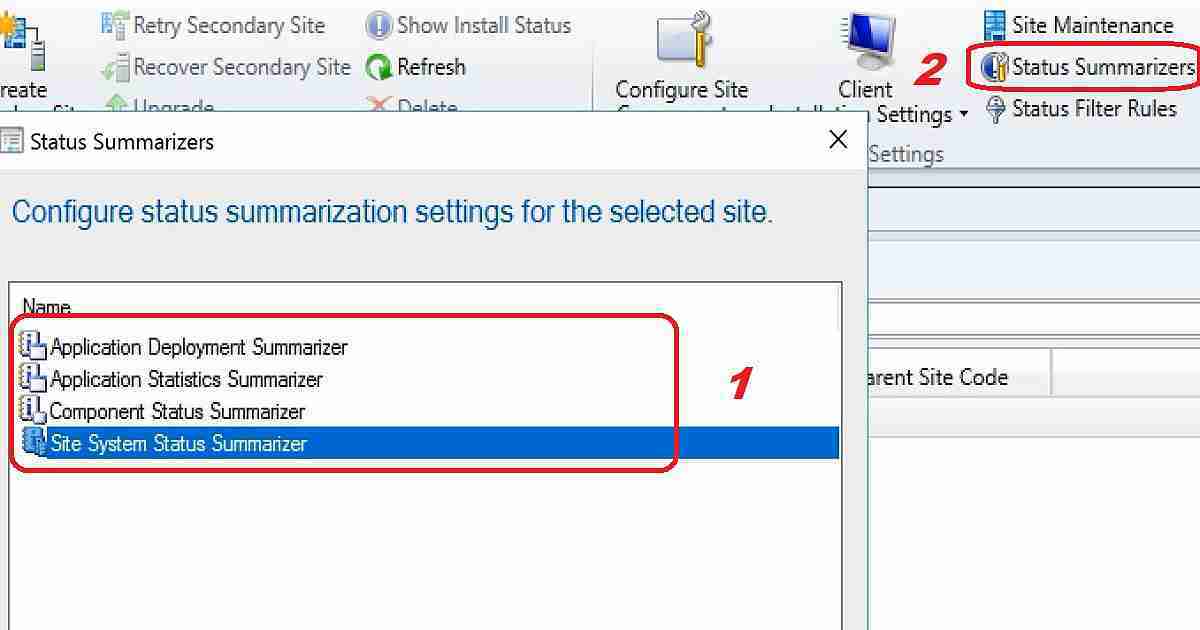
Application Deployment Summarizer – The application deployment summarizer can be used to get SCCM clients’ application deployment status. To Configure application deployment summarize.
| What are the Options for Reconfiguring the SCCM Site & Component Status Summarizers? |
|---|
| Navigate via \Administration\Overview \Site Configuration\Sites – click on the status summarizer ribbon button. |
| In the Status Summarizers dialog box, click Application Deployment Summarize and Edit. |
| In the Application Deployment Summarizer Properties dialog box, configure the required summarization intervals and then click OK. |
Default Settings of Application Deployment Summarizer Frequency of status updates for deployment was modified in the last 30 days Number of Minutes: 60. The frequency of status updates for deployment was altered in the last 31 to 60 days. Number of Hours: 24. The frequency of deployment status updates was modified over 90 days ago. Number of days: 7
The Application Statistics Summarizer specifies how often application statistics should be updated. Intervals are based on the date the application was last modified. To change the application Statistics Summarizer configuration, follow the same steps mentioned above.
Summarization Frequency Frequency of the status updates for deployment was last modified in the last 30 days Number of minutes 240 Frequency of the status updates for deployment was later changed in the previous 31 to 90 days Number of hours 240 Frequency of the status updates for deployment was last modified over 90 days Number of days 7
Component Status Summarizer allows the setting of a threshold for each SCCM component. There are two (2) types of thresholds: the warning threshold and the critical threshold. We have options to disable SCCM status summarization for component status. Also, there are options to set the component status replication priority to the parent site.
To change the component Status Summarizer configuration, follow the same steps mentioned above to change the configuration.
Site System Status Summarizer allows disabling status summarization for site system status. It also allows you to set the replication priority of site system status for the parent site in your SCCM hierarchy. It gives the option to set a status summarization schedule. However, I have never used this option.
How to Reset the Critical Site or Component Status Summarizer Counters
The site System summarizer threshold allows you to specify the free space for displaying warning or critical icons in the site system. To change the configuration of Site System Status Summarize, follow the steps mentioned above.
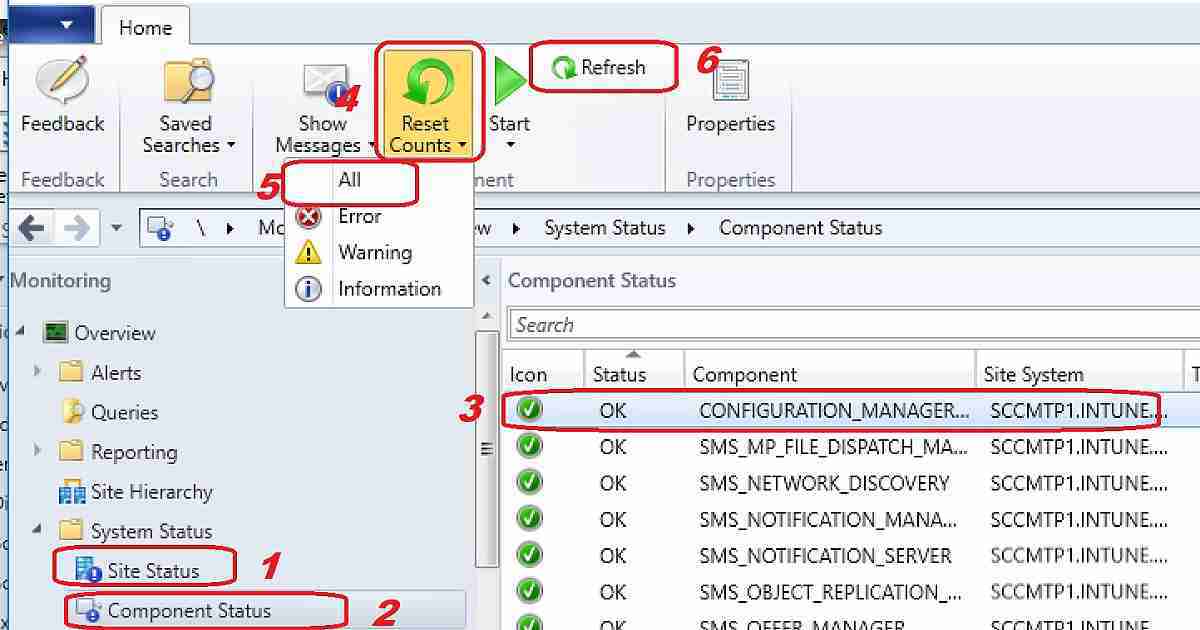
The site and component status summarizer count can be reset from the SCCM console monitoring workspace. This will help eliminate some red alerts from your SCCM monitoring console.
How Do You Reset the SCCM Critical Site Status Summarizer Counters?
\Monitoring\Overview\System Status\Site Status
- Open the SCCM CB console
- Navigate via \Monitoring\Overview\System Status\Site Status
- Select the site status message you want to reset
- Click on the ribbon – Reset Counts icon
- As you can see in the video tutorial, click the Refresh button to make RED alerts GREEN.
How Do You Reset the SCCM Critical Component Status Summarizer Counters?
\Monitoring\Overview\System Status\Component Status
- Open the SCCM CB console
- Navigate via \Monitoring\Overview\System Status\Component Status
- Select the component status message you want to reset
- Click on the ribbon – Reset Counts icon
- As you can see in the video tutorial, click the Refresh button to make RED alerts GREEN.
Resources
Status Message Queries – Track Who Deleted Modified Changed SCCM Settings
We are on WhatsApp now. To get the latest step-by-step guides, news, and updates, Join our Channel. Click here. HTMD WhatsApp.
Author
Anoop C Nair is Microsoft MVP from 2015 onwards for consecutive 10 years! He is a Workplace Solution Architect with more than 22+ years of experience in Workplace technologies. He is a Blogger, Speaker, and Local User Group Community leader. His main focus is on Device Management technologies like SCCM and Intune. He writes about technologies like Intune, SCCM, Windows, Cloud PC, Windows, Entra, Microsoft Security, Career etc…




hello,
Not very helpful when you have a “site status” system role status flagged as “critical” and there are no space issue, no errors nor warnings in the “messages”.
i checked the registry on the impacted server : HKLM\SOFTWARE\Microsoft\SMS\Operations Management\SMS Server Role\SMS Software update point
and see the DWORD KEY “Availability State” with value 0 (which should be OK)
Still don’t know why the status is critical.
any idea?
StaffI normally look at the log file related to site components… hman.log sitecomp.log etc to get more details about errors. If you don’t find any critical issues related to components in logs then you can easily ignore there critical status because this status could be because of the threshold you set in the component summary. Log files Details ->https://www.anoopcnair.com/sccm-logs-files-list-of-configmgr-log-files/
Hi. Thank you for a good site.
How do you automatically reset old critical alerts in the Component Status overview?
I learned they are reset at midnight, but i would like to reset it also after a short period of time after its last error in the messages. For instance a critical alert on the SMS_Execute component, but when i check the messages, it was solved 10 hours ago, yet there is still a critical alert in the overview.
Anyway to reset it at an interval after a critical alert?
Thanks