






Microsoft Introduces New Windows Enrollment Attestation Feature in Intune
Microsoft is Introducing a New Windows Enrollment Attestation in Intune. Today, many users are facing security problems. Security is critical, so we have to keep our data safe from threats. Microsoft Intune always brings the best security features.
This time, Intune is introducing a New Windows Enrollment Attestation. Windows Enrollment Attestation helps organizations verify the security of devices at a hardware level, offering more defence against cyber threats.
The June 2024 public preview of Windows Enrollment Attestation is rolling out. I think this is the best security enhancement. Windows device enrollment attestation is a new security check that ensures devices are safe when they join a network.
Windows Device Enrollment Attestation ensures that it’s done safely when a computer or device joins a company’s system. That means Windows device enrollment attestation helps you understand which computers or devices are to be easily attacked.

| Index |
|---|
| Microsoft Introduces New Windows Enrollment Attestation Feature in Intune |
- New Manual Enrollment Method For Personal Windows Devices In Intune | Pilot Status And Rollout Explained
- 2406 Microsoft Intune New Features June Update
- New Granular Permissions for Endpoint Security Workloads in Intune
- Restrict Users from Importing MS Edge Browsing History with Intune
- Intune Guide to Turn Off Tracking App Launches
What is Windows Enrollment Attestation in Microsoft Intune?
Microsoft Introduces New Windows Enrollment Attestation Feature in Intune
Another part is the Windows enrollment attestation feature in Microsoft Intune, which started rolling out. The report provides detailed insights into the security status of enrolled devices.
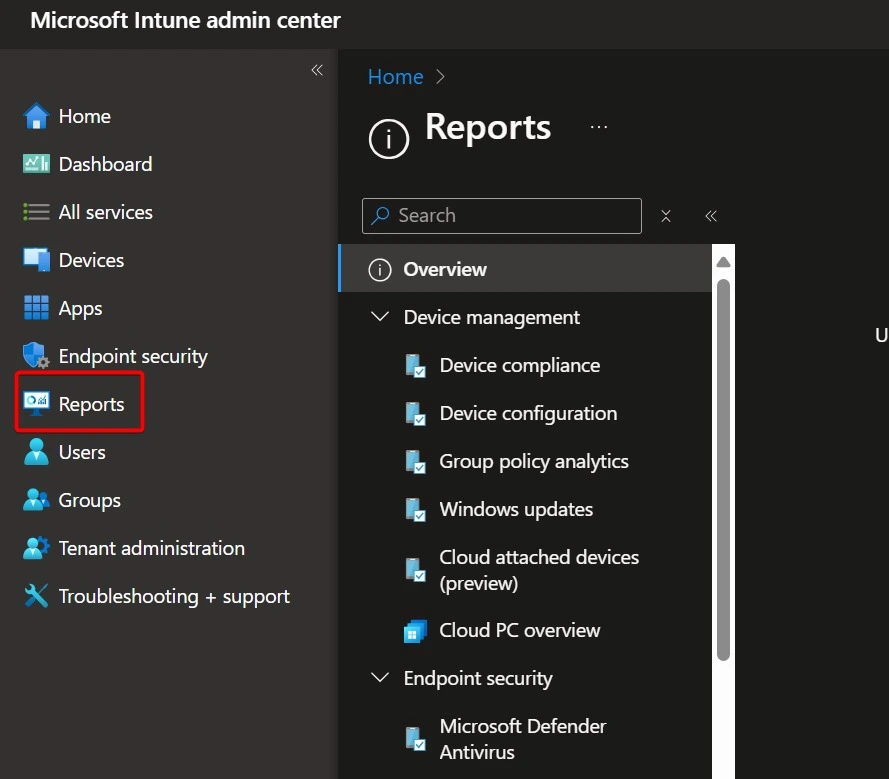
- You can check the device attestation report through Microsoft Intune.
- Open the MS Intune admin centre.
- Then click on the option Report, which shows the screenshot below.
| New IntuneFeature | Info |
|---|---|
| Windows Enrollment Attestation | This feature ensures that Windows devices store their enrollment credentials securely in the TPM 2.0 hardware chip. Intune checks this secure storage, which confirms that the device has enrolled safely. |
Note: Windows Enrollment Attestation will be available in public preview by the end of June.
This new update also Introduces a new feature to enhance security by ensuring critical sign-up details are kept in a particular secure part of the device called TPM 2.0.
See more: FIX Intune Windows Enrollment Invalid_Client Error.
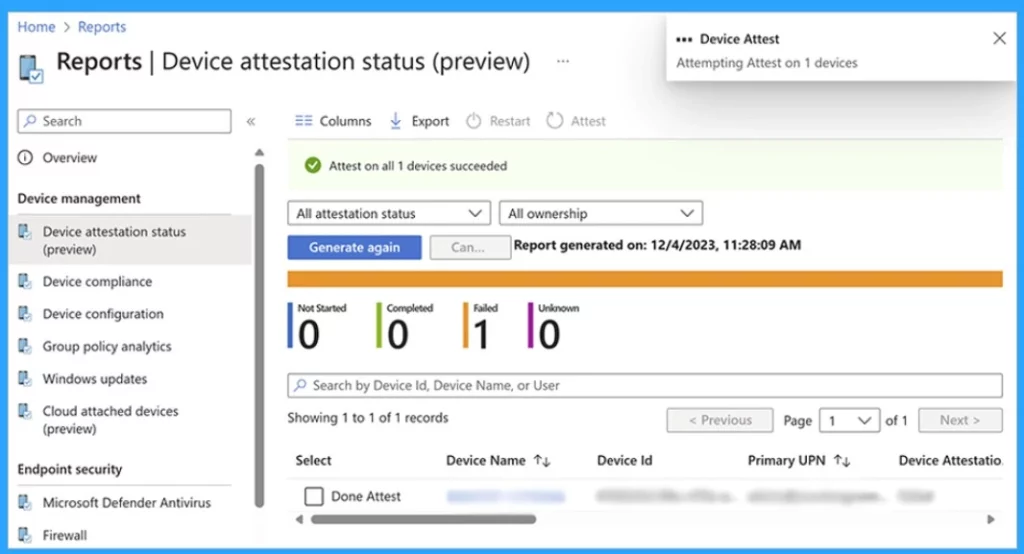
- The attestation process is a security check that ensures a device is safe in a company’s network.
- Devices that pass the attestation are shown as completed in the report.
- The device needs a special security chip called TPM 2.0 for this check.
- TPM 2.0 will sign up for information safely.
- If it’s not secure, you can try again with the “Device Attest” option.
- Fix MDM Enrollment Error Code 0x80180001
- FIX Intune Windows Enrollment Invalid_Client Error
- Intune Advisory TPM Attestation Error 0x81039001 with Windows Autopilot
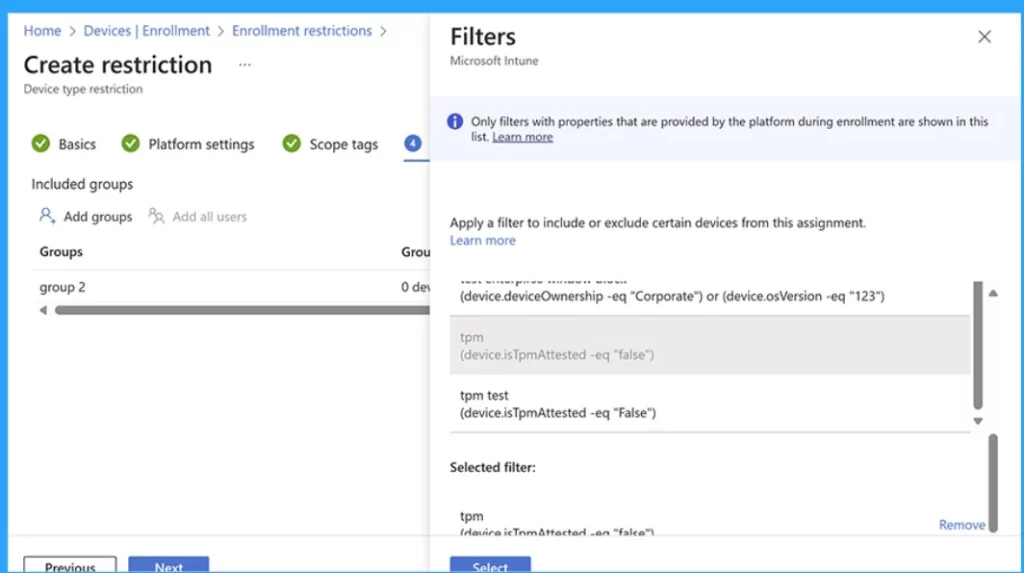
After checking all the devices in your organization, you can select a new check called isTpmAttested to make your network safer. This check can stop a device from joining your network if it doesn’t pass a security test when it tries to sign up.
- The screenshot below is an example of enrollment restriction filters.
Reference
What’s new in Microsoft Intune June 2024
We are on WhatsApp now. To get the latest step-by-step guides, news, and updates, Join our Channel. Click here. HTMD WhatsApp.
Author
Anoop C Nair is Microsoft MVP! He is a Device Management Admin with more than 20 years of experience (calculation done in 2021) in IT. He is a Blogger, Speaker, and Local User Group HTMD Community leader. His main focus is on Device Management technologies like SCCM 2012, Current Branch, and Intune. He writes about ConfigMgr, Windows 11, Windows 10, Azure AD, Microsoft Intune, Windows 365, AVD, etc.


Discussion