






Fix MDM Authentication Error Code 80180002
Let’s discuss fixing the MDM authentication error code 80180002. Microsoft recognized an error that occurred during MDM authentication. As you all know, mobile device management is essential in every organization’s management of mobile devices to ensure data security.
Enrolling devices into MDM solutions helps users ensure data security. Authentication is the primary concern of every organization when enrolling mobile devices. However, many users fail to complete the authentication correctly.
Users may get Authentication errors during Device Enrollment. This is a prevalent issue during MDM device enrollment. Here, the users get Error Code 80180002, which typically occurs during the enrollment stage, and many users report this issue.
The End user did not know how to fix this type of error. In this blog post, I will help you fix error code 80180002. We can avoid such issues by carefully proceeding with the authentication process on MDM devices. This blog post will help you to fix this error code.

| Index |
|---|
| Fix MDM Authentication Error Code 80180002 |
| Reasons for Getting MDM Authentication Errors |
| How to Fix MDM Authentication Error |
- Fix MDM Enrollment Error Code 0x80180001
- FIX SCCM Agent Installation Error 0x80200010
- Known Issue Error 0x800f0982 and Fix for Windows Server OS
Fix MDM Authentication Error Code 80180002
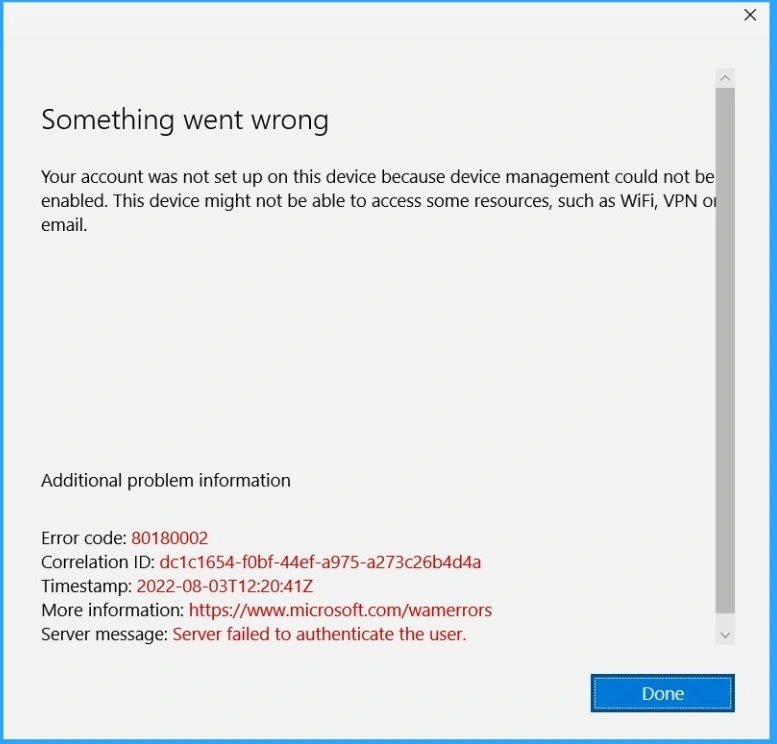
Errors in MDM Authentication are the biggest problem for users in most organizations. This error occurs because the Mobile Device Management (MDM) server failed to authenticate the user. Without proper authentication, we can’t proceed with the steps for MDM Device Enrollment.
Read More – Troubleshoot MDM Enrollment Error Code 80180004
Reasons for Getting MDM Authentication Errors
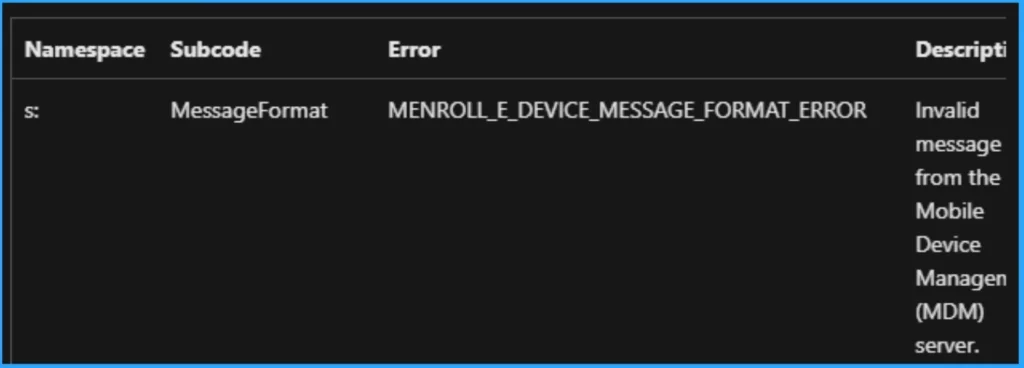
MDM is crucial for users to maintain security for Mobile devices. Many methods are available for MDM authentication. OTP and Directory Credentials are the standard authentication methods. Users face error issues with every authentication method. The common reasons are as follows.
| Major Reasons for MDM Authentication Errors |
|---|
| Usage of an invalid username or password |
| Usage of expired password |
How to Fix MDM Authentication Error
Before fixing MDM authentication errors, we can avoid significant reasons for such errors. The above table shows some reasons for this issue. You should consider these reasons and avoid them during MDM authentication.
Before contacting your system administrator, we can try some steps to resolve the error codes like 80180002. The following are the methods to fix error code 80180002.
- Check Your Network Connectivity – You should ensure your device has a stable Network connection. A poor network connection may have caused an authentication error.
- Verify Credentials – Double-check your credentials. Make sure to use the correct username and password.
- Check Time and Date Settings – Incorrect dates and times lead to authentication errors. Verify your device clock is accurate.
- Retry Enrollment – Authentication errors may be temporary. You should retry the enrollment process after some time.
- How to Solve Sysprep Error 0x80073cf2
- Fix Windows Autopilot Device Registration Errors 802 806 808 640
We are on WhatsApp now. To get the latest step-by-step guides, news, and updates, Join our Channel. Click here. HTMD WhatsApp.
Author
Anoop C Nair is Microsoft MVP! He is a Device Management Admin with more than 20 years of experience (calculation done in 2021) in IT. He is a Blogger, Speaker, and Local User Group HTMD Community leader. His main focus is on Device Management technologies like SCCM 2012, Current Branch, and Intune. He writes about ConfigMgr, Windows 11, Windows 10, Azure AD, Microsoft Intune, Windows 365, AVD, etc.


Discussion