






SCCM 1806 New Features Changes -in a Video Walkthrough
Let’s discuss SCCM 1806 New Features Changes – in a Video Walkthrough. The SCCM 1806 production version is available via the fast ring (opt-in) channel. I upgraded my lab environment, which was a very smooth upgrade.
Microsoft released the SCCM 1806 update via a SLOW ring on August 17, 2018. It is a Slow Ring Production Version.
No need to install the hotfixes available for the 1802 version (1802 known issue). You can skip the hotfixes available for 1802 without making any prior arrangements.
In this post, I will give you an overview of new or enhanced features of the SCCM 1806 production version. This post also includes a video walkthrough of the new features.

Table of Contents
Video SCCM 1806 New Features Walkthrough
A quick overview of SCCM 1806 new features in the following video. Please subscribe to my YouTube channel if you find the videos useful.
SCCM CMPivot Tool
CMPivot is a new in-console utility that provides access to your environment’s real-time device state. It immediately runs a query on all currently connected devices in the target collection and returns the results.
I would recommend reading my previous post to get more details.
- How to Upgrade SCCM Infra to 1806 Production Version
- SCCM 1806 Production Version is Released in Slow Ring
Primary Server Passive Mode Options –SCCM 1806 New Features
The high availability of a stand-alone primary site server role is an SCCM-based solution for installing an additional site server in passive mode. The site server is in passive mode in addition to your existing site server, which is in inactive mode.
A site server in passive mode is available for immediate use when needed. I recommend reading the Microsoft document for more details about the primary server’s passive mode.
A site server in passive mode:
- Uses the same site database as your site server in active mode.
- It doesn’t write data to the site database when it’s massive.
- Uses the same content library as your site server in active mode.
Flow chart details of Primary server passive mode
- Flowchart – Set up a site server in passive mode
- Flowchart – Promote site server (planned)
- Flowchart – Promote site server (unplanned)
[Related Post – How to Upgrade SCCM Infra to 1806 Production Version]
SCCM 1806 – Management Insights
Management Insights will help you gain valuable insights into the current state of the SCCM 1806 environment based on data analysis in the site database.
One of the scenarios in the management insight would be useful for better understanding your environment and taking action based on that insight.
I have explained all the management insights of SCCM 1806 in the video tutorial above. The log file for management insight rules is SMS_DataEngine.log on the site server.
Eliminate Cloud DP. Instead, use Cloud Management Gateway.
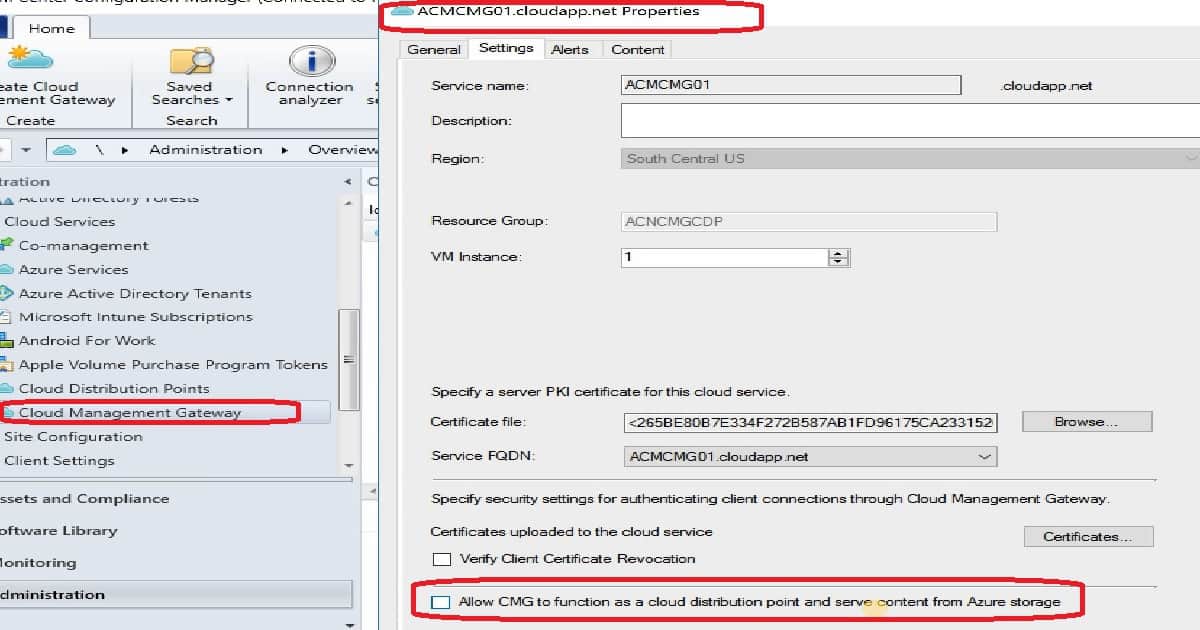
With SCCM 1806, you have an option to avoid creating Cloud DP. Instead, the content can be downloaded from the Cloud Management Gateway (CMG).
I would recommend avoiding creating Cloud DP for your future deployments of SCCM 1806 or later.
SCCM CMG can now also serve content to clients. This CMG functionality reduces the required certificates and cost of extra Azure VMs.
To enable this feature, on the Settings tab of the CMG properties, enable the new option to Allow CMG to function as a cloud distribution point and serve content from Azure storage.
Partial Download support in client peer cache to reduce WAN utilization
SCCM 1806 or later Client peer cache sources can now divide content into parts. These parts minimize the network transfer to reduce WAN utilization.
The management point provides more detailed tracking of the content parts. It tries eliminating more than one download of the same content per boundary group.
You can set this partial download of SCCM content up from the SCCM 1806 console – Hierarchy settings properties.
- Set up boundary groups and peer cache sources. Check out the Boundary group options for peer downloads. Allow peer downloads in this boundary group.
- Go to the Administration workspace in the Configuration Manager console, expand Site Configuration, and select Sites. Click Hierarchy Settings in the ribbon.
- On the General tab, enable the option to Configure client peer cache sources to divide content into parts.
- Create a required deployment with content.
Transition new workloads to Intune using co-management
SCCM 1806 new features include options to transition new workloads to Intune via the co-management option of Windows 10. The following workloads are now able to transition from Configuration Manager to Intune after enabling co-management:
- Device configuration: This workload lets you use Intune to deploy MDM policies while continuing to use SCCM to deploy applications.
- Office 365: Devices don’t install Office 365 deployments from SCCM 1806 or later.
- Mobile apps: Any apps deployed from Intune are available in the Company Portal. Apps you deploy from SCCM are available in the Software Center.
Other SCCM 1806 New Features
The rest of the SCCM 1806 new features are explained in the Video tutorial. The following are some of my favorite changes to SCCM 1806, which I explained in the above video tutorial.
I recommend reading Microsoft documentation on new features to get all the details.
- Support for multiple hierarchies to one Intune tenant
- Phased deployment of applications
- MSIX Support for new Windows app package formats
- Improvements to phased deployments
- A network access account is not required for some scenarios
- Third-party software updates
- Filter automatic deployment rules by software update architecture
We are on WhatsApp. To get the latest step-by-step guides and news updates, Join our Channel. Click here –HTMD WhatsApp.
Author
Anoop C Nair is Microsoft MVP! He is a Device Management Admin with more than 20 years of experience (calculation done in 2021) in IT. He is a Blogger, Speaker, and Local User Group HTMD Community leader. His primary focus is Device Management technologies like SCCM 2012, Current Branch, and Intune. He writes about ConfigMgr, Windows 11, Windows 10, Azure AD, Microsoft Intune, Windows 365, AVD, etc.




Hi – The most liked feature of CB1806 is eliminate could DP. This configuration on CB1802 was costing my home lab around CAD.200 per month to maintain Azure VM running 24/7. Now, I will reactivate the CMG feature and starting using within CB1806.
I will definitely monitor Azure for any additional charges towards CMG.
Thanks for sharing brief outlook of new features in CB1806.
Ram
Hi Guys, can anyone share the doc which show all SCCM version with its main features.
For Eg in a table format (SCCM version and its current features).
StaffHow about this? https://docs.microsoft.com/en-us/sccm/core/get-started/technical-preview#features-in-recent-supported-technical-previews
Can anyone share which is the first version of SCCM which supports Win10.
StaffHere you go … https://www.anoopcnair.com/sccm-client-support/