






FIX – Error SCCM Azure AD Web App Already Exists
Let us learn about FIX – Error SCCM Azure AD Web App Already Exists. SCCM 1806 allows deploying Cloud DP using Azure Resource Manager (ARM). However, I don’t recommend using cloud DP. Rather, you can use CMG to download content.
Microsoft Endpoint Configuration Manager, earlier known as System Center Configuration Manager (SCCM), is a tool for controlling Windows-based devices within an Active Directory domain, which is deployed as a cloud-hosted solution within Azure.
Azure App hosts HTTP-based servicing for web applications, REST APIs, and mobile backends.
As SCCM is undergoing many co-management enhancements, we must delete and recreate the Azure AD Web app for testing purposes. This post will discuss issues related to the existing Azure AD Web app.

Table of Contents
What are Azure Services for Cloud Mgmt?
Deploying the Azure service for Cloud Management enables SCCM clients to authenticate with the site using the Azure Active Directory. You can also allow this tenant to discover Azure Active Directory resources.
- Setup SCCM CMG Azure Management Service Guide
- SCCM 2403 New Key Features and Improvements
- Supported Windows Server OS for SCCM Servers
I recommend reading the How to Create Azure Services for Cloud Management blog post for more details. The above blog post will help you build an Azure Service for cloud management from the SCCM console.
Azure AD Web Apps = Azure AD Server Apps
Issue – SCCM Azure AD Web App Already Exists Error
I hit an error while recreating the CMG (cloud Management Gateway). Even after deleting the existing Azure service created for Cloud Management, I could not create a new Azure Service for Cloud Management. I hit the below error:-
“An Azure AD Web app already exists for this tenant. Use the pre-existing app and click ok.”
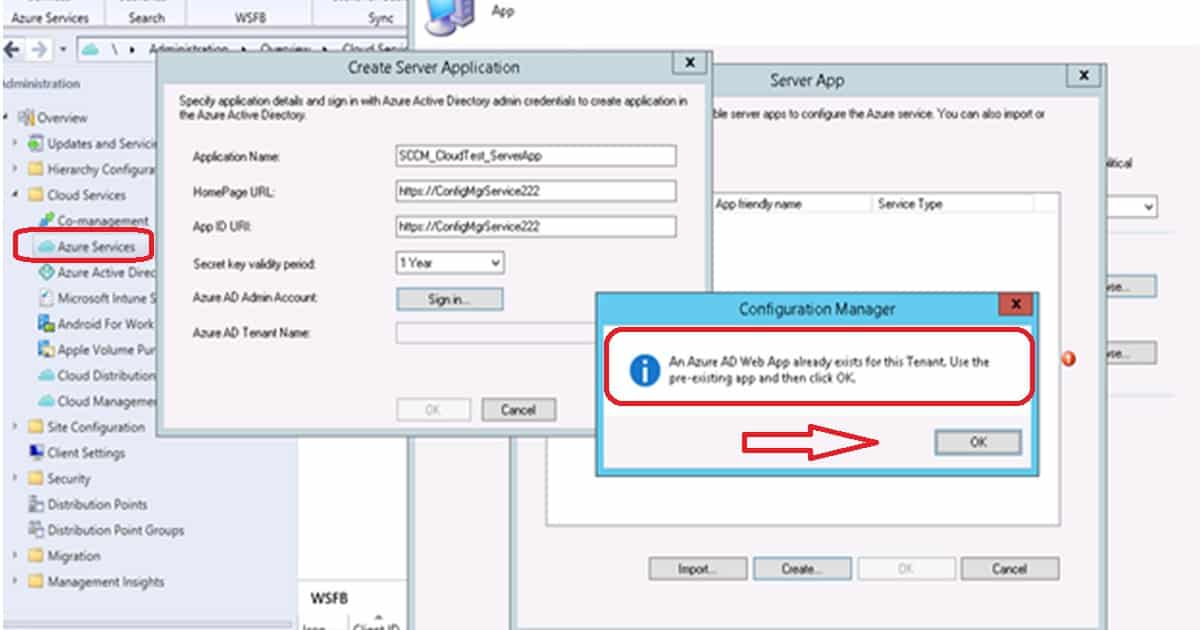
Even though I deleted the WEB APP in Azure for Authentication (Server App for SCCM) from the Azure portal, I got the above error. Let’s see what the quick fix to this issue is.
How to Fix Error Azure AD Web App Already Exists
I don’t recommend performing SQL DB changes to fix this issue with the Azure AD web application. It’s better to resolve the problem from the SCCM console itself.
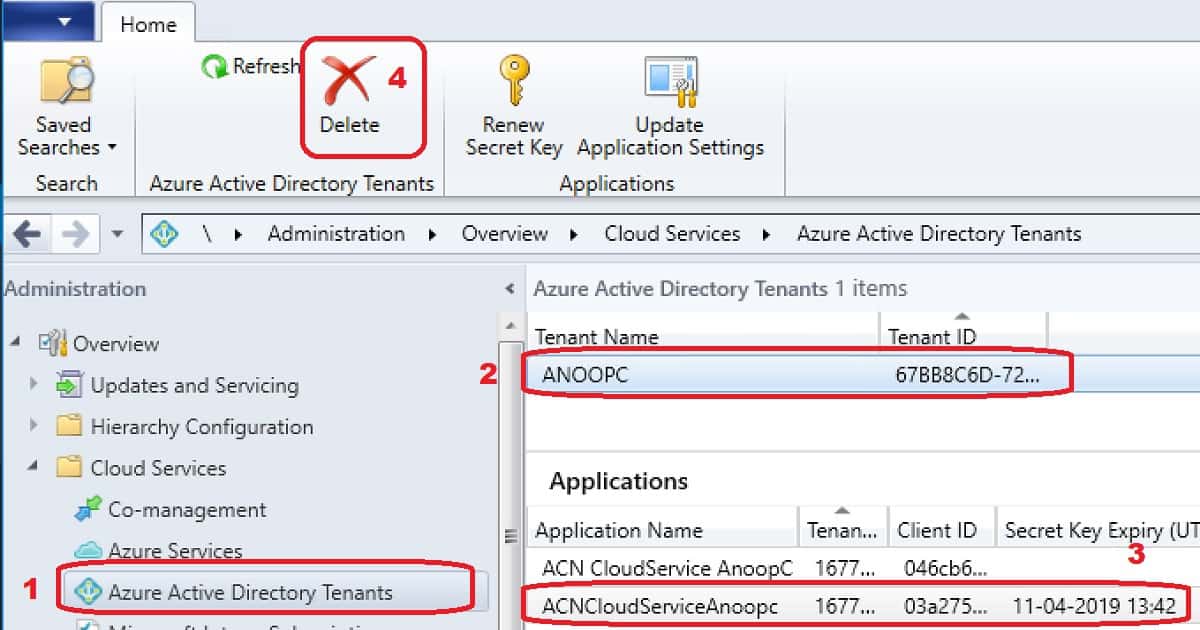
- Navigate to -> \Administration\Overview\Cloud Services\Azure Active Directory Tenants
- Select the Azure AD Tenant from the SCCM console List view
- Click on the DELETE button from the Ribbon menu to delete the tenant and ensure the Azuree apps and tenant are deleted.
- Now, recreate the applications using my previous post, How to create Azure services for cloud management.
Resources
- SCCM 1806 New Features and Changes – https://www.anoopcnair.com/sccm-1806-new-features-video-walkthrough/
- All Co-Management Video Tutorials in one post – https://www.anoopcnair.com/setup-co-management-video-tutorials/
- Integrate Apps with Azure AD – https://docs.microsoft.com/en-gb/azure/active-directory/develop/quickstart-v1-integrate-apps-with-azure-ad
We are on WhatsApp. To get the latest step-by-step guides and news updates, Join our Channel. Click here –HTMD WhatsApp.
Author
Anoop C Nair is Microsoft MVP! He is a Device Management Admin with more than 20 years of experience (calculation done in 2021) in IT. He is a Blogger, Speaker, and Local User Group HTMD Community leader. His primary focus is Device Management technologies like SCCM 2012, Current Branch, and Intune. He writes about ConfigMgr, Windows 11, Windows 10, Azure AD, Microsoft Intune, Windows 365, AVD, etc.




Hi Anoop,
On 1806, I’m not getting an option to delete the Applications themselves even though I have selected one. Instead, it’s only trying to delete the tenant. Not sure if you or anyone else knows of a workaround for this. I have a couple orphaned Applications under my tenant now.
StaffYes that is correct from AD Tenants node you won’t get an option delete the apps (Sorry – updated the post). I think you can delete the apps from Azure Services node? I’m not infront of console to confirm this.
Hi Anoop,
Thanks for getting back to me. It doesn’t look like the apps can be deleted from the Azure Services node either. When creating an Azure Service it looks like you can only create the tenet application. In my case, I hadn’t given my App Registration the correct privileges to the proper resource group, so my Azure Service didn’t populate everything properly. After exiting out of that wizard, that’s when the tenet apps got orphaned since they cannot be selected again.
StaffWhich version of SCCM .. Is it 1806?
Yeah 1806 with the first hotfix installed.
StaffDo you think deletion of application from Azure AD will help? I recommend to delete the apps from both the places (Azure portal and SCCM) before recreating it.
I have deleted the app registrations from Azure AD. Didn’t have anywhere I could do the same in the SCCM console. I put in some feedback on this issue so hopefully someone from their team will follow up. According to the Ignite 2018 Chalk Talk session I attended, someone actually checks the feedback submitted.