





How to Change Parent SCCM Site of SCCM Primary Server and Simplify Hierarchy ConfigMgr
How to Change Parent SCCM Site of SCCM Primary Server and Simplify Hierarchy ConfigMgr. SCCM 2007 End of Support 9th July 2019 Get Ready for Upgrade. This is the first part of this series of posts.
Through this post, I’m trying to analyse the impact of changing the parent site of a primary site (Move a primary site in the SCCM hierarchy).
This process involves two phases. The first step is to detach the primary server from the hierarchy and wait until all the objects are unlocked. The next phase is to attach the primary server back to the hierarchy but to a different parent site (central site).
In this post (Part 1), I’ll cover detaching the primary server from its parent site. Part 2 is available now.

- How to Change SCCM Parent Site of SCCM Primary Server Simplify Hierarchy Part 2 ConfigMgr
- SCCM 2309 Hotfix KB26129847 Client Discovery Data Fix
- SCCM 2303 KB25073607 Hotfix Client Update Fixes
Table of Contents
Change Parent SCCM Site of SCCM Primary Server and Simplify Hierarchy
I have a three-tier hierarchy that consists of three primary servers. I want to detach the PR3 Tier 3 server from the PR2 Tier 2 server and attach it to the Central Tier 1 server.

This will help simplify your hierarchy in a real-world scenario if you’re not utilizing Tier 2 servers much.
- Central Site (CEN – ACNSCCM07PRI) – Tier 1
- Child Primary Site (PR2 – ACNSCCM07PRI2) – Tier 2
- Child Primary Site (PR3 – ACNSCCM07PRI3) – Tier 3
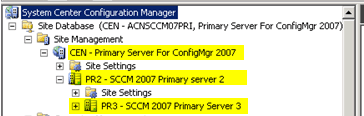
Note: During this analysis (in each phase), I tested the client’s (which is assigned to the affected site PR3) functionality. Everything worked fine, and even the advertisement created at the PR2—Tier2 site also worked fine.
Detach the Primary Server from its Parent Site
As you can see in the picture below, the collections, packages, Advertisements, Software Update objects, and Operating System Objects (which are replicated down from “Tier 1” and “Tier 2”) have been locked at the “PR3 Tier 3” console.
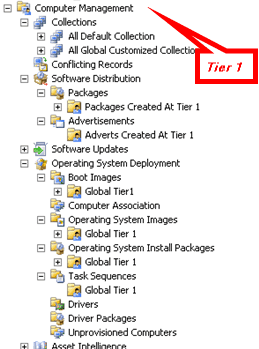
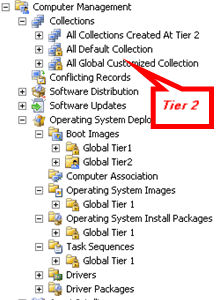
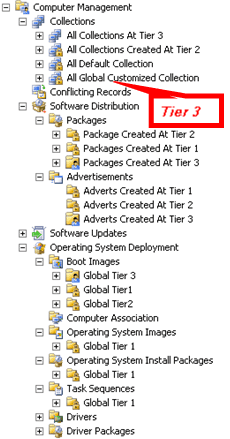
For testing purposes, I’ve created separate collections, packages, advertisements, etc., at each level—Tier 1, Tier 2, and Tier 3—so that it would be easy to understand after breaking the parent-child relations. Have a look at the above picture for more details.
1. To detach the Tier 3 Primary server from the hierarchy, open the PR3—Tier 3 site properties—> Click on Set Parent Site –> Select Central Sites –> Click OK.
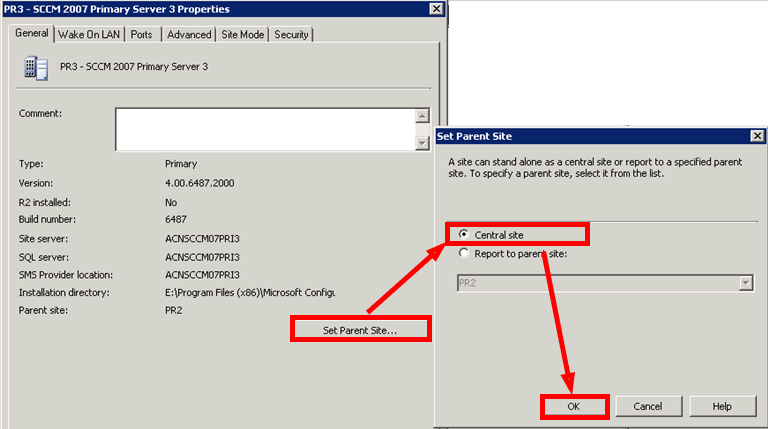
Detachment is completed. Very easy, right? Yes!
2. Check Hman.log at “PR2 – Tier2” and “PR3 – Tier3” servers for verification.
- Detaching site PR3 from site PR2
- Sent the actual site control image to site PR2
- Processing site control file: Site PR3 File E:\Program Files (x86)\Microsoft Configuration Manager\inboxes\hman.box\WMNUDEUJ.CT2
- Update the Sites table: Site=PR3 Parent=
- There is no parent site, so there is no need to forward any site control images.
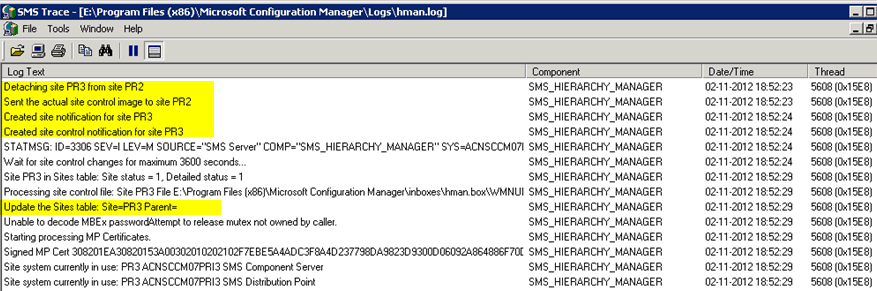
Hman.log at “CEN – Tier 1” server
Site PR3 is detaching from site PR2
I am deleting site PR3 from the site control and sites table because it detaches from site PR2.
Also, the Sitectrl file has been modified, as the following picture shows.
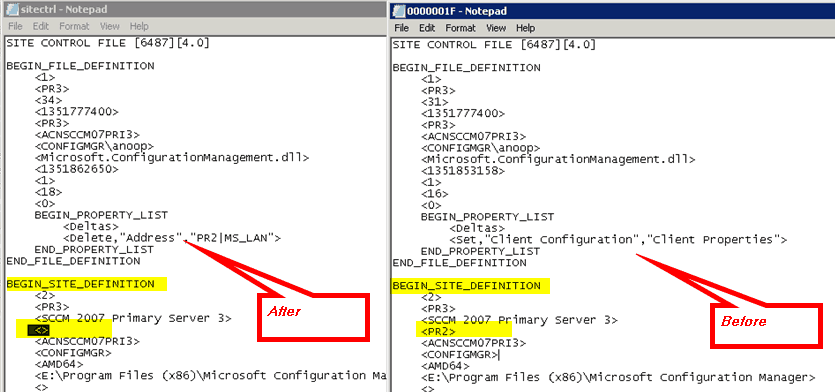
3. Now, you need to delete the Standard Sender Addresses for PR2 and PR3 from the “PR3—Tier3” and “PR2—Tier2” sites, respectively.
- Connect to PR2 site and delete the PR3 site Standard Sender Address
- Connect to PR3 site and delete the PR2 site Standard Sender Address
4. Remove the system accounts from respective local groups (“Administrators” and “SMS_SiteToSiteConnection_PR2”) of both “PR3 – Tier3” and “PR2 – Tier2” servers.
5. Wait until all the “.SHA” file/s processing is finished. There could be separate “.SHA” files for each component; however, I’ve noticed it for components like Collection Evaluator and SMS Object Replication Manager. You can verify the respective log files to review the status.
Resetting update flags for collection SMSDM005
**********~Processing file PR3.SHA
This process will take time, depending on the objects (collection, packages, Ads, Software Updates, operating system Objects, etc.) in your environment. It will change the settings of all these objects and remove the lock symbol on them.

6. Once the detachment process is finished, you’ll see that all the objects at the “PR3” site server are unlocked. Have a look at the following picture for more details.
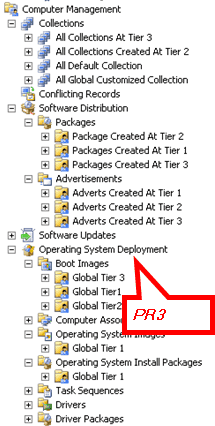
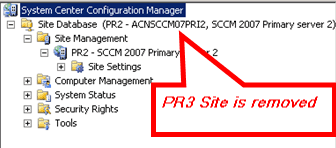
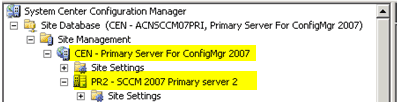
7. Verify the central server (CEN—Tier 1 Site). You should be able to see only the PR2 site, which means the PR3 site has been successfully removed from the hierarchy.
To be Continued….. Part 2
We are on WhatsApp. To get the latest step-by-step guides and news updates, Join our Channel. Click here –HTMD WhatsApp.
Author
Anoop C Nair has been Microsoft MVP from 2015 onwards for 10 consecutive years! He is a Workplace Solution Architect with more than 22+ years of experience in Workplace technologies. He is also a Blogger, Speaker, and leader of the Local User Group Community. His main focus is on Device Management technologies like SCCM and Intune. He writes about technologies like Intune, SCCM, Windows, Cloud PC, Windows, Entra, Microsoft Security, Career, etc..




Although your steps were documented well things don’t seem to be so easy as mentioned.
As detaching a grandchild primary [PR3] is a one-click process the replication was not.
Within our environment [SCCM 2007 hierarchy with tier 4 with 100,000 clients] this took more than 3 hours and had quickly raising of 100,000 replication files.
Making the site [PR3] a stand-alone one by detaching is primary target, but will impact more necessary steps within your ‘To be Continued…..Part 2’.
In addition central site [CEN] database will lose the reference to the elevated primary [PR3] and even worse site system roles, e.g. Distribution Points, will be deleted out of any software package and Distribution Point Groups.
Attaching back the site [PR3] as tier 2 did last another 12 hours [Backlog of 2 GByte of replication files].
Next we had to adjust the child primary sites [PR3] database with:
update pkgservers set sourcesite = ” where sitecode in (”, ”, ”,…)
and copied the content from pkgservers and pkgstatus back to the central site [CEN] database through a export|import functionality with a temp database in order to avoid duplicate keys.
Supported way would probably be to add all missing Distribution Points back to every package, in our case n > 6000, and start an update.