






Significant Impact Accessing Microsoft 365 Apps and Windows 365 Services
This has a significant impact on accessing Microsoft 365 Apps and Windows 365 Services. Due to a global service issue, users might have trouble accessing Microsoft 365 apps and services. This issue also impacts other services worldwide, including supermarkets, payment platforms, banking operations, stock markets, and flights.
According to the Microsoft 365 Service Health Status page, a “configuration change” in their Azure backend disrupts the connection between storage and computing resources. This issue is preventing users from accessing various apps and services.
There are reports of issues affecting Windows 365 and services and the Azure cloud platform. CrowdStike BSOD issues are also affecting Windows hosts. Users may encounter problems accessing Microsoft 365 tools, while Azure services could experience disruptions in various regions.
This post provides all the details about Access Issues with Microsoft 365 Apps and Services. This issue affects many apps and services users depend on for work and tasks. More details are available M365 issue MO821132 and Windows 365 Cloud PC issue WP821561.

- Update M365 Apps On MacOS And IOS Before July 2026 To Avoid Certificate Expiration Issues
- Update Security Baselines for Microsoft 365 Apps from Intune
- Copilot is in All Microsoft 365 Apps
- Deploy Microsoft 365 Apps MS Teams Using Intune MEM
Significant Impact Accessing Microsoft 365 Apps and Windows 365 Services
If you are experiencing issues with Microsoft 365 and W365 Cloud PC services, check the Microsoft 365 admin center to see if your tenant is affected by the incident. If you don’t see an incident listed, but suspect the same issue in different tenants, create a support ticket in the Microsoft 365 admin center.
The support team has more permissions and resources to investigate. To help create a ticket, you need Microsoft 365 admin privileges or should contact your organization’s admin.
The main issue was a change in the settings of Microsoft Azure backend. This change disrupted the connection between storage and compute resources, leading to connectivity problems. These problems then affected Microsoft 365 services that rely on these connections.
- Get Office Apps Inventory Report from Microsoft 365 Admin Center
- Microsoft Office 365 Online And Quick Repair
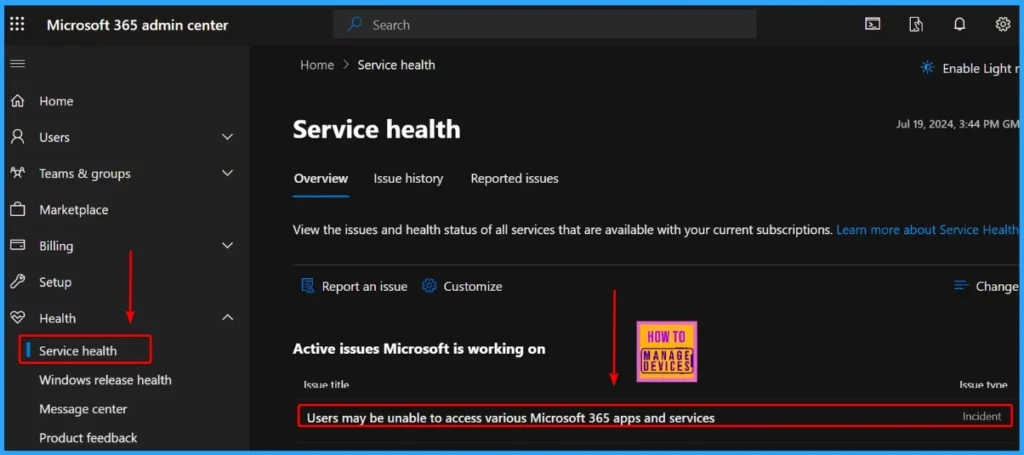
Current Status of Microsoft 365 Apps and Services Availability and Mitigation Efforts
Microsoft has noticed that its services are becoming more available as it works on fixing the issue. It also concentrates on finding and solving the leading cause of the problem. Microsoft’s top priority is this incident, which it is determined to resolve quickly.
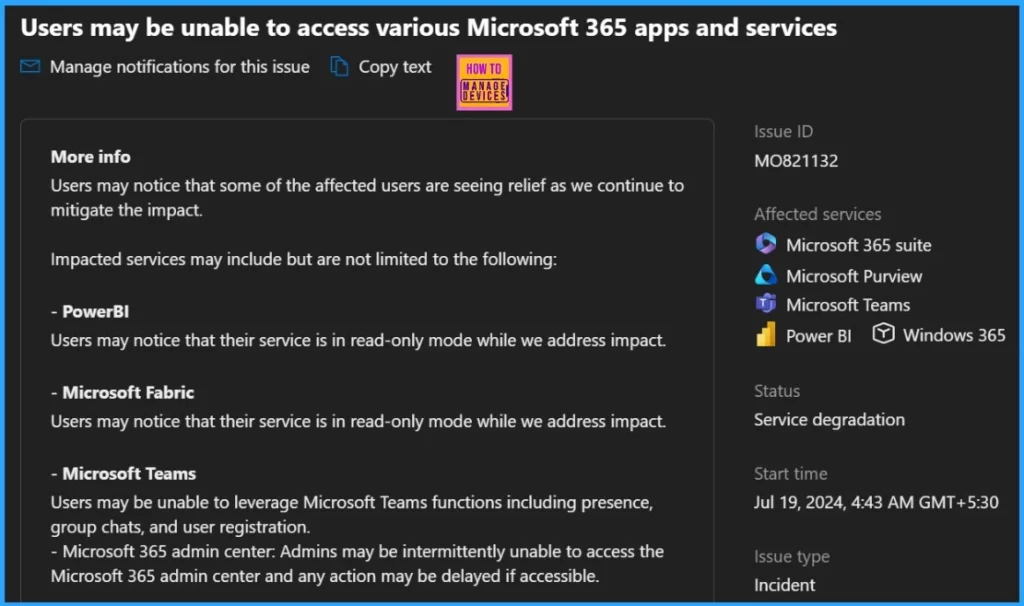
Services Still Impacted
As Microsoft works to fix the issues, some users might see improvements. The table below provides more details about the affected services.
| Service | Impact Description |
|---|---|
| PowerBI | Users may notice that their service is read-only while Microsoft addresses the impact. |
| Microsoft Fabric | Users may notice that their service is read-only while Microsoft addresses the impact. |
| Microsoft Teams | Users may be unable to use functions such as presence, group chats, and user registration. |
| Microsoft 365 Admin Center | Admins may have trouble accessing the admin center, and any actions may be delayed if accessible. |
Recovered Services Based on your Telemetry and Customer Signals
Let’s discuss the recovered services based on your telemetry and customer signals. The table below shows the recovered services based on your telemetry and customer signals.
| Recovered Services Based on your Telemetry and Customer Signals |
|---|
| Service |
| Microsoft Defender |
| Microsoft Defender for Endpoint |
| Microsoft Defender Experts |
| Microsoft Intune |
| Microsoft OneNote |
| OneDrive for Business |
| SharePoint Online |
| Windows 365 |
| Viva Engage |
| Microsoft Purview |
We are on WhatsApp now. To get the latest step-by-step guides, news, and updates, Join our Channel. Click here. HTMD WhatsApp.
Author
Anoop C Nair is Microsoft MVP from 2015 onwards for consecutive 10 years! He is a Workplace Solution Architect with more than 22+ years of experience in Workplace technologies. He is Blogger, Speaker, and Local User Group Community leader. His main focus is on Device Management technologies like SCCM and Intune. He writes about technologies like Intune, SCCM, Windows, Cloud PC, Windows, Entra, Microsoft Security, Career etc…




Discussion