






Microsoft Added New 160+ Apps on Intune Enterprise App Catalog
Let’s discuss Microsoft’s Addition of new 160+ Apps on Intune Enterprise App Catalog. Microsoft recently added over 160+ applications to its Enterprise App catalog, bringing the total number of Apps in the Enterprise Settings Catalog to 450. You can now submit any app for consideration using the public feedback form.
As you know, the Enterprise App Catalog is a collection of prepackaged Win32 apps. Microsoft designed and prepared this catalog to support Microsoft Intune. The Enterprise App Catalog is the best choice for users who want to add Windows Apps.
Admins can deploy more apps from the Enterprise App Catalog. The best thing about this new update is that users can send public feedback about different apps on the Enterprise App Catalog.
In this blog post, I will help you learn more about Microsoft’s addition of new 160+ apps to the Intune Enterprise App Catalog. You can easily send feedback about available apps on the Enterprise App Catalog. You can use Microsoft Graph PowerShell also to view a list of apps in the Enterprise App Catalog.


| Index |
|---|
| Microsoft New Added 160+ Apps on Intune Enterprise App Catalog |
| How to Send Feedback on the Public Feedback Form |
| Use MS Graph PowerShell to List All Available Intune Enterprise App Catalog |
- Create and Deploy Python Application with Intune Enterprise App Catalog App
- Install Zoom Client using Windows Enterprise App Catalog App with Intune
- Automate Intune App Deployment using Microsoft Graph API and PowerShell
- Block Hide BitLocker Recovery Key from Users using MS Graph and PowerShell
Microsoft New Added 160+ Apps on Intune Enterprise App Catalog
I mentioned that 160+ apps have been added to the Microsoft Intune Enterprise App Catalog. You can easily install these applications from the Intune admin center.
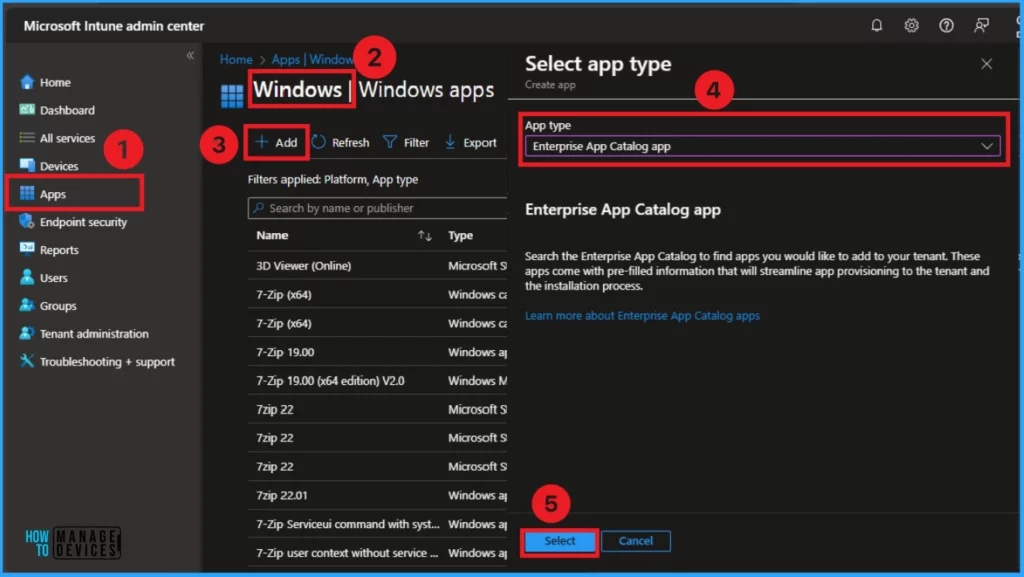
- Sign-in Microsoft Intune admin center
- Apps >Windows >+Add > +Create Policy
- Select Enterprise App Catalog from the App type
- Then Click on the Select Button
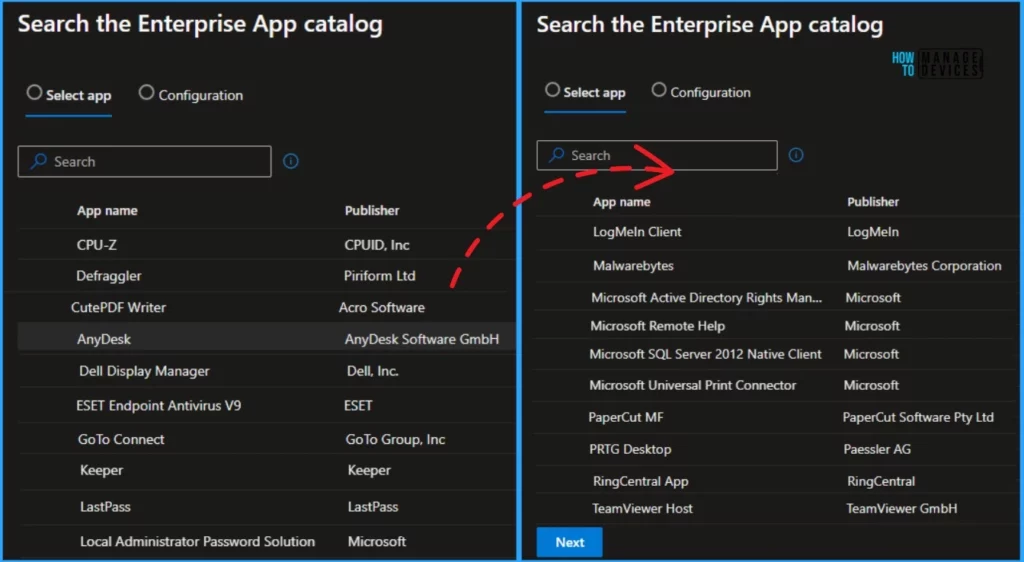
After that, you can see several apps included in the Enterprise App Catalog. You can easily install these applications quickly. The following table shows some apps added to the Enterprise App Catalog.
Daniel Bradley shared all this information in his social media posts.
| New Apps on Enterprise Catalog App |
|---|
| AnyDesk |
| CPU-Z |
| CutePDF Writer |
| Defraggler |
| Dell Display Manager |
| ESET AV |
| GoTo Connect |
| Keeper |
| LastPass |
| LAPS |
| LogMeIn |
| Malwarebytes |
| Microsoft Active Directory RMS |
| Remote Help > Microsoft Remote Help |
| Microsoft SQL Server Native Client 2012 |
| Microsoft Universal Print Connector |
| Visual Studio 2022 |
| Windows ADK for Win10 and Win11 |
| Cisco Umbrella agent |
| PaperCut MF |
| PTRG Desktop |
| RingCentral App |
| TeamViewer Host |
| Ultra VNC |
| Zscaler Client Connector |
How to Send Feedback on the Public Feedback Form
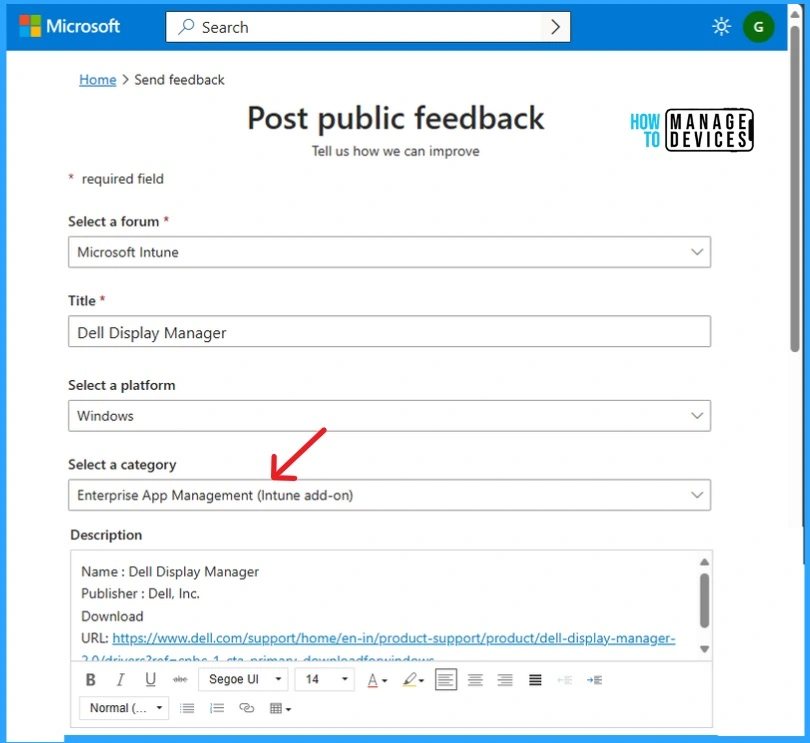
Microsoft allows users to send feedback to any app in the Enterprise App Catalog for consideration. This helps Microsoft improve or change different apps.
- Sign in to Post public feedback
- Fill the form with appropriate information like forum, title, Platform, Category and Description
- Select Enterprise App Management(Intune add-on) category
Use MS Graph PowerShell to List All Available Intune Enterprise App Catalog
Microsoft Graph PowerShell can list all available apps in the Enterprise App Catalog. To use MS Graph PowerShell for this, purchase a trial license of the Intune Suite; this will enable you to make the features available in your tenant so you can use the portal to review the available apps. Credits to Daniel Bradley.
- You must need Microsoft.Graph.Authentication PowerShell module installed on your workstation.
- You must have a Global Administrator account to consent to the required permissions with Connect-MgGraph.
- To list available apps in the Enterprise Catalog app, make a GET request to the /beta/deviceAppManagement/mobileAppCatalogPackages endpoint in Microsoft Graph.
- Use the script below to generate a report of all available applications and display them in a pop-out window.
- Use (PowerShell ISE or similar) to run the below script
Connect-MgGraph -scopes DeviceManagementApps.Read.All
$uri = “https://graph.microsoft.com/beta/deviceAppManagement/mobileAppCatalogPackages?`$apply=groupby((productId,productDisplayName,publisherDisplayName))&$top=10000&$orderBy=productDisplayName%20asc”
$Apps = Invoke-MgGraphRequest -Method GET -Uri $uri -OutputType PSObject | `
Select -ExpandProperty Value | Sort-Object ProductName
$Apps | Out-GridView
- Microsoft is Killing AzureAD MSOnline Powershell Modules
- How to Generate Intune Device Inventory Report using Graph API
- Install Evernote with Intune Enterprise App Catalog App
- Install GitHub CLI with Intune Enterprise App Catalog App
We are on WhatsApp. To get the latest step-by-step guides and news updates, Join our Channel. Click here –HTMD WhatsApp.
Author
Anoop C Nair has been Microsoft MVP from 2015 onwards for 10 consecutive years! He is a Workplace Solution Architect with more than 22+ years of experience in Workplace technologies. He is Blogger, Speaker, and Local User Group Community leader. His main focus is on Device Management technologies like SCCM and Intune. He writes about technologies like Intune, SCCM, Windows, Cloud PC, Windows, Entra, Microsoft Security, Career etc…


Discussion