






BitLocker Recovery Boot Issue After July 2024 Security Update
News Alert! BitLocker Recovery Boot Issue After July 2024 Security Update. Microsoft Identified a crucial security update that caused some devices to boot into BitLocker recovery. Recently, users faced a problem after installing the July 2024 Windows update (KB5040437).
As you know, Windows update KB5040437 (OS Build 22621.3880) is a recent update that aims to improve your system and fix issues. With the latest Windows security updates, some users have faced problems. Microsoft reports the issue officially in their document.
Microsoft recently announced the Known issue of Devices that Might Boot Into BitLocker Recovery, but Microsoft does not currently have any fixes for this. This issue is more likely to impact devices with the Device Encryption option.
If you recently updated your Windows system with the July 2024 security update, you may need a Bitlockery recovery screen. As you know, the Bitlockery recovery screen plays a critical role in data protection and system security. So, in this post, we can look at an overview of this known issue: ”Devices Might Boot Into BitLocker Recovery”.

- Intune Bitlocker Drive Encryption A Deeper Dive To Explore
- Managing Windows Bitlocker Compliance Policy Using Intune | MS Graph | Grace Period
- Block Hide BitLocker Recovery Key From Users Using MS Graph And PowerShell
- Intune Bitlocker Drive Encryption A Deeper Dive To Explore
- Device Encryption – Bitlocker made Effortless
- Deciphering Intune’s Scope w.r.t Bitlocker Drive Encryption
- Bitlocker Recovery key Screen Prompt Issues | Error 0x800f0922 after installing August Patch KB5012170
| Index |
|---|
| Troubleshooting BitLocker Boot Failures After July 2024 Update |
| Solution for this Known Issue |
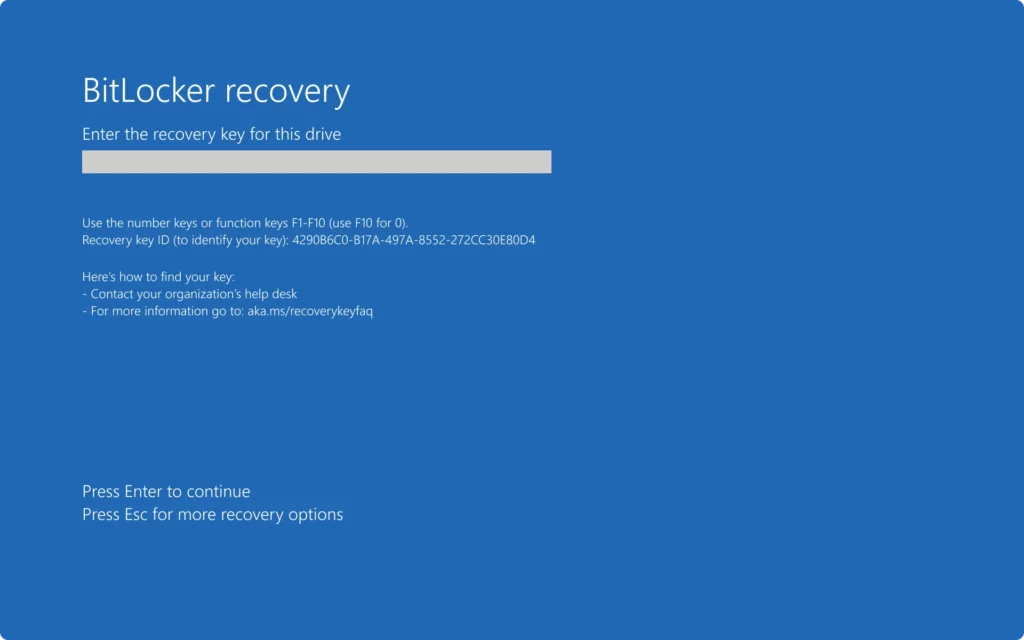
What is a Bitlocker Recovery?
If your device fails to unlock using the usual method, BitLocker recovery helps you to retrieve access.
BitLocker Recovery Boot Issue After July 2024 Security Update
Above, we discussed the details of this known issue ”Devices might boot into BitLocker recovery with the July 2024 security update. So why did this Bitlocker Recovery screen appear when we updated the KB5040437? That’s because of the Device Encryption.
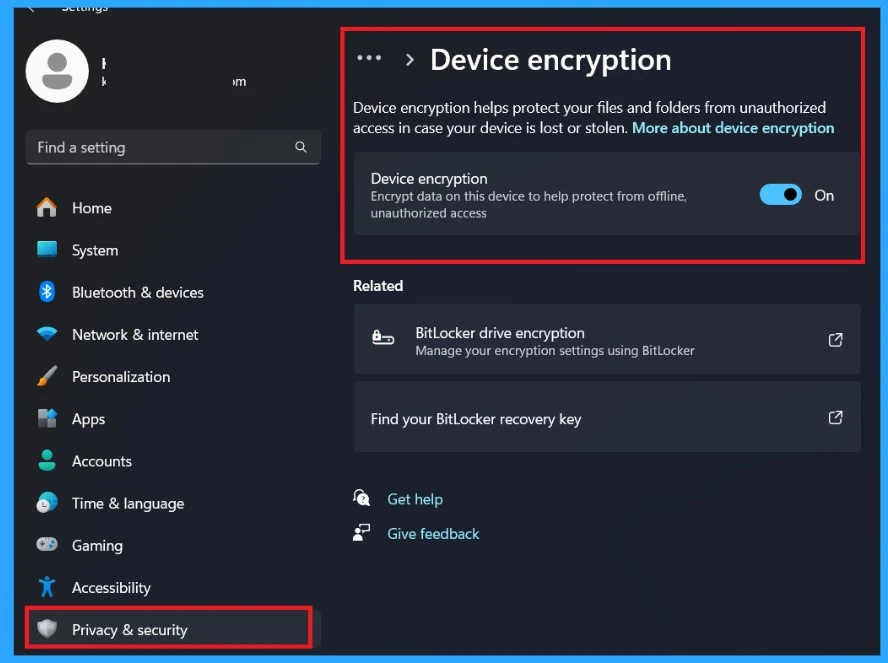
- Device encryption encrypts data on this device to help protect it from offline, unauthorized access.
- Device encryption helps to protect our files and folders from unauthorized access in case your device is lost or stolen.
- If you encounter this BitLocker Recovery screen after a Windows update, it’s likely because the Device Encryption setting has been enabled.
- You can check the Device encryption under Privacy & Security> Device encryption through Settings.
See More: New BitLocker Disk Encryption Policy for Intune Endpoint Security
When this happens, you might need to enter your recovery key from your Microsoft account to unlock your drive.BitLocker recovery helps you retrieve access to a drive protected by BitLocker. Common triggers include entering the wrong PIN too many times or system changes.
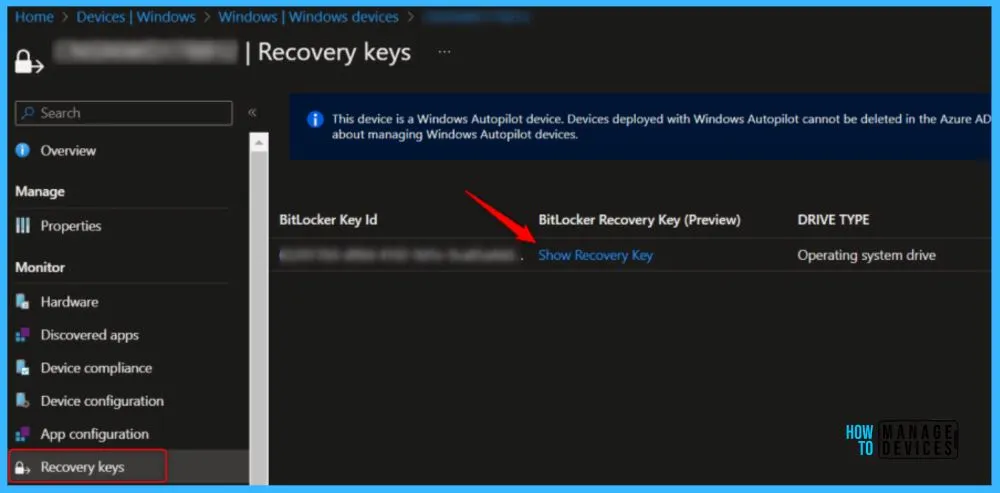
The screenshot below is from our post,” Ability to View BitLocker Recovery Key from Intune Company Portal Website Coming Soon.” If you want to know more about this, follow the link below.
See More: ”Ability to View BitLocker Recovery Key from Intune Company Portal Website Coming Soon”
| Affected Platforms | Info |
|---|---|
| Client | Windows 11 version 23H2, Windows 11 version 22H2, Windows 11 version 21H2, Windows 10 version 22H2, Windows 10 version 21H2. |
| Server | Windows Server 2022, Windows Server 2019, Windows Server 2016, Windows Server 2012 R2, Windows Server 2012, Windows Server 2008 R2, Windows Server 2008. |
- BitLocker Recovery Key Management from Microsoft Intune
- Fix MDM User License Error Code 0X80180018
- Important Things Must Do While Purchasing New Windows Laptop
Solution for this Known Issue
So, let’s check what the workaround for this issue is. When dealing with BitLocker recovery, ensure you enter the right recovery key or password. BitLocker is like a secret code that locks your computer to keep it safe.
When you set it up, Microsoft saves a key in your account. If you want to unlock your PC, you get an authentication code from your Microsoft account.
- So, First, you have to ensure you have access to your Microsoft account to retrieve the BitLocker recovery key.
- So that you can log in to the Microsoft account
- Go to the device section or bitlocker section
- Find your device and locate the recovery key
- with those recovery keys, you can enter those devices that are locked
Note: Microsoft has not announced any solutions; they are investigating this known issue. Soon you will get more information.
We are on WhatsApp now. To get the latest step-by-step guides, news, and updates, Join our Channel. Click here. HTMD WhatsApp.
Author
Anoop C Nair has been Microsoft MVP from 2015 onwards for 10 consecutive years! He is a Workplace Solution Architect with more than 22+ years of experience in Workplace technologies. He is also a Blogger, Speaker, and leader of the Local User Group Community. His main focus is on Device Management technologies like SCCM and Intune. He writes about technologies like Intune, SCCM, Windows, Cloud PC, Windows, Entra, Microsoft Security, Career, etc..




Hello Community
we have this issue, in the moment we check this. Clean the TPM and check the Bootorder. When we have completed this, the System is starting well and working well in the moment. All Devices are from HP
Regards