






Fix Software Update Deployment Issues with SCCM Clients with KB28458746
Let’s discuss the Fix Software Update Deployment Issues with SCCM Clients. Microsoft introduced hotfix KB28458746 to fix a software update deployment issue with Configuration Manager clients. This update is available now, and users can fix issues in a feature on demand.
As you know, Configuration Manager helps IT manage PCs and servers, keep software up-to-date, set configuration and security policies, etc. The Configure Manage Product team identified an issue in Microsoft Configuration Manager (SCCM) Version 2403.
Due to the issue with SCCM clients, Features on Demand failed to install with error 80d02002 or 800F0954. Optional Features and Language packs indicated they couldn’t install with no specific error code displayed.
The option to check online for Microsoft Updates might be missing on Windows 10 computers due to the software update deployment issue with SCCM clients. This blog post will help you to know more about Microsoft Configuration Manager Version 2403 Hotfix KB28458746.

- New Features in SCCM Technical Preview 2401
- New Key Features of SCCM 2309 | Top Improvements
- Download SCCM 2309 Early Ring Version using PowerShell Script
- SCCM Versions Build Numbers Client Console Site
Table of Contents

Fix Software Update Deployment Issues with SCCM Clients with KB28458746
The update prevents Configure Manager from configuring the policy but doesn’t remove or change any previously configured policy. To install this update, a group policy object (GPO) might be necessary to remove previously configured policy values. The table below shows issues fixed in KB28458746.
| Issues Fixed in KB28458746 |
|---|
| Features on Demand, such as .NET 3.5 Framework, fail to install on clients with errors 80d02002 or 800F0954. |
| Optional Features like the Remote Server Administration Tools (RSAT) fail to install on clients with no specific error code. |
| Language Packs fail to install on Configuration Manager clients. |
| The option to check online for Microsoft updates might be missing on Windows 10 computers. |
What is the Software Update issue with SCCM?
These issues happen because SCCM sets the policy to Specify source services for specific classes of Windows Updates to use WSUS. More details are available in the Summary of KB28458746 article.
This update prevents SCCM from configuring the policy but doesn’t remove or change any previously configured policy. Therefore, after you install this update, you might need to use a GPO to remove previously configured policy values.
These values are under Windows Components > Windows Update > Manage updates offered from Windows Server Update Service. The corresponding registry location is HKEY_LOCAL_MACHINE\Software\Policies\Microsoft\Windows\WindowsUpdate.
- SetPolicyDrivenUpdateSourceForDriverUpdates
- SetPolicyDrivenUpdateSourceForFeatureUpdates
- SetPolicyDrivenUpdateSourceForOtherUpdates
- SetPolicyDrivenUpdateSourceForQualityUpdates
Video – SCCM 2403
Let’s look at the following video on SCCM 2403 Improvements Global Search Automatic Troubleshooting for Patching Issues Folder for Script and many more details.
Update Information for Microsoft SCCM
Microsoft provides hotfixes to resolve the issue. You can download them from the Microsoft Download Center. After Downloading the hotfix KB28458746, you can start installation. To apply this hotfix, you must use SCCM 2403.
You get the updated SCCM Versions Build Numbers Client Console Site list for SCCM releases. We will try to keep this list updated. SCCM Versions Build Numbers Client Console Site.
Import the Hotfix KB28458746
After Installing the hotfix, you have to import the hotfix into the SCCM. Launch the command prompt with administrative privileges on the computer that hosts the service connection point. Change directories to the location that contains the update file.
- Run the following command to start the update registration tool: CM2403-KB28458746.ConfigMgr.Update
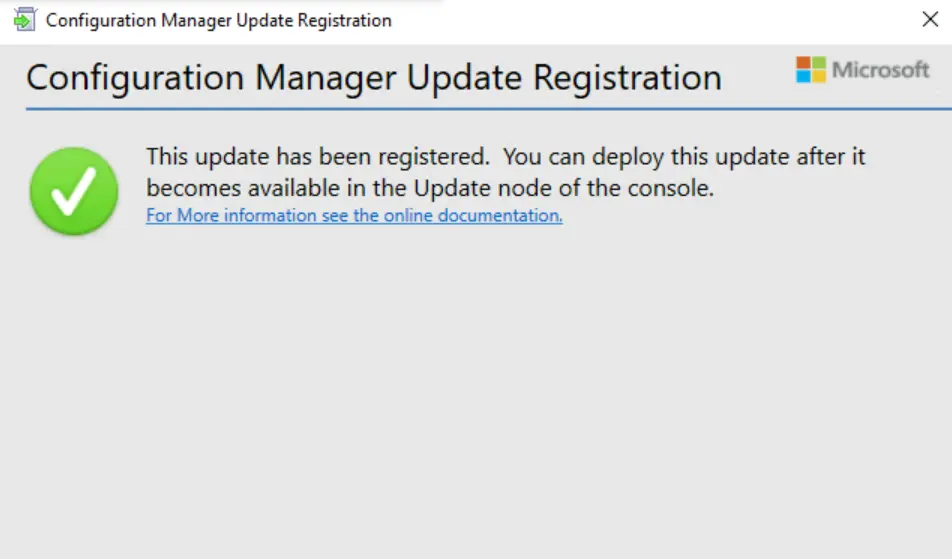
Once the hotfix is registered, it appears as a new update in the SCCM console. To accelerate this process, go to the Administration workspace in the Configuration Manager console and select the Updates and Servicing node.
Steps for Installation Information the Hotfix
The hotfix installation involves different steps. First, download the hotfix KB28458746 from the Microsoft Download Center. Launch the Configuration Manager console on the server.
- Navigate to Administration > Overview > Updates and Servicing
- Right-click Configuration Manager 2403 Hotfix KB28458746 and select Install Update Pack.
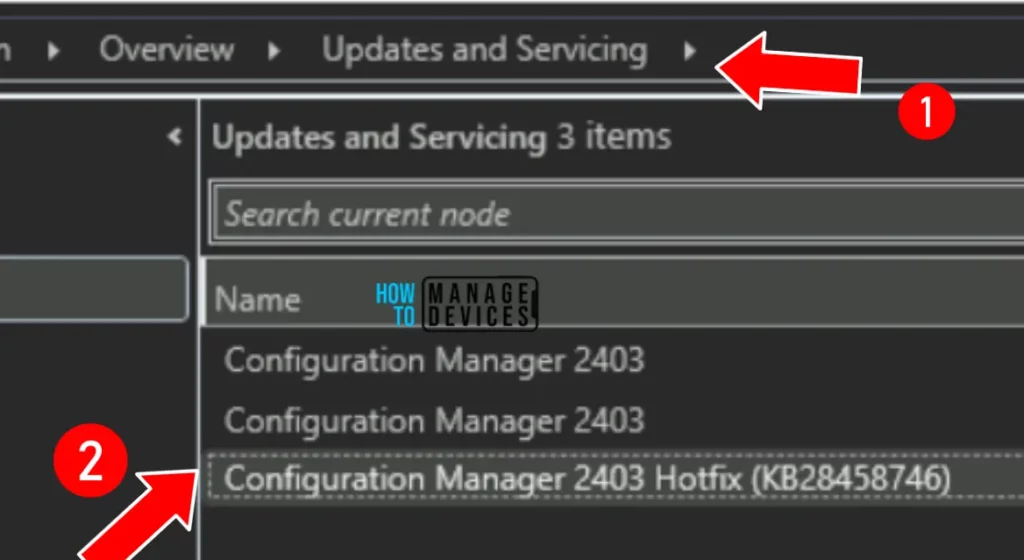
This OOB hotfix includes the updates for the site server and console. No console upgrade is required. For prerequisite warnings, you can enable the option “Ignore any prerequisite check warnings and install the update” on your production server running version 2403. Click Next.
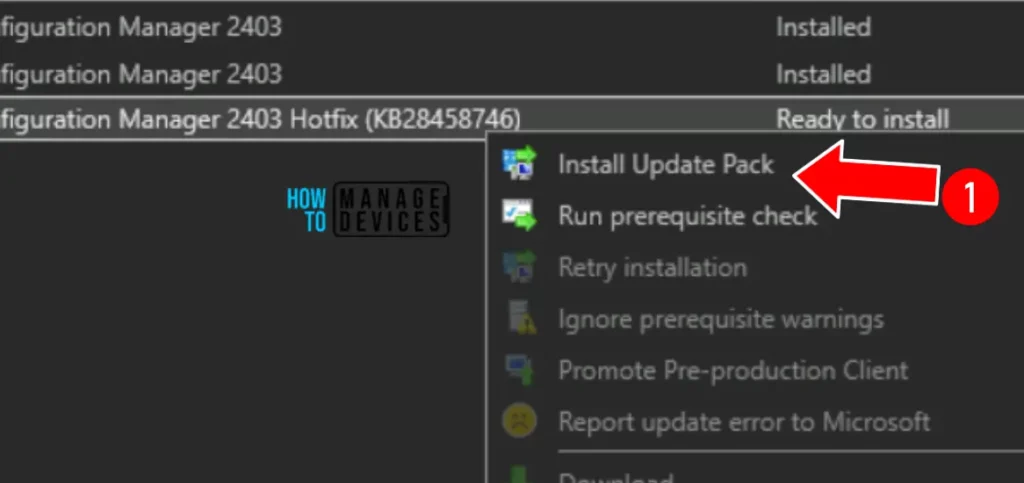
Accept the license terms for installing the update and click Next. The below screenshot will help you. Review the hotfix installation settings on the Summary page and click Next. Close the Configuration Manager Updates wizard.
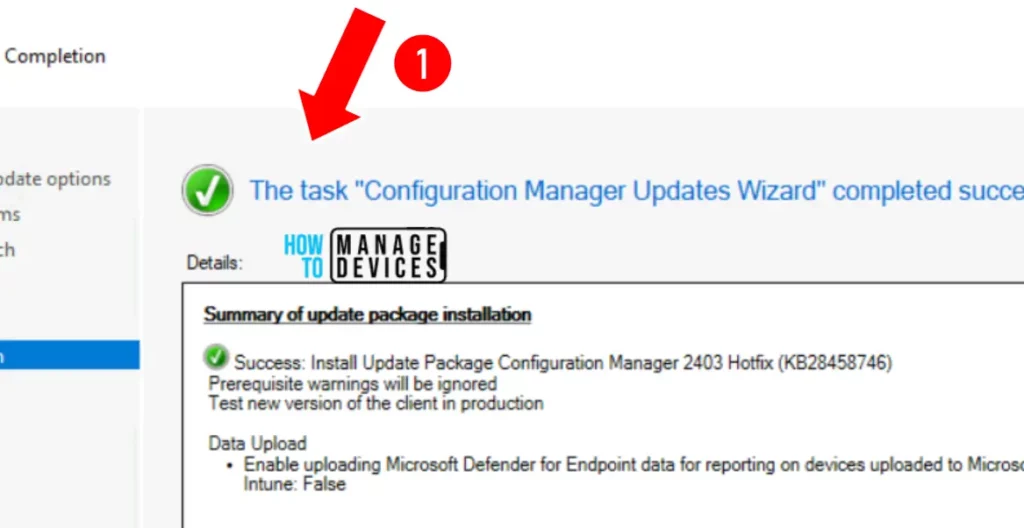
Summary of update package installation: Install Update Package Configuration Manager 2403 Hotfix (KB28458746).
- Prerequisite warnings will be ignored
- Test new version of the client in production
- Data Upload
- Enable uploading Microsoft Defender for Endpoint data for reporting on devices uploaded to Microsoft Intune: False
- Latest SCCM 2103 Hotfix List | ConfigMgr | Configuration Manager
- SCCM 2103 Known Issues Fixes | ConfigMgr | Configuration Manager
- End of Support Dates for SCCM CB Current Branch | ConfigMgr | SCCM End of Life
Other Installation Information
After you install this update on a primary site, pre-existing secondary sites must be manually updated. To update a secondary site in the Configuration Manager console. More details Recover Secondary Site Fix SCCM Secondary Server Recovery Failed Issue | ConfigMgr HTMD Blog (anoopcnair.com).
- Administration > Site Configuration > Sites > Recover Secondary Site
- Select secondary site
- By using the updated files, the primary site then reinstalls that secondary site
- This reinstallation does not affect the configuration and settings for the secondary site
- The new, upgraded, and reinstalled secondary sites under that primary site automatically receive this update.
We are on WhatsApp now. To get the latest step-by-step guides, news, and updates, Join our Channel. Click here. HTMD WhatsApp.
Author
Anoop C Nair has been Microsoft MVP from 2015 onwards for 10 consecutive years! He is a Workplace Solution Architect with more than 22+ years of experience in Workplace technologies. He is also a Blogger, Speaker, and leader of the Local User Group Community. His main focus is on Device Management technologies like SCCM and Intune. He writes about technologies like Intune, SCCM, Windows, Cloud PC, Windows, Entra, Microsoft Security, Career, etc..




Discussion