






Adobe PostScript Type1 Fonts are Deprecated Migrate to OpenType Fonts that can Support Larger Glyph Sets
Hi, let’s check whether Adobe PostScript Type1 fonts are deprecated. Adobe PostScript Type1 Fonts are Deprecated Migrate to OpenType Fonts that can Support Larger Glyph Sets. Recently, Microsoft announced that another feature will be depreciated soon. The Microsoft doc clearly mentions that Adobe PostScript will depreciate from the future release of Windows.
Recently, Microsoft depreciated many features, such as NTLM and VBScript. Now, they are planning to depreciate Adobe PostScript Type1 fonts. This depreciation announcement is based on Abode’s decision to stop supporting Type 1 fonts in the past few years.
Adobe users can no longer use PostScript Type1 fonts in the latest versions of Photoshop (23.0), Illustrator (27.3), and InDesign (18.2) and newer. As you know, Adobe PostScript Type1 fonts were introduced in 1984. After many years of service, they are now depreciating.
These fonts are crucial to the Windows operating system; Abode introduced this type 1 font in the postscript language. Type 1 fonts are high-quality fonts essential for professional printing. In this post, we can review the Microsoft announcement.

Table of Contents
What are Adobe PostScript Type1 Fonts?
How will Acrobat Handle PDFs that Use Type 1 Fonts?
Adobe PostScript Type1 Fonts are Deprecated Migrate to OpenType Fonts that Can Support Larger Glyph Sets
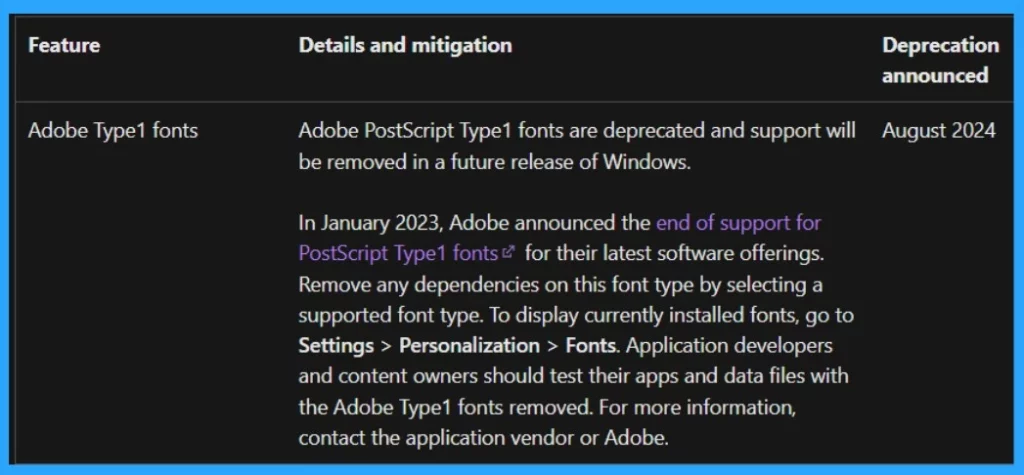
Above, we discussed an overall view of Adobe Type1 Fonts. Microsoft announced that Adobe PostScript Type 1 fonts will no longer be supported. This follows Adobe’s decision to stop supporting these fonts in January 2023. Microsoft advises developers to remove any use of Type 1 fonts in their apps and switch to supported fonts.
- In January 2023, Adobe announced that it had stopped supporting PostscriptType 1 fonts.
- The main reason for this Depreciation is Type 1 fonts are not supported in the recent version of Adobe software.
- The next reason is that Abode started focusing on OpenType Fonts now.
| Feature | Details and Mitigation | Depreciation Announced |
|---|---|---|
| Adobe Type1 Fonts | Adobe PostScript Type1 fonts are deprecated and support will be removed in a future release of Windows. | August 2024 |
- Microsoft is Planning to Remove VBScript from Windows Permanently
- Microsoft Announces Deprecation of NTLM Authentication Protocols
- Adobe Photoshop Express | Complete Feature Review
- How to Install and Use Adobe Creative Cloud
Know More about Currently Installed Fonts Available on Windows
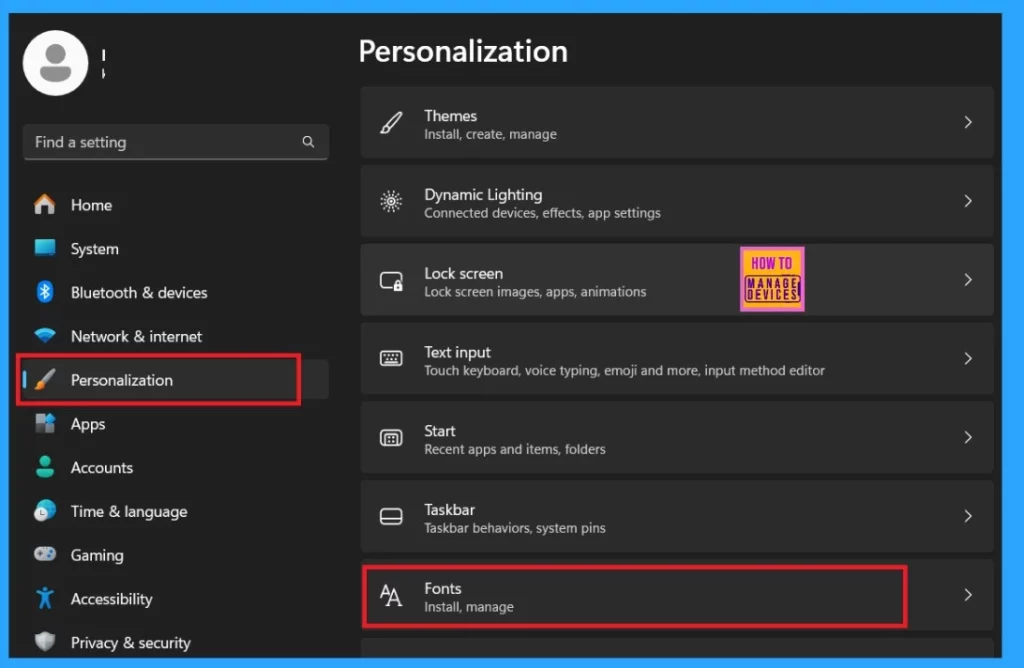
With the depreciation of Adobe PostScript Type 1 fonts, Microsoft advises users to remove Type 1 fonts and use the currently installed fonts. Also, developers should test applications to ensure they work without type 1 fonts. To view the newly Installed Fonts, follow the steps.
- Go to the Settings> Personalization> Fonts
- How to Install and Use Adobe Acrobat Reader DC
- Microsoft Announces Deprecation of WSUS Driver Synchronization
- Microsoft Announce Deprecation of MSDT and MSDT Troubleshooters
Adobe PostScript Type1 Fonts are Deprecated Migrate to OpenType Fonts that can Support Larger Glyph Sets
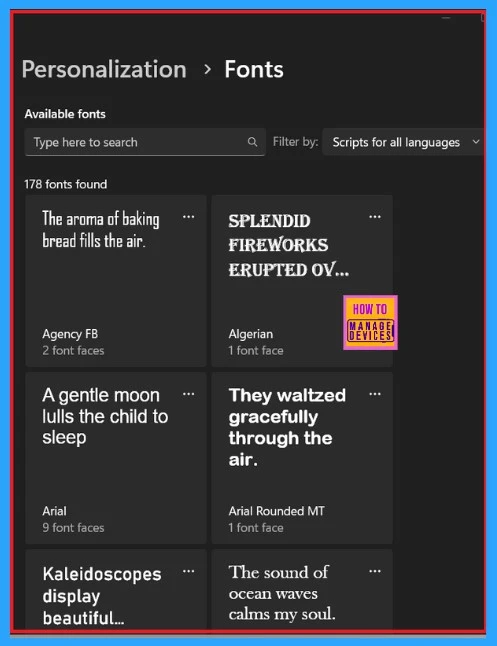
Scrolling down, the Fonts option will appear in the personalization window. Click on Fonts to view all the font details. 178 fonts are now available. You can also install fonts from the MS Store. After the depreciation of PostScript Type 1 fonts, Abode started focusing on OpenType Fonts that can support larger glyph sets, which are more useful than Type 1 Fonts.
We are on WhatsApp now. To get the latest step-by-step guides, news, and updates, Join our Channel. Click here. HTMD WhatsApp.
Author
Anoop C Nair has been Microsoft MVP from 2015 onwards for 10 consecutive years! He is a Workplace Solution Architect with more than 22+ years of experience in Workplace technologies. He is also a Blogger, Speaker, and leader of the Local User Group Community. His main focus is on Device Management technologies like SCCM and Intune. He writes about technologies like Intune, SCCM, Windows, Cloud PC, Windows, Entra, Microsoft Security, Career, etc.




Discussion