






Most Resilient MFA Methods for Break Glass Accounts Emergency Access
Hi, Let’s check out the Most Resilient MFA Methods for break glass accounts. We all know that security is essential nowadays. Cyber threats are growing every day, and this will always affect organizations. Microsoft Entra ID, previously known as Azure AD, is a strong protector against threats.
Our main concern is what we have to do in the face of these cyber threats. In this situation, Entra ID provides incredible methods to secure user identities. The Entra ID Security settings offer the strongest security possible. In a recent post, Merill Fernando shared his thoughts about the resilient MFA options on his social media.
Microsoft will enforce Multifactor authentication( MFA) for all customers in July 2024. Administrators can customize the MFA requirements using the Entra ID and conditional access policies. So that the emergency accounts are to be registered for MFA.
In this case, Selecting the best MFA method is essential, so you must choose the best MFA methods as a user. The three crucial MFA Methods are Certificate-based authentication, Windows Hello for Business, and the FIDO2 security keys, which are the Most Resilient. In this post, we can go through an overview of these MFA methods.

Table of Contents
What is an Emergency Access in Microsoft Entra ID?
What are the Most Resilient MFA Methods for Break Glass Accounts
Above, we discussed the importance of Multifactor authentication for Break Glass Accounts. More organizations use Azure Multi-Factor Authentication for better security, so ensuring emergency accounts are also set up with MFA is important. FIDO2 is the best option for an emergency account.
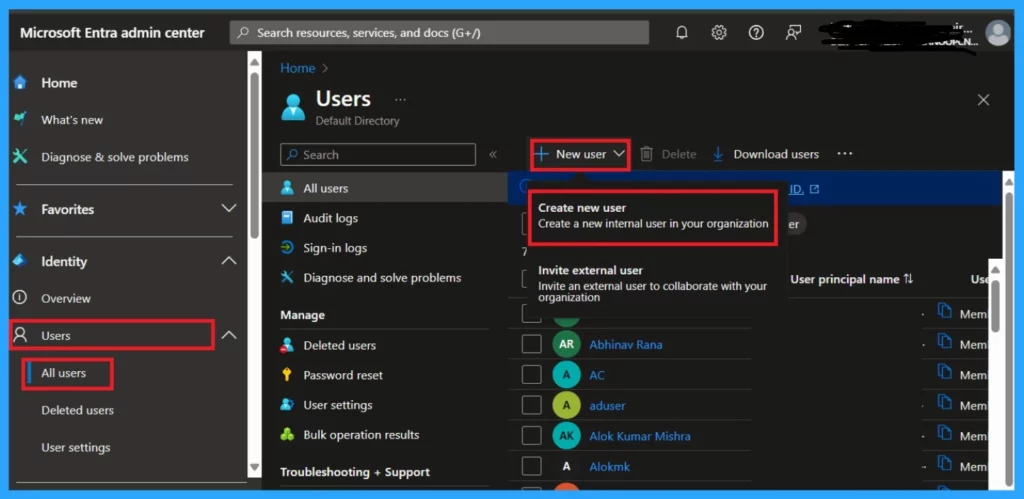
- You can create an Emergency Access. First, go to the Entra admin center
- Navigate to the Identity> Users>All Users
- then click on the New user and Create New user
| Most Resilient MFA Options |
|---|
| Certificate-Based Authentication |
| Windows Hello for Business |
| FIDO2 Security Keys |
- What is Microsoft Entra ID?
- Entra ID Backup using Microsoft 365 Documentation Tool
- Optimize Entra License with New Entra License Utilization Feature
- What is Face Check Feature in Entra
- Microsoft MFA is Mandatory for Accessing Azure from July 2024
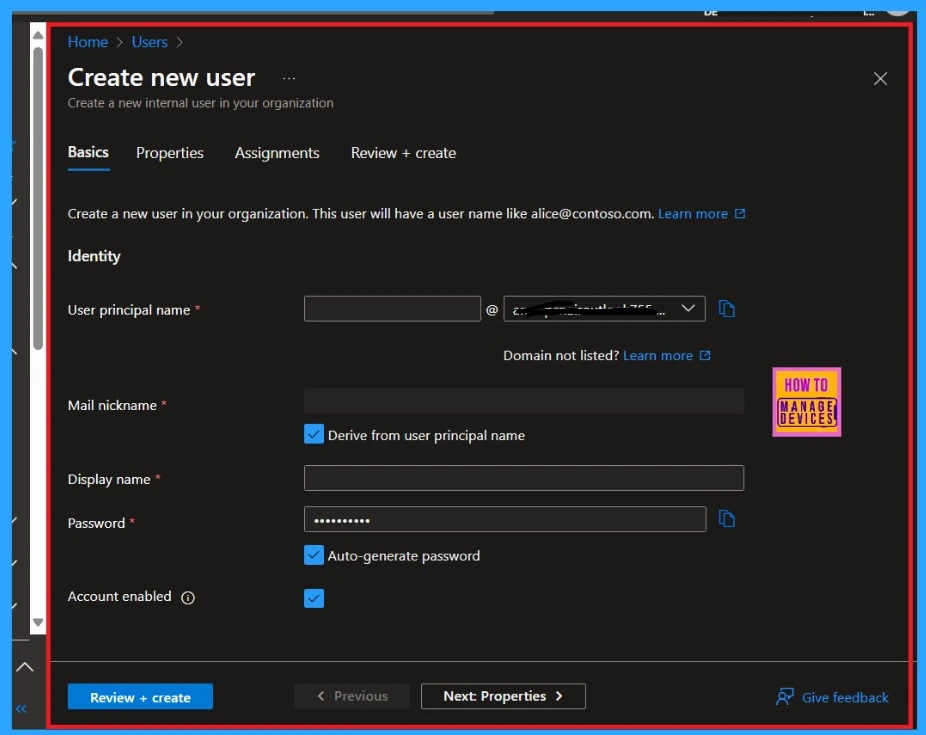
After clicking Create user, you will see a window asking you to enter the new user’s details. Here, you can provide a username; the critical factor is creating a long and complex password for the account.
- Passwordless Authentication now Users can Sign in with a TAP
- Quick Guide to Enforce Multifactor Authentication MFA for Users
- Retirement of Legacy Authentication Methods Management in Microsoft Entra ID
- Cloud PC Support for FIDO Devices and Passkeys on macOS and iOS
1. Certificate-Based Authentication
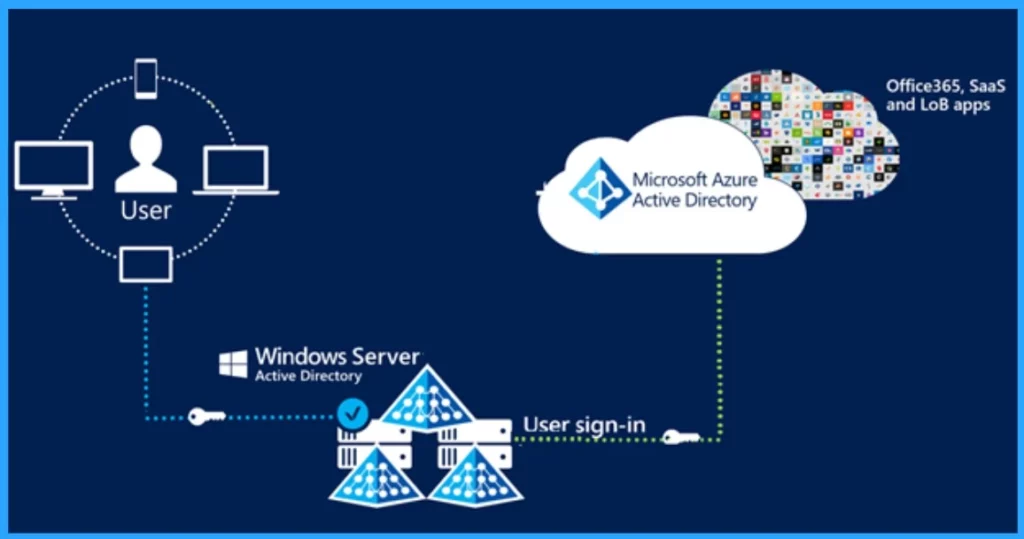
The other Resilient MFA Method is CBA (Certificate-Based Authentication). It is a very useful method. It prefers digital certificates rather than passwords. Use self-signed keys so you don’t depend on external Public Key Infrastructure PKI or CRL. Also, certificates should not be stored in a smart card; a card reader is not recommended.
- CBA integrates with different systems, and users can log in to multiple devices.
- It is a strong method but depends highly on the authentication service.
2. Windows Hello for Business
You all know about using Windows Hello for Business; we already have many posts on this security method. Do you think this is suitable for an emergency account? No, it’s unsuitable for an Emergency account because Windows Hello needs a device connected to the internet. Also, it consumes more costs, and the operational head is high.
See Moore: KB5027215 Issue with Windows Hello Popup Message after signing
3. FIDO2 Security Keys
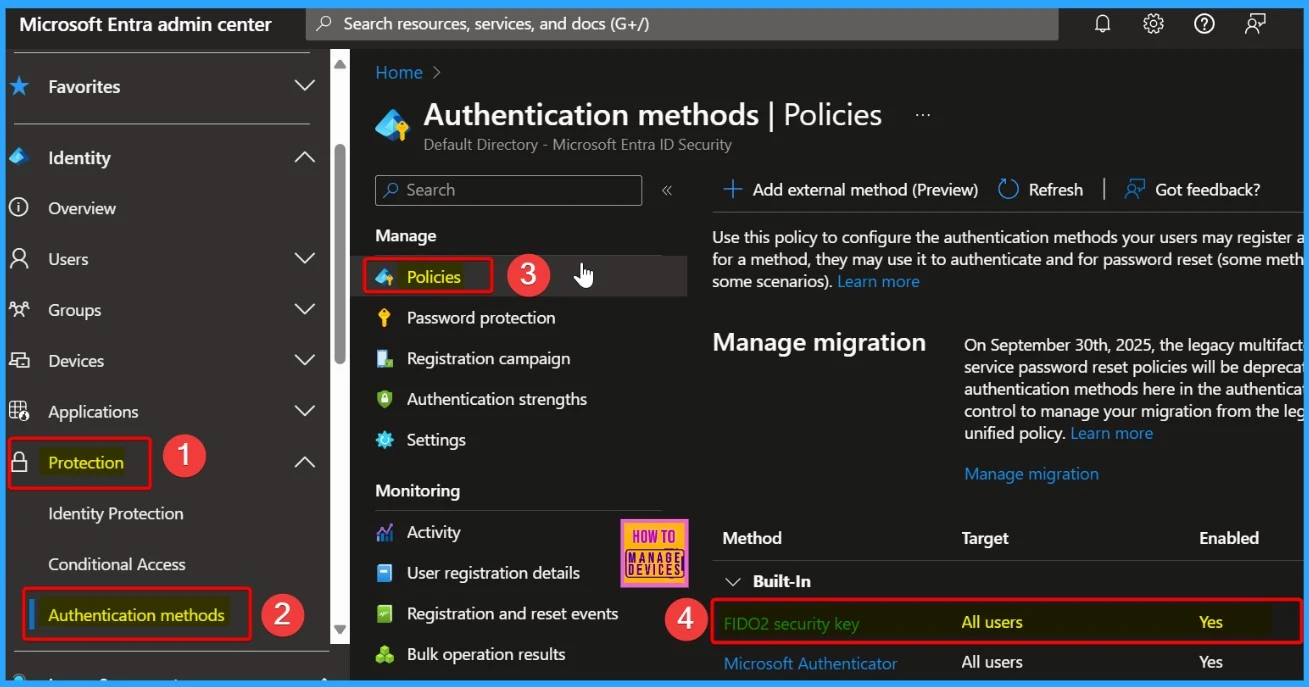
FIDO2 ( Fast IDentity Online 2) is the method suggested for emergency accounts. FIDO2 allows users to log in without using passwords. Rather it uses cryptographic keys. These security features are very easy to set up in an Entra ID. FIDO2 does not need any maintenance charges, and it can be stored safely, which is an essential part of this security. Also, it can be purchased for $25 retail.
- In these 3 methods, FIDO2 is the best option for emergency accounts
See More: How to Enable Passkeys in Microsoft Authenticator
We are on WhatsApp now. To get the latest step-by-step guides, news, and updates, Join our Channel. Click here. HTMD WhatsApp.
Author
Anoop C Nair has been Microsoft MVP from 2015 onwards for 10 consecutive years! He is a Workplace Solution Architect with more than 22+ years of experience in Workplace technologies. He is also a Blogger, Speaker, and leader of the Local User Group Community. His main focus is on Device Management technologies like SCCM and Intune. He writes about technologies like Intune, SCCM, Windows, Cloud PC, Windows, Entra, Microsoft Security, Career, etc.




Discussion