






Fix Intune is Unable to Uninstall Apps Installed from Apple App Store Issue
Fix Intune is Unable to Uninstall Apps Installed from the Apple App Store! Microsoft Intune cannot uninstall applications installed directly from the Apple App Store, and administrators cannot remotely remove these user-installed apps through the Intune management platform.
Organizations may need to use alternative methods for managing and controlling applications on their Apple devices to ensure compliance and maintain security standards. Understanding these changes is essential for effective device management.
One of our articles shows you how to block an app on Android and iOS devices. With Bring Your Own Device (BYOD) policies, employees can use their smartphones, tablets, and laptops for work tasks.
This post covers all the details about why Intune cannot uninstall apps installed from the Apple App Store. It also provides a workaround to help you uninstall free apps using Microsoft Intune.

Table of Contents
What Happens after Apps are Assigned to Intune?
You will be prompted to allow Intune to take over the management of the apps on the device.
Is there a Difference in Uninstalling Apps on Devices Enrolled via Device Enrollment Program (DEP)?
You will not be prompted to take over management when uninstalling apps from devices enrolled in supervised mode via DEP.
How Long Does Changing the Assignment Type to Uninstall after Assigning Apps Take?
The time required can vary based on the installation type and the number of devices.
Intune Unable to Uninstall Apps Installed from Apple App Store
When an iOS device is enrolled in Intune, some apps installed from the Apple App Store, like paid apps not bought through Apple’s Volume Purchase Program (VPP), cannot be uninstalled using Intune.
This is expected behavior because Intune can only uninstall apps installed through the mobile device management (MDM) system. Apps installed directly from the App Store aren’t managed similarly, so Intune can’t remove them.
- Declarative Device Management A New Way of Managing Apple Devices
- Renew SCIM Token in Apple Business Manager to Sync Microsoft Entra ID
- Account-Driven Apple User Enrolment in Intune – Part 1
- Simple Way to Add iOS to Apple Business Manager and Manage in Intune – Part 1
How to Add the Apps to Intune
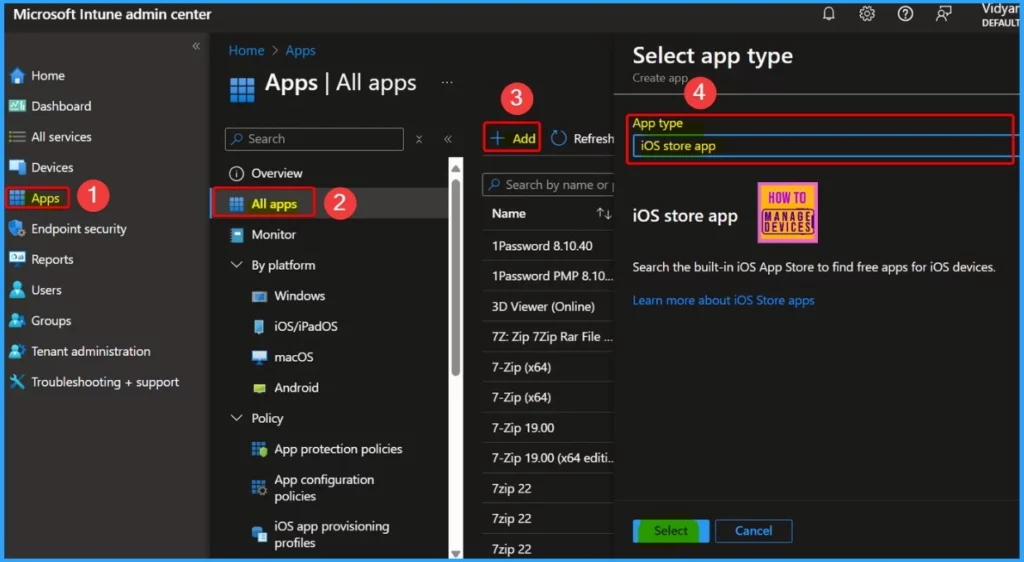
To add an app for management in Microsoft Intune, follow these steps: Log in to your Intune admin account. Go to the Apps section, select All Apps, and click Add. In the Select app type pane, find the list of available store app types and select the iOS store app. This will allow you to add and manage apps from the Apple App Store.
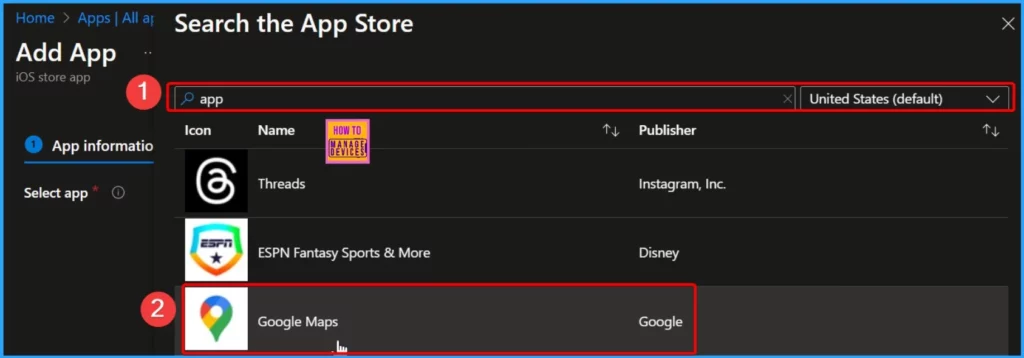
In the Search the App Store pane, select the App Store country/region. In the Search box, type the app’s name. Intune searches the store and returns a list of relevant results. Select the app you want in the results list, and then choose Select.
- Easy way to Deploy Apps to iOS Devices through VPP using Intune
- Prevent iOS Managed Apps Removable using Intune
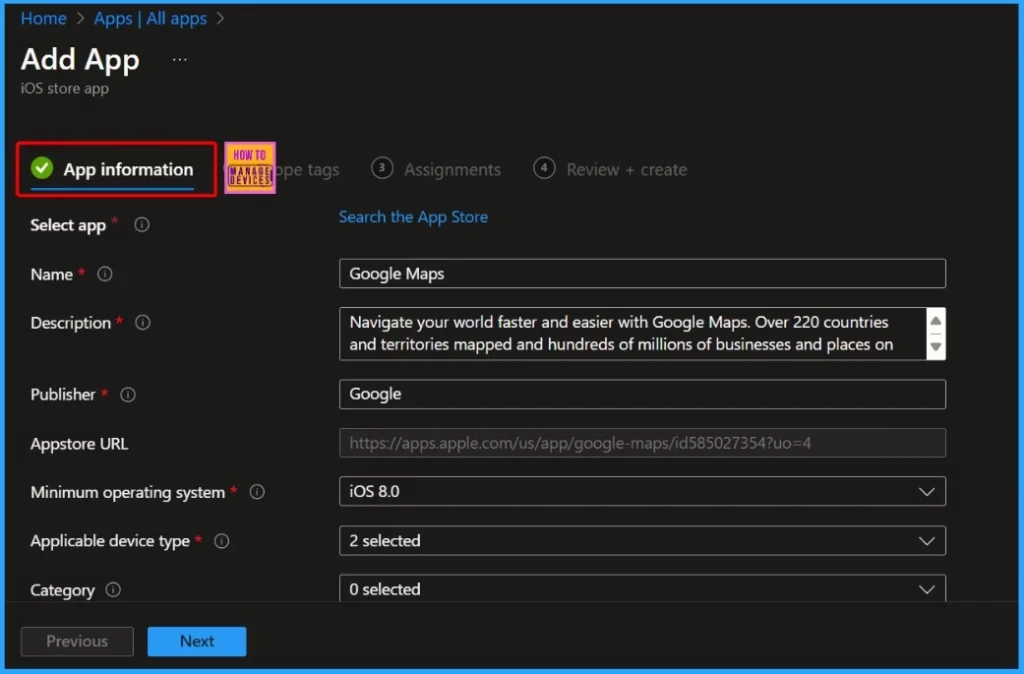
You will see details about the app you selected on the App Information page in the Add app pane. Some of these details might be automatically filled in based on the app from the store. If not, you will need to enter the app details manually.
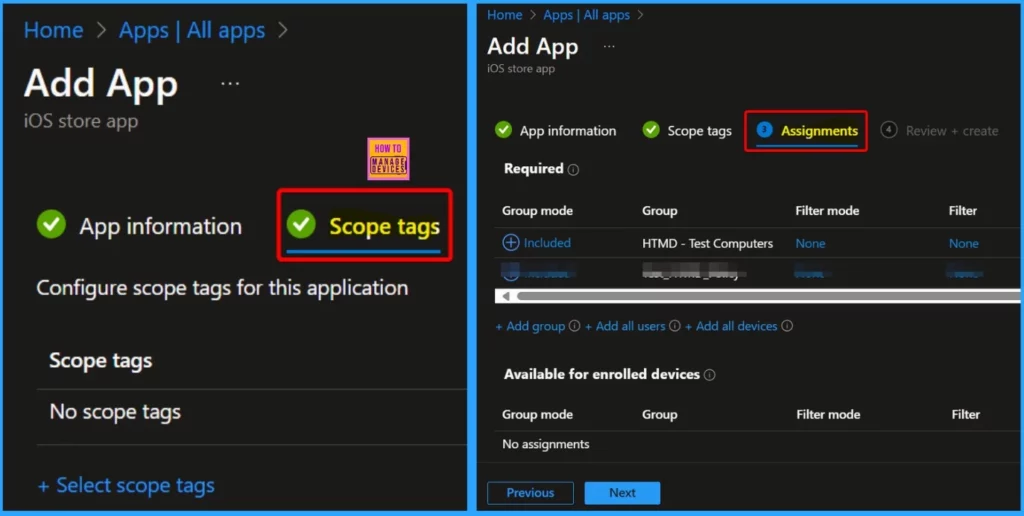
Click on scope tags to optionally add tags that help organize and filter the app for different groups or purposes. In the Assignments tab, select the groups with access to the app. This determines which users or devices can see and install the app.
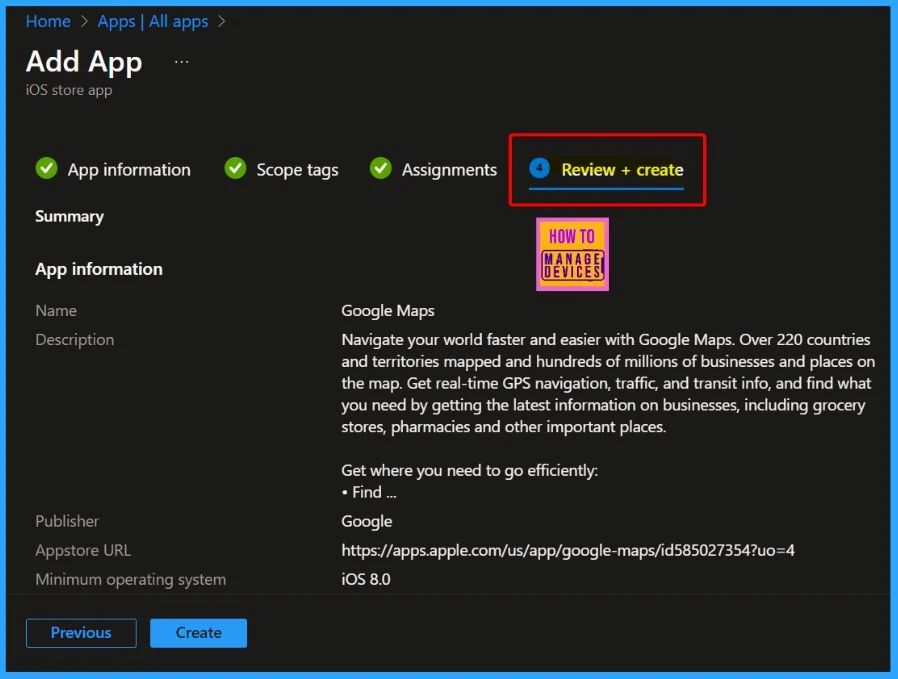
Click Next to go to the Review + Create page. Here, you can review all the values and settings you have entered for the app. Once you have checked everything and are satisfied, click Create to finalize and add the app to Intune.
Workaround – How to Change the Assignment Type – Remove App
Let’s discuss the workaround for the issue where Intune can’t uninstall apps installed from the Apple App Store. The following are the workarounds for the problem. Add the Apps to Intune – First, include the apps you want to manage in Intune and then set them as “Available” or “Required” for users.
- Change the Assignment Type—To remove apps from devices, switch the assignment type to “Uninstall” for your target group.
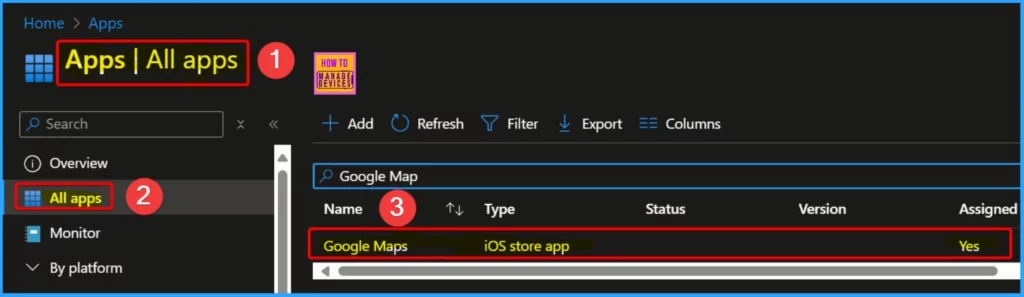
After adding an app to Microsoft Intune, you can assign it to users and devices. You can deploy the app to a device even if Intune does not manage it. Log in to the Microsoft Intune admin center. Then, go to Apps and select All Apps. In the Apps pane, choose the app you want to assign. Here, we select Google Maps.
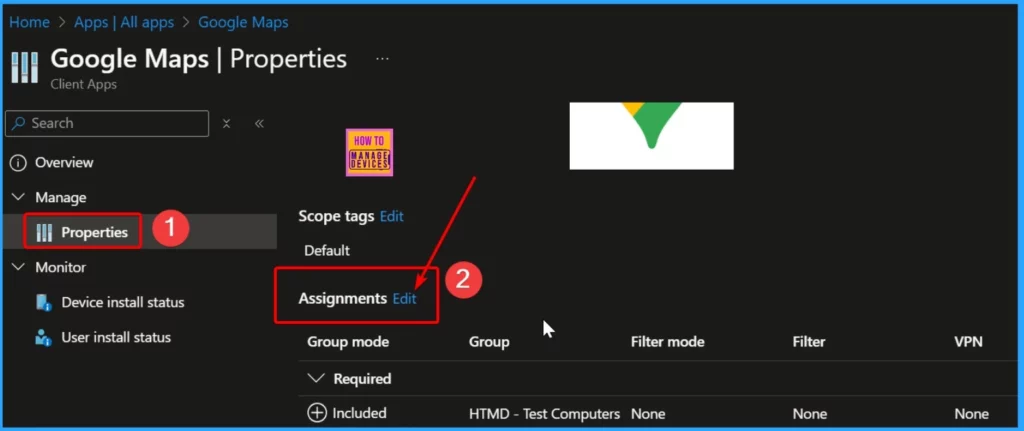
In the Manage section, click on Properties. Scroll down to the Properties section and select Assignments. Then, click the Edit hyperlink to open the pane to add groups related to the app.
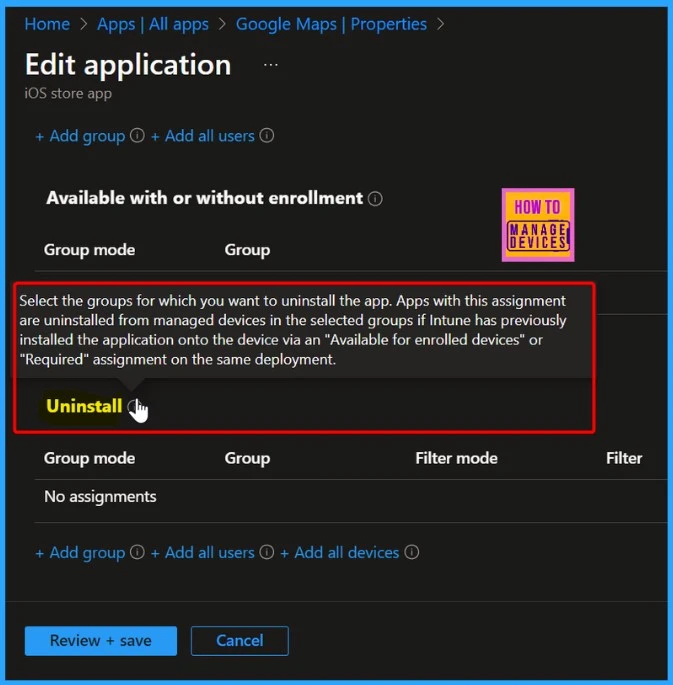
There are 4 different Assignment Types: Available for enrolled devices, Available with or without enrollment, Required, and Uninstall. To remove apps from devices, change the assignment type to “Uninstall” for your target group.
| Different Assignment Type | Details |
|---|---|
| Available for enrolled devices | Select the groups for which you want to make this app available. Apps available for enrolled devices are displayed in the Company Portal app and website for users to optionally install. Available assignments are only valid for User Groups, not device groups. |
| Available with or without enrollment | Select the groups you want to make this app available with or without enrollment. Apps with this assignment are displayed in the Company Portal app and website for users to optionally install without requiring the device to be enrolled. Available assignments are only valid for User Groups, not device groups. |
| Required | The app will be installed on devices in the selected groups. Depending on the platform, users might need to respond to additional prompts before installation. |
| Uninstall | Select the groups for which you want to uninstall the app. Apps with this assignment are uninstalled from managed devices in the selected groups if Intune has previously installed the application onto the device via an “Available for enrolled devices” or “Required” assignment on the same deployment. |
We are on WhatsApp now. To get the latest step-by-step guides, news, and updates, Join our Channel. Click here. HTMD WhatsApp.
Author
Anoop C Nair has been Microsoft MVP from 2015 onwards for 10 consecutive years! He is a Workplace Solution Architect with more than 22+ years of experience in Workplace technologies. He is also a Blogger, Speaker, and Local User Group Community leader. His primary focus is on Device Management technologies like SCCM and Intune. He writes about technologies like Intune, SCCM, Windows, Cloud PC, Windows, Entra, Microsoft Security, Career, etc.


Discussion