






New Office ADMX Template for Microsoft 365 Apps for Enterprise Project and Visio | Import to Intune
Microsoft rolled out a New Office ADMX Template Version: 5469.1000 for Microsoft 365 Apps for enterprise Project and Visio. This post shows how to import the ADMX template to Intune. The administrative Template files (ADMX/ADML) for Microsoft Office have been significantly updated.
IT administrators use the Administrative Template files (ADMX/ADML) for Microsoft Office to manage and configure Office applications through Group Policy/intune. These files include settings for various Office versions, such as Microsoft 365 Apps for Enterprise, Office LTSC 2024, Office LTSC 2021, Office 2019, and Office 2016.
ADMX files are general templates that allow administrators to control Office settings regardless of language. It works with these templates by providing the specific language text so that policies can be set in various languages depending on the region. Together, they help admins configure Office features and apply consistent rules across different devices, regardless of language.
This post provides an overview of the new Office ADMX Template, which includes updates for managing Microsoft Office settings using Group Policy or Intune. The update covers various versions and contains files for the Office Customization Tool (OCT), making it easier for IT admins to configure Office features and apply consistent device settings.

Table of Contents
What is the Office Customization Tool (OCT)?
The Office Customization Tool (OCT) creates configuration files that help deploy Microsoft Office across large organizations. It gives IT admins control over how Office is installed and configured.
New Office ADMX Template Available Now
Microsoft released a new update for its Office ADMX templates on September 18, 2024. The update introduced improvements and features aimed at helping IT administrators manage Office more effectively across various versions, including Microsoft 365 Apps for Enterprise, Office LTSC 2024, Office LTSC 2021, Office 2019, and Office 2016.
- Fix Drive Mapping Failure After Modifying ADMX Settings In Intune
- Download Windows 10 Administrative Templates for All Versions
- Download Windows 11 23H2 Administrative Templates
- Import Custom ADMX Administrative Templates in Intune Portal
ADMX/ADML Files for Configuring Group Policy Settings
ADMX/ADML files are included in the download to configure Group Policy or Intune settings for Microsoft 365 Apps for enterprise and Volume-licensed versions of Office LTSC 2024, Office LTSC 2021, Office 2019, and Office 2016. These files help administrators manage and control Office installations across multiple organisational devices through Group Policy.
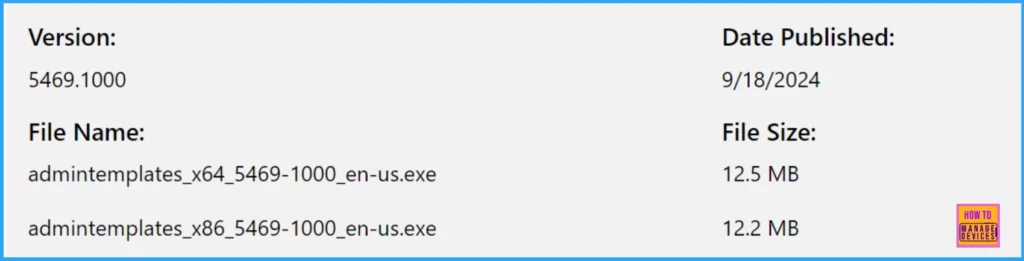
- Version: 5469.1000
- File Name: admintemplates_x64_5469-1000_en-us.exe and admintemplates_x86_5469-1000_en-us.exe
- Date Published: 9/18/2024
Supported Operating Systems and Office Programs for ADMX/ADML Files
Discuss the Supported Operating Systems and Office Programs for ADMX/ADML Files. The list below provides more details.
- Windows Server 2016
- Windows 10
- Windows Server 2019
- Windows 11
- Windows Server 2022
The Administrative Template files (ADMX/ADML) are used with the following Office products. The Office Customization Tool (OPAX/OPAL) files also work with volume-licensed versions of Office 2016, Project 2016, and Visio 2016.
- Microsoft 365 Apps for enterprise
- Desktop versions of Project and Visio with subscription plans
- Volume licensed versions of:
- Office LTSC 2024, Project 2024, Visio LTSC 2024
- Office LTSC 2021, Project 2021, Visio LTSC 2021
- Office 2019, Project 2019, Visio 2019
- Office 2016, Project 2016, Visio 2016
Download and Extract the ADMX/ADML
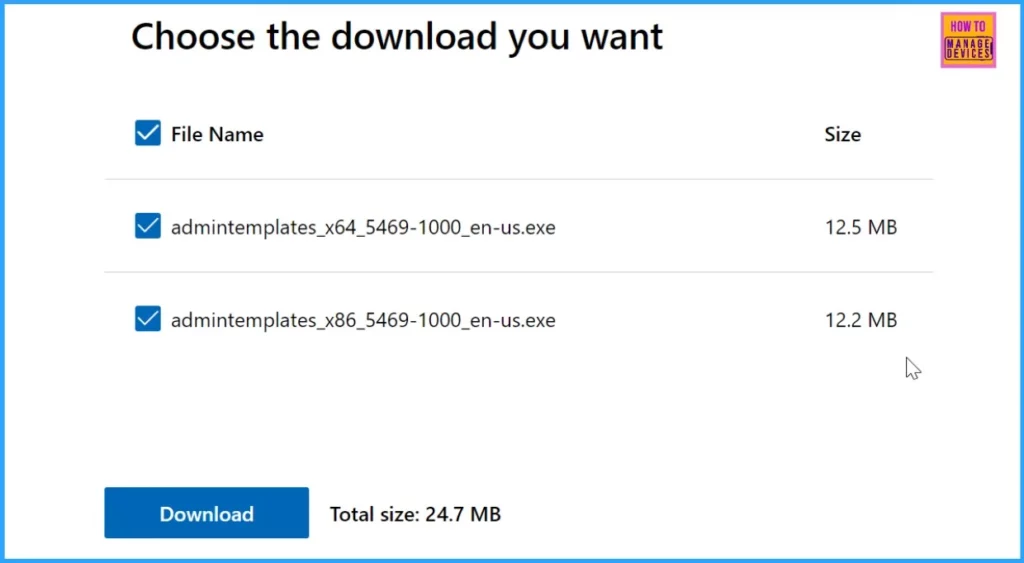
Select the x86 or 64-bit (x64) version depending on your needs. Then, click the Download button on the download page.
- ADMX Group Policy Templates for Office 365 All Office Versions
- Disable Saving Passwords in Google Chrome using ADMX Templates Intune
Click Next and choose where to save the downloaded files on your system. Go to the folder where you saved the files. Double-click the downloaded exe. file (either admintemplates_x64_5469-1000_en-us.exe or admintemplates_x86_5469-1000_en-us.exe).
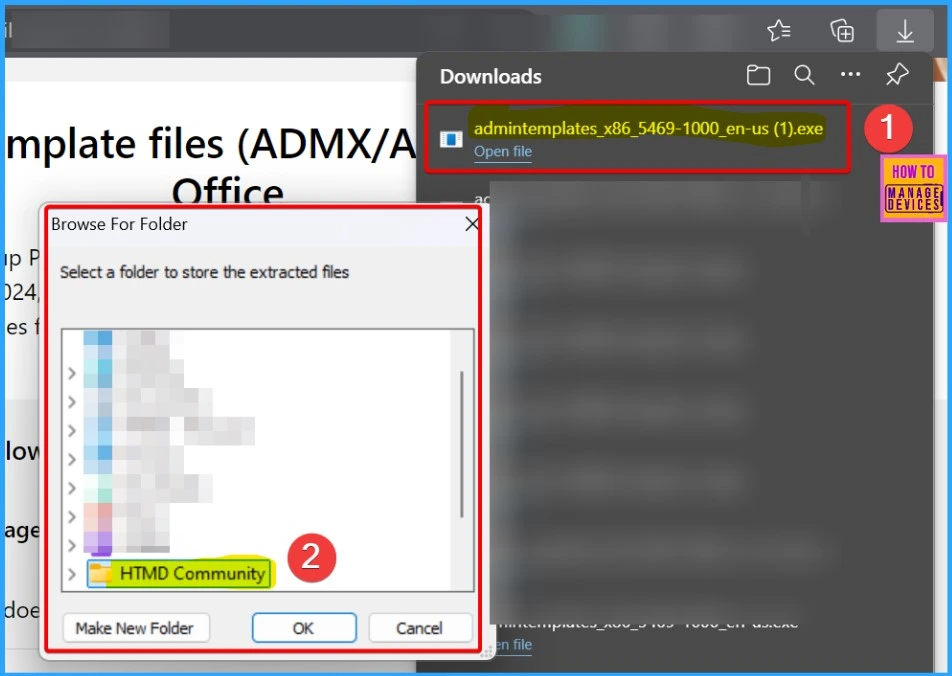
The two files listed, admintemplates_x64_5469-1000_en-us.exe and admintemplates_x86_5469-1000_en-us.exe, are installation packages for the Group Policy Administrative Template files (ADMX/ADML).
- x64 refers to the 64-bit version of the template files.
- x86 refers to the 32-bit version of the template files.
- The numbers (5469-1000) indicate the specific build of these administrative templates.
- en-us denotes that the templates are for the English (US) language.
- Extract the Template file.

Once extracted, you can customize Office installations using the ADMX/ADML files with Group Policy/Intune or the OPAX/OPAL files with the Office Customization Tool (OCT). The download also includes an Admin folder containing OPAX/OPAL files. These are used with the Office Customization Tool (OCT) to customize installations of volume-licensed Office 2016 using the Windows Installer (MSI).

How to Import ADMX Administrative Templates using Intune
We don’t recommend using this import method for Office ADMX templates. We have explained more details in the below paragraph. Once the latest updates are available in the Settings Catalog, configuring Office policies is the best place.
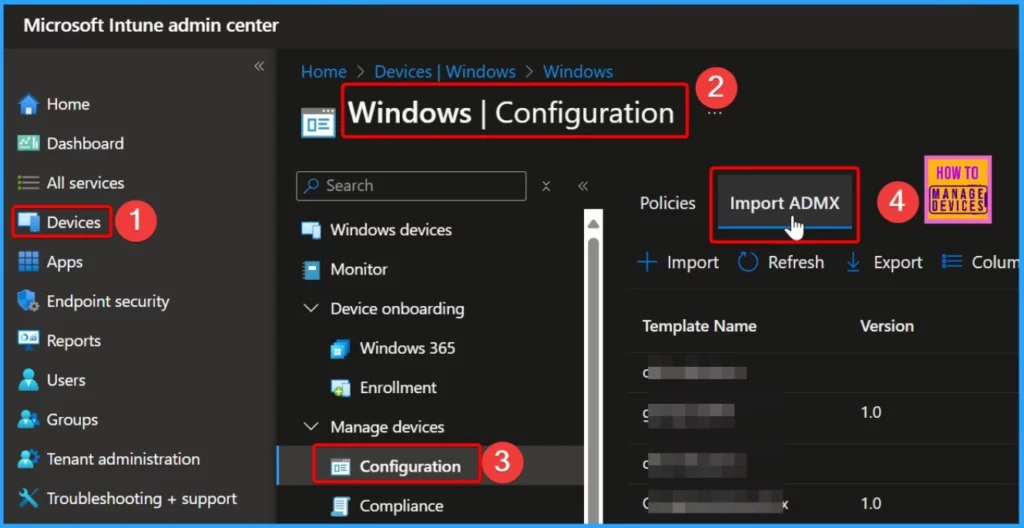
Sign in to the Microsoft Intune Admin portal. Select Devices > Windows > Configuration > Import ADMX. The screenshot below helps you show more details.
More Details – Import Custom ADMX Administrative Templates In Intune
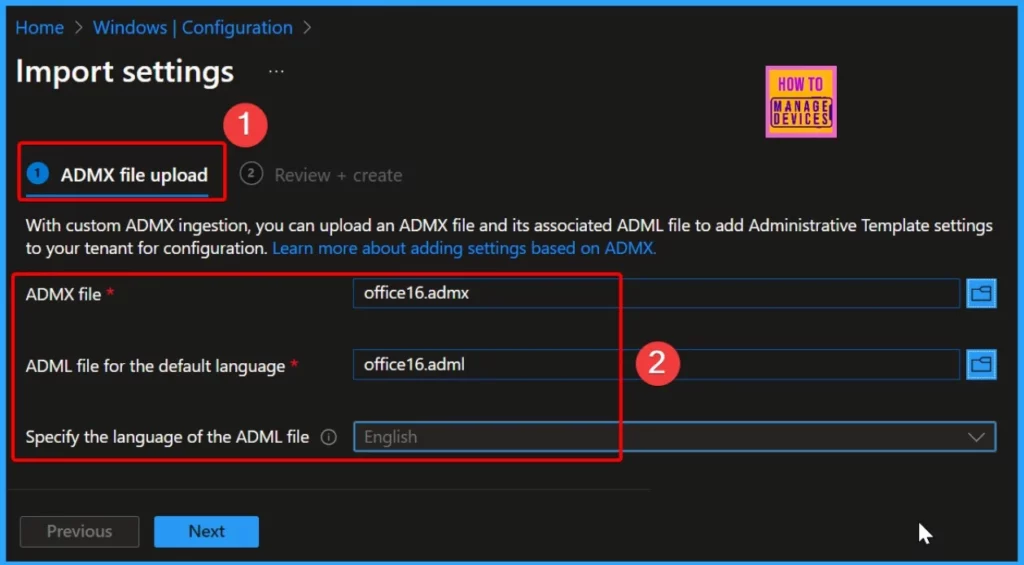
With custom ADMX ingestion, you can upload an ADMX file and its associated ADML file to add Administrative Template settings to your tenant for configuration.
| ADMX File Upload | Details |
|---|---|
| ADMX file | Select an .admx file (office16.admx) |
| ADML file for the default language | Select an .adml file (office16.adml) |
| Specify the language of the ADML file | English |
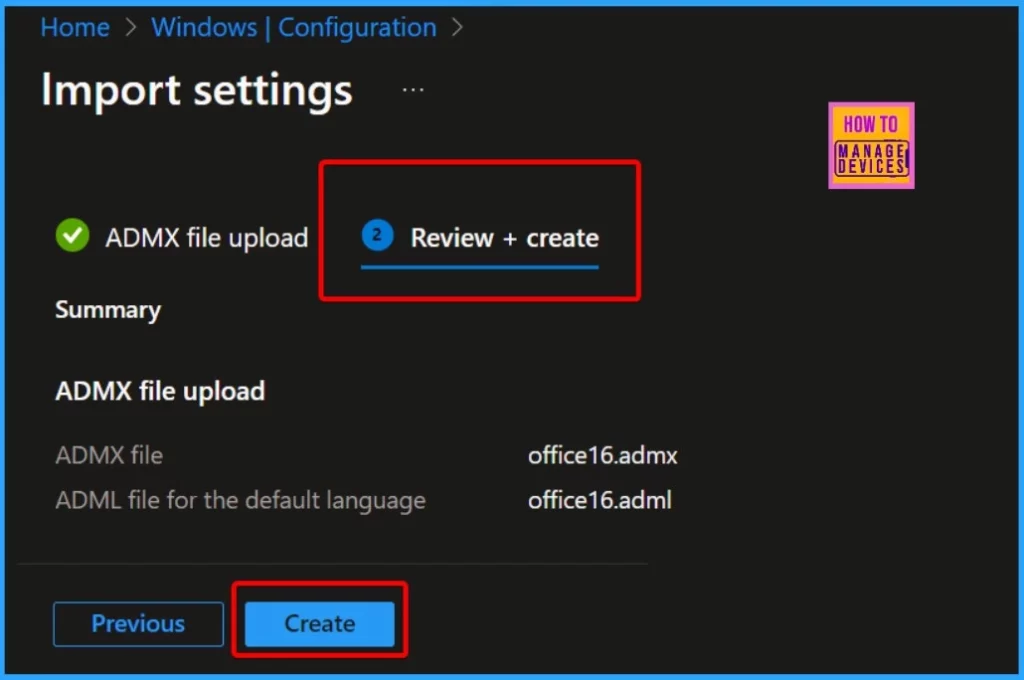
You need to review your settings in the Review + Create tab. After clicking Create, your changes are saved, and the profile is assigned.
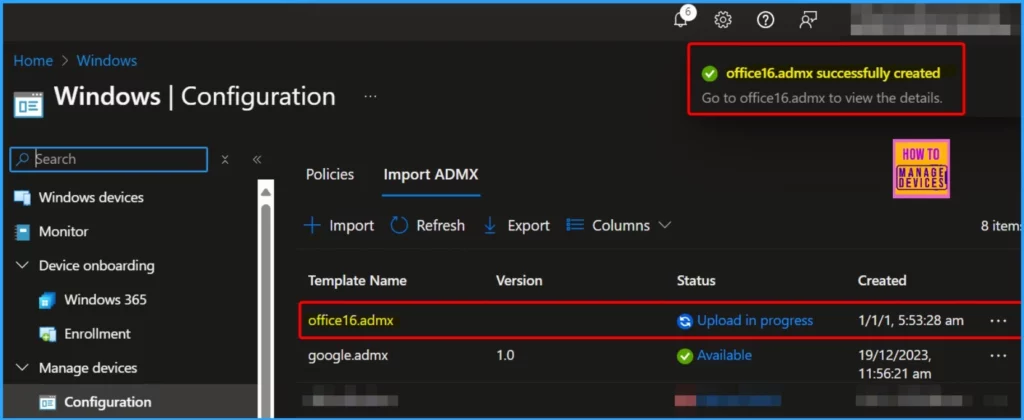
The screenshot below shows that the office16.admx was successfully created. It also shows details such as the Template Name, Version, Status, and Created date.
NOTE! – Intune import gives you the following error – ADMX File size exceeds maximum limit: 1713 KB, please use a smaller file. We recommend to use Settings Catalog policies for Office settings instead of ADMX import.
Join the LinkedIn Page and Telegram group to get the latest step-by-step guides and news updates. Join our Meetup Page to participate in User group meetings. Also, Join the WhatsApp Community to get the latest news on Microsoft Technologies. We are there on Reddit as well.
Author
Anoop C Nair has been Microsoft MVP from 2015 onwards for 10 consecutive years! He is a Workplace Solution Architect with more than 22+ years of experience in Workplace technologies. He is also a Blogger, Speaker, and leader of the Local User Group Community. His primary focus is on Device Management technologies like SCCM and Intune. He writes about technologies like Intune, SCCM, Windows, Cloud PC, Windows, Entra, Microsoft Security, Career, etc.




I had try to import but failed, please help.